Site Sentinel: Plugin & Theme Lock
Professional site-stability utility for agencies. Prevent accidental site breakage by locking mission-critical plugins and themes. Includes secure Developer-Key overrides and site-hardening features.
Install
Upload it under Plugins → Add New Plugin → Upload Plugin, then activate.
Install straight from GitHub with WP-CLI:
wp plugin install https://github.com/cvinfotech/site-sentinel-plugin-theme-lock/releases/download/v1.0.0/site-sentinel-1.0.0.zip🛡️ Site Sentinel
Plugin & Theme Lock for WordPress Sites
Stop clients from breaking their own site — without stopping updates.
Why Agencies Need This
Every agency has lived this story: you hand over a beautifully built site, and two weeks
later you get a panicked call because someone deactivated Elementor "to see what would
happen," or switched the active theme to Twenty Twenty-Four while poking around the
Themes screen.
Site Sentinel is a tiny, zero-bloat safety lock built for exactly that moment. It doesn't limit what a client can do with content — it just removes the two buttons that can take a site down in one click: Deactivate (on critical plugins) and Activate (on any theme but the approved one). Everything else — including automatic and manual plugin updates — works completely normally.
- ✅ No dashboard clutter, no bloated framework, no third-party dependencies.
- ✅ Client-safe by default, developer-friendly by design.
- ✅ You always retain access via the Agency Key, with a documented emergency bypass.
Core Features
| Feature | What it does |
|---|---|
| Plugin Shield | Check-mark "Core Plugins" (Elementor, WooCommerce, Yoast, etc.). Their Deactivate link disappears from the Plugins screen, and direct/bulk deactivation requests are blocked server-side too. |
| Theme Shield | Lock the active theme with one toggle. Activate controls are hidden on every other theme, and any programmatic theme switch is refused while locked. |
| The Agency Key | A secret key only you know. Without an active "unlocked" session, protected controls stay hidden for every admin — including the client's own admin account. |
| Emergency Unlock | A wp-config.php constant that bypasses every shield instantly if you're ever locked out. No database access required. |
| Hardening | The Theme File Editor and Plugin File Editor are automatically removed and blocked while the shield is armed, closing the most common "client accidentally broke functions.php" incident. |
Screenshots
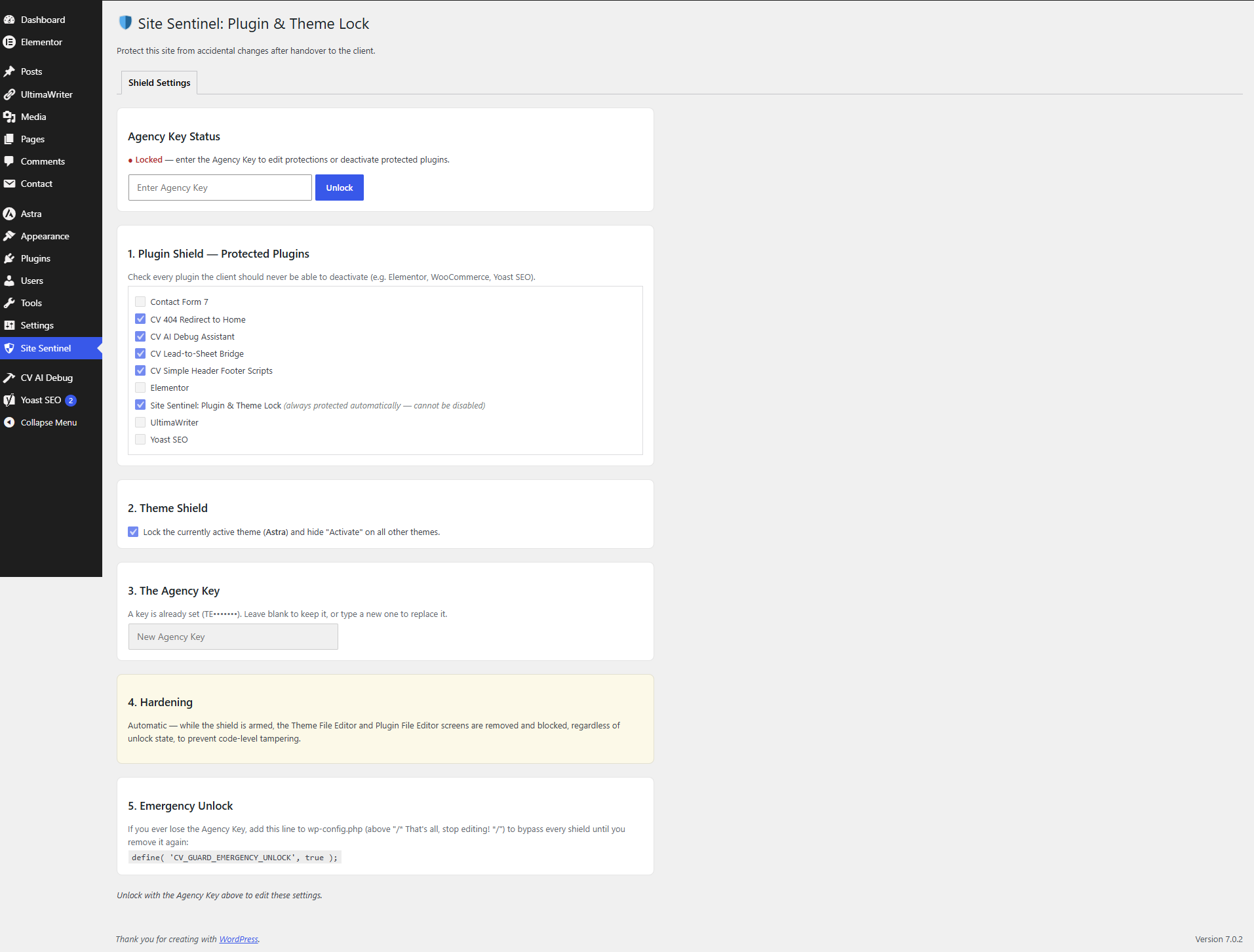
The settings screen — check off protected plugins, lock the active theme, and set the Agency Key. Once a key exists, this screen itself locks too, so a client can't just uncheck their way past the shield.
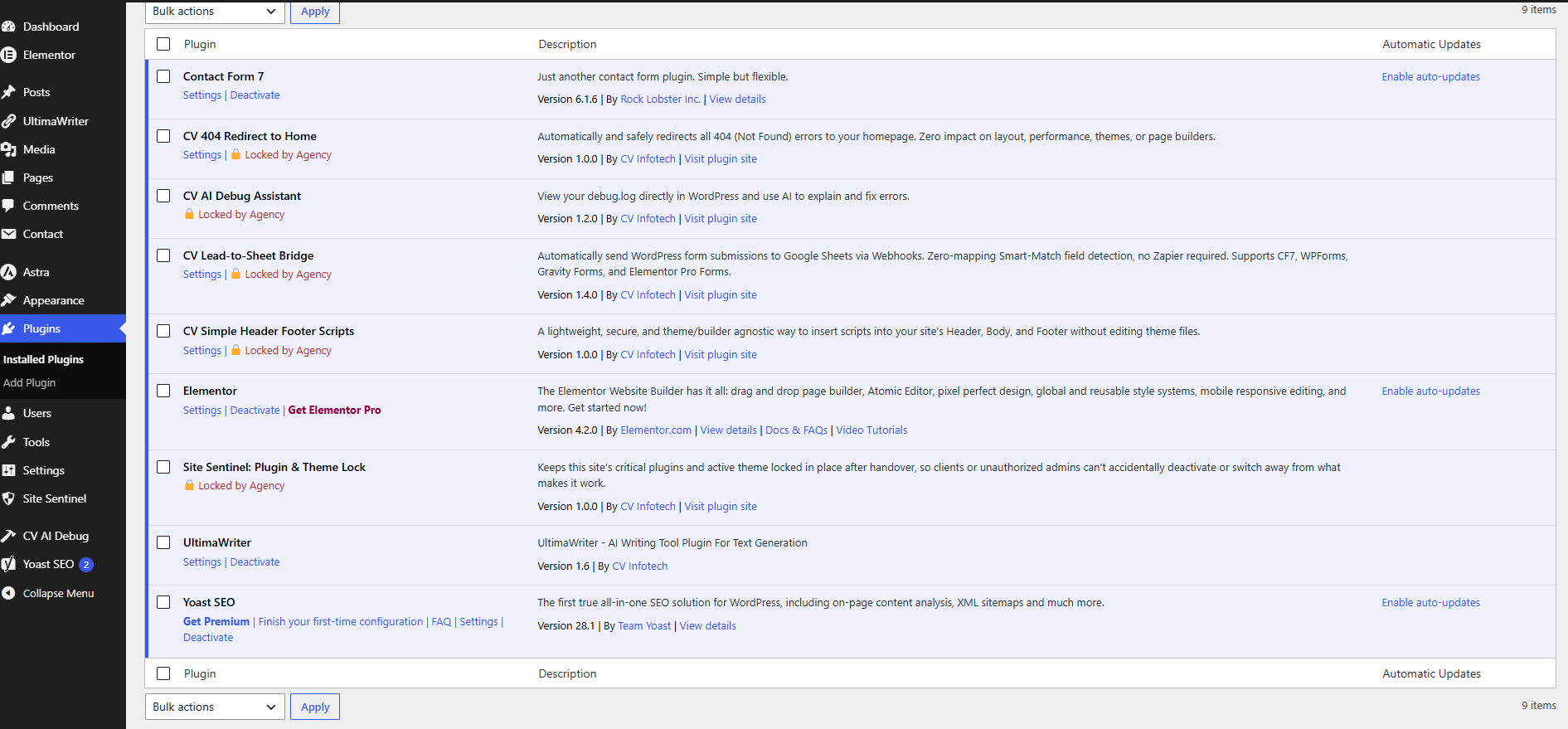
Plugins screen, shield armed — protected plugins show a "🔒 Locked by Agency" badge in place of Deactivate.
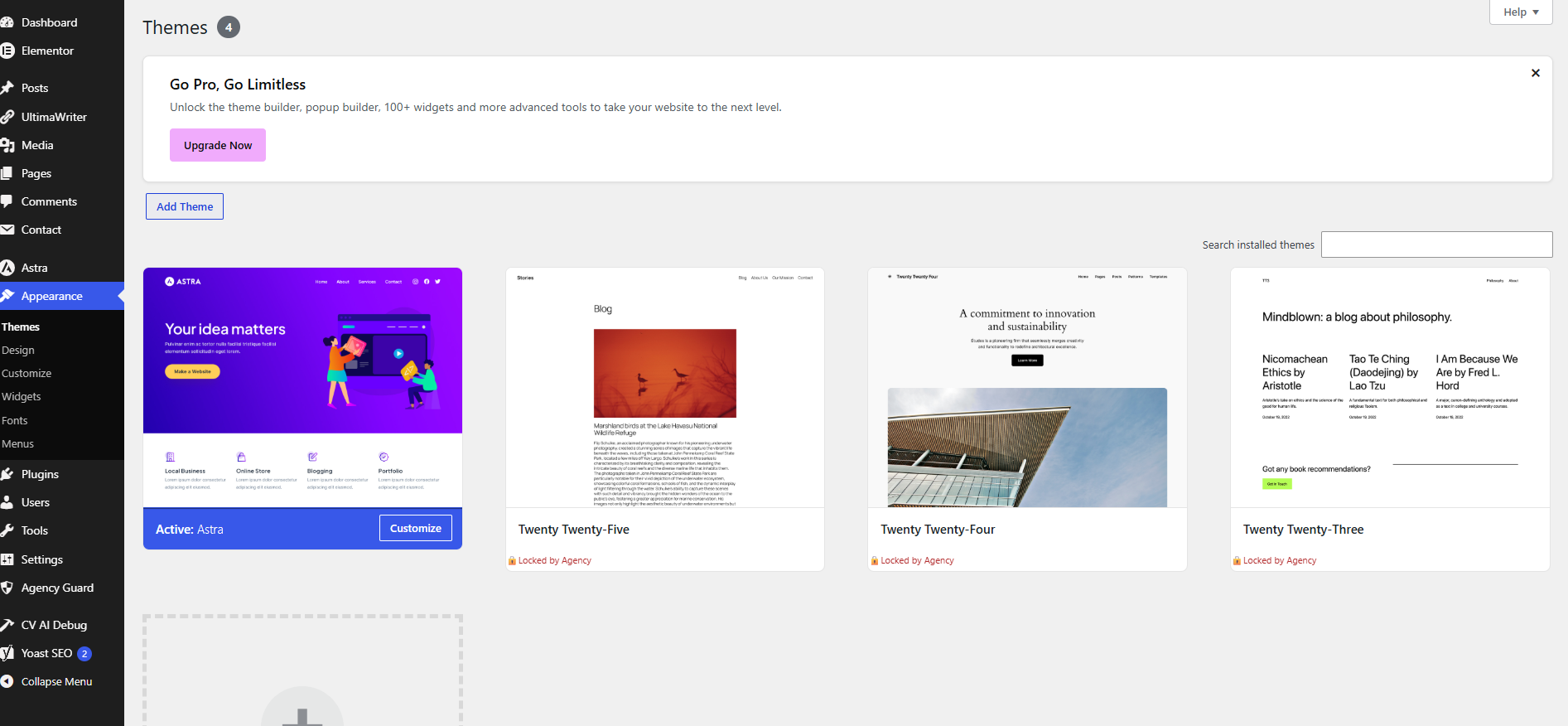
Themes screen, shield armed — every theme except the locked one is marked "Locked by Agency" and its Activate control is hidden.
How It Works
- Install and activate the plugin.
- Go to Site Sentinel in the admin menu.
- Check the plugins you want protected, lock the active theme, and set an Agency Key.
- Save. From this point on, protected controls are hidden site-wide for every admin until someone enters the Agency Key.
- When you need to make a change, unlock your own session with the key, do your work, then re-lock (or let the session expire automatically after 2 hours).
Nothing here touches wp_update_plugins cron, the auto-update system, or the Plugins API —
Site Sentinel only filters UI action links and blocks explicit deactivate/activate
requests. Updates, security patches, and auto-updates continue completely unaffected.
The "Handover" Process (Client Onboarding)
This is the recommended workflow agencies use with Site Sentinel when handing a site off to a client:
- Before handover: Configure the Plugin Shield and Theme Shield for every business-critical component (page builder, WooCommerce, SEO plugin, security plugin).
- Set a unique Agency Key per client/site — don't reuse the same key across your whole portfolio.
- Do not share the Agency Key with the client. It is your key, not theirs. The client's admin account should never need it for day-to-day work.
- Document the Emergency Unlock constant in your internal client runbook (not in anything the client can access) so any team member can recover access if the key is ever lost.
- Hand over the site. The client can create content, manage orders, and use every plugin normally — they simply can't turn off the pieces that keep it standing.
- Future agency visits: unlock your session, make changes, re-lock before you leave.
Installation
- Download the plugin ZIP (or clone this repo into
wp-content/plugins/). - Activate Site Sentinel: Plugin & Theme Lock from the Plugins screen.
- Go to Site Sentinel in the admin sidebar and configure your shields.
Releasing a New Version (for maintainers)
Every push to main runs the CI workflow (.github/workflows/ci.yml): it lints all
PHP files across PHP 7.4 / 8.1 / 8.3 and checks that the plugin header Version: and the
readme.txt Stable tag: are in sync. A mismatch fails the build before it ever reaches
a release.
To publish an installable release ZIP on the Releases page:
- Bump the version number in both:
site-sentinel.php→ theVersion:headerreadme.txt→Stable tag:
- Commit the bump to
main. - Tag the commit and push the tag, using a
vprefix:git tag v1.1.0 git push origin v1.1.0 - The Release workflow (
.github/workflows/release.yml) then automatically:- Lints every
.phpfile. - Verifies the tag matches the plugin header and
readme.txtversions (fails the release otherwise). - Builds a clean, installable
site-sentinel-1.1.0.zip— stripped of.github,.git, dev configs, and anything listed in.distignore— with the correct top-levelsite-sentinel/folder structure WordPress expects. - Generates a
.sha256checksum for the ZIP. - Publishes a GitHub Release for the tag with the ZIP and checksum attached and auto-generated release notes from the commit history.
- Lints every
No manual zipping, no forgetting to strip dev files — push a correctly versioned tag and the release appears on its own.
Technical Notes
- Hooks used:
plugin_action_links,handle_bulk_actions-plugins,pre_update_option_template/pre_update_option_stylesheet,admin_initrequest guards,admin_menu(submenu removal),load-theme-editor.php/load-plugin-editor.php. - Settings are stored in a single option (
cv_guard_settings); the Agency Key is stored as a salted hash (wp_hash_password()), never in plain text. - Session unlocks are per-user transients that expire automatically after 2 hours.
- Self-protection: Site Sentinel is never permanently locked. If a developer checks it as a "protected plugin," it is treated exactly like any other protected plugin — deactivatable the moment the Agency Key is unlocked.
- Multisite network-level theme activation and the Customizer's theme-preview flow are
covered by the
pre_update_option_template/stylesheetguard, but if you rely on heavily customized network-admin flows, test in staging first.
Support
Built and maintained by CV Infotech. For support, custom modifications, or agency licensing, contact support@cvinfotech.com or visit cvinfotech.com.
License
GPLv2 or later — see LICENSE.
Releases
1 release. Each count is every asset in that release; expand a row for the breakdown.