Install
This is the repository archive. It installs, but the folder name will carry the branch suffix and updates will not flow.
Install straight from GitHub with WP-CLI:
wp plugin install https://github.com/cvinfotech/maintenance-scheduler/archive/refs/heads/main.zipA professional WordPress plugin that enables scheduled maintenance mode with advanced features like countdown timer, custom branding, IP whitelisting, and more.
Screenshots
Admin Settings Page
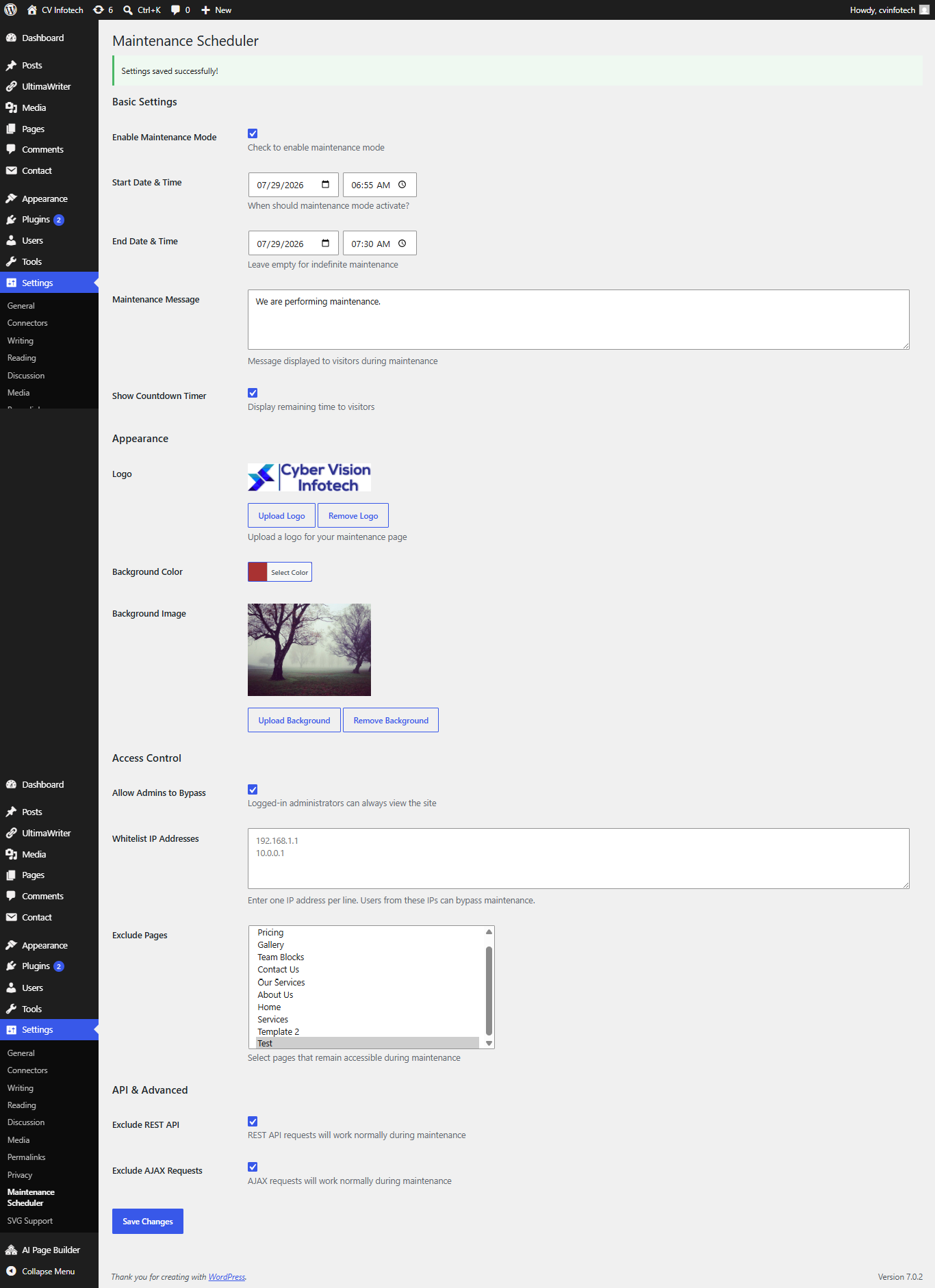
Complete admin interface with all configuration options available at Settings → Maintenance Scheduler.
Maintenance Page (Frontend)
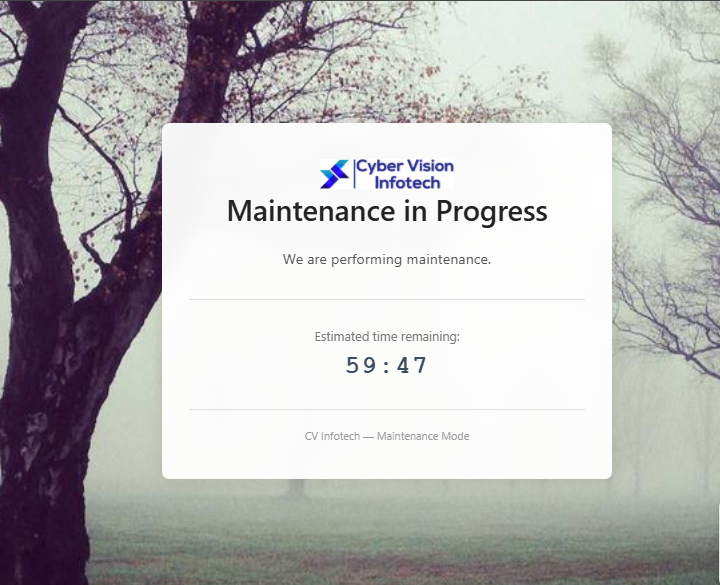
Professional maintenance page with logo, countdown timer, custom background, and responsive design.
Features
Core Features
- Enable/Disable maintenance mode with a single click
- Schedule start and end date/time for automatic activation
- Custom maintenance message
- Real-time countdown timer
- Fully responsive design
Appearance
- Custom logo upload from Media Library
- Background color picker
- Background image upload
- Modern, professional UI
Access Control
- Admin bypass (logged-in admins see live site)
- IP whitelist support (multiple IPs)
- Exclude specific pages from maintenance
- Smart user detection
API & Advanced
- REST API safe mode (keeps
/wp-json/*working) - AJAX safe mode (keeps AJAX requests working)
- Proper HTTP 503 status code
- SEO-friendly Retry-After header
Quality
- Follows WordPress Coding Standards
- Translation ready (i18n support)
- Clean uninstall (removes all plugin data)
- Security hardened (sanitization, escaping, nonces)
Installation
Method 1: WordPress Admin Upload
- Go to Plugins → Add New → Upload Plugin
- Choose the plugin ZIP file
- Click Install Now
- Click Activate
Method 2: FTP Upload
- Upload
maintenance-scheduler.phpto/wp-content/plugins/ - Go to WordPress Admin → Plugins
- Click Activate for Maintenance Scheduler
Method 3: Git Clone
cd wp-content/plugins/
git clone https://github.com/yourusername/maintenance-scheduler.git
Configuration
After activation, go to Settings → Maintenance Scheduler to configure:
| Setting | Description |
|---|---|
| Enable Maintenance Mode | Turn maintenance mode on/off |
| Start Date & Time | When maintenance should begin |
| End Date & Time | When maintenance should end (optional) |
| Maintenance Message | Text displayed to visitors |
| Show Countdown Timer | Display remaining time |
| Logo | Upload custom logo |
| Background Color | Choose page background color |
| Background Image | Upload full-screen background |
| Allow Admins to Bypass | Admins see live site |
| Whitelist IP Addresses | IPs that bypass maintenance |
| Exclude Pages | Pages accessible during maintenance |
| Exclude REST API | Keep REST API functional |
| Exclude AJAX Requests | Keep AJAX functional |
Usage Examples
Scheduled Maintenance Window
Enable: Yes
Start: 2026-01-15, 02:00 AM
End: 2026-01-15, 06:00 AM
Message: "Server maintenance 2-6 AM. We will be back shortly."
Show Countdown: Yes
Admin Bypass: Yes
Client Access During Maintenance
Enable: Yes
Admin Bypass: Yes
Whitelist IPs: 203.0.113.50
Message: "Site under maintenance. Your IP has access."
Mobile App + Web Maintenance
Enable: Yes
Exclude REST API: Yes
Exclude AJAX: Yes
Message: "Web maintenance. Mobile app continues working."
Requirements
- WordPress 5.0 or higher
- PHP 7.2 or higher
- MySQL 5.7 or higher
File Structure
maintenance-scheduler/
├── maintenance-scheduler.php    Main plugin file
├── uninstall.php                Cleanup on uninstall
├── readme.txt                   WordPress.org readme
├── README.md                    GitHub readme (this file)
├── CHANGELOG.md                 Version history
├── CONTRIBUTING.md              Contribution guidelines
├── LICENSE                      GPL v2 license
├── .gitignore                   Git ignore rules
├── .gitattributes               Git attributes
├── screenshot-1.png             Admin settings screenshot
└── screenshot-2.png             Maintenance page screenshot
Security
This plugin follows WordPress security best practices:
- All inputs are sanitized using appropriate WordPress functions
- All outputs are escaped before display
- Forms are protected with WordPress nonces (CSRF protection)
- Capability checks ensure only admins can change settings
- IP addresses are validated before saving
- No direct database queries (uses WordPress APIs)
Performance
- Lightweight (~27 KB main file)
- Minimal database queries
- No external dependencies
- Fast maintenance page rendering (pure HTML/CSS)
- Approximately 1-2ms overhead per page load
Contributing
Contributions are welcome. Please see CONTRIBUTING.md for details.
Ways to contribute:
- Report bugs by opening an issue
- Suggest new features
- Submit pull requests
- Improve documentation
- Help with translations
Changelog
See CHANGELOG.md for full version history.
License
This plugin is licensed under the GNU General Public License v2.0 or later. See LICENSE for details.
Author
CVInfotech (Cyber Vision Infotech Pvt. Ltd.)
- Website: https://www.cvinfotech.com
- Location: Gurugram, India
- Founded: 2012
Services: Custom Web Development, WordPress Development, Mobile App Development, React/Node.js Development, AI Solutions, SEO & Digital Marketing.
Support
For issues, feature requests, or questions:
- Open an Issue
- Start a Discussion
- Visit CVInfotech
Show Your Support
If you find this plugin useful:
- Star this repository
- Share with others
- Report bugs
- Contribute code