Install
Upload it under Plugins → Add New Plugin → Upload Plugin, then activate.
Install straight from GitHub with WP-CLI:
wp plugin install https://github.com/cvinfotech/cv-404-redirect-to-home/releases/download/v1.0.0/cv-404-redirect-to-home.zipAutomatically and safely redirect every broken (404) link on your WordPress site straight to your homepage — without touching your theme, page builder, or performance.
Developed and maintained by CV Infotech Support: support@cvinfotech.com
Screenshot
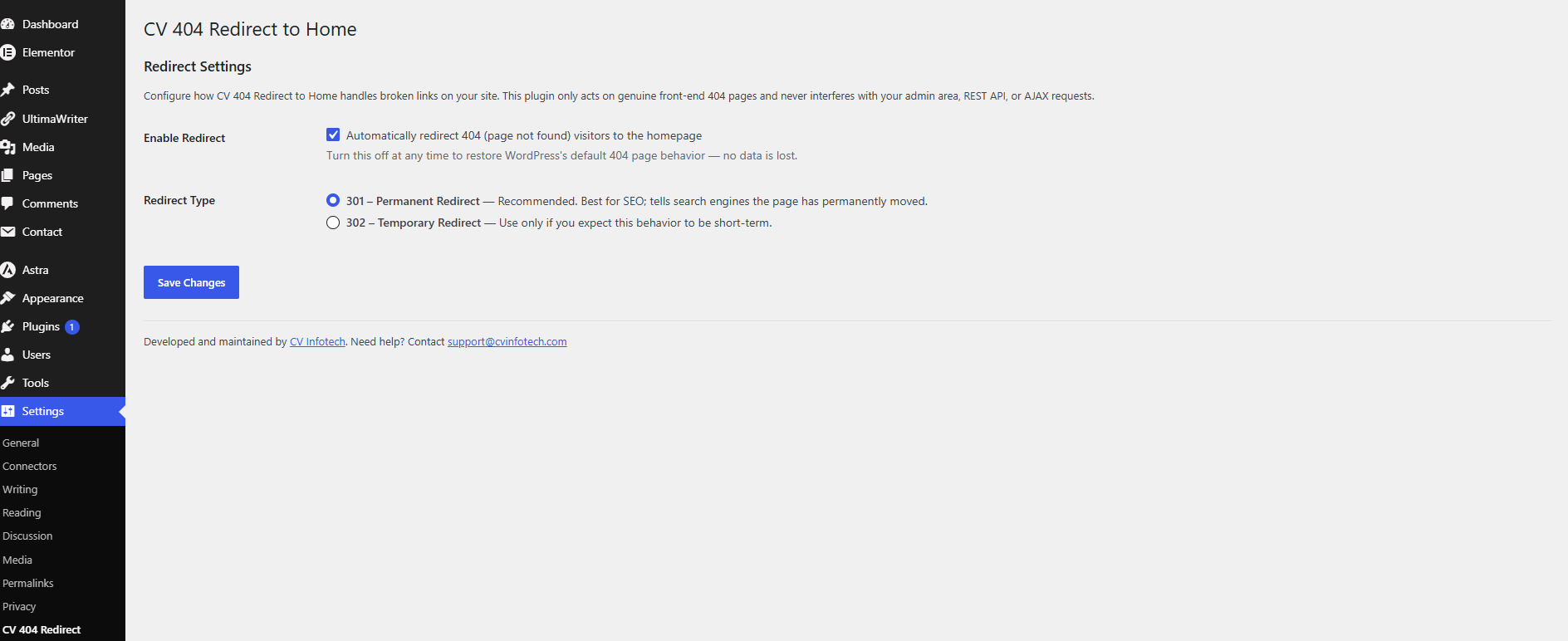
The Redirect Settings screen under Settings → CV 404 Redirect.
Overview
Broken links happen — old blog posts get deleted, URLs change, or visitors mistype an address. Instead of showing visitors (and search engines) an unhelpful "404 Not Found" page, CV 404 Redirect to Home silently sends them to your homepage so they can keep exploring your site.
It's built to a simple standard: do one thing, do it safely, and get out of the way.
Features
- ✅ Automatic 404 → Home redirection using WordPress's own
is_404()conditional — no guesswork, no scanning, no external services. - ✅ One-click ON/OFF toggle — disable instantly without deactivating the plugin.
- ✅ Choice of redirect type:
301 Permanent— recommended, best for SEO and passing link equity.302 Temporary— for short-term use cases.
- ✅ Zero layout impact — the plugin renders no front-end markup, CSS, or JavaScript whatsoever.
- ✅ Zero performance impact — one lightweight hook, no database queries on normal page loads, no cron jobs, no remote requests.
- ✅ 100% theme & page builder compatible — tested against Astra, Divi, GeneratePress, and other major themes, as well as Elementor, Beaver Builder, and other builders.
- ✅ Clean uninstall — removes its single settings entry from the database when deleted, including on multisite.
- ✅ Developer-friendly filters —
cv404_r2h_pre_redirectandcv404_r2h_redirect_urlfor advanced customization without editing core plugin files. - ✅ Translation-ready with a proper text domain.
Installation
- Upload the
cv-404-redirect-to-homefolder to/wp-content/plugins/, or install the plugin ZIP via Plugins → Add New → Upload Plugin. - Activate the plugin through the Plugins menu in WordPress.
- Go to Settings → CV 404 Redirect to configure it.
That's it — redirection is active immediately with sensible defaults (enabled, 301 Permanent).
Settings
| Setting | Description | Default |
|---|---|---|
| Enable Redirect | Master switch to turn redirection on or off | On |
| Redirect Type | 301 Permanent or 302 Temporary |
301 Permanent |
Why This Is Safe
This plugin is built around a single guiding rule: only act on a genuine, front-end 404 page — never anything else. Before any redirect happens, the plugin runs through a strict chain of exclusion checks and bails out silently if any of them are true:
| Guard | What it protects |
|---|---|
is_404() must be true |
Redirect logic only ever triggers on a real "not found" query — nothing else. |
is_admin() check |
The WP Admin dashboard, plugin/theme editors, and admin AJAX handlers are never touched. |
wp_doing_ajax() check |
AJAX calls used constantly by Elementor, Beaver Builder, WooCommerce, and contact forms are left completely untouched. |
| REST API detection | Any request to /wp-json/ or ?rest_route= (used by Gutenberg, the Site Editor, and headless/mobile apps) is ignored. |
WP_CLI check |
Command-line operations (migrations, backups, automation) are unaffected. |
DOING_CRON check |
Scheduled background tasks are unaffected. |
is_feed() check |
RSS/Atom feeds and XML sitemaps continue to work normally. |
favicon.ico / robots.txt check |
These conventional static requests are allowed to behave normally rather than being redirected. |
is_customize_preview() check |
The Customizer and live preview experience are never interrupted. |
Because every one of these checks must fail (i.e., none of them apply) before a redirect is even considered, the plugin cannot interfere with:
- Theme rendering (Astra, Divi, GeneratePress, OceanWP, etc.)
- Page builders (Elementor, Beaver Builder, WPBakery, Bricks, etc.)
- WooCommerce and other e-commerce checkouts
- Contact forms and AJAX-driven UI
- The block editor, Site Editor, and Customizer
- REST-based apps, headless front ends, and mobile apps
- Cron jobs, WP-CLI, staging, and migration tools
The redirect logic itself is hooked on template_redirect, which runs before any theme template file is loaded — so on the rare occasion a redirect does fire, it happens instantly via wp_safe_redirect(), without ever rendering a page, a theme, or a single line of page-builder output. There is no front-end CSS/JS enqueued, no shortcodes, no widgets, and no database writes on normal traffic — just one conditional check per request.
Frequently Asked Questions
Will this affect my site's SEO? Used with the default 301 Permanent setting, this plugin follows SEO best practice by telling search engines that broken URLs now permanently point to your homepage, helping consolidate link equity instead of losing it to dead pages.
Will this break my page builder or theme? No. The plugin never loads any front-end assets and explicitly excludes AJAX, REST, and admin requests — see the "Why This Is Safe" section above.
What happens if I deactivate or delete the plugin? Deactivating simply stops the redirect (your site returns to the default 404 behavior). Deleting the plugin also removes its single settings entry from your database — nothing is left behind.
Can I exclude specific URLs from being redirected?
Yes, via the cv404_r2h_pre_redirect filter, which lets developers add custom conditions in a child theme or site-specific plugin without modifying this plugin's files.
Developer Filters
// Prevent the redirect from firing under a custom condition.
add_filter( 'cv404_r2h_pre_redirect', function( $do_redirect ) {
    if ( is_user_logged_in() ) {
        return false;
    }
    return $do_redirect;
} );

// Change the redirect destination.
add_filter( 'cv404_r2h_redirect_url', function( $url ) {
    return home_url( '/sitemap/' );
} );
Requirements
- WordPress 5.2 or higher
- PHP 7.4 or higher
Changelog
See CHANGELOG.md for the full version history.
Contributing
Contributions are welcome! Please read CONTRIBUTING.md for coding standards, development setup, and the pull request process.
Security
Found a vulnerability? Please do not open a public issue — see SECURITY.md for how to report it responsibly.
License
This plugin is licensed under the GPLv2 (or later). See https://www.gnu.org/licenses/gpl-2.0.html for the full license text.
Support & Company
CV Infotech 🌐 https://www.cvinfotech.com/ ✉️ support@cvinfotech.com
For bug reports, feature requests, or custom development inquiries, please reach out via the email above or through our website.
Releases
1 release. Each count is every asset in that release; expand a row for the breakdown.