Cornell Business: In-Page Governance WP Registry grade D. High-severity findings · 6 findingsWP RegistryHigh-severity findings · 6 findingsOpen the reportD
Allows tracking and adding notes about the content, purpose, audiences, etc. of individual pages in WordPress
Install
This is the repository archive. It installs, but the folder name will carry the branch suffix and updates will not flow.
Install straight from GitHub with WP-CLI:
wp plugin install https://github.com/cu-business-webteam/cornell-governance/archive/refs/heads/main.zipCornell In-Page Governance
Allows tracking and adding notes about the content, purpose, audiences, etc of individual pages
Description
This plugin adds numerous fields to the page editor, allowing users to review their pages, provide certain relevant information about the page and its audiences, etc.
It also adds automated review messages that can be emailed out to a list of relevant users.
Links
- Setup
- Updates
- Settings
- Constants
- Emails
- REST API Information
- Cron Triggers
- Installation
- Frequently Asked Questions
- Screenshots
- Changelog
- Upgrade Notice
Setup
- Go to Governance -> Audiences on each site and add the audiences that should be selectable for the Primary and Secondary Audience fields
- Go to Governance -> Governance Settings on each site and make sure the settings make sense, then save them
Updates
The plugin has a built-in update checker. By default, it will use the public, authoritative GitHub repository for the plugin.
If you would like to override those settings to check your own Git repository, you can do so with environment variables or PHP constants.
To override those settings, you have a few options.
- You can copy the
.env.defaultfile to.envin the plugin folder, and update the definitions (not recommended, as.envis a plain-text file, and those secrets would be publicly accessible) - You can create and define environment variables on your server with these values
- You can create a file called
cornell-governance-config.phpin the plugin's root and define these as PHP constants - You can add these constant definitions to your
wp-config.phpfile
The definitions available are:
CORNELL_GOVERNANCE_REPO_URL- the URL to the Git repositoryCORNELL_GOVERNANCE_REPO_SLUG- the unique slug for the repo; if you're using a self-hosted GitLab instance and subgroups or nested groups, you have to tell the update checker which parts of the URL are subgroupsCORNELL_GOVERNANCE_REPO_BRANCH- the name of the stable branch you want to use- If you are using a private Bitbucket repo, you will need to get a consumer key and secret, and define them:
CORNELL_GOVERNANCE_REPO_CONSUMER_KEYCORNELL_GOVERNANCE_REPO_CONSUMER_SECRET
- If you're using a private GitLab repo, you will need to get a token and define it:
CORNELL_GOVERNANCE_REPO_AUTH_TOKEN
CORNELL_GOVERNANCE_REPO_IS_CUSTOM_GITLAB- If you're using a self-hosted GitLab repo, you need to indicate that by setting this totrue
Settings
General Settings
-
Which capability should be used to determine who can change governance information on a page?
There are two interfaces for Governance information on individual pieces of content. The first interface is essentially a read-only interface, which displays the governance information about the page, provides a checkbox allowing the user to indicate that they have reviewed the governance information, and provides them with a link to request changes to that information. The second interface is the "administrative" interface, which allows privileged users to make changes to the governance information for that page. This setting allows you to specify which WordPress capability is used to determine whether to show the "read-only" interface or the fully interactive interface.
-
What is the name of the office that manages Governance for your organization?
In various places throughout the plugin, a managing office is referenced. To specify the name of that managing office, enter a value in this field. For instance, in one case, the name of that managing office might be "Marketing and Communications", so, one of the Governance information fields would read "Marketing and Communications Liaison", rather than just "Managing Office Liaison".
-
On which post types should the governance information be displayed?
This is a list of all post types registered on the site. Check off each post type where you would like the Governance metaboxes to appear.
-
Global Tasks
If you would like all authors to complete a specific set of on-page content review tasks on all pages, in addition to the on-page content review tasks that are set for specific pages, this is where you will add them.
These global tasks will be inserted as plain-text above the list of inputs where administrators add new tasks for each page, and they will be inserted at the beginning of the task checklist for authors/page stewards.
-
Include a button allowing stewards to mark pages for deletion?
If this is enabled, then a "Mark this page for deletion" option becomes available to stewards, allowing them to specify that a page is no longer necessary.
When that option is selected by the Steward, then an email message is dispatched to the steward, the secondary contact, and the liaison, notifying all of them that the page is no longer necessary. At that point, the liaison can choose to delete/draft/remove the page from the site.
Wayback Integration Settings
-
Integrate Wayback Machine archival of modified content?
Check this box to implement integration with the Internet Archive Wayback Machine
-
If you would like to replace this site's URL with a production URL, enter this site's URL here.
If this is a non-production site, chances are fairly good that there won't be any existing snapshots of the pages on this site (and that you probably don't want to capture snapshots of this site).
In this case, the plugin can programatically replace any calls to the Wayback API so that it queries the production URL instead of the non-production URL.
This setting allows you to specify the URL of this non-production site that should be replaced during those API queries.
-
If you would like to replace this site's URL with a production URL, enter that production URL here.
If this is a non-production site, chances are fairly good that there won't be any existing snapshots of the pages on this site (and that you probably don't want to capture snapshots of this site).
In this case, the plugin can programatically replace any calls to the Wayback API so that it queries the production URL instead of the non-production URL.
This setting allows you to specify the URL of your production site, so that that URL will replace this site's URL in Wayback queries.
-
How many days should be stored in the Archive Snapshot log?
This plugin will store a log of Wayback Machine snapshot requests that are triggered by the plugin. That log should be cleaned out regularly in order to avoid bloat in the database.
With this setting, you can specify how long those logs should be kept. The default is 30 days, but you can set it to any number of days you want.
If you have a very active, large site, you may want to set it as low as 7 days; if you have a fairly small site that doesn't get updated extremely often, you could realistically set this to 365 days.
Change Form Settings
-
Include a link to a form allowing users to request changes to the governance settings for a page?
Check this box to include a link to a "Change Form" that allows page authors and editors to request updates/changes to the governance settings for a specific piece of content.
If this box is not checked, the rest of the Change Form settings are ignored, as no link is output in the Governance box.
-
What text would you like to use for the "Change Form" link?
The text of the link to the change form is configurable; this is where you would specify exactly what you would like that link to say.
-
What is the URL of the form that users can fill out to submit requests for changes?
A link to a "request" form is provided to non-privileged users, so that they can request changes to the governance information for a specific page. This field allows you to specify where that request form lives.
-
Which properties of the post should be appended to the change form URL?
Once the URL for the change form is set, the plugin can automatically add a number of parameters to that URL, so that some information can be automatically included in the request. This field allows you to choose which information is automatically added as a query string to that URL:
post_title- the title of the post/page being editedpost_id- the WordPress ID of the post/page being editedpost_url- the permalink URL to the post/page being editeduser_email- the email address associated with the WordPress user making the requestuser_id- the WordPress ID of the user account making the requestuser_display_name- the display name associated with the WordPress user making the request
Email Settings
This plugin will automatically send out three (3) separate email prompts for each review.
The first prompt lets folks know that their pages are ready to be reviewed.
The second prompt lets folks know that they should review their pages if they haven't already done so.
The third prompt lets them know that they are getting close to being out of compliance, and they absolutely need to review their pages to keep them compliant.
These settings allow you to schedule how many days before non-compliance each of those prompt messages should be sent.
By default, they are set to 60 days, 30 days and 15 days.
- How many days before a review is due should the first prompt message be sent?
- How many days before a review is due should the second prompt message be sent?
- How many days before a review is due should the third and final prompt message be sent?
Help Documentation Settings
You can optionally add an extra tab to the Governance interface included on the page edit screen with your custom help information.
Simply add your Help content to the WYSIWYG editor in the Help Documentation Settings tab and save the Governance settings, then any information entered in that WYSIWYG field will appear in its own tab within the interface.
Constants
There are a number of constants used within this plugin. They can be defined as environment variables within your PHP environment; they can be defined in an .env file in the root folder of this plugin (not recommended for publicly-accessible websites); they can be defined within wp-config, or they can be defined as PHP constants in a file called cornell-governance-config.php.
CORNELL_DEBUG- This will output informational debug content into the error log when it is defined astrueCORNELL_GOVERNANCE_EMAIL_TO- If theCORNELL_DEBUGconstant is defined astrueand this constant is defined with a valid email address, that email address will be used as the "to" field for all automated emails from this plugin (overriding the individual users' email addresses)CORNELL_GOVERNANCE_EMAIL_CC- Can accept a comma-separated list of email addresses. Any addresses set inside this constant will receive a CC copy of all email messages sent by this pluginCORNELL_GOVERNANCE_EMAIL_BCC- Can accept a comma-separated list of email addresses. Any addresses set inside this constant will receive a BCC copy of all email messages sent by this plugin
The following constants apply to the auto-update functionality. They are defined with defaults that will point to the main public Github repo, but you can redefine them for your own private repo if you prefer:
CORNELL_GOVERNANCE_REPO_URL- the URL to the git repo where this plugin can be downloadedCORNELL_GOVERNANCE_REPO_SLUG- the slug of the plugin within that repoCORNELL_GOVERNANCE_REPO_BRANCH- the branch from which you want to pull the pluginCORNELL_GOVERNANCE_REPO_CONSUMER_KEY- if you are using a private Bitbucket repo, you will need to define a consumer keyCORNELL_GOVERNANCE_REPO_CONSUMER_SECRET- if you are using a private Bitbucket repo, you will need to define a consumer secretCORNELL_GOVERNANCE_REPO_AUTH_TOKEN- if you are using a private GitLab repo, you will need to set an authorization tokenCORNELL_GOVERNANCE_REPO_IS_CUSTOM_GITLAB- if you are using a custom/self-hosted GitLab server, you need to indicate that
In a multisite environment, these constants will impact all sites in the network where the plugin is active; they are not unique to each individual site within the network.
Emails
This plugin can automatically dispatch email messages to authors/page stewards, supervisors/secondary contacts, and liaisons.
By default, an email message will be sent to authors/page stewards 60 days before a page is due for review.
Emails will also be sent to authors/page stewards and their supervisors/secondary contact 30 days before a page review is due.
Another email will be sent to authors/page stewards, their supervisors/secondary contacts, and the page liaisons 7 days before a page is due for review, and a final email will be sent to those same folks daily once a page is overdue.
You can change the "60 days", "30 days" and "7 days" to your own custom values within the plugin settings.
In order to automate the email sending, you will need to set up a cron job that adds cornell/governance/run-email-cron as part of the query string. We recommend, if possible, adding a unique value for that query parameter in order to ensure the request doesn't get cached by your server.
An example would be: https://www.example.com/?cornell/governance/run-email-cron=2023-09-06-122500
Email Templates
This plugin includes basic templates for all of the automated emails that it sends out.
If you would like to build custom templates, you can do so by including them in your WordPress theme. The file structure is as follows:
- {theme directory}/cornell-governance/templates/
- Compliant.handlebars
- Deletion.handlebars
- Due.handlebars
- Initial_Prompt.handlebars
- Overdue.handlebars
- Secondary_Prompt.handlebars
- Tertiary_Prompt.handlebars
- Supervisor/
- Due.handlebars
- Overdue.handlebars
- Tertiary_Prompt.handlebars
- Liaison/
- Due.handlebars
- Overdue.handlebars
The template files are built as Handlebars templates. The following data are available by default to the template files:
site_name- The title of the site (as set in Settings -> General in your WordPress site)managing-office- The name of the managing office (default: "MarCom")review_time- (Only available in the Initial, Secondary and Tertiary Prompt emails) - the number of days within which the review is due (by default, these are 60 days, 30 days and 7 days)report- This is an object/array that contains all of the properties available in a standard WP_Post object, in addition to the following:permalink- The full URL to the piece of contentdue_date- A formatted version of the date on which the review is dueedit_link- The full URL to edit the piece of contentauthor_email- The email address of the content author
prompt-times- The numerical representations of the number of days before due date that a prompt is sentinitial- The numerical representation of the first prompt (default: 60)secondary- The numerical representation of the second prompt (default: 30)tertiary- The numerical representation of the third prompt (default: 7)
prompt-words- A textual representation of the number of days before due date that a prompt is sentinitial- A textual representation of the first prompt (default: "sixty")secondary- A textual representation of the second prompt (default: "thirty")tertiary- A textual representation of the third prompt (default: "seven")initial-uc- A textual representation of the first prompt with the first letter capitalized (default: "Sixty")secondary- A textual representation of the second prompt with the first letter capitalized (default: "Thirty")tertiary- A textual representation of the third prompt with the first letter capitalized (default: "Seven")
The template variables can be modified using the cornell/governance/emails/report-data filter. That filter sends the array of data being sent to the template as the first parameter, and the name of the PHP class being used to generate the email as the second parameter.
REST API Information
WordPress Native REST Requests
This plugin adds some custom information to the standard post REST requests found at wp-json/wp/v2/. The following data are added to these responses:
goal- the "Page Goal" textpurpose- the "Purpose/Problems Solved" textprimaryAudience- the slug for the Primary Audience selectionsecondaryAudience- the slug for the Secondary Audience selectionsecondaryContact- the email address for the Secondary Contactliaison- the email address for the liaisoncycle- a text representation of how often the page is reviewedcomplianceStatus- a message about the page's compliance statusupdateMessage- the most recent "Content Update" commit messagecommit-message- the text of the latest commit messageeditor- the ID of the user that posted that commit messagetimestamp- the UNIX timestamp showing when the commit message was saved
Custom Governance REST Endpoint
You can also access just the Governance information for content by using the custom REST endpoint located at wp-json/cornell/governance/v1/information.
If you want Governance Information about a specific piece of content, you can append the content ID to the end of that endpoint.
The properties included in this response are:
post-title- The title assigned to the piece of content (for informational purposes)goals- the text of the "Page Goals" fieldprimary-audience- A WP_Term object containing information about the selected Primary Audienceproblem- the text of the "Purpose/Problems Solved" fieldreview-cycle- an array with information about the review cyclecycle- the number of months between reviewstext- a text representation showing how often the page needs to be reviewed
secondary-audience- A WP_Term object containing information about the selected Secondary Audiencesecondary-contact- the email address of the Secondary Contacttasks- an array of the tasks for the contentliaison- the email address for the Liaison assigned to this contenttimestamp- the date and time at which the governance information was last updatedlast-review- an array of information about when the content was last reviewedtimestamp- the UNIX timestamp when the content was last revieweddate- the ISO 8601 date formatted date and time when the content was last reviewed
initial-setup- an array with information about when the governance information was first set uptimestamp- the UNIX timestamp when the information was createddate- the ISO 8601 date formatted date and time when the information was createduser- an array with information about the user that set up the governance informationid- the user IDemail- the user's email address
completed-tasks- an array showing which tasks (if any) have been checked offcompliance-status- a text representation showing the compliance status for the pagenotes- an array with information about notes that have been added to the pagenotes- the raw markdown text of the notestimestamp- a WP-formatted date and time showing when the notes were last updatedrendered- an HTML-formatted version of the notes
revisions- an array of revision content update notes. Each item inside the array is an array with the following propertiesrevision-id- the ID that WP assigned to the revision that is associated with the update messagemessage- the text of the update messageauthor- an array of information about the user that committed the update messageid- the WP User IDemail- the user's email address
timestamp- the UNIX timestamp of the update messagedate- the WP-formatted date and time of the update message
Cron Triggers
A handful of cron triggers are available in this plugin to automate some tasks.
In all of these cases, if you are going to use these query parameters to trigger cron actions, we recommend setting the values of those parameters to a unique timestamp in order to avoid any caching issues.
cornell/governance/run-email-cron- Adding this string as a query parameter will trigger any scheduled emails to be sent through this plugin. We recommend running this cron job every hour.cornell/governance/trigger-snapshots- Instantiates the job that will send a request to the Wayback API telling it to capture a snapshot of each page that was edited throughout the past day. We recommend only running this job once a day.cornell/governance/process-snapshots- If the snapshot trigger is active, this will loop through all scheduled snapshots and request that they be handled by the Archive API. We recommend running this every few minutes.cornell/governance/retrieve-snapshots- If you would like to prime the lists of snapshots displayed within the Governance metabox while editing a page, you can run this cron job in order to make those requests in the background, rather than trying to run them when a user edits a page.
Credits
This plugin was created by Shelley Keith and developed by Curtiss Grymala for the Cornell SC Johnson College of Business.
Installation
- Upload the plugin files to the
/wp-content/plugins/cornell-governancedirectory, or install the plugin through the WordPress plugins screen directly. - Activate the plugin through the 'Plugins' screen in WordPress
Frequently Asked Questions
What filters are available in this plugin?
Settings
cornell/governance/capability- filters the WordPress capability that determines whether a user is able to edit/manage the options and fields within this plugin.cornell/governance/managing-office- filters the name of the managing office that is in charge of reviewing the governance compliance.cornell/governance/post-types- filters the list of post types on which the governance information appearscornell/governance/default-tasks- filters the array of default tasks before they are added to the list on the page itselfcornell/governance/change-form/active- filters whether the Change Form link should be displayed or notcornell/governance/change-form/link-text- filters the text that's used for the Change Form linkcornell/governance/change-form/url- allows you to change the location of the form used for requesting changescornell/governance/change-form/props- filters the array of query parameters appended to the change form URL when it's presented as a link (same as below)cornell/governance/change-form-url/parameters- filters the array of query parameters appended to the change form URL when it's presented as a linkcornell/governance/mark-for-deletion/active- whether the mark for deletion option should be enabled or notcornell/governance/emails/limit- allows you to limit how many emails are sent in a single batch. The default is 25.cornell/governance/frontend-compliance/active- filters whether the Frontend Compliance widget is active or notcornell/governance/archive/active- filters whether the Wayback Machine integration is active or notcornell/governance/wayback/timeout- allows you to filter how long the list of Wayback Machine snapshots are cached (default is 1 day) (added in 0.6.2)cornell/governance/wayback/record-limit- allows you to filter the maximum number of Wayback Machine results to display in a list or table (default is 20) (added in 0.6.2)
Reports
General
cornell/governance/reports/current-user- if a report should only show posts authored/owned by a specific user, use this filter to set that user ID
Page List Report
cornell/governance/page-list-table/columns- filters the columns to be included in the WP_List_Table within the Page List reportcornell/governance/page-list-table/columns/visible- filters which columns are visible in the Page List reportcornell/governance/page-list-table/columns/hidden- filters which columns are hidden in the Page List Reportcornell/governance/page-list-table/columns/sortable- filters which columns in the Page List report are sortablecornell/governance/page-list-table/columns/default-orderby- filters which column is the one used by default for sorting the informationcornell/governance/page-list-table/columns/query-args- filters the query arguments that are used when querying posts for the Page List reportcornell/governance/page-list-table/data- filters the data returned by the query to be displayed in the Page List report
Unreviewed Pages Report
cornell/governance/unreviewed-table/columns- filters the columns to be included in the WP_List_Table within the Unreviewed Pages reportcornell/governance/unreviewed-table/columns/visible- filters which columns are visible in the Unreviewed Pages reportcornell/governance/unreviewed-table/columns/hidden- filters which columns are hidden in the Unreviewed Pages Reportcornell/governance/unreviewed-table/columns/sortable- filters which columns in the Unreviewed Pages report are sortablecornell/governance/unreviewed-table/columns/default-orderby- filters which column is the one used by default for sorting the informationcornell/governance/unreviewed-table/columns/query-args- filters the query arguments that are used when querying posts for the Unreviewed Pages reportcornell/governance/unreviewed-table/data- filters the data returned by the query to be displayed in the Unreviewed Pages report
Email Templates
cornell/governance/emails/report-data- filters the data shared with the email template. The first parameter is the array of report data. The second parameter is the name of the PHP class used to generate the email.
Import/Export
cornell/governance/import-export/headers- allows you to add extra headers to import/export (must be used in conjunction withcornell/governance/import-export/data)cornell/governance/import-export/data- allows you to add additional data (custom fields, taxonomies, etc.) to the import/export (must be used in conjunction withcornell/governance/import-export/headers)cornell/governance/import-export/data-defaults- allows you to filter the default meta data that should be used for any post where that data is not setcornell/governance/import-export/sample-descriptions- filters the descriptions of data fields (second row) in the sample format. It's a good idea to use this if you manipulate the headerscornell/governance/import-export/sample-data- filters the sample data included in the sample format (third row). It's a good idea to use this if you manipulate the headers
In addition, the following actions are run during import/export:
-
do_action( 'cornell/governance/import-export/before-import', $data, $headers )@param array$data- the full set of data from the import file
@param array$headers- the array of headers from the import file (the first row)Allows you to perform any actions that need to be done before the import is actually performed.
-
do_action( 'cornell/governance/import-export/before-post-import', $post, $row, $headers )
@param \WP_Post$post- the post being imported
@param array$row- the information being imported for the current post
@param array$headers- the array of headers from the import file (the first row)Allows you to perform any actions that need to be done before information is imported for a specific post
-
do_action( 'cornell/governance/import-export/after-post-import', $post, $row, $headers )
@param \WP_Post$post- the post being imported
@param array$row- the information being imported for the current post
@param array$headers- the array of headers from the import file (the first row)Allows you to perform any actions that need to be done after information is imported for a specific post
-
do_action( 'cornell/governance/import-export/after-import', $data, $headers )@param array$data- the full set of data from the import file
@param array$headers- the array of headers from the import file (the first row)Allows you to perform any actions that need to be done after the import is completed.
Miscellaneous
cornell/governance/textarea/value- filters the value of a textarea field in meta boxes. The first parameter is the current value of the textarea; the second parameter is the HTML ID of the textarea field.
Screenshots
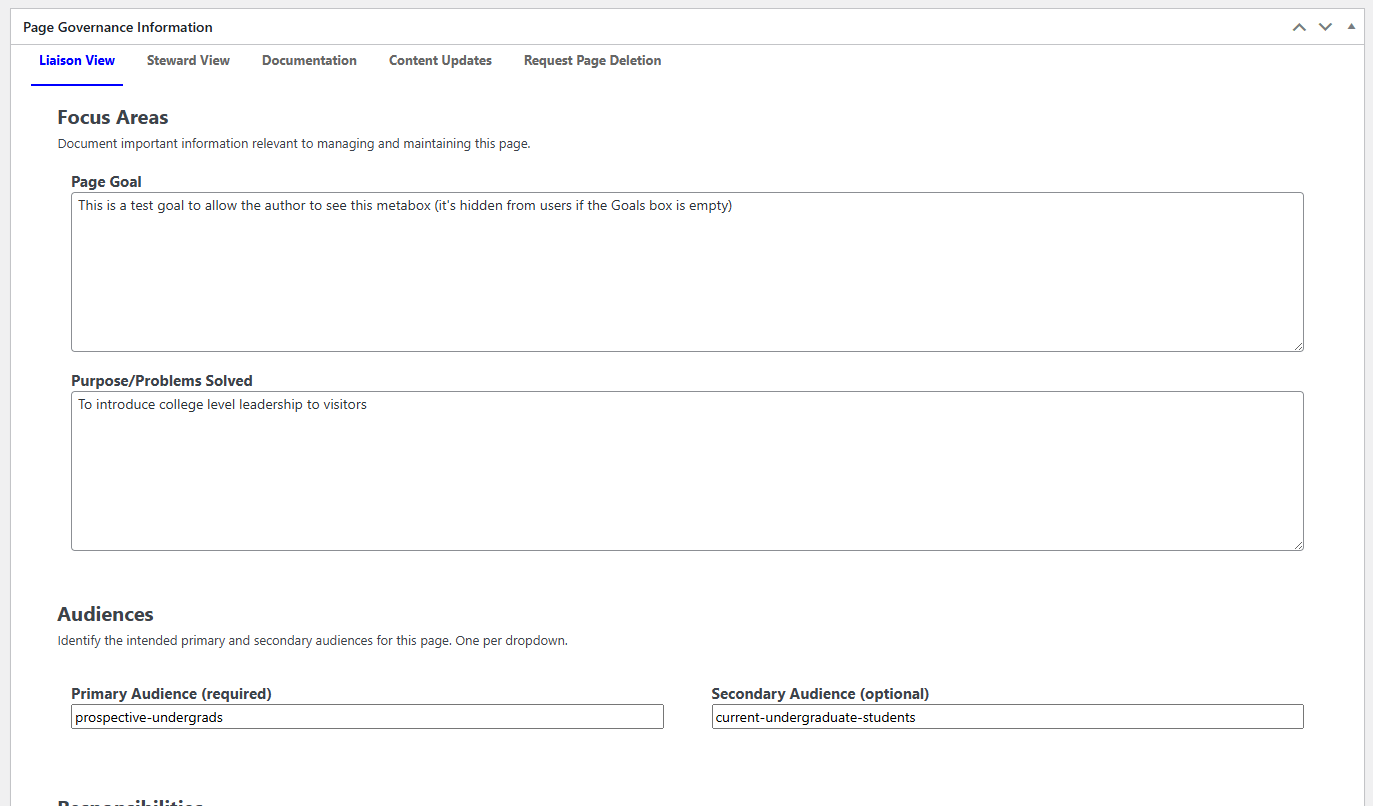 A snapshot of the interface that a privileged user will see while editing a page
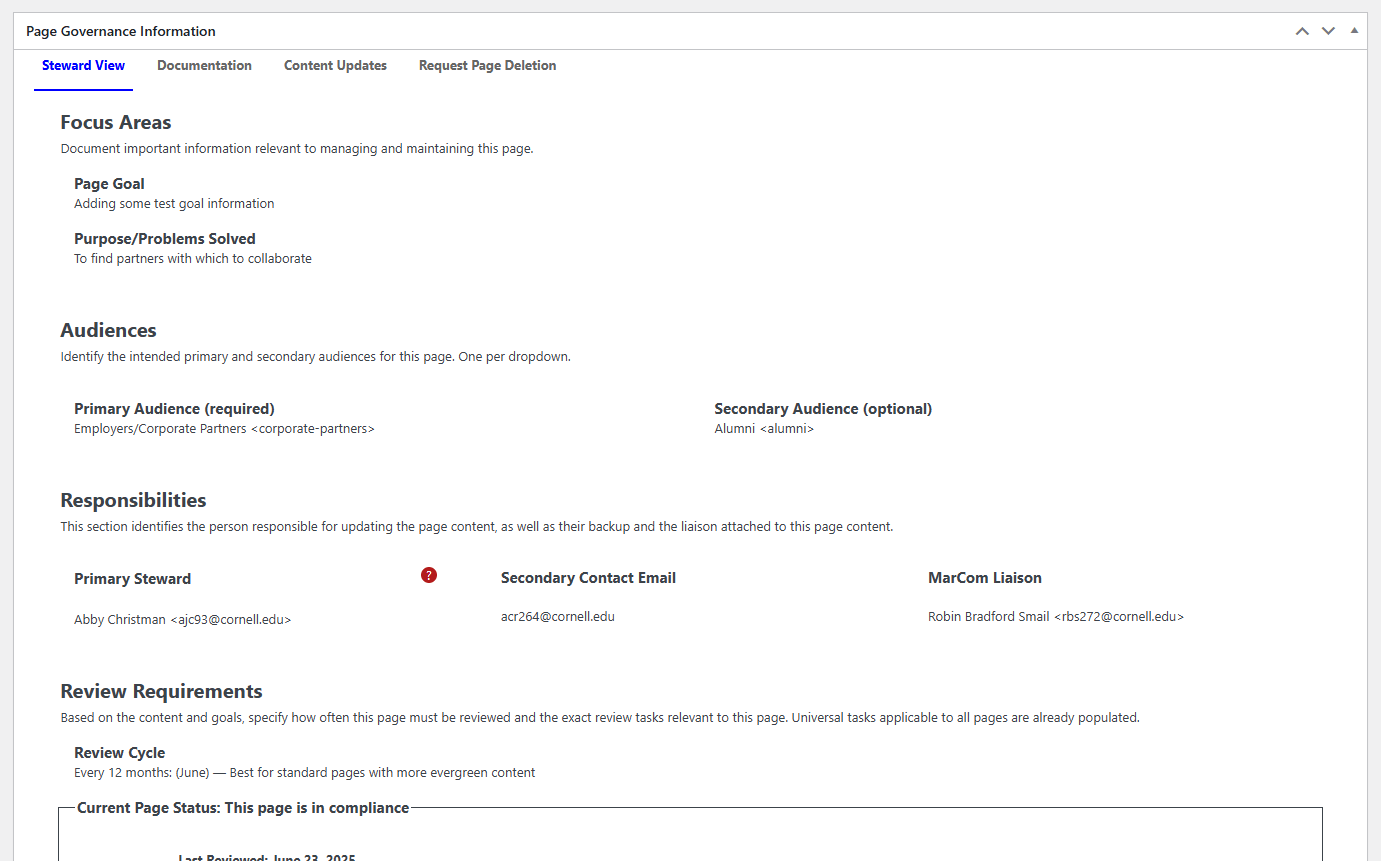 A snapshot of the interface a non-privileged user will see while editing a page
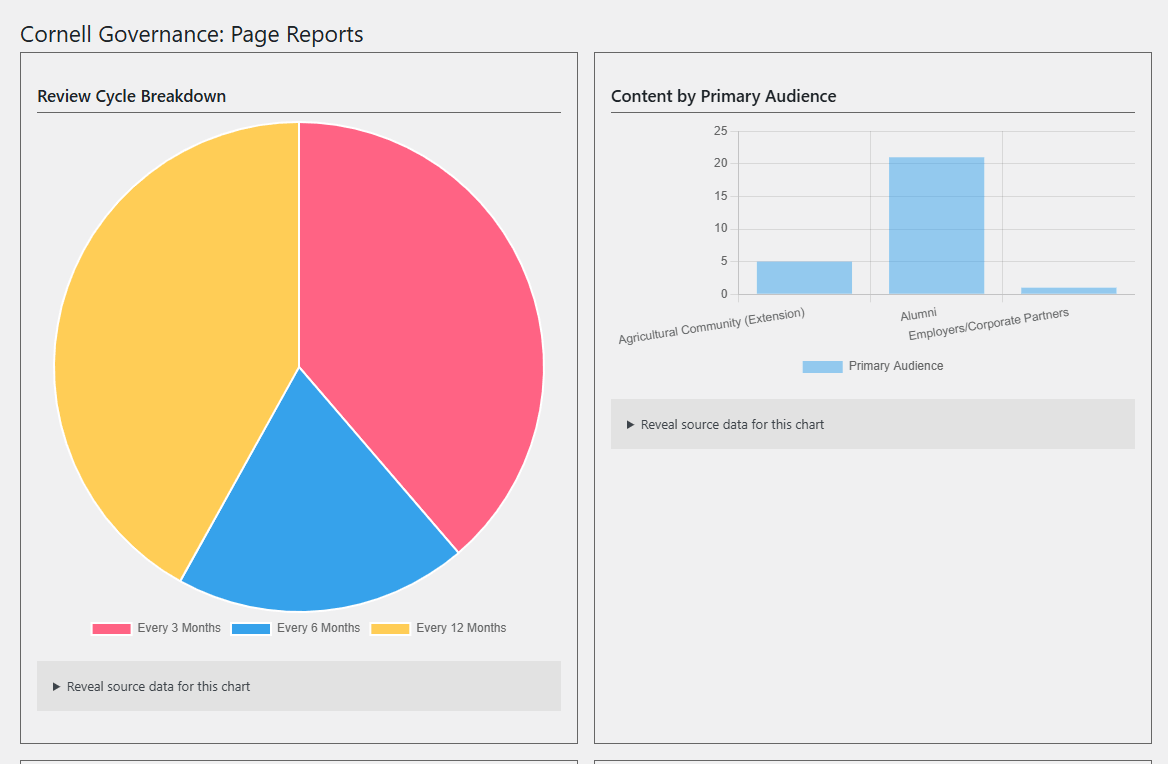 A snapshot of some of the basic reports that are available within the plugin
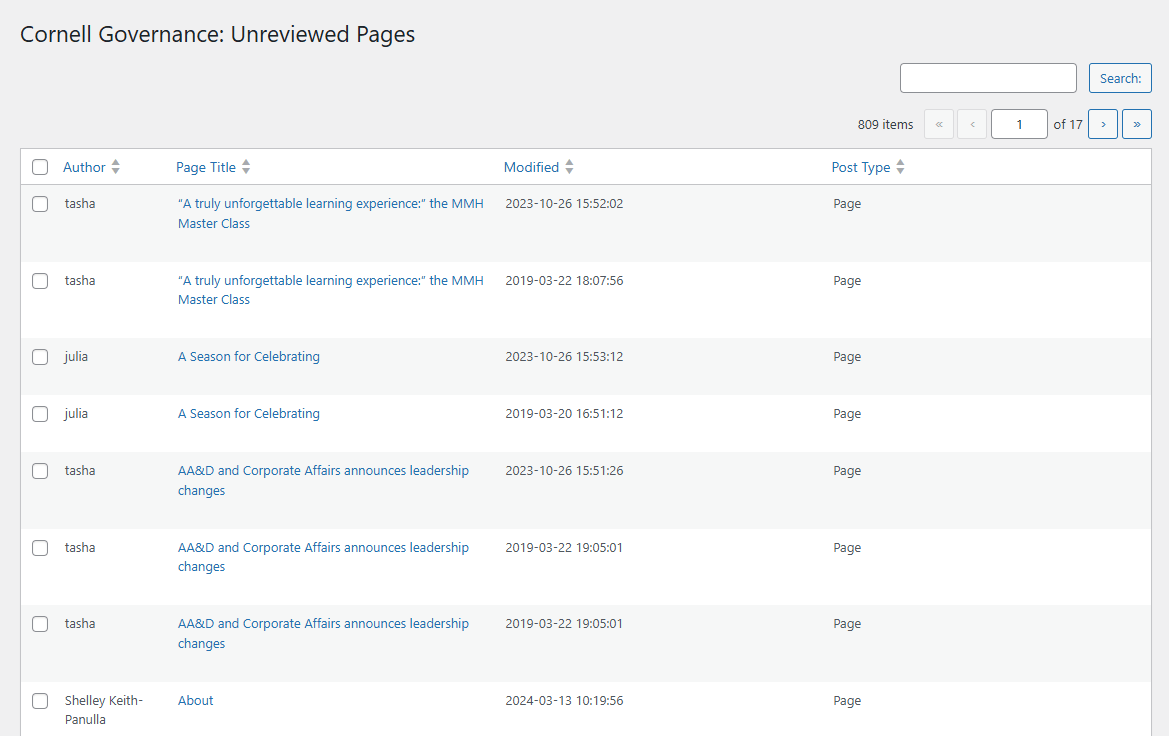 An example of the "Unreviewed Pages" report
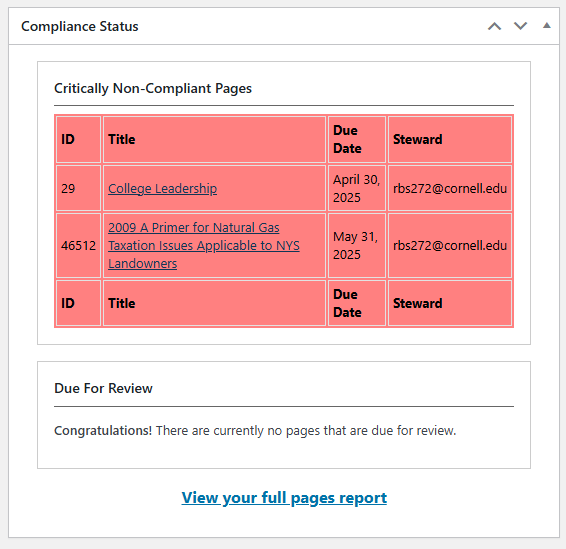 An example of the Compliance Widget on the Dashboard for the current user
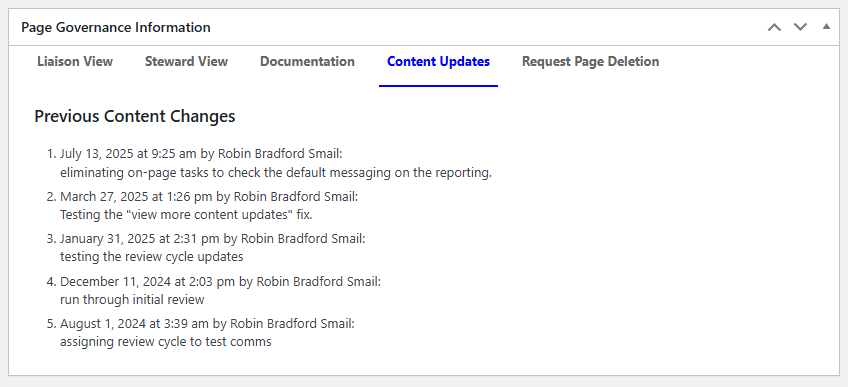 An example of the list of recent commit messages
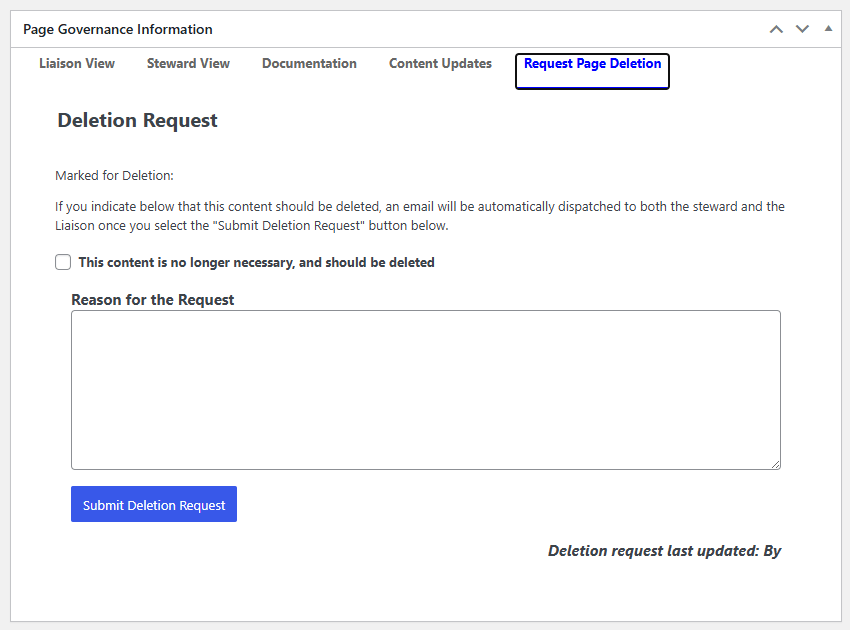 The Page Deletion Request interface
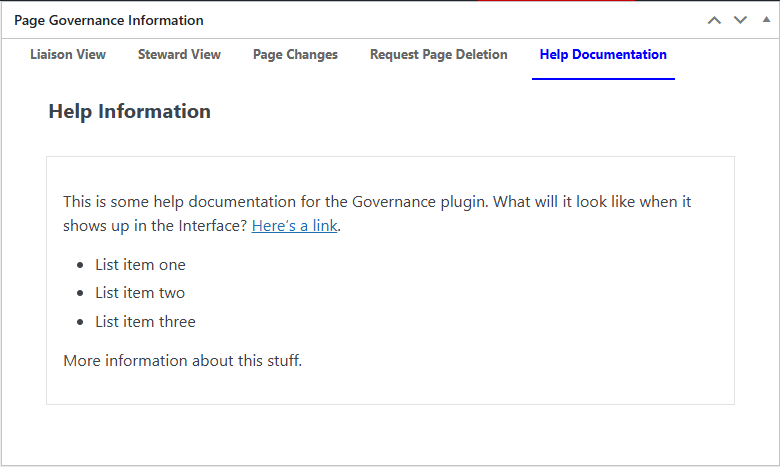 An optional, customizable Help Documentation Tab
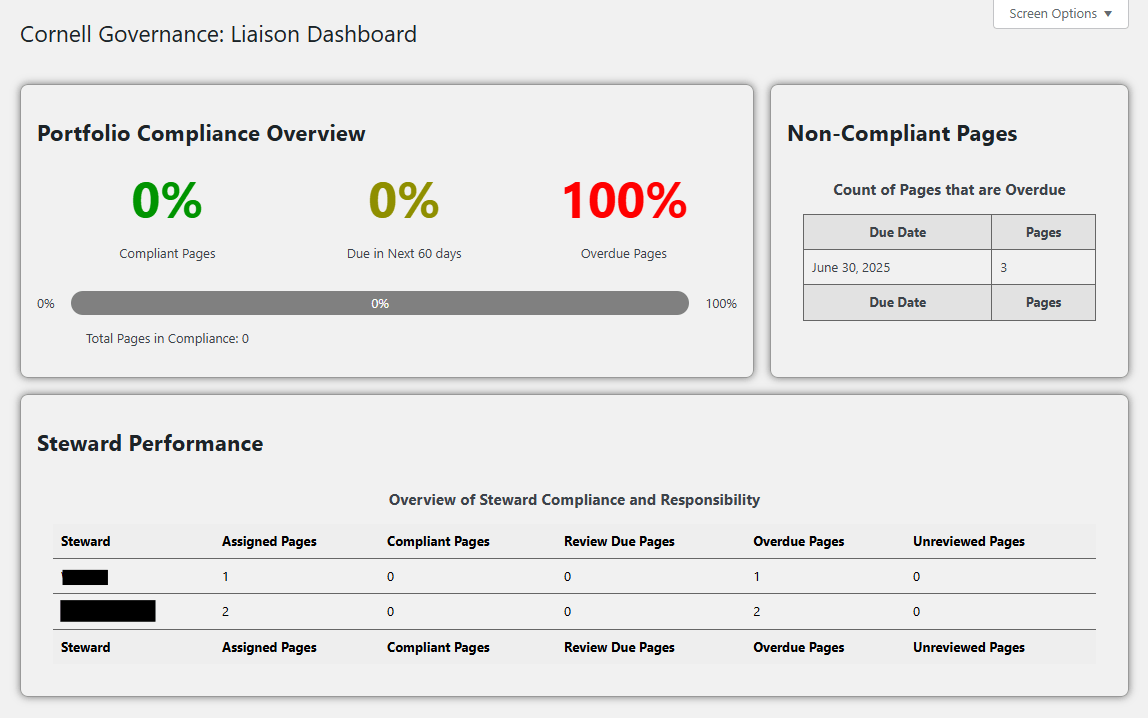 Some of the reports available in the Liaison Dashboard
 A snapshot of the interface that a privileged user will see while editing a page
 A snapshot of the interface a non-privileged user will see while editing a page
 A snapshot of some of the basic reports that are available within the plugin
 An example of the "Unreviewed Pages" report
 An example of the Compliance Widget on the Dashboard for the current user
 An example of the list of recent commit messages
 The Page Deletion Request interface
 An optional, customizable Help Documentation Tab
 Some of the reports available in the Liaison Dashboard
Changelog
1.0.9
- Patch NPM security vulnerabilities
1.0.8
- Patch NPM security vulnerabilities
- Build composer package
- Optimize screenshot images
1.0.7
- Hides Compliance dashboard widget from users that have no editing permissions
- Fixes incorrect SQL query in reports
- Makes the plugin installable as a Composer package
1.0.6
- Fixes improperly escaped HTML in Revisions metabox
- Fixes dependency vulnerability
1.0.5
- Update capability used to allow users to view Archive log page (since, in some prod environments, even Super Admins are not allowed to delete plugins)
- Update the way historical Archive.org logs are stored and the information stored in them
- Namespace all
class_existscalls to avoid collision - Remove Email Test and Archive submenus from Admin menu if those settings are disabled
1.0.4
- Added documentation for cron triggers in the plugin
- Performance improvements:
- Added the retrieve-snapshots cron trigger to prime the list of snapshots
- Added a 1-hour transient any time a page retrieves no results from the Archive API in order to avoid querying that API on every editor page load
1.0.3
- Fixes tabbed interface on Governance Settings page
- Cleans up the way Archive snapshots are triggered & processed
1.0.2
- Updates Liaison Dashboard
- Updates Wayback Machine integration
- Fixes some PHP warnings
- Fixes incorrect Secondary Contact information in reports
1.0.1
- Fixes table search functionality on report pages
- Adds new actions and filters allowing imports and exports to be manipulated
- Adds export functionality to reports
- Adds Help Documentation tab to interface
- Combines the "Documentation" tab with the "Content Updates" tab into "Page Changes" tab
- Adds new Users API endpoint that is available to any authenticated user (for reporting purposes)
1.0.0
This is the first complete version of the plugin. All features intended to be included in the initial version have been added and tested.
0.9.1
- Fixed some PHP warnings throughout the plugin
0.6.6
- Added URL to exported data to help identify pages
- Added user email and username to exported data, and begin handling user email in imports
0.6.5
- Adds a report where Liaisons can see all pages for which they're responsible
- Re-implements the "Screen Options" for all reports with page list tables
- Fixes pagination for report page lists
0.6.4
- Fixes fatal error in some Governance REST requests
- On import, will blank out last review date if that cell is blank in the import file
0.6.3
Bugfixes:
- Pages that were compliant were showing "Never reviewed" as their status; this is fixed
- There were some new PHP errors/warnings introduced in 0.6.2; these are fixed
- Various admin style tweaks
0.6.2
- Implements REST API for Governance information
- Governance info is added to posts/pages REST endpoint
- New custom endpoint specifically for Governance info
- Implements Import/Export functionality
- You can now export all existing Governance information to a CSV file
- You can also import a specially-formatted CSV file into a site to add, update or overwrite Governance information on the site
- Moves Deletion Request to its own tab in the interface
- Adds field to allow steward to add reason for deletion
0.6.1
- Fix "View more content updates" link in Content Updates side metabox
0.6.0
- Move i18n to correct hook
- Fix PHP warning on frontend
- Move Info Meta Box key to root constant
- Add schema to registered meta data
0.5.9
- Implements new optional front-end compliance banner for post authors
0.5.8
- Fixes bug that kept authors from seeing Task checkboxes
- Any user that is allowed to edit a post can now review the governance info for that post
0.5.7
- Updated microcopy for Audience selectors
- Updated microcopy for Secondary Contact Email field
- Tweaked CSS for legends and labels in Governance input metaboxes
- Begin setting automatic updater to preserve .env file
- Fixed bugs when calculating review dates
- "Every 6 Months" cycle was calculating the date incorrectly
- On the calculated due date, the language said "was" due, even though it shouldn't be due until the end of the day; that language is fixed
0.5.6
Bug-fixes:
- Ensure compliance status is update in real time when review cycle is changed or page review is completed
- Ensure Steward View is visible for Liaisons, and make sure save button is included appropriately in the correct contexts
- CSS changes to 'Overdue' widget in dashboard and reports
0.5.5
- Fixes bug that stopped Liaisons from seeing Steward Tab
0.5.4
- Fixes fatal error introduced in 0.5.3
0.5.3
- Moved update checker to its own class
- Allow users to override default update settings
0.5.2
- Implemented automatic plugin updates
0.5.1
- Implemented tabbed interface for Liaison, Steward, Documentation and Content Updates (revisions)
- Fixes:
- If a page is due for review, the steward will get the checkbox list rather than a plain list after governance information is updated
- Updating the list of tasks no longer un-sets the completed tasks
0.5.0
- Implemented view mode for Page Documentation so that folks don’t accidentally edit it
- Updated micro copy throughout plugin
- Updated styles for Liaison View and Steward View meta box content
0.4.9
New Features:
- Allow editors, etc. to see non-interactive governance information
- Make "Mark for deletion" checkbox optional, based on plugin settings
Fatal Error Fixes:
- Fix fatal error in Page Meta reports
- Fix fatal errors when specific governance info is not set for a page
- Fix fatal error that occurred when saving Settings without any Change Form parameters selected
JavaScript Fixes:
- Stop overlay from being added multiple times during save
- Ensure that the Steward review options are hidden appropriately after confirming page review
- Ensure task lists are updated appropriately when tasks are updated
0.4.8
New Features:
- Add tabbed interface allowing Liaisons to act as Stewards on their own pages
- Add checkbox allowing Steward to mark a page for deletion
- Add email message and template for deletion notification
Bug fixes:
- Stop Stewards from being able to confirm page review unless they’ve checked off all page tasks
- Fix bug that allowed Editors to confirm page review even if they were not the Steward for the page
- Automatically refresh governance information when changes are made:
- Refresh compliance date and icon when page is reviewed
- Refresh task list for Steward role when tasks are added through the Liaison role
0.4.7
- Updated NPM packages to resolve security issues in dependent packages
0.4.6
- Added
CORNELL_GOVERNANCE_EMAIL_CCconstant to allow users to force all messages to be CC'd to specific email addresses - Added
CORNELL_GOVERNANCE_EMAIL_BCCconstant to allow users to force all messages to be BCC'd to specific email addresses
0.4.5
- Make default email templates more generic (removing any JCB-specific information)
0.4.4
- Implement email dispatches when a page is brought into compliance
- Email message will be sent to page steward every time they complete a page review
- Secondary contacts and liaisons will be CC’d on these messages when due date is within the next week (or already past)
- Add Site Name to all email subjects
- Re-enable the 7-day prompt to liaisons
- Change
Page OwnertoPage Stewardin Secondary Prompt sent to Secondary Recipients
0.4.3
- Replace "Supervisor" with "Secondary Contact" in publicly-visible language
- Finish updating the Secondary Contact and Liaison email templates
- Remove secondary prompt from secondary contact list (they will only start receiving as of tertiary notice)
- Remove tertiary prompt from liaison contact list (they will only begin receiving as of "due today")
0.4.2
- Begin updating Web Steward email templates
- Implement Due Day email prompts
0.4.1
- Attempt to temporarily short-circuit all emails from prod/test/dev
0.4.0
- Re-implement different email sch
This README is longer than the copy stored here. Read the rest on GitHub →
Releases
11 releases.
These releases are tags only. The author does not attach a packaged zip, so there are no download counts to report.