Install
This is the repository archive. It installs, but the folder name will carry the branch suffix and updates will not flow.
Install straight from GitHub with WP-CLI:
wp plugin install https://github.com/craynai/crayn-ai-builder-mcp/archive/refs/heads/main.zip
Crayn AI Builder MCP
Let AI agents build and manage your WordPress site, and keep the last word yourself.
Connect Claude Desktop, Claude Code, Cursor or any MCP client to your site. The agent gets 57 ready-to-call tools for pages, SEO, menus, settings and plugins. You get a preview before any write, a record of every change, and a Revert button.
Install · Connect a client · All tools · Safety model
| Works with | WordPress 6.9+, PHP 7.4+, Elementor, WPBakery, Rank Math, Yoast SEO |
| Clients | Claude Desktop, Claude Code, Cursor and other MCP clients |
| Status | 1.0.0 on GitHub. WordPress.org directory review in progress. |
See it work
Everything below comes from a real run on our test site, using the plugin's own tools. Only the site address in the settings screenshot is masked.
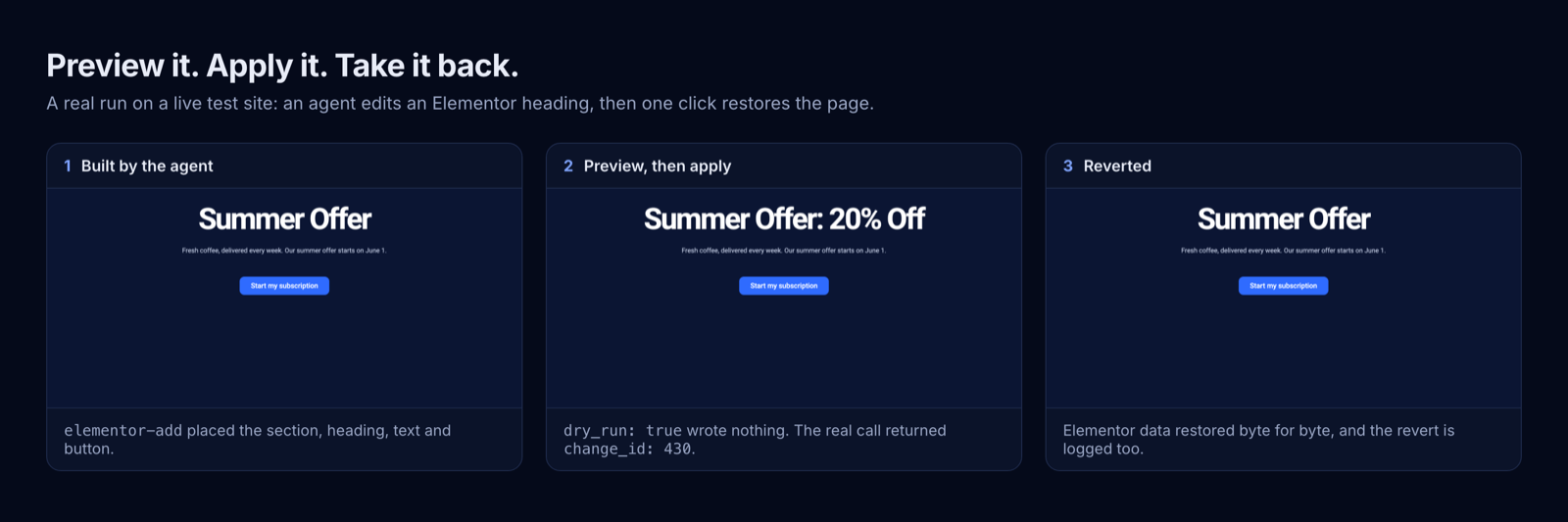
Preview it. Apply it. Take it back.
An agent builds a campaign section in Elementor, changes the heading after a dry run, and the change is reverted with one click.
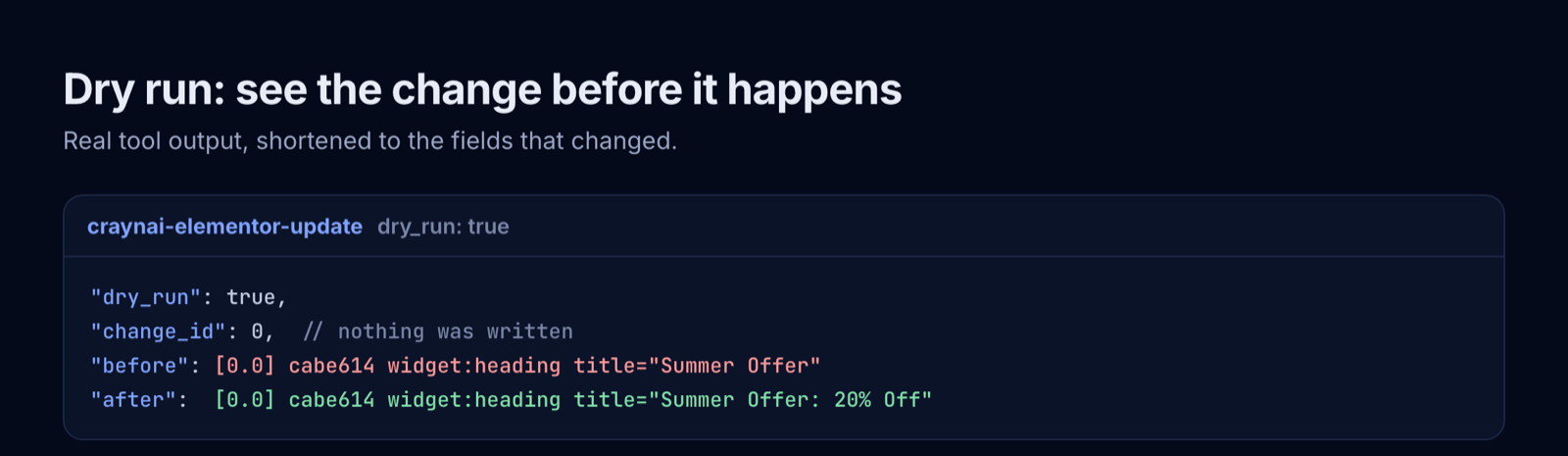
Nothing is written during a dry run
Every write tool accepts dry_run: true and answers with the planned before and after. change_id: 0 means nothing was stored.
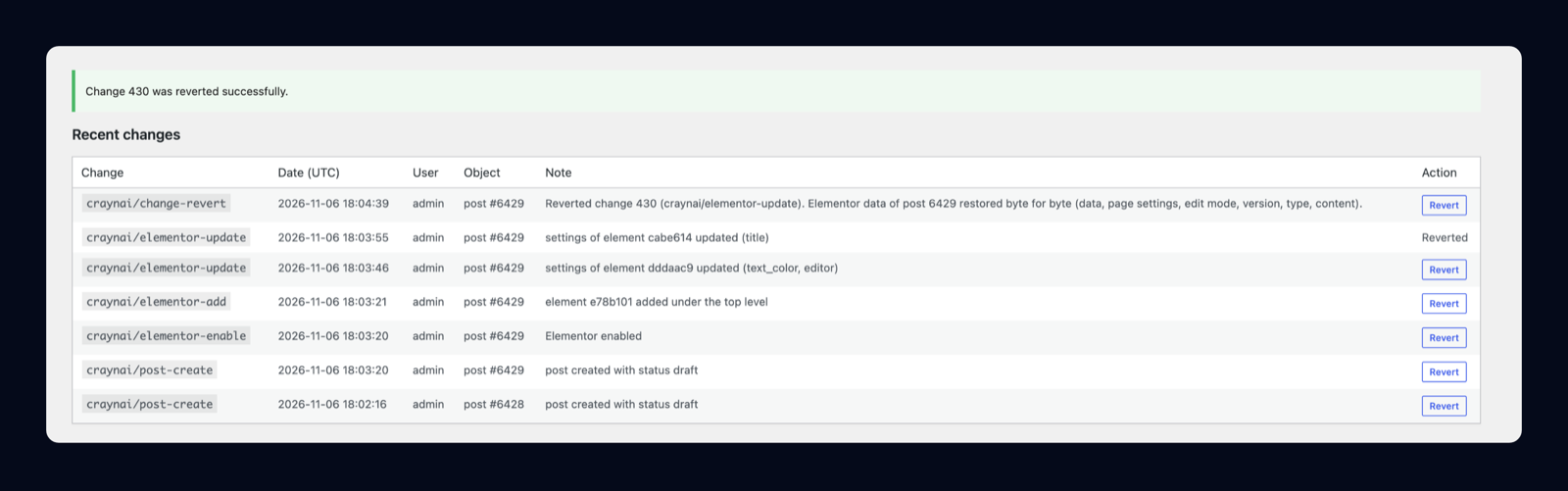
Every change has a record, and a way back
Each real write is logged with a before and after snapshot. Revert it from the settings page, or let the agent call change-revert. The revert is logged as well, and the same change cannot be reverted twice.
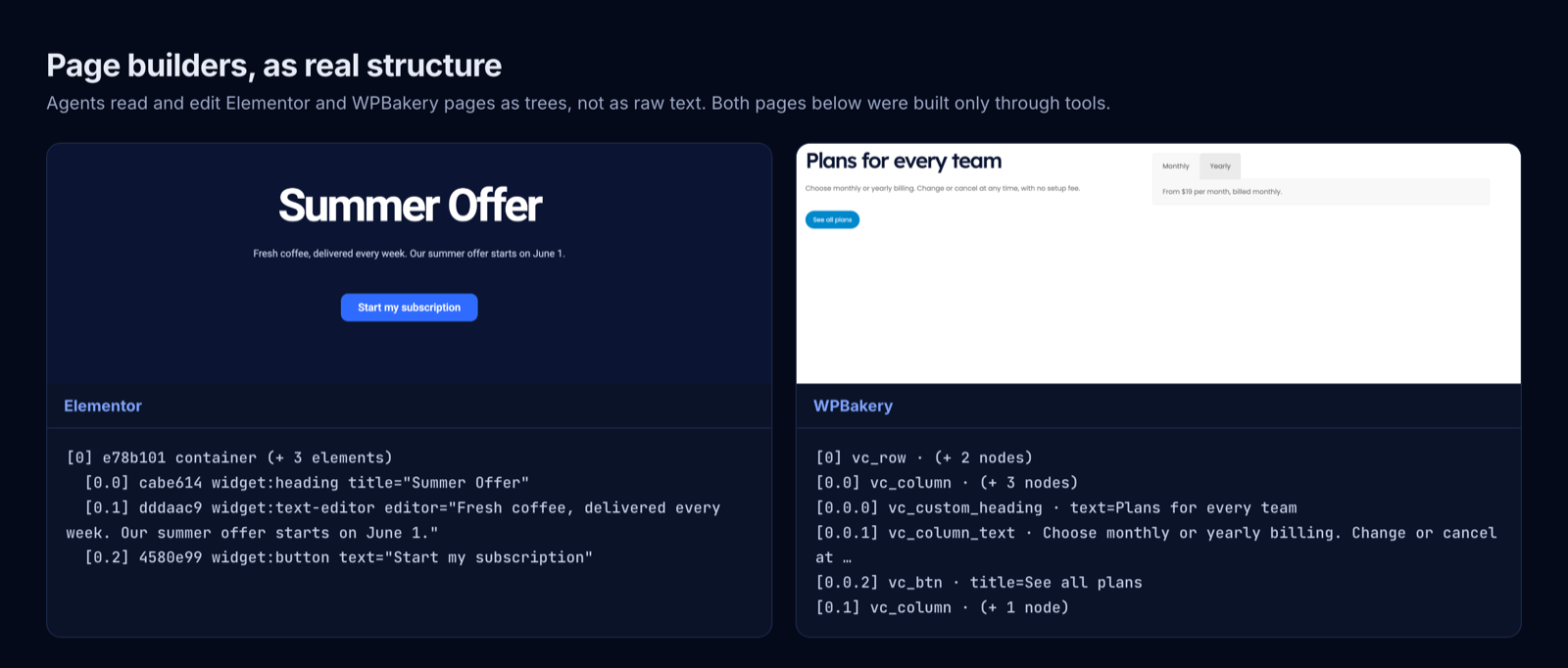
Page builders as real structure
The agent reads a page as a tree of elements and changes one element at a time, so it does not have to rewrite a page's raw markup. Placement rules are checked before a WPBakery element is added.
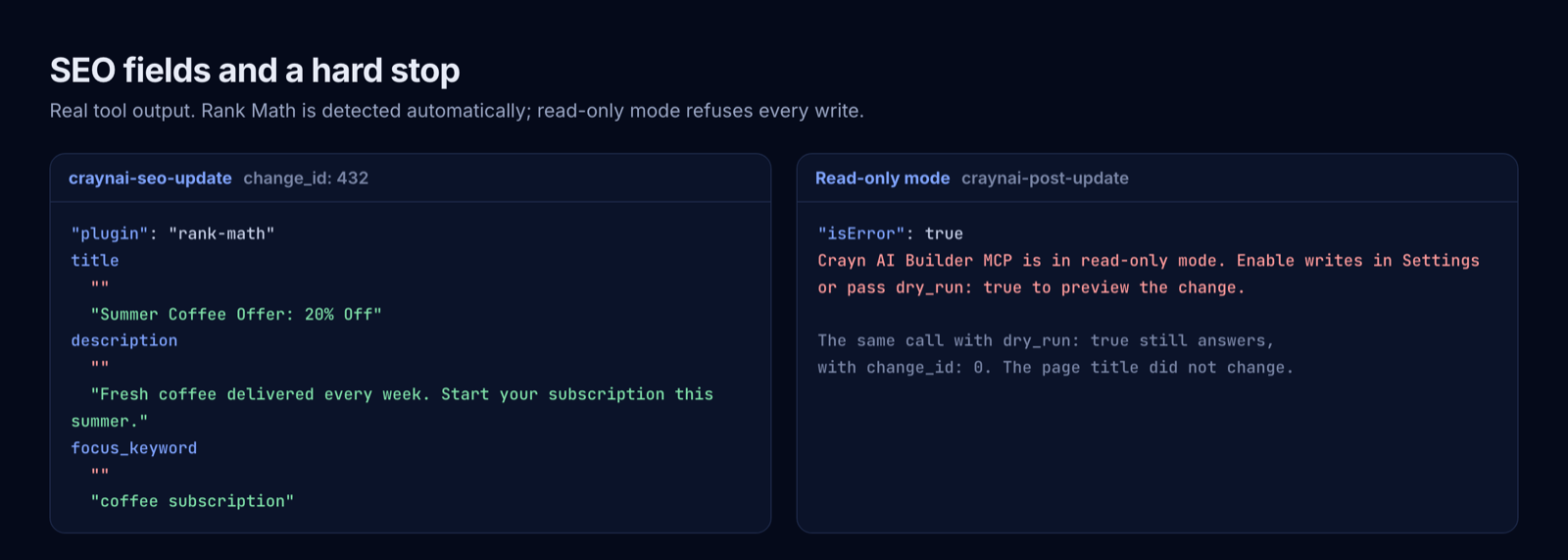
SEO fields, and a hard stop
Rank Math or Yoast is detected automatically, and old values go into the log. Turn on read-only mode and every write is refused, while reads and dry runs keep working.
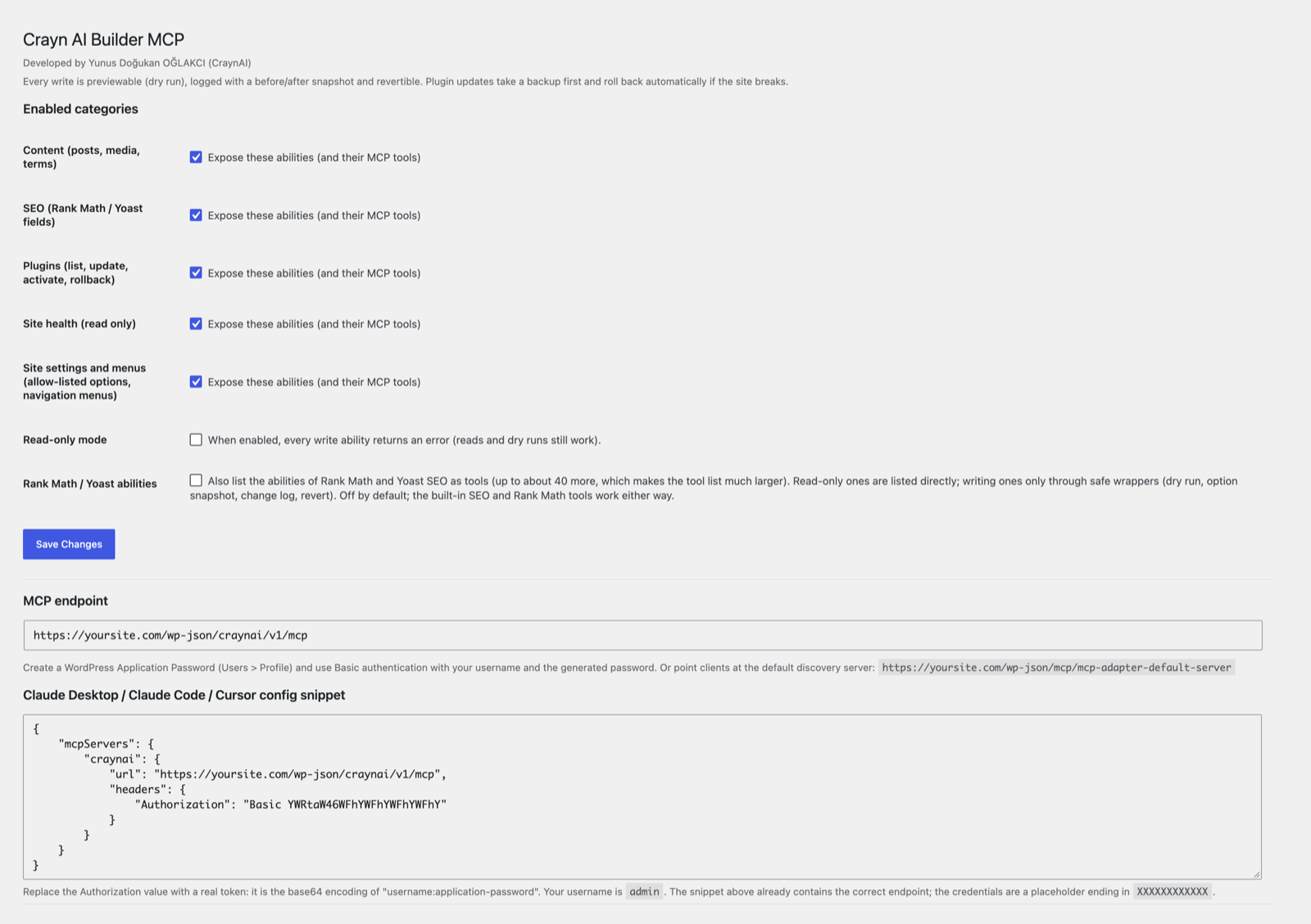
You decide what the agent can touch
Switch whole categories on or off, turn on read-only mode, and copy a ready-made client configuration.
What you get
- Direct tools: every tool is listed to the agent with its full schema, with no discover-inspect-execute round trips.
- 57 built-in tools: content, SEO, Rank Math, WPBakery, Elementor, plugins, site health, site settings and menus. The Rank Math, WPBakery and Elementor tools appear only on sites that use those plugins. Rank Math and Yoast's own abilities can be turned on in the settings, up to about 40 more; their writing abilities are only reachable through safe wrappers.
- Safe by design: dry run, before and after snapshots, revert, read-only mode. Posts go to the trash, never straight to deletion.
- Safer plugin updates: a zip backup first, then a health check, with automatic rollback if the site breaks.
How it is tested
On WordPress 7.1 with PHP 8.5: 1,266 end-to-end checks passed, 0 failed and 28 skipped; Plugin Check reports 0 errors. Not yet tested on multisite or with Elementor Pro.
Built on the official WordPress MCP Adapter (GPL), included unmodified. Developed by Yunus Doğukan OĞLAKCI (CraynAI); not affiliated with or endorsed by the WordPress Foundation.
- Plugin Name: Crayn AI Builder MCP
- Author: Yunus Doğukan OĞLAKCI (CraynAI) — https://www.crayn.ai/
- License: GPL-2.0-or-later
- Requires: WordPress 6.9+ (Abilities API in core), PHP 7.4+
Why it is safe
Selling point of every write tool: preview first, log everything, revert anything.
- Dry run everywhere. Every write ability accepts
dry_run(boolean, defaultfalse). Withdry_run: truenothing is written; the tool returns the planned change as{before, after}. - Before/after snapshots. Every real write stores a row in the
{$wpdb->prefix}craynai_logtable before returning, including the fullbefore_data/after_dataJSON snapshots, and returns achange_id. - Revert.
craynai/change-revertrestores the before snapshot for: post fields (title, content, excerpt, status, slug), term assignments (categories/tags), featured image, post meta (SEO fields), WPBakery and Elementor page data, site settings, navigation menus and menu locations, plugin activation state, and plugin files (from the automatically created backup zip). Reverting a change twice fails cleanly, and a revert is refused withcraynai_revert_conflictwhen the object changed after the write. - No silent deletes. Posts go to the trash only (
wp_trash_post); created terms and imported media are never silently destroyed. WordPress has no trash for navigation menus and menu items:menu-deleteandmenu-item-removedelete them, but the whole menu stays in the change log andchange-revertrecreates it. - Plugin updates with auto-rollback.
craynai/plugin-update:- zips the plugin folder to
wp-content/craynai-backups/plugins/<slug>-<oldversion>-<YmdHis>.zip(directory protected withindex.php+.htaccessdeny rules), - runs the update via
Plugin_Upgrader+Automatic_Upgrader_Skin, - runs a site health check:
home_url('/')andadmin_url()must answer with HTTP 200/302 and the body must not contain "critical error" / "Fatal error", - if the check fails, restores from the zip, re-activates the plugin if it was active
and reports
rolled_back: truewith the reason. Everything is logged. Activation/deactivation changes use the same health check and undo themselves automatically on failure.
- zips the plugin folder to
- Read-only mode. The admin switch makes every write ability return an error (reads and dry runs still work).
- Per-category on/off. Content, SEO, plugins, site and settings categories can be disabled independently; disabled abilities are not registered at all. The settings category (site settings and menus) is on by default.
What it registers
Categories on wp_abilities_api_categories_init: craynai-content, craynai-seo,
craynai-plugins, craynai-site, craynai-settings. Abilities on wp_abilities_api_init, named craynai/<name>,
each with proper input_schema/output_schema, a capability-based permission_callback
and MCP annotations (readOnlyHint, destructiveHint, idempotentHint; WordPress format
readonly/destructive/idempotent — the adapter converts them). Every ability also sets
meta.mcp.public = true so the adapter's default discovery server can find them.
Custom MCP server
On mcp_adapter_init the plugin creates a custom server listing all abilities as direct
tools (no discovery step needed):
| Setting | Value |
|---|---|
| Server id | craynai |
| Route namespace | craynai/v1 |
| Route | mcp |
| Endpoint | /wp-json/craynai/v1/mcp |
| Transport | WP\MCP\Transport\HttpTransport |
| Error handler | WP\MCP\Infrastructure\ErrorHandling\ErrorLogMcpErrorHandler |
Content (craynai-content)
| Tool | Writes? | Notes |
|---|---|---|
craynai/posts-list |
no | post_type, status, search, per_page (≤50), page |
craynai/post-get |
no | title, content, excerpt, status, slug, terms, featured image, modified |
craynai/post-create |
yes | default status draft, dry_run, returns change_id |
craynai/post-update |
yes | title, content, excerpt, status, slug, categories, tags, featured_media; dry_run; logs old values |
craynai/post-trash |
yes | trash only, never hard delete |
craynai/media-list |
no | pagination + search |
craynai/media-upload-from-url |
yes | url, title, alt; sideloads into the media library |
craynai/terms-list |
no | taxonomy required |
craynai/term-create |
yes | taxonomy, name, slug, description, parent |
SEO (craynai-seo)
Auto-detects Rank Math or Yoast (top-level custom SEO fields; no plugin → explicit error). Full Rank Math support is described under Rank Math & Yoast below.
| Tool | Writes? | Notes |
|---|---|---|
craynai/seo-get |
no | title, description, focus keyword, canonical, robots per post |
craynai/seo-update |
yes | same fields; old values logged and revertible via change-revert |
Rank Math & Yoast
Rank Math per-post parity (registered only when Rank Math is active). Everything the Rank Math editor sidebar can set, through the same safety layer (dry run {before, after}, change log, change-revert, read-only mode, edit_post per post, wp_slash on meta writes).
| Tool | Writes? | Notes |
|---|---|---|
craynai/rankmath-get |
no | All Rank Math data of a post, normalised: title, description, focus_keywords, pillar_content, robots, advanced_robots, canonical_url, breadcrumb_title, primary_category, facebook{}, twitter{} (incl. player / app cards), seo_score, decoded schemas (with meta ids), the post's redirect (Redirections module) and a raw map of every rank_math_* meta with exists flags |
craynai/rankmath-update |
yes | Any subset of the fields above; only provided fields are written, an empty value deletes the meta. Revert restores the exact previous meta rows (deleting rows that did not exist) |
craynai/rankmath-schema-set |
yes | schema_type (Article, BlogPosting, NewsArticle, FAQPage, HowTo, Product, Service, LocalBusiness, Event, Recipe, VideoObject, Person, Course, JobPosting, SoftwareApplication, Book, ...) + data; stored exactly like the Rank Math editor does (rank_math_schema_<Type> with the metadata block and the shortcode shortcut meta); optional replace_existing, is_primary |
craynai/rankmath-schema-delete |
yes | Remove a schema by meta key (and optional meta id); revertible |
craynai/rankmath-redirect-set |
yes | Create / update a redirect for a post URL through the Redirections module (only when that module is active); revert trashes a created redirect or restores the old values |
craynai/rankmath-analyze |
no | Wraps rank-math/analyze-post-content and adds the stored SEO score |
post-create and post-update also accept an optional rankmath object (same fields as rankmath-update), so a post and all of its SEO data can be written in one call and one change row; reverting restores both.
External abilities (setting Rank Math / Yoast abilities, off by default). Abilities registered by Rank Math (rank-math/...) and Yoast SEO (yoast-seo/...):
- while the setting is on, read-only ones are listed on the MCP server directly;
- writing ones are never exposed raw, whatever the setting says. While the setting is on, CraynAI registers for each of them
craynai/ext-<name>which honours read-only mode anddry_run(returns the input and the current option snapshot), snapshots the plugin options first (rank-math-options-*andrank_math_modulesfor Rank Math;wpseo,wpseo_titles,wpseo_social,wpseo_llmstxtfor Yoast), runs the original ability, logsbefore/afterand can be undone withchange-revert(options are restored exactly). The original writing abilities stay hidden from the MCP Adapter's default server (meta.mcp.public = false), so with the setting off they are not reachable over MCP.
Note: the wrapper restores plugin options only. If an original ability also writes other data (for example post meta), that part is not reverted.
WPBakery (craynai-content, registered only when WPBakery is active)
Build and edit WPBakery pages element by element. Pages are addressed as a tree: a path like [1,0,2] means 2nd row, 1st column, 3rd element. Attribute escaping, vc_link values, raw HTML encoding and design-option CSS are handled the way WPBakery does; parts of a page you do not touch are written back byte for byte.
| Tool | Writes | What it does |
|---|---|---|
craynai/wpbakery-elements |
no | Elements available on the site, including theme elements. base returns one element with all params and allowed values |
craynai/wpbakery-get |
no | Outline, full tree with decoded values and custom CSS of a page |
craynai/wpbakery-add |
yes | Add an element at a path, optionally with children (a full row in one call). Placement is validated against WPBakery's rules |
craynai/wpbakery-update |
yes | Merge attributes, remove attributes, replace content |
craynai/wpbakery-move |
yes | Move an element or a subtree, with placement validation |
craynai/wpbakery-remove |
yes | Remove an element; the previous content stays in the change log |
craynai/wpbakery-replace |
yes | Replace the whole page from a shortcode string or a tree. Placement is not validated |
craynai/wpbakery-enable |
yes | Open the page in WPBakery mode in the editor |
craynai/wpbakery-page-css |
yes | Set or clear the page's own custom CSS (_wpb_post_custom_css, as in the editor); empty string clears it |
A WPBakery change restores the whole page when reverted, so a revert is refused if the page changed afterwards: revert newer changes first, newest first. Page-level custom CSS (_wpb_post_custom_css) can be read and is written/restored with craynai/wpbakery-page-css; reverting a page-CSS change does not touch the page content.
Elementor (craynai-content, registered only when Elementor is loaded)
Read and edit pages built with Elementor element by element. Elements are addressed by their Elementor id (the outline also shows a path such as 0.1.2). Placement follows the editor's own rules (section › column › widget or inner section, container › widget or container, widgets only inside a container or column), widgets must be registered on the site, new ids are generated in Elementor's format, and isInner is computed. The data meta is written byte for byte for everything you do not touch (empty {} settings objects, escaped slashes, unicode and elements of widgets that are not installed anymore all survive), the page CSS and element cache are cleared and the post_content text mirror is refreshed the way Elementor's own save does.
| Tool | Writes | What it does |
|---|---|---|
craynai/elementor-widgets |
no | Registered widgets (name, title, categories) and layout element types; with name the controls of one widget (name, type, label, default, options) by tab |
craynai/elementor-get |
no | uses_elementor, document type, outline, full tree and page settings; a post without Elementor is reported cleanly |
craynai/elementor-add |
yes | Add an element (optionally with children) under a parent id or at the top level, at a position |
craynai/elementor-update |
yes | Merge settings of an element (each given key replaced as a whole), remove settings; warns about keys that are not controls |
craynai/elementor-move |
yes | Move an element with its subtree; cycles and invalid placements are refused |
craynai/elementor-remove |
yes | Remove an element; the previous data stays in the change log |
craynai/elementor-duplicate |
yes | Copy an element right after the original with fresh ids |
craynai/elementor-replace |
yes | Replace the whole tree (for example the tree of elementor-get after editing); unchanged elements keep their bytes |
craynai/elementor-page-settings |
yes | Merge values into the Elementor page settings (_elementor_page_settings) |
craynai/elementor-enable |
yes | Turn a post into an Elementor page; refuses when it has content but no Elementor data, unless convert_content is true |
Elementor 4 atomic (V4, e-...) elements can be read, moved and removed, but not created or edited (they use typed props and local styles); updates, duplicates and replacements that would change them are refused. A write is refused while another user has the page open in an editor. A revert restores the data meta, page settings, edit mode, version, template type and post_content of the page and is refused if any of them changed afterwards.
Site settings (craynai-settings)
An allow-list of WordPress options; anything else is refused and never written.
| Tool | Writes | What it does |
|---|---|---|
craynai/settings-get |
no | Values, types and limits of the allowed options (all, or the ones in names) |
craynai/settings-update |
yes | Change several options atomically (values): every value is validated first, one bad value refuses the call; old values are logged and reverted together. blog_public 0 and a new permalink_structure return a warning; the rewrite rules are flushed after the write and after a revert |
Allowed: blogname, blogdescription, timezone_string, gmt_offset, date_format, time_format, start_of_week, WPLANG (an installed language, empty = English), posts_per_page, posts_per_rss, rss_use_excerpt, show_on_front, page_on_front, page_for_posts (published pages), blog_public, the comment options (default_comment_status, default_ping_status, comment_moderation, comments_notify, moderation_notify, require_name_email, comment_registration, close_comments_for_old_posts, close_comments_days_old, thread_comments, thread_comments_depth, page_comments, comments_per_page), permalink_structure, category_base, tag_base, the image sizes (thumbnail_size_w/h, medium_size_w/h, large_size_w/h), uploads_use_yearmonth_folders, default_category, default_post_format.
Never writable, even through the filter: siteurl, home, admin_email, new_admin_email, users_can_register, default_role, active_plugins, template, stylesheet, the roles option, and anything named auth_*, secret*, *_key, *_salt, *_token or containing password. The filter crayn_ai_builder_mcp_settings_allowlist (name => spec) can remove entries or add options that WordPress core does not own (type string, int, flag, enum or number, plus limits); it cannot change a built-in entry or lift the deny-list.
Menus (craynai-settings)
Needs the edit_theme_options capability. Every write stores a snapshot of the whole menu (items, parents, order, locations), so a revert is exact on title, url, parent and order; a revert is refused if the menu changed afterwards. Reverting a deleted menu or item recreates it and re-maps the parents; items keep their old ids when those are free.
| Tool | Writes | What it does |
|---|---|---|
craynai/menu-list |
no | Menus (id, name, slug, item count, locations) and the theme locations with their assigned menu |
craynai/menu-get |
no | One menu with its items nested by parent |
craynai/menu-create |
yes | Create an empty menu (unique name) |
craynai/menu-update |
yes | Rename and/or change the description; the slug stays |
craynai/menu-delete |
yes | Delete a menu with its items; locations pointing to it become empty |
craynai/menu-item-add |
yes | Custom link, page, post or term item; the target must exist; optional parent and position |
craynai/menu-item-update |
yes | Title, url (custom items), target, classes, title attribute, description, XFN |
craynai/menu-item-move |
yes | New parent and/or position; cycles are refused |
craynai/menu-item-remove |
yes | Remove an item; its sub-items move up one level |
craynai/menu-locations-set |
yes | Assign menus to registered theme locations or clear them |
Plugins (craynai-plugins)
| Tool | Writes? | Notes |
|---|---|---|
craynai/plugins-list |
no | name, slug/file, version, active, network-active, update available + new version, auto-update status |
craynai/plugin-update |
yes | zip backup → update → health check → auto-rollback, change_id |
craynai/plugin-activate |
yes | health check + automatic undo on failure |
craynai/plugin-deactivate |
yes | health check + automatic undo on failure |
craynai/plugin-rollback |
yes | restore from a backup zip file name (see backups-list) |
craynai/backups-list |
no | backup files with size and date |
craynai/updates-list |
no | core, plugins, themes with available versions |
Site (craynai-site, admin only)
| Tool | Writes? | Notes |
|---|---|---|
craynai/site-health |
no | WP version, PHP version, active theme (+version), debug flags, pending update counts, free disk space, last 10 debug.log entries |
craynai/changes-list |
no | filters: object_type, object_id, limit |
craynai/change-revert |
yes | restores before_data (may also restore plugin files from the backup zip) |
Install
- Download
crayn-ai-builder-mcp-1.0.0.zipfrom Releases and install it under Plugins → Add New → Upload Plugin. This repository does not includevendor/; to run from source, usecomposer install --no-dev. - Activate the plugin. The log table is created with
dbDeltaon activation. - Go to Settings → Crayn AI Builder MCP to toggle categories, read-only mode and copy the endpoint + client snippet.
The official MCP Adapter ships in vendor/ (Jetpack Autoloader handles class conflicts with
a standalone MCP Adapter plugin; the adapter may log a notice about it in debug mode). No separate
"MCP Adapter" plugin activation is required. Requires WordPress 6.9+ for the core Abilities API.
Connect Claude Desktop / Claude Code / Cursor
- Create an Application Password: Users → Profile → Application Passwords.
- Point the client at the custom server endpoint with HTTP Basic auth
(
username:application_password, base64 encoded):
{
  "mcpServers": {
    "craynai": {
      "url": "https://yoursite.com/wp-json/craynai/v1/mcp",
      "headers": {
        "Authorization": "Basic <base64 of username:application-password>"
      }
    }
  }
}
For Claude Code you can also run:
claude mcp add --transport http craynai \
  https://yoursite.com/wp-json/craynai/v1/mcp \
  --header "Authorization: Basic <base64 of username:application-password>"
The MCP protocol requires a session handshake: the client sends initialize first and the
adapter answers with the Mcp-Session-Id header used for all following requests. MCP
compliant clients (Claude Desktop, Claude Code, Cursor, …) do this automatically; if you
test with curl, follow the session flow documented in the adapter's docs.
Alternatively point clients at the adapter's default discovery server
(https://yoursite.com/wp-json/mcp/mcp-adapter-default-server) and use the three meta tools
(mcp-adapter-discover-abilities, mcp-adapter-get-ability-info,
mcp-adapter-execute-ability) to list and run every ability marked with meta.mcp.public = true.
The safety model in one paragraph
Nothing here is destructive by default: writes are disabled site-wide with one switch,
each write can be simulated with dry_run, each real write leaves a snapshot row with a
change_id before the tool answers, plugin files are always zipped before they change and
health checked afterwards (with automatic restore when the check fails), revert operations
refuse to run twice, and no workflow hard-deletes content. Capabilities stay inside
WordPress' own roles (edit_posts, upload_files, update_plugins, activate_plugins,
manage_options, edit_theme_options) and every user must authenticate with an Application Password through
Basic auth on the MCP endpoint.
License
GPL-2.0-or-later — see LICENSE. The bundled MCP Adapter is also GPL-2.0-or-later (© WordPress AI Team).