Crawl Cove Connector
WordPress plugin for the Crawl Cove desktop SEO crawler: bulk-apply approved title and meta description fixes to Yoast SEO, Rank Math, SEOPress or AIOSEO, with a change log and one-click revert.
by Crawl Cove · github.com/crawlcove/crawl-cove-connector · website
Install
No release zip yet. The repository archive installs, but the folder name will carry the branch suffix and updates will not flow:
wp plugin install https://github.com/crawlcove/crawl-cove-connector/archive/refs/heads/main.zipCrawl Cove Connector — WordPress SEO Plugin for Bulk Title & Meta Description Fixes
The official WordPress companion plugin for Crawl Cove, the desktop SEO crawler. Push approved page title and meta description fixes from your SEO audit straight into Yoast SEO, Rank Math, SEOPress or All in One SEO (AIOSEO), with a full change log and one-click revert.
Crawl your site, review the suggested fixes in the app, push the ones you approve. No CSV exports, no spreadsheets, no copy-pasting into the post editor one page at a time.
Why this plugin exists
Every SEO crawler can find missing, duplicate, too-long or too-short titles and meta descriptions. Almost none of them can fix any of it. The usual workflow is: export a CSV, open each post in the WordPress editor, find the SEO plugin's meta box, paste, save, repeat a few hundred times.
Crawl Cove Connector closes that loop. The Crawl Cove desktop crawler sends the fixes you approved to your site over the WordPress REST API, and this plugin writes them into the native fields of whichever SEO plugin you already use. Nothing is duplicated or overridden at render time; your SEO plugin keeps working exactly as before, just with better values.
Features
- Bulk-apply title and meta description fixes approved in the Crawl Cove app, in batches, with per-item results.
- Works with the four major WordPress SEO plugins: Yoast SEO, Rank Math, SEOPress and AIOSEO. The connector detects which one is active and writes its native fields.
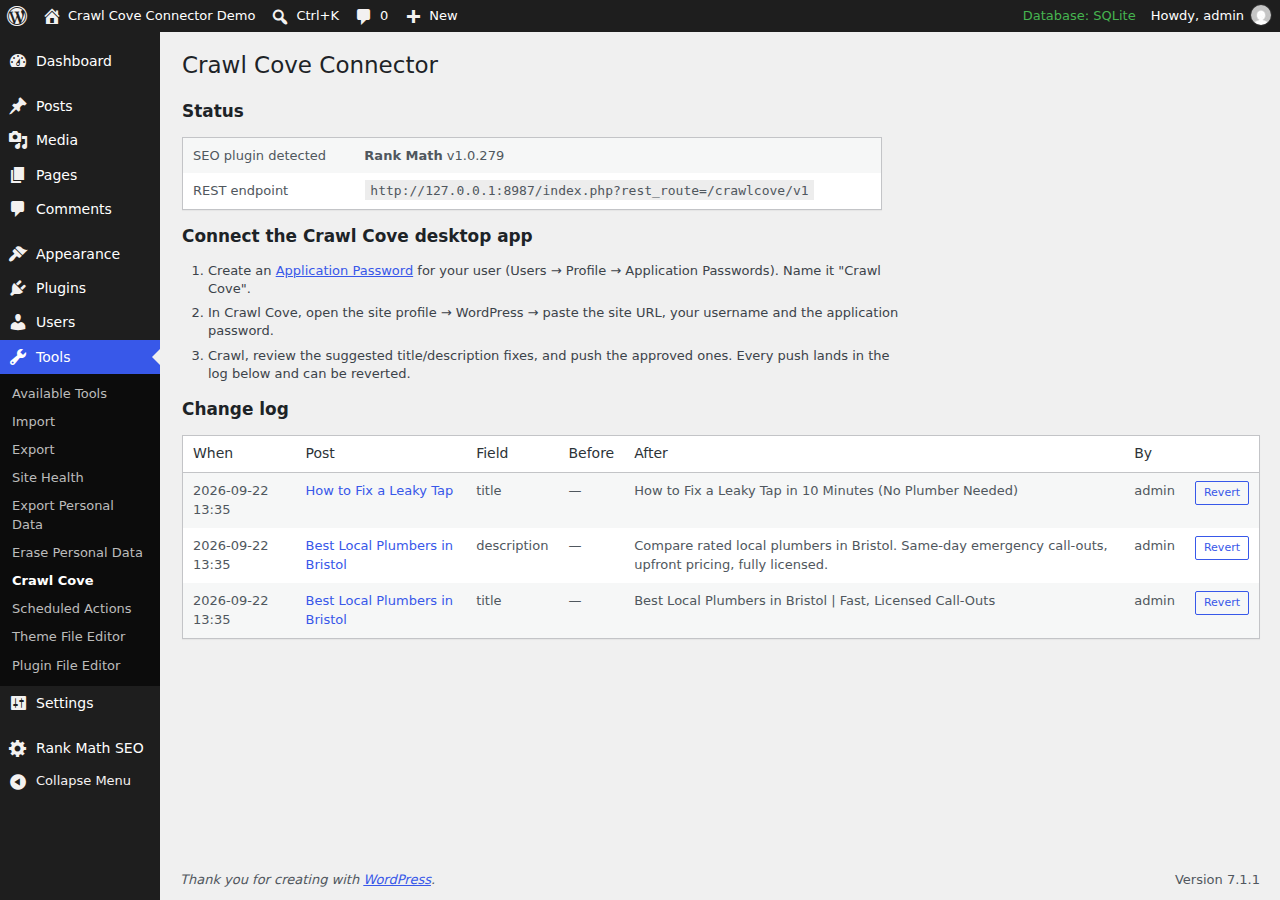
- Full change log with one-click revert: every write records the previous value. Undo any change from Tools → Crawl Cove or from the app.
- Dry-run mode shows exactly what would change before anything is written.
- Authentication via WordPress core Application Passwords: no extra accounts, no API keys stored by the plugin, revoke access any time from your user profile.
- Respects WordPress permissions: a connected user can only change posts they are allowed to edit (
edit_postchecked per post). - Private by design: no external requests, no tracking, no data leaves your site. The plugin only receives what you send it.
- Small and auditable: a few hundred lines of GPL PHP, unit- and integration-tested, PHPCS-clean against WordPress-Extra and WordPress-Docs.
How it works
The plugin registers a REST API under crawlcove/v1 (auth: WordPress core Application Passwords):
| Route | Method | Purpose |
|---|---|---|
/status |
GET | Plugin + detected SEO plugin info |
/resolve |
POST | Map crawled URLs to posts, return current title/description |
/apply |
POST | Apply a batch of reviewed fixes (dry_run supported) |
/changes |
GET | The change log |
/revert |
POST | Restore a change's previous value |
Safety model:
- Nothing is written that wasn't sent by an authenticated user with the right capability for that specific target:
edit_postfor a post/page,manage_optionsfor the homepage,edit_termfor a taxonomy term. - Values are sanitized and length-capped; batches are capped at 50 changes.
- Every write records the previous value; revert from the app or from Tools → Crawl Cove.
- Empty string means "remove the override, fall back to the SEO plugin's template".
- No external requests, no tracking, no data leaves the site.
The homepage target (post_id: 0)
A site with no static front page set (Settings → Reading → "Your latest posts")
has no post to hold a title/description override for / — Yoast and Rank Math each
keep it in their own settings instead. /resolve reports the site root as
post_id: 0 in that case (a static front page still resolves to its own real
post id, exactly like any other page — nothing changes there); pass post_id: 0
back to /apply or /revert to target it.
- Supported adapters: Yoast SEO, Rank Math and SEOPress. AIOSEO changes to
post_id: 0fail withccc_home_unsupported— the change is reported, not silently dropped. AIOSEO isn't just unresearched: its "homepage" title and description read the same site-wide template used to fill in every other page's title/description, so writing to it to "fix the homepage" would silently change titles across the whole site, not just/. - Capability:
manage_options, notedit_post— there is no post to checkedit_postagainst, and Settings → Reading (where this value lives natively) already requires it. - Rank Math's homepage title cannot be cleared: unlike every other
title/description field in this plugin, an empty string sent for Rank Math's
homepage title is rejected with
ccc_home_title_clear_unsupportedinstead of being written. Verified against real Rank Math source: its homepage title has no fallback template applied at render time (an empty stored value renders as a literally empty<title>tag), unlike Yoast's homepage title/description and Rank Math's own homepage description, which do fall back safely. Set a new title instead of clearing it, or clear it from Rank Math's own settings page. - Sending
post_id: 0on a site that does have a static front page returnsccc_no_homepage_target— pass that page's own post id instead.
The taxonomy term target (a negative post_id)
A category, tag or custom-taxonomy archive (e.g. /category/news/) has no
post to hold a title/description override — Yoast, Rank Math and SEOPress
each keep per-term SEO data in their own storage instead. /resolve reports
a term archive URL as post_id: -$term_id (term ids are always positive, so
a negative number is unambiguous and free to repurpose — the same trick
post_id: 0 already uses for the homepage); pass that same negative number
back to /apply or /revert to target it.
This is deliberately a per-term override, not the taxonomy's site-wide default title template (Settings the SEO plugin itself exposes, e.g. "Category archives" in Yoast's Search Appearance). A template change would affect every term in that taxonomy at once — wrong for a fix aimed at one crawled URL — so this plugin never touches it.
- Supported adapters: Yoast SEO, Rank Math and SEOPress. AIOSEO changes
to a term fail with
ccc_term_unsupported— the change is reported, not silently dropped. AIOSEO isn't just unresearched: its own source confirms per-term SEO fields are a Pro-only feature (app/Common/Main/ BulkActions.php: "Pro only. The term analysis columns live on the Pro aioseo_terms table") — nothing exists to write to in the free plugin this connector supports. - Capability:
edit_term, WordPress core's own meta capability for editing a specific term — there is no post to checkedit_postagainst. It maps through to the term's taxonomy (e.g.manage_categoriesforcategory/post_tag; a custom taxonomy can register its own capability type). Editor-role users have this by default; Author-role users do not. - Sending a negative
post_idwith no matching term returnsccc_no_term. - Unlike Rank Math's homepage title, clearing a term's title or description
to
''is safe for all three supported adapters — each falls back to the taxonomy's own default title template, verified against real source (Rank Math'sPaper\Taxonomy::title(); Yoast's term-archive indexable presentation follows the same pattern as its homepage description; SEOPress'sTaxonomySpecification::getValue()falls through to its own per-taxonomy default the same way).
See SECURITY-NOTES.md for the full security pass (capability matrix, fuzzing, findings).
Installation
- Install and activate the plugin on your WordPress site (requires WordPress 6.2+ and PHP 7.4+).
- Create an Application Password: Users → Profile → Application Passwords → "Crawl Cove".
- In the Crawl Cove desktop app, open your site profile → WordPress and enter the site URL, username and application password.
- Crawl, review the suggested fixes, push the approved ones. Review or revert them any time under Tools → Crawl Cove.
Frequently asked questions
Does it work without the Crawl Cove app? The plugin is the receiving end; fixes are reviewed and sent from the desktop crawler. The change log and revert work standalone in wp-admin.
Will it conflict with my SEO plugin?
No. It writes the same post meta fields your SEO plugin owns (for example Yoast's _yoast_wpseo_title), then gets out of the way. There is nothing to keep in sync.
Can it change content or anything besides SEO fields? No. It writes SEO titles and meta descriptions, nothing else, and only for posts the authenticated user can edit.
Development
composer install
composer test     # PHPUnit against lightweight WP stubs (tests/bootstrap.php)
composer lint     # php -l over all plugin files
The core logic (CCC_Service, CCC_Adapter, CCC_Change_Log) is deliberately free of WP_REST_* types so it unit-tests without a WordPress install. Integration smoke-testing against a real WordPress (all four adapters, plus a security check suite) runs before each release: see tests/integration/.
Releasing
Versions are tagged vX.Y.Z on main. See CHANGELOG.md.
About Crawl Cove
Crawl Cove is a desktop SEO crawler for auditing sites of any size: broken links, redirects, duplicate content, titles and meta descriptions, structured data and more, with your data staying on your machine.
License: GPLv2 or later.