Install
Upload it under Plugins → Add New Plugin → Upload Plugin, then activate.
Install straight from GitHub with WP-CLI:
wp plugin install https://github.com/cptnope/jat-shell-scanner/releases/download/v1.6.0/jat-shell-scanner.zip🛡️ JAT Shell Scanner
Find out in two minutes whether your WordPress site is exposed to — or has already been broken into through — the October 2026 PHP2Shell attack on PHP, and the July 2026 wp2shell attack on WordPress.
⬇️ Download jat-shell-scanner.zip
Current version: 1.6.0 (October 28, 2026) · What's new · Full changelog
Free · scans only read · optional one-click fixes you can undo · self-hosted fleet dashboard · no account · nothing sent to us
By Jeremy Anderson · Plugin page and docs · Need hands-on help? Book a call

[!IMPORTANT] PHP2Shell is a bug in PHP itself, not in WordPress. Updating WordPress or your plugins does not fix it — the PHP on your server has to be updated, which on most hosting plans means your host. This plugin tells you whether you're affected and gives you a ready-made message to send them.
What's new
| Version | Highlights |
|---|---|
| 1.6.0 | Renamed JAT Shell Scanner on WordPress.org (by Jeremy Anderson Tech). Quarantine moves into the plugin's own folder in uploads, blocked from the web; folders are found through WordPress's functions, so moved content, plugin and theme folders are scanned correctly |
| 1.5.1 | Latest PHP2Shell intel (October 22–24): the Potassium/Mirai botnet's second stage, servers and download names, exploit-kit webshell names (wp2s.php, axiom_*.php…) and markers (P2S_OK, NxSP…), poisoned session files, Apache worker aborts, 34 more attacker addresses, and advice for the unpatched CVE-2026-115560 |
| 1.5.0 | Looks for backdoors in the database (code in settings, injected scripts and hidden links in posts, scheduled tasks that carry code), checks plugin files against wordpress.org's checksums, and flags unexplained drop-ins |
| 1.4.0 | WordPress.org edition, listed as Anderson Shell Scanner (WordPress.org allows no "wp" in plugin names) (updates through WordPress.org, self-check against WordPress.org checksums); links to docs, support and the author; the GitHub update check no longer sends the site address |
| 1.3.2 | Recognises the Installatron Worker (it-api.php, used by IONOS and other hosts for one-click installs) by its signature check, and hidden data files that can only answer "404 Not Found" (a plugin's stored key or settings) — no more false "backdoor" alarms for either |
| 1.3.1 | No false alarms for WordPress's own leftover temp-write-test-… files (dated from their names) or for WordPress 7.0 files left behind after updating (checked against official fingerprints) |
| 1.3.0 | Security fixes from an independent review (per-site fleet identities, safer quarantine), fleet alerts by email/Slack/Discord, Scan again for member sites, new PHP2Shell intel, screenshots and demo |
| 1.2.0 | One-click fixes with undo, the fleet dashboard, redesigned scanner page |
Update from Dashboard → Updates (the GitHub edition updates itself from GitHub; the WordPress.org edition through WordPress.org), or upload the new zip over the old one: Plugins → Add New Plugin → Upload Plugin → Replace current with uploaded.
Contents
For site owners
- What are PHP2Shell and wp2shell?
- Is my site affected?
- Install and scan (step by step)
- Understanding your results
- Getting your host to update PHP
- What it checks
- Settings, automatic scans and email alerts
- Ignoring things that are yours
- If your site is compromised
- Updating the plugin
- Troubleshooting
- FAQ
For agencies, hosts and developers
- WP-CLI reference
- Scanning many sites
- Finding your logs
- Hosting compatibility
- How it works inside
- Privacy and stored data
- Hooks, filters and constants
- Report format (JSON)
- Development, tests and releases
- Limits · Security · Sources · License
1. What are PHP2Shell and wp2shell?
Two separate, critical attacks hit WordPress sites in 2026. Both let a stranger run their own code on your server without logging in, and both end the same way — with a backdoor ("webshell") on your site. This plugin checks for both.
| 🔴 PHP2Shell | 🟠 wp2shell | |
|---|---|---|
| What's broken | PHP itself — the language WordPress runs on | WordPress core |
| CVE numbers | CVE-2026-109618, CVE-2026-109619 | CVE-2026-63030, CVE-2026-60137 |
| Made public | October 21, 2026 | July 17, 2026 |
| Attacks seen since | October 17, 2026 — before it was announced | Within hours of July 17, 2026 |
| Severity | CVSS 9.2 (critical) | Critical |
| Who is affected | Practically every PHP website — WordPress, Drupal, Magento, anything — on unpatched PHP | WordPress 6.8 – 7.0.1 |
| Extra danger | Can also leak memory: passwords, keys and tokens that passed through PHP | Creates admin accounts and uploads plugins |
| Fixed by | Updating PHP — usually your host's job | Updating WordPress — usually automatic |
How PHP2Shell works
sequenceDiagram
    autonumber
    actor A as Attacker
    participant P as PHP on your server
    participant W as WordPress
    A->>P: Huge multipart form request (any page)
    Note over P: PHP runs out of memory while still<br/>reading the request - before WordPress even starts
    P-->>A: Error (often HTTP 500), but leftover<br/>internal state is not cleaned up properly
    A->>P: Second request, handled by the same PHP worker
    Note over P: PHP reuses the stale, freed memory
    alt Memory leak
        P-->>A: Response contains other visitors' data<br/>passwords, cookies, API keys
    else Code execution
        A->>P: Attacker's code runs inside PHP
        P->>W: Webshell written, admin created, files changed
end| CVE | What goes wrong inside PHP |
|---|---|
| CVE-2026-109618 | Memory corruption when PHP runs out of memory part-way through reading a request |
| CVE-2026-109619 | State left over from one request (including upload-progress tracking) is reused by the next |
Either one can be chained into a memory leak or into running code — so don't read the diagram as "leak = one CVE, code = the other".
Because the bug sits underneath WordPress, no WordPress setting, security plugin or maintenance mode can stop it. Only a patched PHP (or temporary php.ini settings your host can apply) does.
How wp2shell works
sequenceDiagram
    autonumber
    actor A as Attacker
    participant W as WordPress
    participant D as Database
    A->>W: Crafted request to the batch API (/wp-json/batch/v1)
    Note over W: CVE-2026-63030 - nested requests skip login checks
    W->>D: Query built from attacker input
    Note over D: CVE-2026-60137 - SQL injection in WP_Query
    A->>W: Creates or hijacks an administrator
    A->>W: Uploads a "plugin" that is really a webshell
What attackers leave behind
| Seen after these attacks | What it looks like on your site |
|---|---|
| A webshell disguised as a plugin | A plugin folder like wp2shell_6a5566a6, or plugins called CMSmap, WP Static Cache Helper, or starting with gg- |
| A webshell dropped straight onto disk | A small PHP file in wp-content/cache/, uploads/, wp-content/ itself or the site root |
| A hidden REST backdoor | A plugin that registers /wp-json/morning/v1/… and runs any command sent to it |
| New or promoted admin accounts | Administrators you don't recognise |
| Backdoors kept in the database | Code in a setting that a small loader runs, scripts or hidden links injected into posts, a scheduled task that reinstalls the webshell |
| A backdoor inside a real plugin | A plugin file that no longer matches the official copy on wordpress.org, or an extra PHP file in its folder |
| Stolen secrets (PHP2Shell) | Nothing visible — which is why you should change passwords and keys if you were exposed |
| Traces in server logs (PHP2Shell) | "Allowed memory size … exhausted … in Unknown on line 0", PHP worker crashes, bursts of failed POSTs, the public scanner tools (php2shell-scan, php2shell-verify, JACKALPOC) in the access log |
| A second-stage program (PHP2Shell) | The Potassium botnet (a Mirai variant) downloaded into /tmp as nfs, nfs-setup, mountpoint or cCmono |
| Webshells from PHP2Shell kits | PHP files named wp2s.php, php2shell.php, axiom_*.php or autologin_fd.php; code that prints P2S_OK or talks to the botnet's servers |
| Poisoned PHP sessions (PHP2Shell) | Session files with the kits' fixed IDs (sess_p2sopchain…) or markers (NxSP…), planted to be included later |
2. Is my site affected?
You need to check two things: your PHP version (for PHP2Shell) and your WordPress version (for wp2shell). The scanner checks both for you, and shows your PHP version on its page. You can also find it under Tools → Site Health → Info → Server.
PHP (PHP2Shell)
| Your PHP version | Status | What to do |
|---|---|---|
| 8.5.12+, 8.4.27+, 8.3.36+, 8.2.35+ | 🟢 Fixed | Nothing for PHP2Shell |
| 8.5.0 – 8.5.11 · 8.4.0 – 8.4.26 · 8.3.0 – 8.3.35 · 8.2.0 – 8.2.34 | 🔴 Vulnerable — unless your host patched it without changing the number (see below) | Ask your host to update or confirm |
| 7.4, 8.0, 8.1 | 🔴 No official fix — the PHP team only published source-code patches | Ask your host whether they applied them; plan a move to 8.2+ |
| 7.3 and older (5.4 – 7.3) | 🚨 Will never be fixed | Move to PHP 8.2+ as soon as possible |
[!NOTE] "My version number looks old, but my host says it's patched." That can be true. Linux distributions (Ubuntu, Debian, AlmaLinux, Rocky, CloudLinux, Red Hat…) often fix PHP without changing its version number. The scanner detects this situation and says "ask your host to confirm" instead of "vulnerable". If they confirm, click Ignore on that finding.
On Ubuntu and Debian the scanner can usually settle this itself: it reads the installed package version (for example
8.3.6-0ubuntu0.24.04.13) and knows which package builds carry the fix. On other systems it also looks at when PHP was built (the date on PHP’s own files) — a PHP built after October 21, 2026 is reported as probably patched.
| Distribution | PHP | First fixed package |
|---|---|---|
| Ubuntu 26.10 | 8.5 | 8.5.9-0ubuntu2.1 |
| Ubuntu 26.04 LTS | 8.5 | 8.5.4-0ubuntu1.5 |
| Ubuntu 24.04 LTS | 8.3 | 8.3.6-0ubuntu0.24.04.13 |
| Ubuntu 22.04 LTS | 8.1 | 8.1.2-1ubuntu2.28 |
| Ubuntu 20.04 (ESM) | 7.4 | 7.4.3-4ubuntu2.29+esm5 |
| Ubuntu 18.04 (ESM) | 7.2 | 7.2.24-0ubuntu0.18.04.17+esm14 |
| Ubuntu 16.04 (ESM) | 7.0 | 7.0.33-0ubuntu0.16.04.16+esm22 |
| Debian 13 | 8.4 | 8.4.27-1~deb13u1 (DSA-6574-1) |
| Debian 12 | 8.2 | 8.2.35-1~deb12u1 (DLA-4848-1) |
| RHEL 9 (php:8.2 module) | 8.2 | php-8.2.35-1.module+el9.8.0… (RHSA-2026:87072) |
Debian and Red Hat moved to the fixed upstream version numbers, so the normal version check covers them. At the time of writing, Alpine, Homebrew, the Docker official php image and Remi had not shipped fixed builds yet.
WordPress (wp2shell)
| Your WordPress version | Status | Fixed in |
|---|---|---|
| 6.8 – 6.8.5 | 🟠 SQL injection only | 6.8.6 |
| 6.9 – 6.9.4 | 🔴 Full takeover without login | 6.9.5 |
| 7.0 – 7.0.1 | 🔴 Full takeover without login | 7.0.2 |
| Older than 6.8, or 6.8.6 / 6.9.5 / 7.0.2 and newer | 🟢 Not affected | — |
[!IMPORTANT] Patching closes the door — it doesn't remove someone already inside. If your site ran a vulnerable PHP after October 17, 2026, or a vulnerable WordPress after July 17, 2026, run a scan to look for signs of a break-in.
flowchart TD
    A["Run the scanner"] --> B{"Is PHP patched<br/>for PHP2Shell?"}
    B -->|"No / not sure"| C["🔴 Send your host the<br/>ready-made message"]
    B -- Yes --> D{"Is WordPress patched<br/>for wp2shell?"}
    C --> D
    D -- No --> E["🟠 Update WordPress"]
    D -- Yes --> F{"Any signs of<br/>a break-in?"}
    E --> F
    F -- Yes --> G["🚨 Follow the clean-up steps"]
    F -- No --> H["🟢 Keep weekly scans on"]
3. Install and scan (step by step)
No technical skills needed. It takes about two minutes.
flowchart LR
    A["⬇️ Download<br/>the zip"] --> B["Plugins → Add New Plugin<br/>→ Upload Plugin"]
    B --> C["Install Now<br/>→ Activate"]
    C --> D["Tools →<br/>JAT Shell Scanner"]
    D --> E["Click<br/>Scan now"]
E --> F["Read your result"]- Download jat-shell-scanner.zip. Don't unzip it.
- Log in to WordPress as an administrator and go to Plugins → Add New Plugin.
- Click Upload Plugin (top of the page), then Choose File, pick the zip, and click Install Now.
- When it says "Plugin installed successfully", click Activate Plugin.
- Go to Tools → JAT Shell Scanner (or click Scan under the plugin on the Plugins screen).
- Click Scan now. A progress bar shows how it's going. Most sites finish in under a minute; very large ones take a few minutes.
- Read your result — see Understanding your results.
What the scanner page looks like
| Part | What it shows |
|---|---|
| Result at the top | One plain sentence ("Your site looks clean", "Your host needs to update PHP"…) and three panels: PHP2Shell, wp2shell and Signs of a break-in, each green, amber or red |
| What to do next | Your personal to-do list in order — back up, message your host, update WordPress, quarantine flagged files, check admins, change secrets, scan again — only the steps that apply to you |
| Findings tab | Everything found, grouped by area, with Needs action / Everything / Ignored filters and the fix buttons |
| Quarantine tab | What you've quarantined or demoted, with Restore and Delete |
| Fleet tab | The multi-site dashboard |
| Settings tab | Schedule, email alerts, log paths |
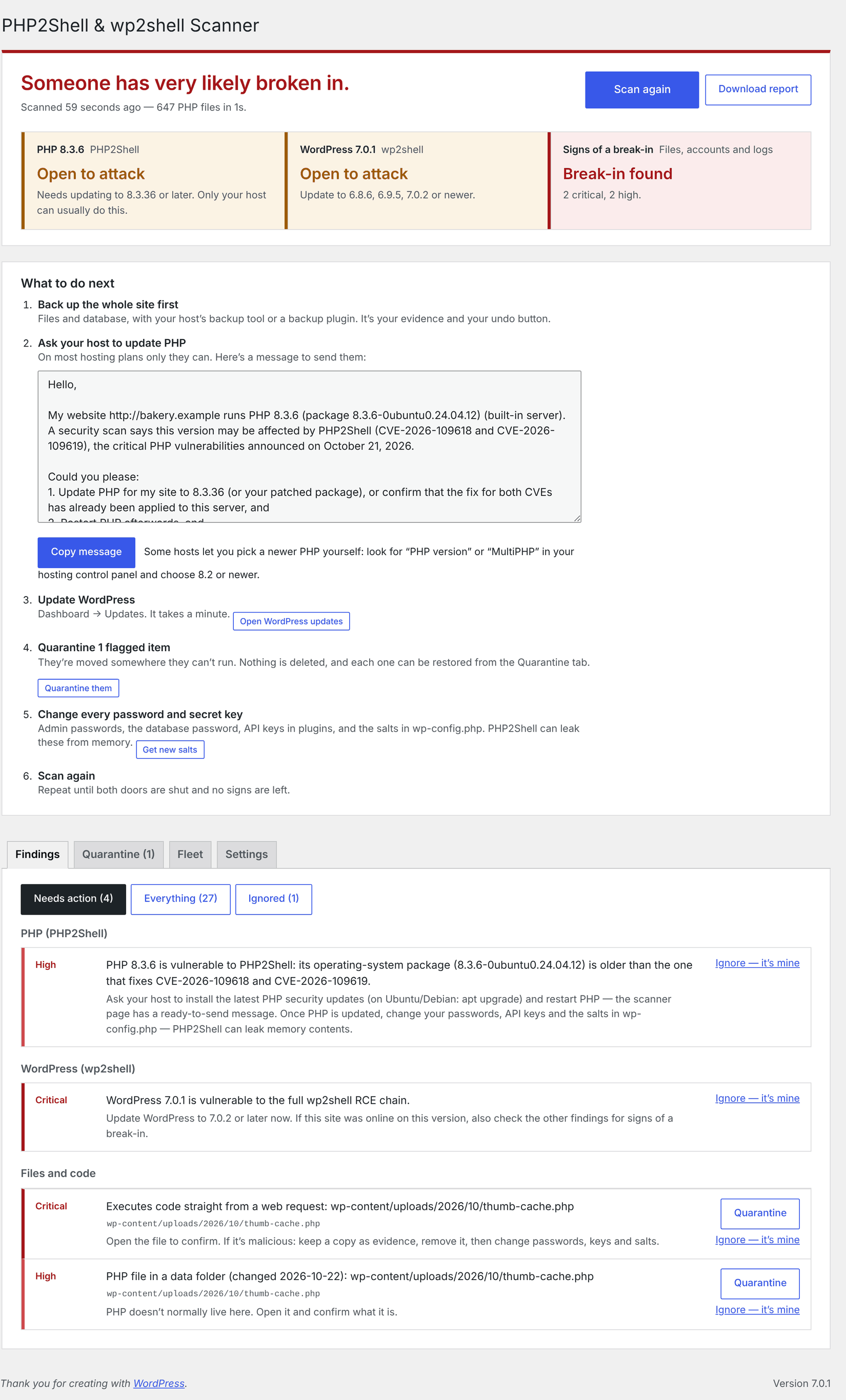
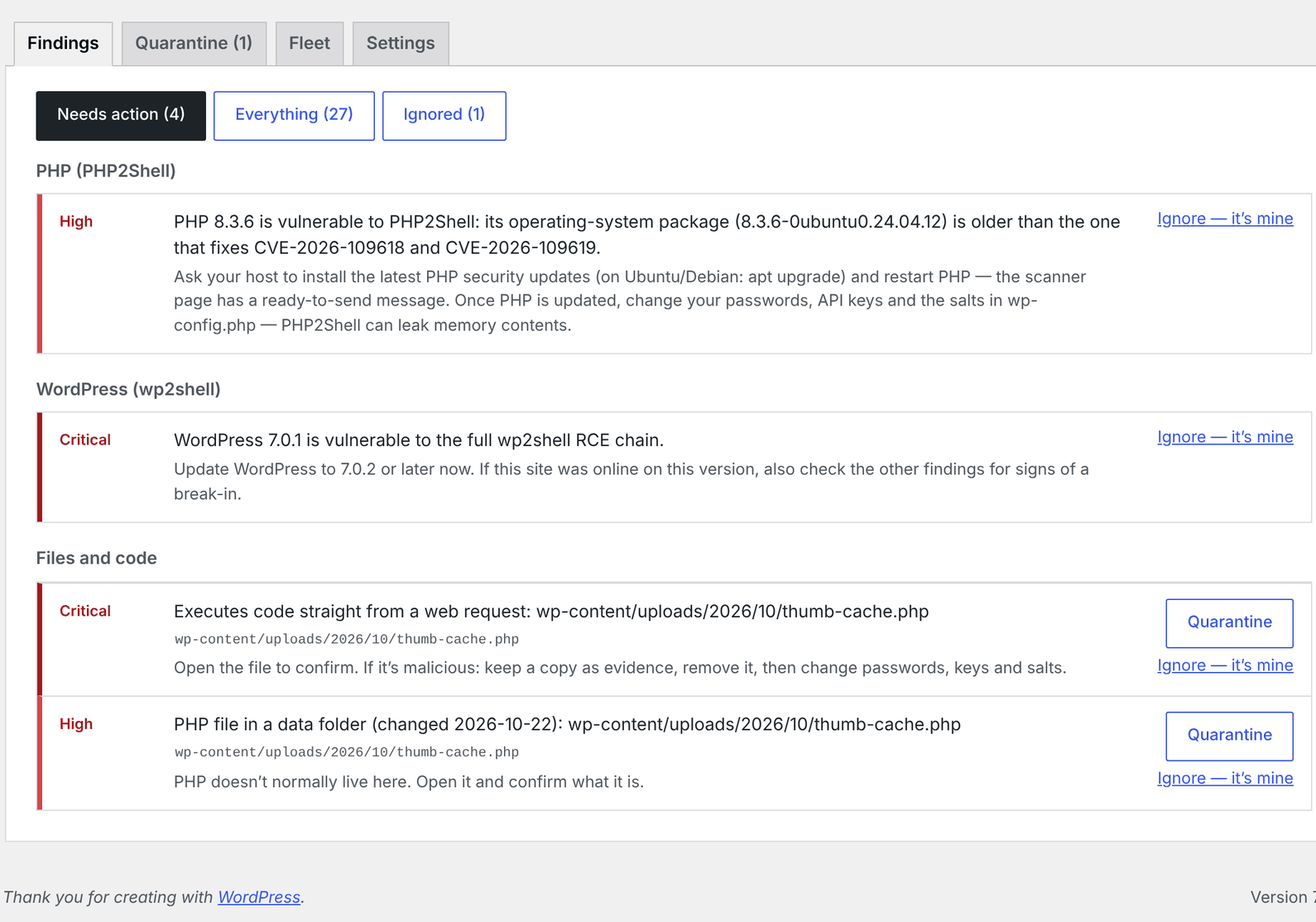
From then on it scans automatically once a week and emails you only if something serious and new turns up.
[!TIP] Multisite? Go to Network Admin → Plugins, upload, and choose Network Activate. The scanner lives under Network Admin → Settings → JAT Shell Scanner and covers the whole network.
[!WARNING] Use the download link above — not GitHub's green Code → Download ZIP button. That one is the raw source code; it works, but the release zip is the one that can check its own files for tampering.
No "Upload Plugin" button? Some hosts and plans don't allow plugin uploads (for example WordPress.com's lower plans, or sites with DISALLOW_FILE_MODS). Ask your host to install it, or to run the scan for you with WP-CLI.
4. Understanding your results
Every scan ends with one of these results:
| Result | What it means | What to do |
|---|---|---|
| 🟢 No signs of PHP2Shell or wp2shell | PHP and WordPress are patched and no traces of an attack were found. | Nothing. Keep weekly scans on. |
| 🟡 Needs review | A few things to confirm, none alarming on their own — e.g. "PHP looks old but may be an OS package — ask your host". | Read them; Ignore what you've confirmed. |
| 🟠 Vulnerable — PHP needs updating | No signs of a break-in, but your server's PHP can be attacked through PHP2Shell. | Send your host the ready-made message. |
| 🟠 Vulnerable — update WordPress | No signs of a break-in, but your WordPress can be attacked through wp2shell. | Click Go to WordPress updates. |
| 🔴 Suspicious | Something needs a closer look today — e.g. an unknown admin, PHP in your uploads folder, PHP2Shell traces in the error log. | Check every High finding. |
| 🚨 Compromised | Strong evidence of an attack — e.g. a known webshell. | Follow If your site is compromised. |
How the result is decided:
flowchart TD
    S["Scan finishes"] --> X["Leave out anything<br/>you marked Ignore"]
    X --> C{"Any Critical sign<br/>of an attack?"}
    C -- Yes --> R1["🚨 Compromised"]
    C -- No --> H{"Any High sign<br/>of an attack?"}
    H -- Yes --> R2["🔴 Suspicious"]
    H -- No --> V{"Is PHP or WordPress<br/>a vulnerable version?"}
    V -- Yes --> R3["🟠 Vulnerable"]
    V -- No --> M{"Anything Medium?"}
    M -- Yes --> R4["🟡 Needs review"]
    M -- No --> R5["🟢 No signs"]
An old PHP or WordPress version on its own is never reported as Compromised — being vulnerable isn't the same as being hacked.
Each finding has a severity:
| Severity | Meaning | Examples |
|---|---|---|
| Critical | Almost certainly malicious (or PHP that will never be fixed) | A known webshell; a wp2shell_… plugin; a modified file of this scanner; PHP 7.3 |
| High | Very likely bad — check today | Unpatched PHP; recent PHP in uploads/; an unknown admin; a burst of PHP2Shell errors in the log |
| Medium | Possibly bad, often innocent | Old-looking PHP from an OS package; a must-use plugin changed recently; a role with admin powers |
| Low | Usually normal, listed so you can confirm | Plugins or themes updated since July 17; wp-config.php edited |
| Info | Just information | "PHP 8.4.27 includes the PHP2Shell fix"; which temporary protections are on |
5. Getting your host to update PHP
Most site owners can't update PHP themselves. When PHP needs attention, the scanner shows a box called "Your host needs to update PHP" with a ready-made support message that already includes your site address, PHP version and the CVE numbers. Click Copy message and paste it into a support ticket or live chat.
sequenceDiagram
    actor You
    participant S as Scanner
    participant H as Your host
    S->>You: "PHP 8.3.10 is vulnerable to PHP2Shell"
    You->>S: Copy message
    You->>H: Support ticket / live chat
    H->>H: Update PHP to 8.3.36 (or confirm the OS package is patched)
    H-->>You: Done
    You->>S: Scan again
    S->>You: 🟢 PHP includes the PHP2Shell fix
Can I do it myself? On many hosts, yes: look in your hosting control panel for "PHP version", "Select PHP Version" or "MultiPHP Manager" (cPanel) and choose 8.2 or newer. Test your site afterwards — very old plugins and themes may not work on newer PHP.
Temporary protections your host can set in php.ini until PHP is updated (the scanner shows which ones are on):
| Setting | Protects against | Note |
|---|---|---|
session.upload_progress.enabled = 0 |
CVE-2026-109619 | Rarely needed by WordPress sites |
memory_limit = -1 |
CVE-2026-109618 | Must be enforced so sites can't override it (php_admin_value[memory_limit] = -1 in the PHP-FPM pool) |
fatal_error_backtraces = 0 |
CVE-2026-109619, PHP 8.5 only | |
Low post_max_size and max_input_nesting_level |
CVE-2026-109618 | Limits how big and deep a form submission can be |
pm.max_requests = 1 (PHP-FPM) |
Both | Each worker handles one request, so no leftover state is reused; costs performance |
No RLIMIT_AS / RLIMIT_DATA limits on PHP |
CVE-2026-109618 | Operating-system memory limits can trigger the bug too |
These reduce the risk; they don't remove it — security firms have shown attacks working with them in place. PHP must be restarted after changing them.
6. What it checks
PHP2Shell
| Check | What it looks for | Severity |
|---|---|---|
| PHP version | The version your website runs — not just the command line's — against the fixed releases | Critical / High / Medium → Vulnerable or Needs review |
| OS packages | The installed Ubuntu/Debian package version against the first fixed build; other distributions that may carry the fix without a new version number | High (known-unfixed package) · Info (fixed package) · Medium ("ask your host") |
| Build date | PHP built after the fix was published (October 21, 2026), from the date on PHP’s own files | Medium ("probably patched — confirm") |
| Riskiest setup | Apache mod_php, which researchers rate highest-risk |
Noted in the finding |
| Temporary protections | session.upload_progress.enabled, memory_limit, fatal_error_backtraces, post_max_size, max_input_nesting_level. They make attacks harder, not impossible — only a patched PHP fixes it |
Info |
| PHP history | Whether this site ran an unpatched PHP after October 17, 2026, even if it's patched now | Medium — change your passwords and keys |
| CVE-2026-115560 | Session upload progress turned on. PHP's October 23 advisory for this related flaw (no fix in any version yet) asks for it to be off — shown even on patched PHP | Info |
| PHP error log | Allowed memory size … exhausted … in Unknown on line 0 (out-of-memory before any script ran — the tell-tale sign), Maximum execution time … exceeded in Unknown on line 0, Failed to decode session object, worker crashes (SIGSEGV, Apache AH00052 … exit signal Segmentation fault (11) or Abort (6), heap corruption) since October 17 |
Medium; High for bursts or crashes |
Out-of-memory errors even though memory_limit = -1 (they should be impossible) |
High | |
| Access log | Bursts of POST requests answered with HTTP 500/502 from one address since October 17 | Medium (a lead, not proof) |
The public exploit and scanner tools (php2shell-scan, php2shell-verify, php2shell-109618, JACKALPOC), the kits' markers (P2S_OK, SHL_OK, NxSP…, ADV618BOUNDARY), the botnet's download URLs and servers, and PHPSESSID cookies carrying leaked memory (where cookies are logged) |
High | |
| Addresses publicly reported attacking PHP2Shell (Amazon, Hunt.io, Arctic Wolf, and Wordfence's 20 busiest sources) | Medium | |
| Temp folders | The botnet's second stage saved as nfs, nfs-setup, mountpoint or cCmono; critical for any program matching a published Potassium hash |
High / Critical |
Programs (ELF files) in /dev/shm, or in /tmp since October 17; PHP files written to /tmp since October 17 (High when named like a kit's webshell) |
High / Medium | |
| Kit webshells | PHP files named wp2s.php, php2shell.php, php-to-shell…, autologin_fd.php, axiom_*.php (High) or tebaran_*.php (Medium); code printing P2S_OK/SHL_OK (High) or contacting the botnet's servers (Critical) |
Critical / High / Medium |
| Server persistence | /etc/ld.so.preload loading a library into every program (a rootkit favourite) |
High |
| PHP sessions | Session files containing PHP code (written by an attack, then included), or the kits' fixed session IDs and markers | High |
[!NOTE] Patched PHP 8.4.27 and 8.5.12 log "Failed to decode session object" more often than before (php-src #24493). On a patched PHP the scanner treats that message as information only, not as a sign of attack.
wp2shell
| Check | What it looks for | Severity |
|---|---|---|
| WordPress version | 6.8 – 6.8.5, 6.9 – 6.9.4, 7.0 – 7.0.1 | Critical / High → Vulnerable |
| Exploit plugins | wp2shell_<hex>, fake CMSmap, fake WP Static Cache Helper, gg- REST shells |
Critical / High |
| Exploit leftovers | wp2shell_*.zip, wp2shell_<hex> staging folders, temp-write-test-* probes |
Critical / High |
temp-write-test-… files WordPress itself made (the date is in the name): before July 17, 2026 → harmless leftover; after → worth a look |
Low / Medium | |
| REST backdoor | The morning/v1 namespace |
Critical |
| Known files | SHA-1 hashes of published webshells | Critical |
| Access log | Successful (200/207) batch-API requests (even URL-encoded), exploit-tool user agents, attacker IPs, plugin uploads, admin enumeration | Critical → Medium |
What either attack leaves behind
| Check | What it looks for | Severity |
|---|---|---|
| Webshell code (whole site) | Code run straight from a request (eval, assert, system, passthru…), functions named by the request ($_GET['f'](…)), packed eval(gzuncompress(base64_decode(…))), large base64 payloads, split ${'_P'.'OST'}, create_function with request input, including images as PHP, writing request data to disk, REST endpoints that run shell commands |
Critical / High |
Request input + decoder + eval in one small file (some legitimate plugins do this) |
Medium | |
| PHP where it doesn't belong | PHP in uploads/, cache/, upgrade/, or loose in wp-content/ — High if changed since July 17, Medium if older, Low if it can't be run directly |
High / Medium / Low |
| Images with PHP inside | <?php hidden in uploaded .jpg/.png/.gif… files |
High |
| Hidden PHP | PHP files whose names start with a dot — in the site root or wp-content |
High / Medium |
| PHP loaded into every page | auto_prepend_file / auto_append_file in .user.ini, .htaccess or php.ini (Wordfence's firewall is recognised) |
High |
Uploads .htaccess |
Lines that make PHP executable in uploads (Wordfence's protective rules are recognised) | High |
wp-config.php |
Webshell code in it; edits since July 17 | Critical / Low |
| Administrators | Admins created since July 17 (the one created at site setup is recognised) | High |
| Existing or backdated accounts that became admins since the previous scan | High | |
| Application passwords added to admins since July 17 | Medium | |
| Roles | Non-admin roles given admin powers (install_plugins, edit_plugins, promote_users…) |
Medium |
| Must-use plugins | Added or changed since July 17 (known host files only Low) | Medium / Low |
| Plugins | Folders of PHP hidden from the Plugins screen; loose single-file plugins; plugins updated since July 17 | Medium / Low |
| Plugin files | Files of plugins from wordpress.org that differ from the official release's checksums (High); PHP files the release doesn't have (Medium); a plugin where most files differ — usually a Pro edition, but also what mass infection looks like (Medium). Plugins from elsewhere are skipped | High / Medium |
| Drop-ins | advanced-cache.php, object-cache.php, db.php, sunrise.php… added or changed since July 17 that don't name the plugin that made them (cache and database plugins are recognised) |
Medium |
| Settings in the database | Code a backdoor can load: PHP that decodes or runs other code, scripts that decode and run hidden JavaScript, scripts built from character codes, scripts loaded from a bare IP address. Ordinary analytics snippets are fine | High / Medium |
| Posts and pages | Changed since July 17 with self-decoding scripts, invisible iframes, or blocks of links hidden from visitors (SEO spam). Embeds are fine | High / Medium |
| Scheduled tasks (WP-Cron) | Tasks whose arguments carry code (High) or download a script (Medium); random-looking task names nothing handles (Low) | High / Medium / Low |
| WordPress core | Files that differ from wordpress.org's checksums; unknown PHP in wp-admin/, wp-includes/ or the site root (old leftovers from manual updates are only Low) |
High / Medium / Low |
| This scanner itself | Every file checked against the official release's fingerprints — attackers like to blind security tools | Critical / High |
Built not to cry wolf. Every release is tested against WordPress core and some of the most-installed plugins — WooCommerce, Yoast SEO, Elementor, Jetpack, Contact Form 7, WP Super Cache, over 16,000 PHP files — and must produce zero High or Critical matches. Common legitimate files (cache plugins, Wordfence, Performance Lab, host must-use plugins, "Silence is golden" placeholders, WordPress's own update backups) are recognised.
7. Settings, automatic scans and email alerts
All settings are on the scanner page (Tools → JAT Shell Scanner, right-hand box):
| Setting | Default | What it does |
|---|---|---|
| Automatic scans | Weekly | Off, Daily or Weekly. The first run happens within an hour of activating. |
| Email me when an automatic scan finds something new | On | Emails only when a scheduled scan finds a new High/Critical problem, or the site becomes vulnerable. You won't get the same alert twice. |
| Alert email address | Site admin email | Where alerts go. |
| Core and plugin files | On | Downloads the official checksums for your WordPress version and for each plugin from wordpress.org (cached for a day). |
| PHP error log (Server logs) | Detected automatically | Where PHP2Shell attempts show up. Leave empty to use the log PHP reports, plus WordPress's debug.log. |
| Web server access log (Server logs) | (empty) | Optional. Lets scans spot attack traffic. See Finding your logs. |
The bottom of the box shows the PHP your website runs (version, server type, operating system), as seen by the scanner.
You'll also see results:
- in a red notice across the admin area when the result is Compromised, Suspicious or Vulnerable (dismissible; it comes back only if a later scan is still bad),
- under Tools → Site Health, which also warns when the last clean scan is out of date.
How a scheduled scan runs on a host with short time limits:
sequenceDiagram
    participant C as WP-Cron
    participant S as Scanner
    participant DB as Database
    participant M as Your inbox
    C->>S: Weekly scan is due
    S->>DB: Start a scan job
    loop Until finished
        S->>S: Scan for as long as this request safely can
        S->>DB: Save its exact place
        S->>C: Schedule the next slice
    end
    S->>DB: Save the report
    alt New High or Critical problem
        S->>M: Plain-text alert (once per problem)
    else Nothing new
        Note over S: Stays quiet
    end
[!NOTE] WordPress's built-in scheduler only runs when someone visits the site. On a very quiet site a scheduled scan may take a while — it always picks up where it left off, and is only abandoned after a full day with no progress. With a real server cron (
DISABLE_WP_CRON), scans run in bigger slices.
8. Ignoring things that are yours
If a finding is something you know about — your own admin account, your host's must-use plugin, a PHP version your host confirmed is patched — click Ignore next to it.
- Ignored findings no longer count toward the result and never trigger an email.
- They're kept in an "ignored findings" list at the bottom, where Restore brings them back.
- A finding stays ignored when only a date or count in its text changes (e.g. your host updates their must-use plugin again).
- If an ignored file changes, it's flagged again — so an attacker can't hide inside something you once approved.
- The ignore list is signed with your site's secret keys from
wp-config.php, so an attacker who only got into the database can't quietly add their own files to it. - From WP-CLI:
wp jat-shell ignore <id>andwp jat-shell ignore <id> --undo.
[!CAUTION] Only ignore things you're sure about. If you're unsure, ask your developer or host — or open an issue describing what was flagged (don't post passwords or full file contents).
9. If your site is compromised
Don't panic, and don't start deleting things yet. Work through these steps in order:
flowchart TD
    A["🚨 Compromised or Suspicious"] --> B["1. Back up everything<br/>files + database"]
    B --> C["2. Close the way in<br/>update PHP and WordPress"]
    C --> D["3. Remove what was flagged<br/>files · plugins · admin users"]
    D --> E["4. Change every secret<br/>passwords · DB · API keys · salts"]
    E --> F["5. Hunt for other ways back in<br/>mu-plugins · .htaccess · .user.ini · cron"]
    F --> G["6. Scan again"]
    G --> H{"Clean?"}
    H -- Yes --> I["🟢 Keep scanning weekly"]
H -- No --> J["Restore a clean backup<br/>or get professional help"]| Step | How |
|---|---|
| 1. Back up | Use your host's backup tool or a backup plugin to copy files and database. It's your evidence and your undo button. |
| 2. Close the way in | PHP: have your host update it (see section 5). WordPress: Dashboard → Updates. Update all plugins and themes too. |
| 3. Remove what was flagged | Delete flagged plugins on the Plugins screen; flagged files with your host's file manager or SFTP; unknown admins under Users (assign their content to yourself). For modified core files use Dashboard → Updates → Re-install. If this scanner's files were modified, delete and reinstall it from the release. |
| 4. Change every secret | PHP2Shell can leak memory, so assume anything that passed through PHP is known: reset every admin password; revoke unknown application passwords (Users → Profile); change the database password (hosting panel + wp-config.php); regenerate API keys stored in plugins (payment, email, backup, CDN…); replace the salts in wp-config.php with fresh ones from the WordPress salt generator (this logs everyone out). |
| 5. Look for other ways back in | wp-content/mu-plugins/, every .htaccess and .user.ini, scheduled tasks (a plugin such as WP Crontrol lists them), your hosting panel's cron jobs, FTP/SFTP and SSH accounts. |
| 6. Scan again | Click Scan again until the result is clean. |
One-click fixes
For the most common clean-up jobs you don't need a file manager. Next to a finding you'll see a button when there's a safe fix:
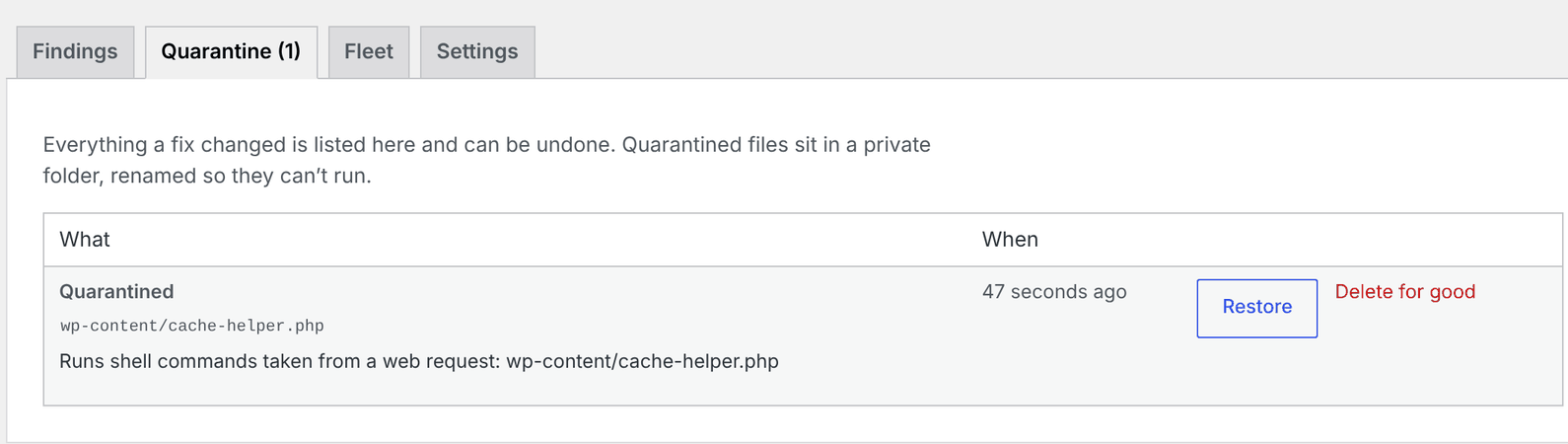
| Button | When it appears | What it does | Undo |
|---|---|---|---|
| Quarantine | A flagged file (webshell, PHP in uploads, a modified file) rated Medium or worse | Moves it into a private, locked quarantine folder in uploads/jat-shell-scanner/ and renames it (no .php left anywhere in the name) so it can never run |
Restore puts it back exactly where it was |
| Quarantine plugin | A malicious or suspicious plugin folder | Moves the whole folder into quarantine (WordPress deactivates it) | Restore |
| Remove admin rights | An unknown or newly promoted administrator (never you) | Makes them a Subscriber on every site, revokes Super Admin, logs them out everywhere | Undo gives the role back |
| Quarantine them all | Several critical/high file findings | Applies every file fix in one go (asks first) | Each one can be restored |
flowchart LR
    F["Finding"] --> Q{"Safe to fix<br/>automatically?"}
    Q -- "No: core folder, wp-config,<br/>whole theme, this scanner" --> M["Shown with manual<br/>instructions only"]
    Q -- Yes --> A["You click the button"]
    A --> R["Moved to quarantine<br/>or admin demoted"]
    R --> L["Signed record kept<br/>on the Quarantine tab"]
    L --> U["Restore / Undo"]
    L --> D["Delete for good"]
Safety rules:
- Scans never change anything — only a button you click (or
wp jat-shell fix) does. - It refuses to touch WordPress core folders and root files (
wp-login.php,xmlrpc.php…),wp-config.php, the site's.htaccessand.user.ini, the drop-ins (db.php,object-cache.php,advanced-cache.php,sunrise.php), the root ofwp-content,plugins,themes,uploadsormu-plugins, a whole theme, or this scanner's own files. Modified core files are left to Dashboard → Updates → Re-install. - It only moves the file the scan saw: if the file changed since (different contents), or was swapped for a link, it refuses and asks you to scan again. Restoring refuses too if the original folder has been replaced by a link.
- It never removes the rights of the last administrator.
- Every other finding about a quarantined file counts as handled; if a webshell is dropped again at the same path, it needs action again.
- It respects
DISALLOW_FILE_MODS— if your site forbids file changes, the buttons don't appear. - Each fix record is signed with your site's secret keys, so an attacker can't plant a fake "restore" that moves a file somewhere else.
- Quarantined files are deleted when you uninstall the plugin, or individually from the Quarantine tab.
[!TIP] Not comfortable doing this yourself? Your host's support team or a WordPress security service can clean the site — many for a fixed fee. Give them the Download report (JSON) file; it lists everything found.
10. Updating the plugin
There are two editions, built from the same code:
| Edition | Install from | Updates from | Self-check against |
|---|---|---|---|
| WordPress.org — JAT Shell Scanner | Plugins → Add New Plugin, search "JAT Shell Scanner" | WordPress.org, like any directory plugin | WordPress.org's published checksums |
| GitHub | The zip on the releases page | This repository's releases (below) | The release's manifest.json |
The WordPress.org edition is the same plugin without includes/class-updater.php (WordPress.org plugins may only update through WordPress.org). To switch from GitHub to WordPress.org, delete the GitHub copy and install from the directory — deleting removes settings and quarantine, so restore anything you need first.
The GitHub edition updates itself from this repository, through the normal WordPress update screen.
sequenceDiagram
    participant WP as Your WordPress
    participant GH as GitHub Releases
    WP->>GH: Is there a newer version? (at most twice a day)
    GH-->>WP: Latest relea
This README is longer than the copy stored here. Read the rest on GitHub →
Releases
10 releases. Each count is every asset in that release; expand a row for the breakdown.
v1.6.0
latest
Oct 28, 2026 5d ago
jat-shell-scanner.zip
+2 assets
7
Oct 24, 2026 9d ago
wp2shell-scanner.zip
+2 assets
cohort
11
Oct 24, 2026 9d ago
wp2shell-scanner.zip
+2 assets
0
Oct 24, 2026 9d ago
wp2shell-scanner.zip
+2 assets
0
Oct 22, 2026 11d ago
wp2shell-scanner.zip
+2 assets
7
Oct 22, 2026 11d ago
wp2shell-scanner.zip
+2 assets
4
Oct 22, 2026 11d ago
wp2shell-scanner.zip
+2 assets
11
Oct 22, 2026 11d ago
manifest.json
+2 assets
2
Oct 22, 2026 11d ago
wp2shell-scanner.zip
+2 assets
3
Oct 22, 2026 11d ago
wp2shell-scanner.zip
+1 asset
3
Active-site estimate ≈10 comes from the v1.5.1 cohort. Method.