Outpost Mobile Publishing WP Registry grade A. No security issues foundWP RegistryNo security issues foundOpen the reportA
Mobile-first PWA composer for IndieWeb POSSE workflows
Install
This is the repository archive. It installs, but the folder name will carry the branch suffix and updates will not flow.
Install straight from GitHub with WP-CLI:
wp plugin install https://github.com/courtneyr-dev/outpost/archive/refs/heads/main.zipPost from your outpost. Reach your people everywhere.
Mobile-first Progressive Web App composer for IndieWeb POSSE workflows. Requires WordPress 6.5+ and PHP 8.2+; tested up to WordPress 7.1.
Status: version 1.0.11 (Plugin Check clean). Not yet listed on WordPress.org — install from GitHub.
User documentation
User documentation: Read the complete Outpost documentation
Key pages:
- Installation — GitHub install plus the required IndieAuth and Micropub plugins.
- Getting started — sign in, post a note from your phone, install to your home screen.
- Settings — composer defaults, API keys, appearance, OAuth connections.
- Troubleshooting — managed-host auth issues, offline queue, dependency notices.
- Privacy and data — what's stored and which services are contacted.
The docs site builds from docs/ with Astro Starlight — see docs/MAINTAINING.md to update it.
What this is
Outpost is a WordPress plugin that ships a mobile-first PWA composer at /post (configurable). It's optimised for the post shapes IndieWeb people actually publish — quick notes, replies, likes, photos, and life-tracking entries — with one-tap syndication chips that default to on for every configured destination.
Every kind that Post Kinds for IndieWeb registers is postable from the composer, grouped into six tabs:
| Tab | Kinds |
|---|---|
| Post | note, status, aside, quote, article |
| Reply | reply, like, favorite, repost, bookmark, RSVP, follow, wishlist, tag, acquisition, issue |
| Photo | photo and galleries |
| Doing | listen, watch, read, play, game, jam, checkin, eat, drink, exercise, craft, event, review, video, audio |
| Life | mood, weather, sleep, trip, itinerary, question |
| Recipe | recipe (h-recipe with ingredients and steps) |
Any Doing kind except Video, and Recipe, accept an optional photo. The first photo on a post becomes its featured image unless one is already set (site owners can turn that off with the outpost_set_featured_image filter).
When the Post Kinds companion is active, the composer also names the kind explicitly on each Micropub post (a pkiw-kind vendor property), so property-ambiguous kinds — an issue is wire-identical to a reply — classify correctly. Other Micropub servers never receive the property.
What Outpost writes: posts — the standard post type. Not pages, not custom post types (the Micropub plugin's filters decide any routing), not comments; a Reply is an h-entry on your own site that links to the page you're replying to. How each post gets its format, which IndieWeb specs it's built on, and what XFN adds are explained in How Outpost shapes a post.
Share sheet: installed as an app on Android (or desktop Chrome/Edge), Outpost registers as a Web Share Target — a shared link opens a Reply, shared text a Note, a title plus text an Article, and a shared photo the Photo tab with the picture attached. iOS Safari has no share-target API, so iPhone and iPad use a Shortcut: the guided one from wp-admin Settings → Outpost iOS Shortcut posts through a scoped token without opening the composer; a manual one opens the composer so you can review first. Six steps for the manual one: (1) Shortcuts app → +; (2) in the first action tap Nowhere → Share Sheet, and set the types to URLs and Text; (3) add the Open URLs action — not Share — with the URL https://your-site/post/share-target?url= and Shortcut Input inserted at the end; (4) rename it Post to Outpost; (5) share any page from Safari and pick it — the composer opens on Reply with that link; (6) to keep it near the top of the share sheet, scroll to the sheet's bottom, tap Edit Actions…, tap the green + by Post to Outpost to add it to Favorites, drag it up, and tap Done. Photos get a second Shortcut: the same steps, but keep Images as the type and set Open URLs to https://your-site/post/?mode=photo with nothing after it, named Photo to Outpost. The composer's About tab has the same steps with your site's address filled in; the full walkthrough is in Common tasks.
standard.site: with the Post Kinds companion, Outpost's posts adhere to the standard.site spec on the AT Protocol. Cited pages' site.standard.document records are read into citation cards with no setup, and with ATmosphere connected your own posts publish as documents under Post Kinds' kind rules — public content and logs by default, privacy-sensitive kinds opt-in. Details: How Outpost shapes a post.
It works standalone with the Micropub plugin (required) and lights up additional capabilities when companion plugins are also active. No Jetpack, no app store, no third-party auth.
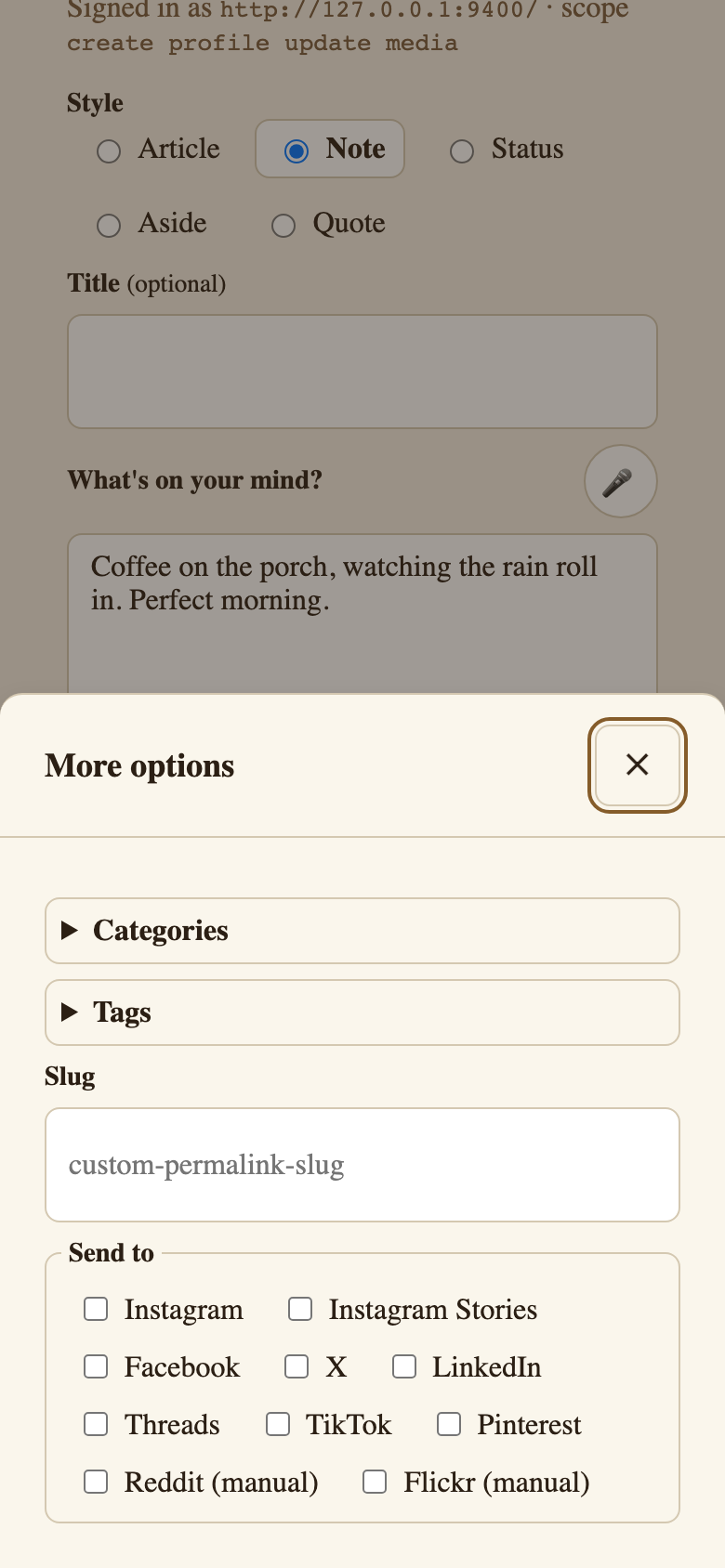 |
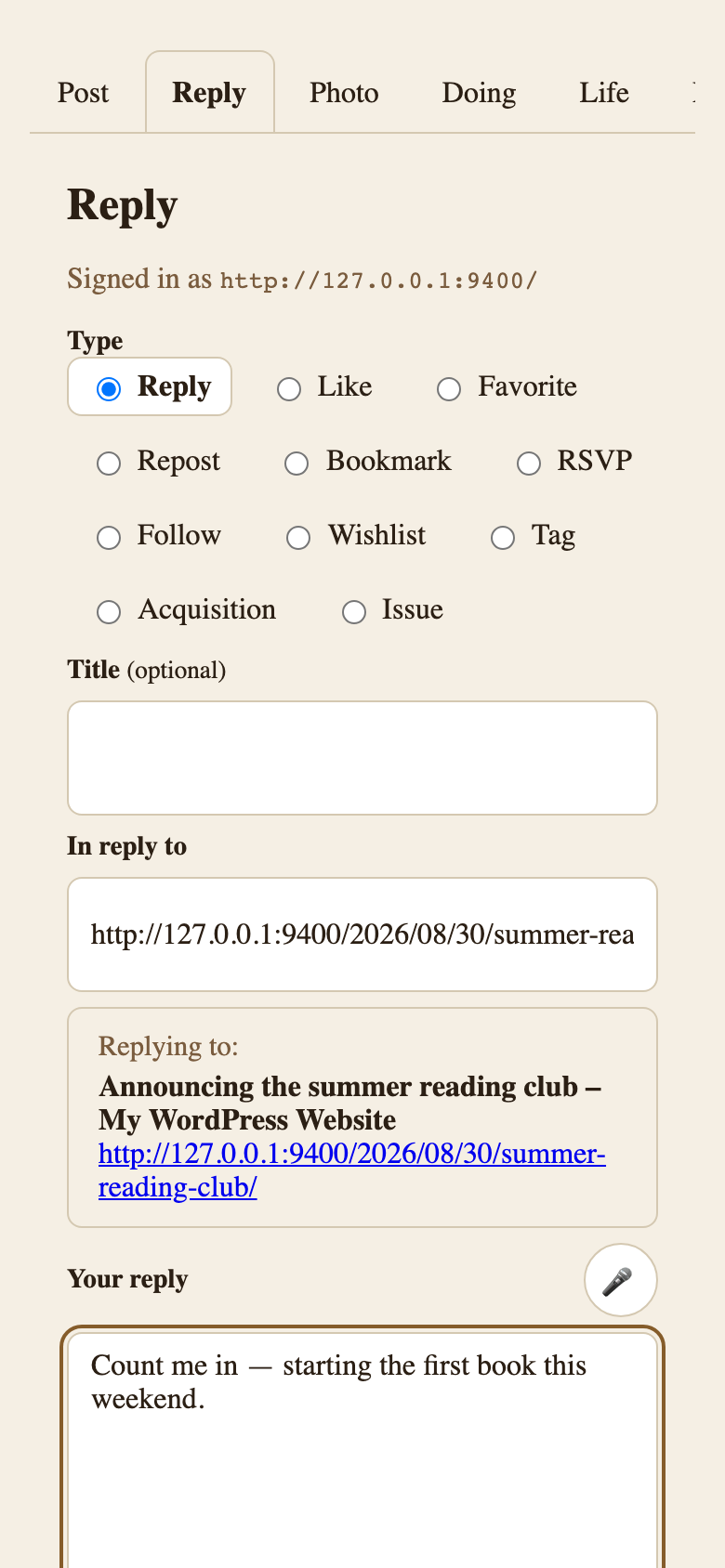 |
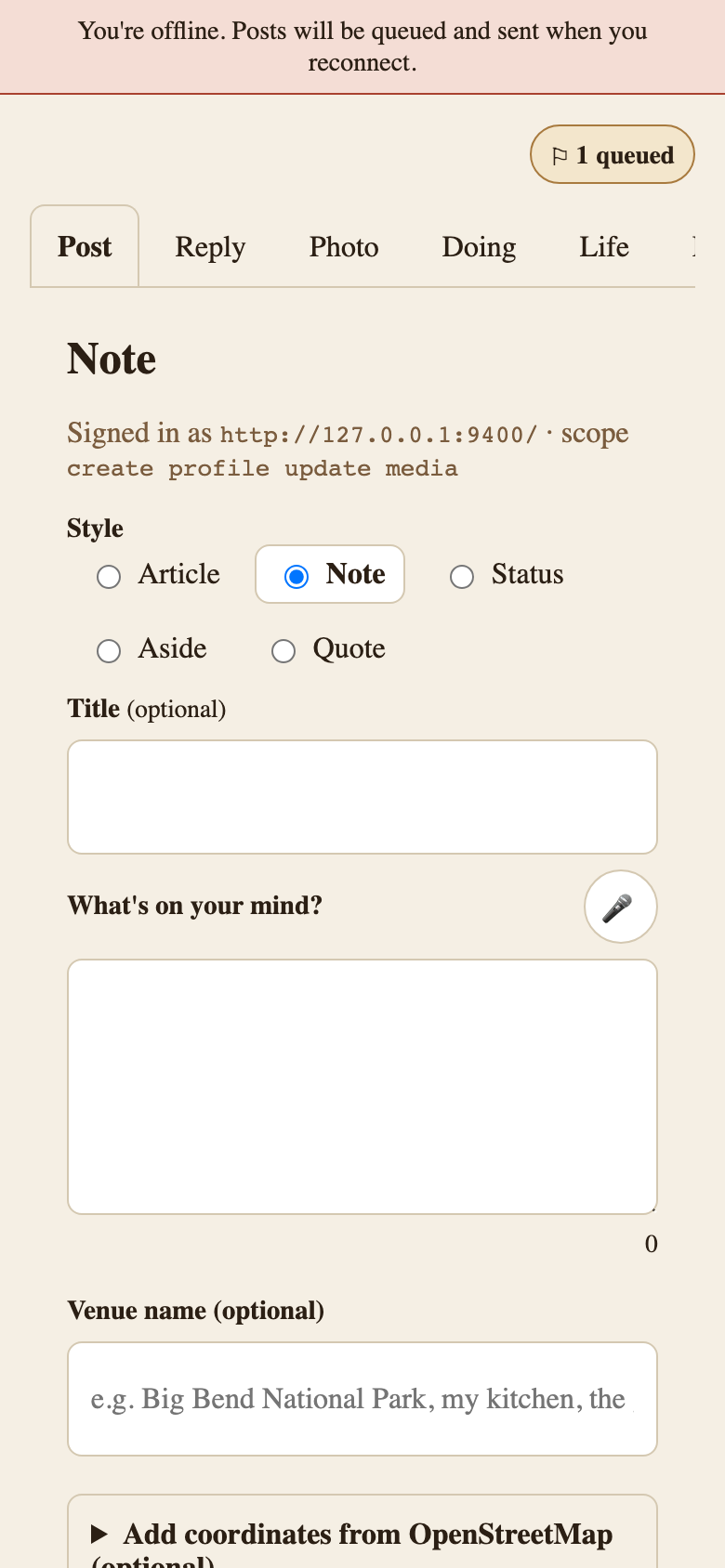 |
|---|---|---|
| Note mode with syndication chips | Reply mode with the target's context | Offline, with a queued draft |
More screens in the screenshot gallery.
Why this exists
Mobile posting on a self-hosted WordPress site in 2026 is broken unless you accept Jetpack auth, which is a non-starter for IndieWeb-aligned users. Outpost replaces the mobile composer with a real PWA served from your own domain, using Micropub as the API and IndieAuth for browser-side auth.
Companion plugins
Outpost detects companions at runtime (not at install time) and updates the composer UI as you activate plugins.
| Companion | When active |
|---|---|
| Micropub (David Shanske) | Required. Server endpoint. |
| IndieAuth | Auth provider. Falls back to application passwords. |
| Post Kinds for IndieWeb in Block Themes | Kind classification for every composer entry (explicit pkiw-kind hint), media "Look it up" search, and card rendering. Reads standard.site records behind cited pages; with ATmosphere, decides which kinds publish as standard.site documents. |
| Post Formats for Block Themes | Format selector + auto-detection. |
| Link Extension for XFN | Relationship picker on reply targets. |
| Syndication Links | Destinations populate syndication chips. |
| Yoast SEO | Focus keyphrase + meta description fields in the More panel. |
| ActivityPub | The Fediverse appears as a syndication chip; posts federate natively, no Bridgy needed. |
| Bridgy (a service, not a plugin) | Its publish endpoints — brid.gy, bsky.brid.gy for Bluesky, fed.brid.gy for the fediverse — appear as syndication chips; replying to a Mastodon or Bluesky URL pre-checks the matching one. |
| Accessibility Checker | A "View accessibility report" link after each post; the scan runs server-side on save. |
| RSS Chat Routing | A per-post Send to rss.chat choice in the More panel (see below). |
| ATmosphere (not detected — works alongside) | Cross-posts every published post to Bluesky and stores it as a standard.site document on your AT Protocol account; Outpost adds no chip, and per-post opt-out lives in the block editor (see below). |
Webmention. Outpost sends and receives no webmentions itself. With the Webmention plugin active, your site sends the webmention that asks Bridgy to publish a post and receives the replies, likes, and reposts Bridgy backfeeds; Outpost marks each syndicated copy on the post as u-syndication so Bridgy can find it. rss.chat replies come home the same way.
rss.chat. rss.chat is a chat network built on RSS: your site publishes a post to it, people reply there, and the replies come back to your post as comments. Matthias Pfefferle's RSS Chat plugin does the sending; on its own it sends only posts carrying the core chat post format. RSS Chat Routing chooses which posts go instead — by default post format, default Post Kind, or per post — and brings replies home as verified Webmentions. With it active, the composer's More panel adds the same per-post choice, Send to rss.chat (Site default, Include in RSS Chat, or Exclude from RSS Chat), sent as mp-rss-chat-routing, so you can opt a post in or out from the app without opening the editor.
ATmosphere. ATmosphere (Automattic) makes your site a first-class citizen of the AT Protocol, the open network behind Bluesky. When a post is published it shares it on Bluesky — a short post, or a thread that links back to a long article — and stores the full article on your own AT Protocol account as a standard.site document (the community site.standard.* lexicons for blogs and articles), so any app that understands that schema can read it. Bluesky replies, likes, and reposts come back as WordPress comments, and your own domain can become your Bluesky handle. Outpost doesn't detect ATmosphere or add a chip for it: everything you post from the composer is an ordinary published post, so ATmosphere cross-posts it exactly as it would a post from the editor. Two things to know: opting a single post out is done from the block editor sidebar, not from the composer; and if ATmosphere is connected, leave the Bluesky via Bridgy chip off, or the same post can reach Bluesky twice. With Post Kinds active, Post Kinds decides which kinds publish by default and derives readable titles for untitled ones, so posts from Outpost follow the standard.site rules.
| ActivityPub / Bridgy | Surface as syndication chips automatically. |
The hard contract
Plugin owns layout. Theme owns paint.
- Plugin always owns: PWA shell, routes, service worker, manifest, composer interaction, structural CSS (layout, iOS safe-area, touch targets, focus).
- Theme always owns: every color, every font, spacing, radius, shadow, button fills, link colors.
- Plugin CSS only references colors and fonts through
var(--outpost-*, neutral-fallback). No part of Outpost ever forces a color the theme didn't ask for. - One forced default:
padding-bottom: env(safe-area-inset-bottom)on the iOS bottom toolbar.
Prior art
Outpost evolves from prior IndieWeb work for WordPress.
- IndieWeb Press This (Pfefferle, Shanske, Barrett) — bookmarklet pattern for Reply/Like/Repost/RSVP/Follow. Outpost extends and modernizes.
- Micropub plugin (David Shanske) — required dependency.
- IndieAuth plugin (Pfefferle, Shanske) — auth.
- IndieBlocks (Jan Boddez) — companion for theme blocks.
- Bridgy (Ryan Barrett) — round-trip syndication.
The IndieWeb WordPress community built the foundation Outpost sits on top of.
Development
composer install && npm install
npm run dev             # Vite dev server for PWA frontend
npm run build           # Production PWA build to /build/pwa/
composer test           # PHPUnit
composer lint           # PHPCS (WordPress-Extra)
composer lint:section5  # §5 audit (case-study leak / credential / instance / i18n)
composer analyze        # PHPStan
npm run lint            # ESLint
npm run test:e2e        # Playwright
See CLAUDE.md for the development conventions and session-based build plan, and CONTRIBUTING.md for the §5 audit lint that runs in CI on every PR.
Status & roadmap
Outpost is being built across ~40 small, atomic sessions, each scoped to a specific deliverable. Phases:
- A — Foundation (slug, scaffold, companion detector, routes)
- B — Auth and Micropub (IndieAuth, Micropub client, server-side mf2 preview)
- C — Composer modes (Note → Reply → Photo → Listen group → Article → More pull-out)
- D — PWA polish (manifest, service worker, offline queue, voice, iOS safe-area)
- E — Share-sheet and bookmarklets (Web Share Target, iOS Shortcut, multi-action bookmarklet generator, Bridgy auto-suggest)
- F — Companions (adapters)
- G — Security (token hardening, CSP, file-upload, rate-limit, URL validation, pen test)
- H — Settings and onboarding
- I — Distribution (WordPress.org submission)
- J — Documentation and launch
Support
- Questions and bug reports: GitHub issues.
- Security vulnerabilities: follow
SECURITY.md— don't open a public issue. - Contributions: see
CONTRIBUTING.md.
License
GPLv2 or later. See LICENSE.
Author
Releases
3 releases.
These releases are tags only. The author does not attach a packaged zip, so there are no download counts to report.