Aftercare
Daily Core Web Vitals monitoring, a complete change ledger and performance regression alerts. Catch problems before your visitors do.
Install
This is the repository archive. It installs, but the folder name will carry the branch suffix and updates will not flow.
Install straight from GitHub with WP-CLI:
wp plugin install https://github.com/costibotez/aftercare/archive/refs/heads/main.zip
Aftercare
Know what changed. Know what it cost. Prove what you did.
A free WordPress plugin for agencies, freelancers and site owners who look after WordPress sites long after launch —
it watches your Core Web Vitals every day, records every change made to the site, and opens an incident
the moment performance regresses, so you catch problems before your client (or your visitors) do.




Quick start · Features · Pro · Screenshots · Roadmap · Development
Author: Costin Botez (@costinbotez) · Portfolio · Instagram · GitHub
Why Aftercare exists
Every site on a care plan eventually produces the same two conversations: "the site feels slower — what happened?" and "what did you actually do this month?" Aftercare answers both from data it collects automatically:
- A plugin update lands on Tuesday, LCP jumps 40% on Wednesday — Aftercare opens an incident, emails you, and shows every change from the 72 hours before the regression, side by side with the trend.
- A month of updates, publishes and settings changes becomes a scrollable, filterable ledger with a human-readable summary and the responsible user on every line.
What the free plugin includes
📈 Core Web Vitals monitor
- Daily p75 values for LCP, INP, CLS and TTFB from the Chrome UX Report (real Chrome-user field data), fetched with your own free Google API key — origin-level fallback when URL-level data is thin, recorded under its own source so the two levels are never averaged together
- Optional real-user monitoring beacon: ~2 KB, dependency-free (native
PerformanceObserver), loaded for a configurable sample of visits, aggregated to daily p75 on your own site — no third-party service involved - Homepage plus up to 5 tracked URLs, 30 days of history, sparkline trends with pass / warn / fail status pills
💰 Performance budgets & incidents
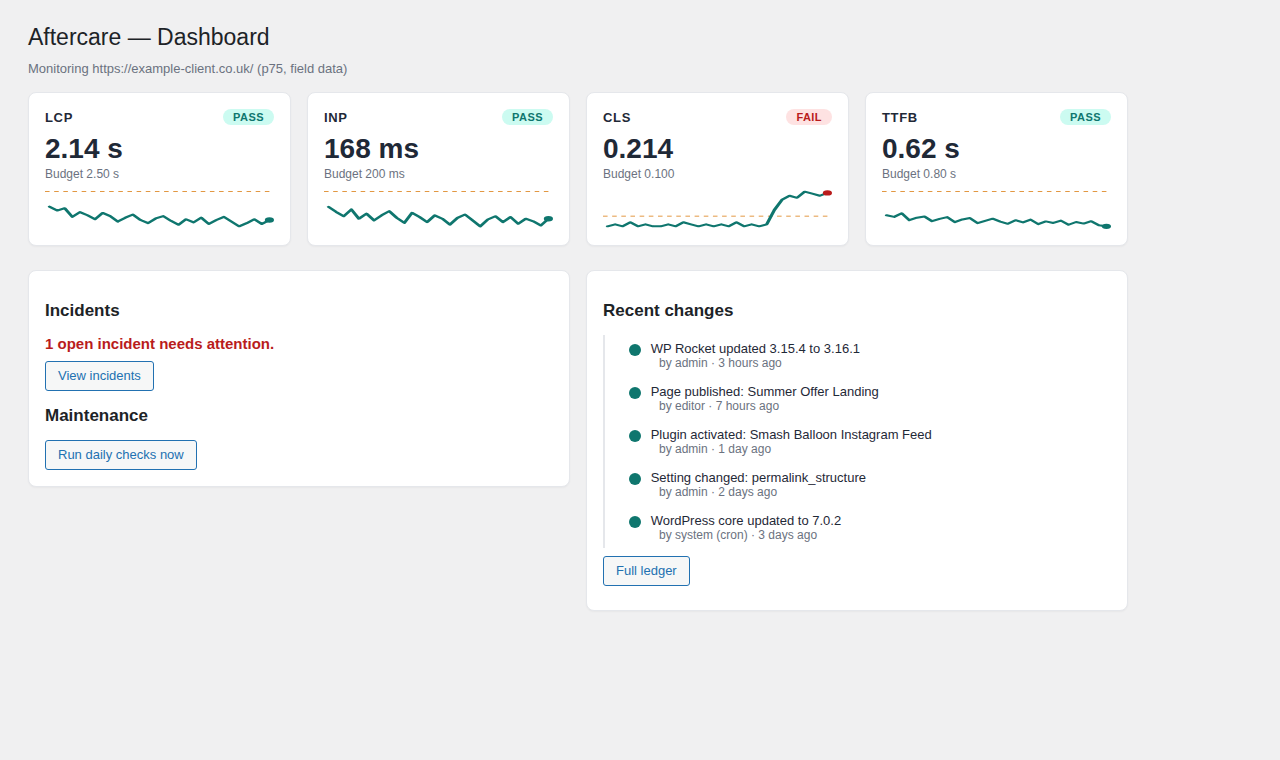
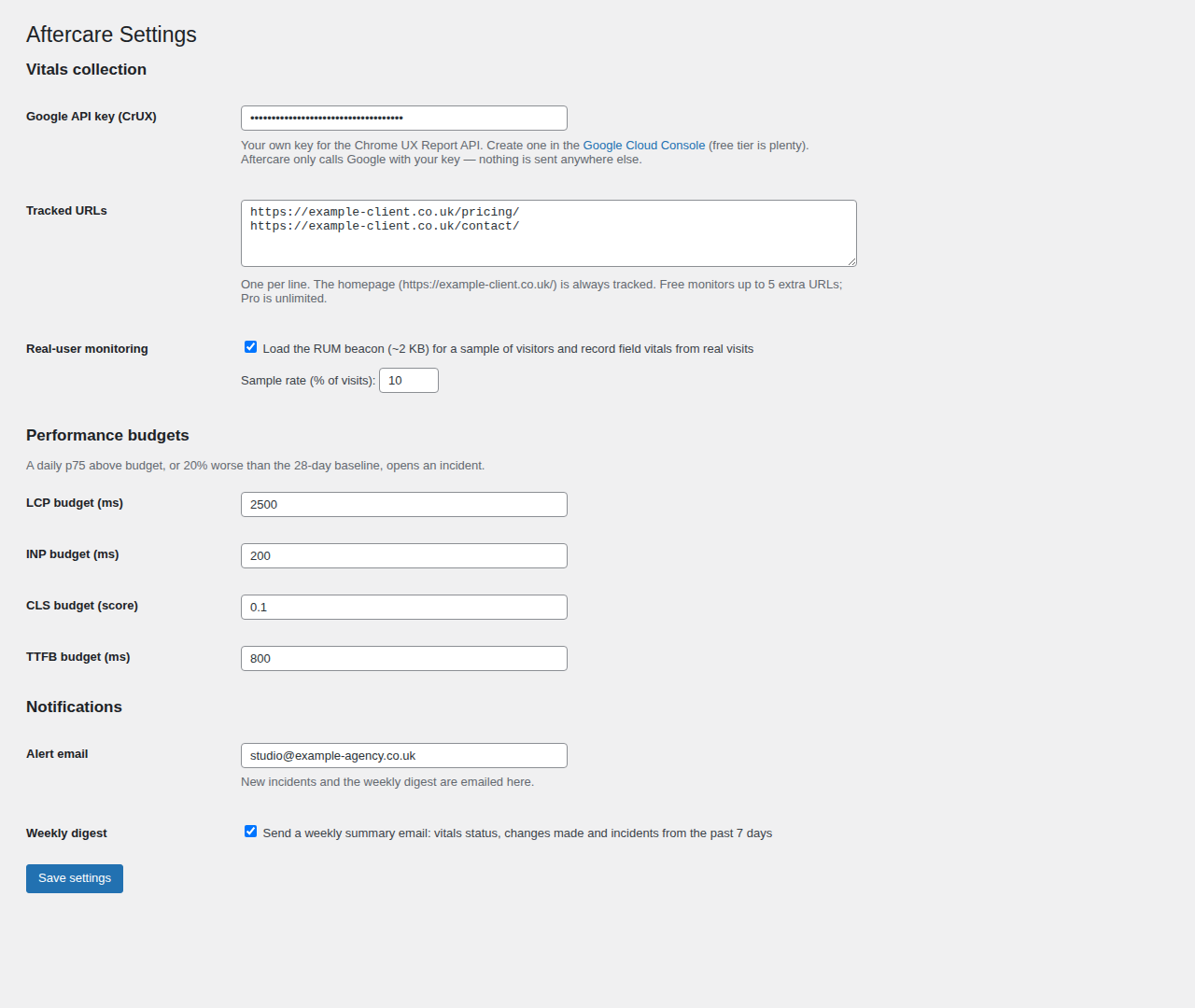
- Editable budgets per metric (defaults: LCP 2.5 s, INP 200 ms, CLS 0.1, TTFB 800 ms)
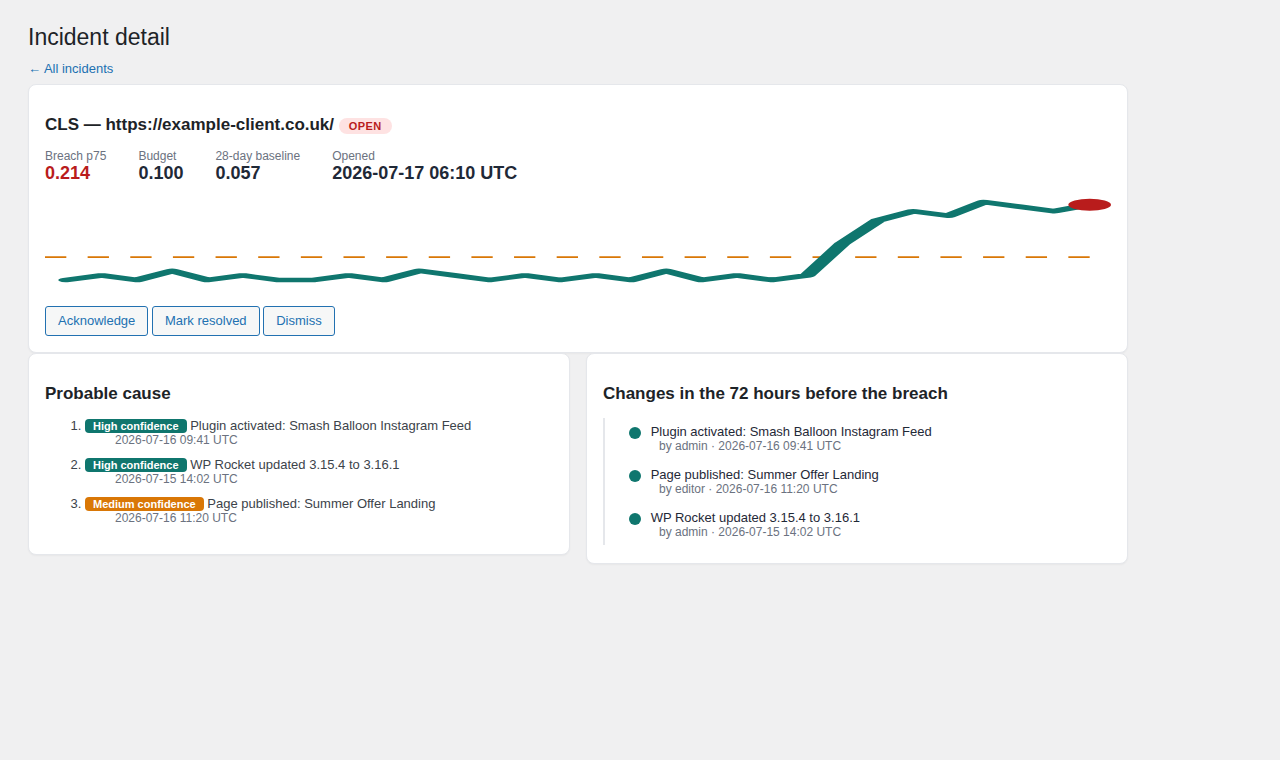
- A daily p75 over budget — or 20% worse than the 28-day baseline — opens an incident with the breach value, budget and baseline
- The baseline is built from the same data source as the reading it judges, and stays muted until 7 days of same-source history exist — so the day CrUX switches a thin URL-level record to origin-level, you get silence rather than a regression that never happened
- Email alert on every new incident; automatic resolution when the metric recovers
- Incident detail shows the raw change timeline from the 72 hours before the breach
📒 Change ledger
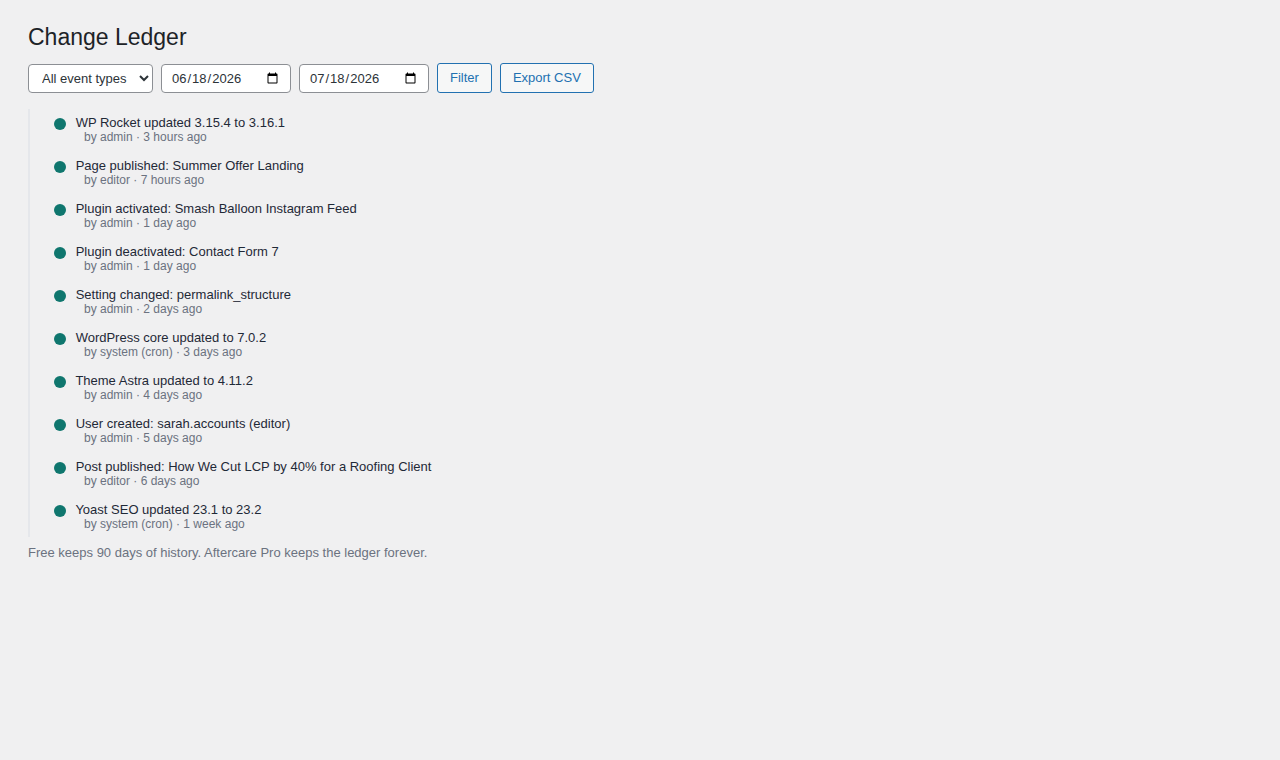
- Records plugin updates (old → new version), activations and deactivations, theme updates and switches, core updates, allow-listed settings changes (never secrets, values truncated), content publishes and new users
- Every entry is human-readable — "WP Rocket updated 3.15 to 3.16 by admin" — with actor and timestamp
- Filterable timeline by type and date, CSV export; 90 days of history
🧰 Fits into your workflow
- WordPress dashboard widget — vitals status pills and open incidents on the main wp-admin screen
- Admin bar indicator — a pass/warn/fail dot for administrators, on the front end too
- Site Health integration — tests for "API key configured", "daily checks running" and "budgets currently breached"
- WP-CLI commands —
wp aftercare pull,wp aftercare check,wp aftercare status,wp aftercare run; point a real server cron atwp aftercare runand skip WP-Cron entirely - Weekly digest email — vitals status, changes made and incidents from the past 7 days (opt-out in settings)
- First-run setup guide — a three-step pointer until vitals collection is configured
- Privacy-policy helper — suggested policy text for the RUM beacon via the WordPress privacy tools
🔒 Private by design
- No phoning home. CrUX calls go directly from your server to Google with your key; RUM beacons post to your own site's REST API; nothing is sent to us — there is no "us" to send it to
- All output escaped, all input sanitized, nonces and
manage_optionscapability checks on every form and route - Uninstall removes all tables and options unless you tick "keep data"
⚡ Quick start (under 5 minutes)
- Install and activate the plugin.
- Create a free Google API key with the Chrome UX Report API enabled.
- Paste it in Aftercare → Settings, optionally add tracked URLs and enable RUM.
- Press Run daily checks now on the dashboard — first vitals data appears immediately.
Aftercare Pro
The free plugin tells you that something regressed and what changed. Aftercare Pro tells you which change probably did it — and turns the month into client-ready proof:
- Cause attribution — every change from the 72 hours before a regression, ranked with high / medium / low confidence badges
- White-label monthly client reports — vitals vs last month, work performed, incidents caught and resolved; your logo, colours, personal note; print/PDF and email delivery
- Slack and webhook notifications, unlimited tracked URLs, per-URL budgets, 13-month history and unlimited ledger retention
Roadmap (free)
- Guided multi-step onboarding wizard (replacing the current setup notice)
- Multisite network awareness
- Agency Hub: a central dashboard aggregating many sites (the REST endpoints are already versioned and site-agnostic for this)
Screenshots
| Dashboard | Change Ledger |
|---|---|
 |
 |
| Incidents | Settings |
|---|---|
 |
 |
Development
- WordPress 6.4+, PHP 8.1+. Vanilla PHP with a light PSR-4 structure under the
Aftercare\namespace — no build step, no framework. - Distribution model: this repository contains the full (premium) codebase. The WordPress.org free build is produced with
wp dist-archive ., which excludes the premium-only files listed in.distignore(attribution engine, report builder, Slack/webhook notifiers) — directory guidelines forbid shipping locked functionality inside the free plugin. The free code degrades gracefully viaclass_exists()guards, so both builds run from the same source. - Cron uses Action Scheduler when available (e.g. WooCommerce installs), WP-Cron otherwise, with a health warning when WP-Cron looks unreliable.
aftercare.php          Bootstrap + PSR-4 autoloader
uninstall.php          Clean removal (respects "keep data" setting)
src/
  Core/                Container, activation, migrations, cron, options
  Vitals/              CrUX client, RUM REST endpoint + aggregation, breach detector
  Ledger/              Hook listeners, event storage and queries
  Incidents/           Incident storage + attribution engine
  Reports/             Monthly report builder (Pro)
  Admin/               Dashboard / Ledger / Incidents / Reports / Settings screens
  Notifications/       Email (free), Slack + webhook (Pro)
  Licensing/           Pro gating
assets/                Admin CSS/JS (dependency-free SVG sparklines), RUM beacon
templates/             Incident email, report template
languages/             POT + Romanian translation
Useful hooks:
| Hook | Type | Purpose |
|---|---|---|
aftercare_incident_opened / aftercare_incident_resolved |
action | Incident lifecycle (feeds notifications) |
aftercare_budget |
filter | Override a budget per metric/URL |
aftercare_is_pro |
filter | Unlock Pro features (development / service installs) |
aftercare_attribution_causes |
filter | Adjust ranked causes for an incident |
aftercare_pdf_engine |
filter | Plug in a PDF engine (e.g. dompdf) for reports |
QA shortcut: Dashboard → Run daily checks now runs the full daily pipeline (CrUX pull → RUM aggregation → breach detection → retention) on demand. Lower a budget below the current value and run it to force an incident and the alert email.
License
GPL-2.0-or-later.

Built and maintained by Costin Botez — Nomad Developer · @costinbotez
WordPress development, care plans and performance work for agencies and small businesses.