Install
This is the repository archive. It installs, but the folder name will carry the branch suffix and updates will not flow.
Install straight from GitHub with WP-CLI:
wp plugin install https://github.com/corsivo-suite/define-blocks/archive/refs/heads/master.zipCustom Gutenberg blocks from PHP. You write a schema, the plugin builds the editor UI.
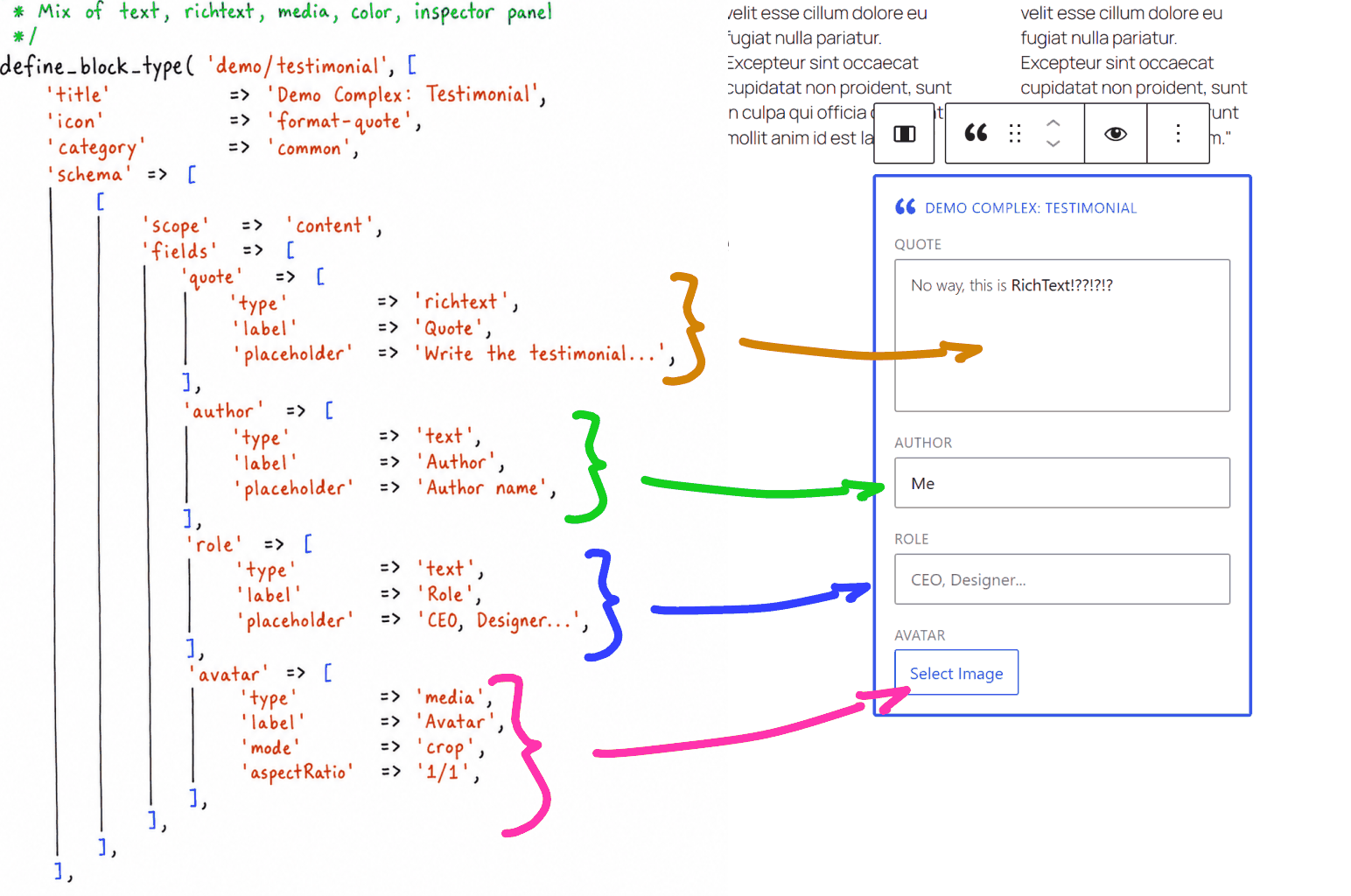 Each field in the PHP schema maps to a field in the block editor.
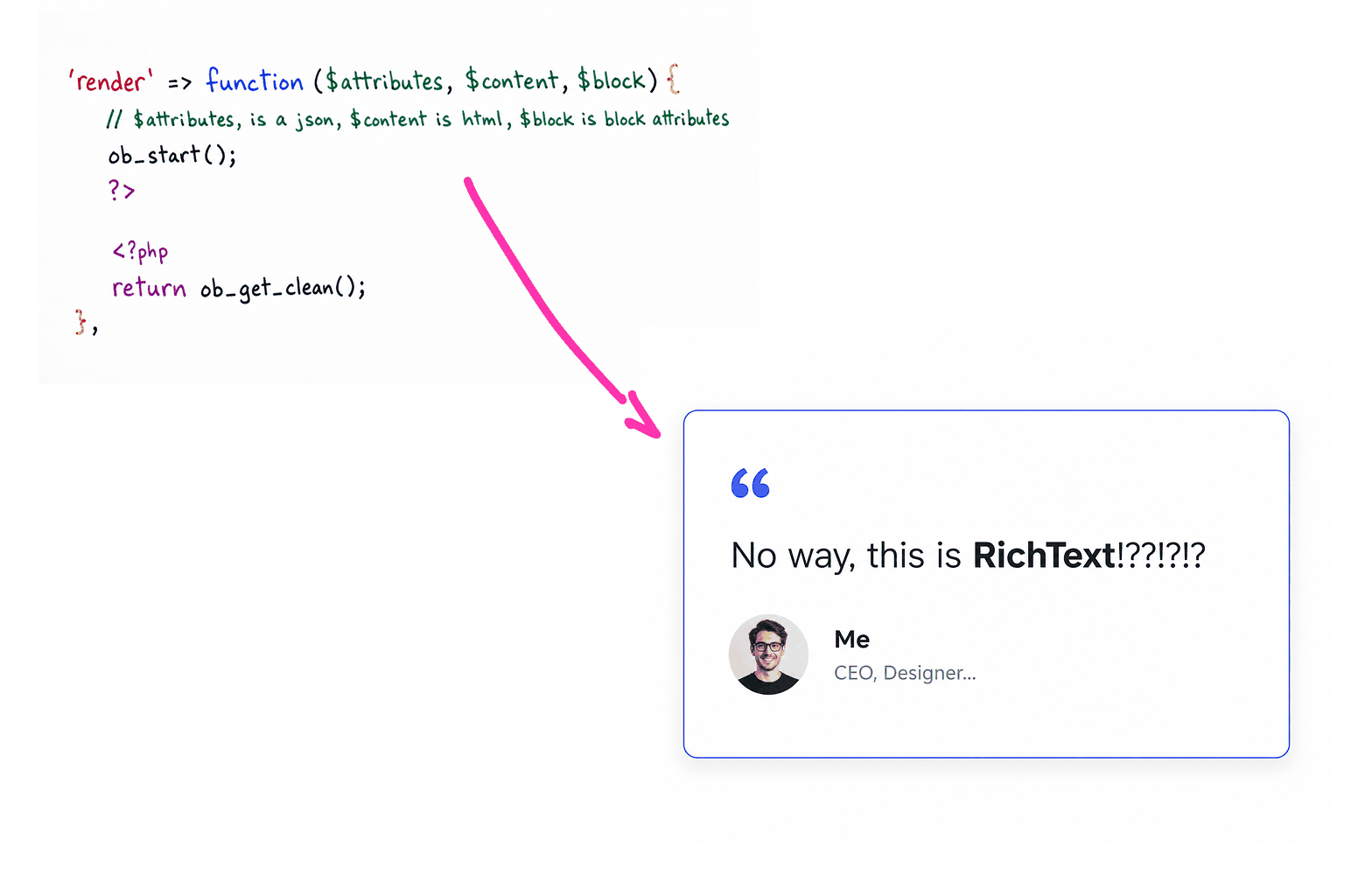 The render callback produces the frontend HTML.
add_action( 'init', function () {
    define_block_type( 'myplugin/hero', [
        'title'    => 'Hero',
        'icon'     => 'cover-image',
        'category' => 'design',
        'schema'   => [
            [
                'scope'  => 'content',
                'fields' => [
                    'heading' => [ 'type' => 'richtext', 'label' => 'Heading' ],
                    'image'   => [ 'type' => 'media',    'label' => 'Background' ],
                ],
            ],
            [
                'scope' => 'inspector',
                'panel' => 'Settings',
                'fields' => [
                    'overlay_color'   => [ 'type' => 'color', 'label' => 'Overlay' ],
                    'overlay_opacity' => [ 'type' => 'range', 'label' => 'Opacity', 'min' => 0, 'max' => 100 ],
                ],
            ],
        ],
        'render' => function ( $attributes, $content, $block ) {
            $values = $attributes['values'] ?? [];
            $heading = $values['heading'] ?? '';
            $image   = $values['image']['url'] ?? '';
            $color   = $values['overlay_color'] ?? 'rgba(0,0,0,0.5)';
            $opacity = ( $values['overlay_opacity'] ?? 50 ) / 100;

            return sprintf(
                '<div class="hero" style="background-image:url(%s)">
                    <div class="hero__overlay" style="background:%s;opacity:%s"></div>
                    <h1 class="hero__heading">%s</h1>
                </div>',
                esc_url( $image ),
                esc_attr( $color ),
                esc_attr( $opacity ),
                wp_kses_post( $heading )
            );
        },
    ] );
} );
No JavaScript on your side. No block.json. No build step. Under the hood it calls register_block_type() like any normal block -- you just never have to touch React.
WordPress 6.6+, PHP 8.1+.
Installation
Drop define-blocks into /wp-content/plugins/, activate, call define_block_type() from your theme or plugin.
Call it on the init hook (or earlier). Registrations are collected at init priority 99, so a block registered after that point is ignored.
The distributed plugin is self-contained and loads only editor/build. Its editor source uses the private @corsivo-suite/wp-admin-ui and @corsivo-suite/wp-admin-maps packages at the exact 0.1.0 version.
define_block_type() reference
define_block_type( 'namespace/block-name', [
    'title'       => 'Block Title',
    'description' => 'What this block does.',
    'icon'        => 'dashicon-slug',
    'category'    => 'design',
    'keywords'    => [ 'hero', 'banner' ],
    'supports'    => [],
    'settings'    => [],
    'schema'      => [],
    'render'      => null,
    'wrapperClass' => '',
] );| Key | Type | Description |
|---|---|---|
title |
string |
Block title in the inserter |
description |
string |
Block description |
icon |
string |
Dashicon slug (without dashicons- prefix) |
category |
string |
Block category: text, media, design, widgets, theme, embed |
keywords |
array |
Search keywords for the inserter |
supports |
array |
WP block supports -- see below |
settings |
array |
Editor behavior -- see below |
schema |
array |
Field definitions -- see Schema |
render |
callable\|string\|null |
Render callback, file path, or null to auto-derive |
wrapperClass |
string |
Extra CSS class on the block wrapper <div> |
parent |
string[] |
Offer this block only as a direct child of the listed block types |
ancestor |
string[] |
Offer this block anywhere inside the listed ancestor types |
usesContext |
string[] |
Native context values consumed by the block |
providesContext |
array |
Native context-name to top-level attribute-name mapping |
Nested blocks and context
These optional properties belong beside schema and render in define_block_type(). They are passed to both WordPress registrations. parent and ancestor control insertion in Gutenberg; they do not remove previously saved blocks or replace the container's allowedBlocks setting.
For example, an item can declare 'parent' => [ 'site/collection' ] and 'usesContext' => [ 'site/collectionValues' ]. The collection declares 'providesContext' => [ 'site/collectionValues' => 'values' ] to make its values available to descendants that request that context.
WordPress maps providesContext to a top-level attribute. Define Blocks stores schema fields together in values, so provide that complete object and read the required key from it. A mapping to values.layout does not select an individual field. No additional attributes or copies of field values are created.
Provided context follows the native attribute values, including top-level defaults registered on the block type. Per-post field defaults applied inside the PHP renderer do not retroactively alter descendant context. The editor applies field defaults to its normal values attribute; once saved, those values are available to consumers as usual.
Context reaches the native editor edit props and the PHP renderer through $block->context. The server also consumes postId and postType to resolve the current post's definition, including within a Query Loop. Declare them in usesContext when your editor code needs them. Context is not available to Gutenberg's save function.
Settings
'settings' => [
    'frontendPreview' => true,
    'startPreview'    => true,
    'canCollapse'     => false,
    'hideTitle'       => false,
],| Key | Type | Default | Description |
|---|---|---|---|
frontendPreview |
bool |
false |
Server-side preview in the editor |
startPreview |
bool |
false |
Open in preview mode when inserted |
canCollapse |
bool |
false |
Collapsible content area |
hideTitle |
bool |
false |
Hide the block title bar |
Shorthand: 'frontend_preview' => true at the top level sets both frontendPreview and startPreview.
InnerBlocks stays mounted while the block is collapsed or in preview, so templates initialize even with startPreview. Save validation follows the document's block tree, including children whose editor controls are currently hidden.
Block supports
Every block gets these by default:
[
    'align'           => true,
    'alignWide'       => true,
    'html'            => true,
    'customClassName' => true,
    'color'           => [ 'background' => true, 'text' => true, 'gradients' => true ],
]
Spacing and dimensions are opt-in — declare them explicitly to get the Dimensions panel:
'supports' => [
    'spacing'    => [ 'margin' => true, 'padding' => true, 'blockGap' => true ],
    'dimensions' => [ 'minHeight' => true ],
],
Override through supports. Full list in the WP docs.
Schema diagnostics
With WP_DEBUG enabled, invalid declarations produce a developer notice through _doing_it_wrong(), including the block name and field path. Checks cover unknown properties and field types, invalid scope/field structures, duplicate names in the same saved values object, malformed conditions, missing field references, and unsupported InnerBlocks placement. A block can have one InnerBlocks area; placing it inside a repeater is unsupported.
Missing render callbacks are valid and do not produce a notice. Diagnostics do not prevent registration of otherwise usable blocks. defb_schema_diagnostics( $definition ) returns the diagnostic entries without emitting notices, including when WP_DEBUG is disabled.
Custom types registered with a PHP sanitizer are recognized automatically. Bundles can also declare their types with defb_register_custom_field( __FILE__, [ 'my-custom-type' ] ). The original one-argument call remains supported; since its JavaScript types cannot be known in PHP, unknown-type notices are suppressed when such a bundle is present. Use defb_schema_field_types and defb_schema_field_properties to declare extensions to those registries.
Schema
The schema says what fields your block has and where they go in the editor. Each entry has a scope that puts the fields in a specific area.
Scopes
'schema' => [
    // Main block canvas
    [
        'scope'  => 'content',
        'fields' => [ ... ],
    ],

    // Sidebar panel
    [
        'scope'       => 'inspector',
        'panel'       => 'My Settings',
        'icon'        => 'admin-generic',
        'initialOpen' => true,
        'fields'      => [ ... ],
    ],

    // Advanced section in the sidebar
    [
        'scope'  => 'inspector-advanced',
        'fields' => [ ... ],
    ],

    // Toolbar
    [
        'scope'  => 'toolbar',
        'fields' => [ ... ],
    ],

    // Toolbar dropdown
    [
        'scope' => 'toolbar-dropdown',
        'icon'  => 'ellipsis',
        'label' => 'More options',
        'fields' => [ ... ],
    ],
],
You can repeat scopes -- they get appended. Multiple inspector entries make separate panels.
Shorthand
If all fields go in the content area, skip the scope wrapper:
'schema' => [
    'heading' => [ 'type' => 'richtext', 'label' => 'Heading' ],
    'text'    => [ 'type' => 'textarea', 'label' => 'Body text' ],
],
Field types
Text and content
| Type | Aliases | What it is |
|---|---|---|
text |
target, number |
Single-line input |
text-with-parser |
textwithparser, text_with_parser |
Text input with a custom parsing hook |
textarea |
text-area, code, json |
Multiline input |
richtext |
rich-text, rich_text, editor, classic-editor |
Rich text (WYSIWYG) |
Selection
| Type | Aliases | What it is |
|---|---|---|
select |
radio |
Dropdown, single value |
multi-select |
multiselect, multi_select, select-multi |
Dropdown, multiple values |
autocomplete |
combobox |
Searchable dropdown |
multi-autocomplete |
multiautocomplete, multi_autocomplete |
Searchable, multiple values |
chips |
tokenfield |
Tag/token input |
checkbox |
toggle, switch |
Boolean |
Media
| Type | Aliases | What it is |
|---|---|---|
media |
image, img, picture |
Image picker |
file |
-- | File upload |
gallery |
-- | Multiple images |
video |
-- | Video picker |
Data
| Type | Aliases | What it is |
|---|---|---|
color |
-- | Color picker |
url |
-- | URL input |
link |
cta, button |
Link (text + URL + target) |
range |
-- | Slider with min, max, step |
time |
-- | Time picker |
date |
datepicker |
Date picker |
datetime |
datetimepicker |
Date and time |
post-selector |
postselector, post_selector |
Search and pick a post |
taxonomy |
-- | Term selector |
Structural
| Type | Aliases | What it is |
|---|---|---|
repeater |
-- | Repeating field group, drag & drop |
group |
-- | Groups fields visually, no repetition |
tabpanels |
tabpanel, tab-panels, tabs |
Tabbed groups |
innerblocks |
innerblock, inner-block, inner-blocks |
WP InnerBlocks |
Maps
| Type | Aliases | What it is |
|---|---|---|
google-map |
map, maps, map-target, map-bounds |
Google Maps |
google-geocoder |
geocoder, google-geocode |
Google address search |
mapbox-map |
mapbox |
Mapbox-styled map rendered with Leaflet |
mapbox-geocoder |
mapbox-geocode |
Mapbox address search |
osm-map |
osm, openstreetmap, leaflet |
OpenStreetMap |
osm-geocoder |
osm-geocode, openstreetmap-geocoder |
OpenStreetMap address search |
Toolbar-only
| Type | What it is |
|---|---|
toolbar-toggle |
Toggle button |
toolbar-select |
Dropdown select |
toolbar-dropdown |
Grouped buttons in a dropdown |
Special
| Type | What it is |
|---|---|
hidden |
Not rendered, stores a value |
value |
Read-only display |
title |
Label/heading, no data |
Field properties
'my_field' => [
    'type'        => 'text',
    'label'       => 'My field',
    'default'     => '',
    'description' => 'Help text below the field.',
    'placeholder' => 'Type something...',
    'width'       => '50',
    'style'       => [ 'marginTop' => '10px' ],
    'visible'     => true,
    'condition'   => [ 'other_field' => 'some_value' ],
    'saveInMeta'  => 'my_meta_key',
    'validate'    => [ 'required' => true ],
],| Property | Type | What it does |
|---|---|---|
type |
string |
Required. Accepts aliases. |
label |
string |
Field label |
default |
mixed |
Default value |
description |
string |
Help text below the field |
placeholder |
string |
Placeholder |
width |
string |
Width as percentage, e.g. "50" |
style |
array |
Inline CSS as key-value pairs |
visible |
bool |
Show/hide |
condition |
array\|string |
Show when condition matches |
conditionHide |
array\|string |
Hide when condition matches |
saveInMeta |
string |
Save as post meta with this key |
validate |
array\|callable |
Validation rules, runs on save (PHP side) |
saveCallback |
callable |
Custom save logic -- gets $value, $post_id, $field_name |
Per-type properties
select, multi-select, autocomplete, multi-autocomplete take an options array:
'my_select' => [
    'type'    => 'select',
    'label'   => 'Layout',
    'options' => [
        [ 'label' => 'Grid',  'value' => 'grid' ],
        [ 'label' => 'List',  'value' => 'list' ],
        [ 'label' => 'Carousel', 'value' => 'carousel' ],
    ],
],
range takes min, max, step:
'opacity' => [
    'type' => 'range',
    'label' => 'Opacity',
    'min'   => 0,
    'max'   => 100,
    'step'  => 5,
],
color accepts enableAlpha => true; alpha colors keep their CSS rgba() or eight-digit hexadecimal value through REST previews and saveInMeta.
media stores an object: id, url, alt, title, sizes.
repeater has sub-fields, min/max items, and a previewKey for the collapsed label. Direct sub-fields with inline => true are rendered once in the item header instead of the expanded body:
'items' => [
    'type'       => 'repeater',
    'label'      => 'Items',
    'min'        => 1,
    'max'        => 10,
    'previewKey' => 'title',
    'fields'     => [
        'color'       => [ 'type' => 'color', 'label' => 'Color', 'inline' => true ],
        'title'       => [ 'type' => 'text', 'label' => 'Title', 'inline' => true ],
        'description' => [ 'type' => 'textarea', 'label' => 'Description' ],
        'image'       => [ 'type' => 'media', 'label' => 'Image' ],
    ],
],
inline is available to every field type. The field keeps its normal conditions and validation; the schema author is responsible for choosing controls that fit on a single header row. Nested fields are not promoted by an inline flag declared inside a group or tab panel.
Explicit defaults are applied recursively to new and existing repeater rows, including fields inside groups and tabs. Groups and tabs share their containing row's values object. Existing values, unknown keys, and row IDs are preserved; an explicit empty string or null does not receive a default. Numeric fields retain numeric values through editing, conditions, preview, and server-side reads.
tabpanels groups fields into tabs:
'settings' => [
    'type' => 'tabpanels',
    'tabs' => [
        [
            'name'   => 'general',
            'title'  => 'General',
            'fields' => [
                'title' => [ 'type' => 'text', 'label' => 'Title' ],
            ],
        ],
        [
            'name'   => 'style',
            'title'  => 'Style',
            'fields' => [
                'color' => [ 'type' => 'color', 'label' => 'Color' ],
            ],
        ],
    ],
],
post-selector needs a post type (same postType key powers remote search on select, autocomplete, multi-autocomplete and link):
'featured_post' => [
    'type'     => 'post-selector',
    'label'    => 'Featured Post',
    'postType' => 'post',
],
taxonomy needs a taxonomy name:
'category' => [
    'type'     => 'taxonomy',
    'label'    => 'Category',
    'taxonomy' => 'category',
],
The selector searches terms after the first character instead of downloading the full taxonomy. Results are paginated, hierarchical labels include their ancestor path, and existing selections are hydrated in batches without changing the saved { value, label } shape. allowCreate => true continues to use the taxonomy's native REST controller.
google-map and google-geocoder use the Google Maps key:
add_filter( 'defb_google_maps_key', fn() => 'YOUR_API_KEY' );The Google Maps API is loaded on demand by @corsivo-suite/wp-admin-maps; Define Blocks does not enqueue a second global Maps script.
mapbox-map and mapbox-geocoder use the Mapbox token:
add_filter( 'defb_mapbox_key', fn() => 'YOUR_MAPBOX_TOKEN' );mapbox-map uses the Mapbox Static Tiles and Geocoding APIs without bundling the Mapbox GL SDK. styleUrl accepts mapbox://styles/{owner}/{style}, Mapbox Styles API URLs, raster tile templates and inline raster style objects containing a tiles source. Vector style objects and Mapbox Standard cannot be rendered through Static Tiles: the editor reports the fallback and uses Streets v12. The field type, saved value shape, search, click selection and draggable pin remain backward compatible. Custom attribution is appended without removing the required Mapbox and OpenStreetMap attribution; use it for any additional credits required by custom data sources. Static Tiles usage is billed by Mapbox per API request. Geocoding requests always set permanent=true because selected results are persisted in block attributes; the Mapbox account and plan must permit permanent result storage.
osm-map and osm-geocoder use explicit Search/Enter with the public Nominatim service; typing alone does not send requests. Public search and reverse lookups share a queue and a bounded cache within the editor page. This queue coordinates that page, not concurrent users across a site. Configure searchEndpoint and reverseEndpoint for a dedicated Nominatim-compatible service when broader traffic coordination is needed; dedicated search endpoints retain autocomplete.
innerblocks wraps WP's InnerBlocks:
'content' => [
    'type'            => 'innerblocks',
    'allowedBlocks'   => [ 'core/paragraph', 'core/heading', 'core/image' ],
    'template'        => [
        [ 'core/heading', [ 'placeholder' => 'Title...' ] ],
        [ 'core/paragraph', [ 'placeholder' => 'Content...' ] ],
    ],
    'templateLock'    => false,
],
Conditional visibility
Show or hide fields based on another field's value.
Array form -- field columns appears only when layout is grid:
'layout' => [
    'type'    => 'select',
    'label'   => 'Layout',
    'options' => [
        [ 'label' => 'Grid',     'value' => 'grid' ],
        [ 'label' => 'Carousel', 'value' => 'carousel' ],
    ],
],
'columns' => [
    'type'      => 'range',
    'label'     => 'Columns',
    'min'       => 1,
    'max'       => 6,
    'condition' => [ 'layout' => 'grid' ],
],
'autoplay' => [
    'type'      => 'checkbox',
    'label'     => 'Autoplay',
    'condition' => [ 'layout' => 'carousel' ],
],
String expressions for anything more complex:
'condition' => 'layout == "grid" && columns > 2',
'condition' => 'show_overlay == true || layout == "hero"',
'condition' => 'items !empty',
Operators: ==, !=, >, <, >=, <=, &&, ||, empty, in, contains.
To invert the logic (visible by default, hidden when matched), use conditionHide or the hide alias:
'advanced_settings' => [
    'type'          => 'group',
    'conditionHide' => [ 'simple_mode' => true ],
    'fields'        => [ ... ],
],
Render
The callback gets three arguments:
'render' => function ( array $attributes, string $content, WP_Block $block ) {
    $values = $attributes['values'] ?? [];
    return '<div>' . esc_html( $values['heading'] ?? '' ) . '</div>';
},
Field values live in $attributes['values'] as a flat array. The output gets wrapped in <div> with get_block_wrapper_attributes() -- you don't have to do that yourself.
How render is resolved
The plugin tries these in order:
renderis a callable (closure or function name) -- calls itrenderis a file path -- includes it as a template (receives$attributes,$content,$block)renderis null -- looks for a function matching the block name:myplugin/hero-bannertriesmyplugin_hero_banner_render()- Nothing matched -- returns the raw InnerBlocks content
Declare the block in the site plugin and define its render callback in whichever plugin or theme owns its presentation. Callback availability is checked when rendering, so a theme function does not need a second frontend registration. Without a matching renderer, a block with children returns their content and a block without children produces no output.
Schema defaults are resolved for the post being rendered, using the same per-post defb_register definition as the Read API and preview. Declare block types globally; use the post-specific filter to adjust their definitions and defaults. Native metadata such as parent and providesContext belongs to the block type and should remain stable between posts.
Keep frontend CSS and JavaScript next to that renderer and load them with the native WordPress asset APIs, such as wp_enqueue_block_style() and the script enqueue hooks. Theme ownership is optional. Custom React fields continue to supply editor controls; they do not automatically become frontend JavaScript. Preview CSS can still be supplied through defb_preview_style.
So you can do any of these:
'render' => function ( $attributes, $content, $block ) { ... },
'render' => 'myplugin_hero_render',
'render' => get_template_directory() . '/blocks/hero.php',
'render' => null, // will look for myplugin_hero_render()
Saving to post meta
Put saveInMeta on a field and its value gets written to post_meta on every save:
'featured_label' => [
    'type'       => 'text',
    'label'      => 'Featured Label',
    'saveInMeta' => 'featured_label',
],
The value stays in $attributes['values'] too (that's what the editor uses), but now you can also query it:
$posts = get_posts( [
    'meta_key'   => 'featured_label',
    'meta_value' => 'Breaking',
] );
The old name persistAs still works.
Custom save logic
saveCallback runs on save and lets you do whatever you want:
'price' => [
    'type'         => 'text',
    'label'        => 'Price',
    'saveCallback' => function ( $value, $post_id, $field_name ) {
        update_post_meta( $post_id, 'product_price', floatval( $value ) );
    },
],
Validation on save
'email' => [
    'type'     => 'text',
    'label'    => 'Email',
    'validate' => function ( $value, $key, $post_id ) {
        if ( ! is_email( $value ) ) {
            return false;
        }
        return true;
    },
],
Return false or a string to skip saving the field.
Both normal saves and /defb/v1/meta normalize field values before validation. Validators and saveCallback receive the normalized value that is eligible for persistence. Malformed shapes and values that fail validation do not update their meta mirrors. The meta endpoint returns a field error instead of bypassing validation.
Authenticated saves also require edit_post_meta for each mirrored key, honoring registered meta authorization callbacks. Programmatic save_post calls without a current user retain the normal WordPress ability to update metadata; the REST endpoints still require an authorized user. A saveCallback owns the authorization of any additional writes it performs.
The save_post hook validates mirror writes after WordPress has stored the post. It does not reject or rewrite post_content. The editor's document validation prevents saving invalid visible fields, including invalid fields in hidden child editors; external integrations must validate their own content writes.
Read API
Get block values from any post, without parsing blocks yourself.
defb_get_block() returns the first instance:
$values = defb_get_block( $post_id, 'myplugin/hero' );
// [ 'heading' => '...', 'image' => [...], ... ]

$heading = defb_get_block( $post_id, 'myplugin/hero', 'heading' );
// 'Hello World'
defb_get_blocks() returns all instances (for blocks that appear more than once):
$slides = defb_get_blocks( $post_id, 'myplugin/slide' );
// [ [ 'title' => '...', ... ], [ 'title' => '...', ... ] ]
Both search into InnerBlocks recursively.
Server-side preview
Show the rendered block right in the editor:
define_block_type( 'myplugin/hero', [
    'frontend_preview' => true,
    ...
] );
This calls your render callback via REST and shows the HTML in the editor. To load styles into the preview, use the filter:
add_filter( 'defb_preview_style', function ( $sources ) {
    $sources[] = get_template_directory() . '/assets/css/blocks.css';
    return $sources;
} );
You can also set frontendPreview and startPreview separately in settings if you want the preview available but not active by default.
Preview requests are debounced and keep the last successful HTML visible while refreshing. Obsolete requests are cancelled and ignored. A short-lived cache includes attributes, child content, and block context, so previews with different inherited values are kept separate.
Custom field types
You can register your own types from a separate plugin.
PHP side -- in your plugin's main file:
defb_register_custom_field( __FILE__ );This loads build/index.js (and build/style-index.css if it exists) when the block editor opens.
JS side -- register a React component:
const { createElement } = wp.element;

function MyCustomField( { name, field, value, onChange } ) {
    return createElement( 'div', { className: 'my-custom-field' },
        createElement( 'input', {
            type: 'text',
            value: value || '',
            onChange: ( e ) => onChange( e.target.value ),
        } )
    );
}

window.DefineBlocks.Extensions['my-custom-type'] = MyCustomField;
Custom fields that store structured values can register a server-side sanitizer for REST previews:
defb_register_custom_field_sanitizer(
    'my-custom-type',
    static function ( mixed $value, array $field ): array {
        return is_array( $value ) ? $value : [];
    }
);
Without a registered sanitizer, unknown field types fall back to the recursive text sanitizer.
Then use it in any schema:
'my_field' => [ 'type' => 'my-custom-type', 'label' => 'Custom' ],Props your component gets:
| Prop | Type | What it is |
|---|---|---|
name |
string |
Field key in the values object |
id |
string |
Unique DOM ID for the control and its associated label; distinct from the saved field name |
context |
object |
Inherited Gutenberg context requested by the block's usesContext declaration |
field |
object |
The full field definition from the schema |
value |
mixed |
Current value |
onChange |
function |
Call with the new value |
onBlur |
function |
Call on blur (triggers validation) |
Hooks and filters
PHP
| Hook | Type | What it does |
|---|---|---|
defb_register |
filter | Collects block registrations. Gets (array $blocks, ?int $post_id) |
defb_preview_style |
filter | CSS file paths or raw CSS for the preview scope |
defb_google_maps_key |
filter | Google Maps API key |
defb_editor_debug |
filter | Enable conditional console diagnostics for field render failures |
defb_schema_field_types |
filter | Extend the field types recognized by PHP schema diagnostics |
defb_schema_field_properties |
filter | Extend recognized field properties; receives the property list and block definition |
JS
| Hook | Type | What it does |
|---|---|---|
defb.blockSettings |
filter | Modify settings before registerBlockType() |
defb.ready.{blockName} |
action | Fires when a block instance mounts |
defb.change.{blockName}.{field} |
action | Fires when a field value changes |
defb.toggle.{blockName}.{field} |
action | Fires when a checkbox is toggled |
defb.toolbar.toggle |
action | Fires when a toolbar toggle changes |
defb.parse.{parser} |
filter | Custom parsing for text-with-parser fields |
defb.fieldRenderError |
action | Receives (error, details) when a lazy field fails to render |
These use the @wordpress/hooks API:
wp.hooks.addFilter( 'defb.blockSettings', 'myplugin', ( settings, blockName ) => {
    if ( blockName === 'myplugin/hero' ) {
        settings.icon = 'star-filled';
    }
    return settings;
} );

wp.hooks.addAction( 'defb.change.myplugin/hero.heading', 'myplugin', ( value, context ) => {
    console.log( 'Heading changed to:', value );
} );
JS namespace
window.DefineBlocks = {
    Registry: {},       // block definitions by name
    Instances: {},      // runtime instances by name/clientId
    Extensions: {},     // third-party field components
    Shared: {},         // shared deps for extensions
};
Development checks
From editor, run npm test -- --watch=false, npm run lint, and npm run build. The plugin loads the generated files in editor/build.
From the plugin directory, run php tests/php/run.php, php tests/php/values.php, and php tests/php/registration.php. The last runner uses the surrounding WordPress checkout, or the directory supplied through DEFB_WP_ROOT, to exercise native block rendering and context. These runners isolate persistence in memory and do not boot the site or access its database.
Credits
By Salvatore Corsi. With thanks to QZR Studio.
License
GPL-2.0-or-later
Bundled dependency licenses are listed in THIRD_PARTY_NOTICES.md.