Cornerstone Builder Integration for Polylang WP Registry grade A. No security issues foundWP RegistryNo security issues foundOpen the reportA
Theme.co Pro theme and Polylang integration
Install
Upload it under Plugins → Add New Plugin → Upload Plugin, then activate.
Install straight from GitHub with WP-CLI:
wp plugin install https://github.com/controlzetadigital/polylang-tcopro/releases/download/v1.5.1/polylang-tcopro-1.5.1.zipIntegrates Polylang with Cornerstone Builder (Pro Theme / X Theme): language picker in the builder, layout language assignment, and translation creation from the builder UI.
Information
Contributors: ControlZetaDigital
Tags: polylang, cornerstone, multilanguage, themeco, translation
Donate Link Donate link: https://donate.stripe.com/4gwg177xifrsfSgcMN
Requires at least: 5.4
Tested up to: 7.0
Requires PHP: 7.4
Stable tag: 1.5.1
License: GPLv2 or later
License URI: https://www.gnu.org/licenses/gpl-2.0.html
Description
A simple plugin that integrates Polylang multilanguage plugin with layout, headers and footers contents created with Cornerstone builder in Pro themes by Theme.co
Installation
For detailed installation instructions, please read the standard installation procedure for WordPress plugins.
How to use
Language assignment
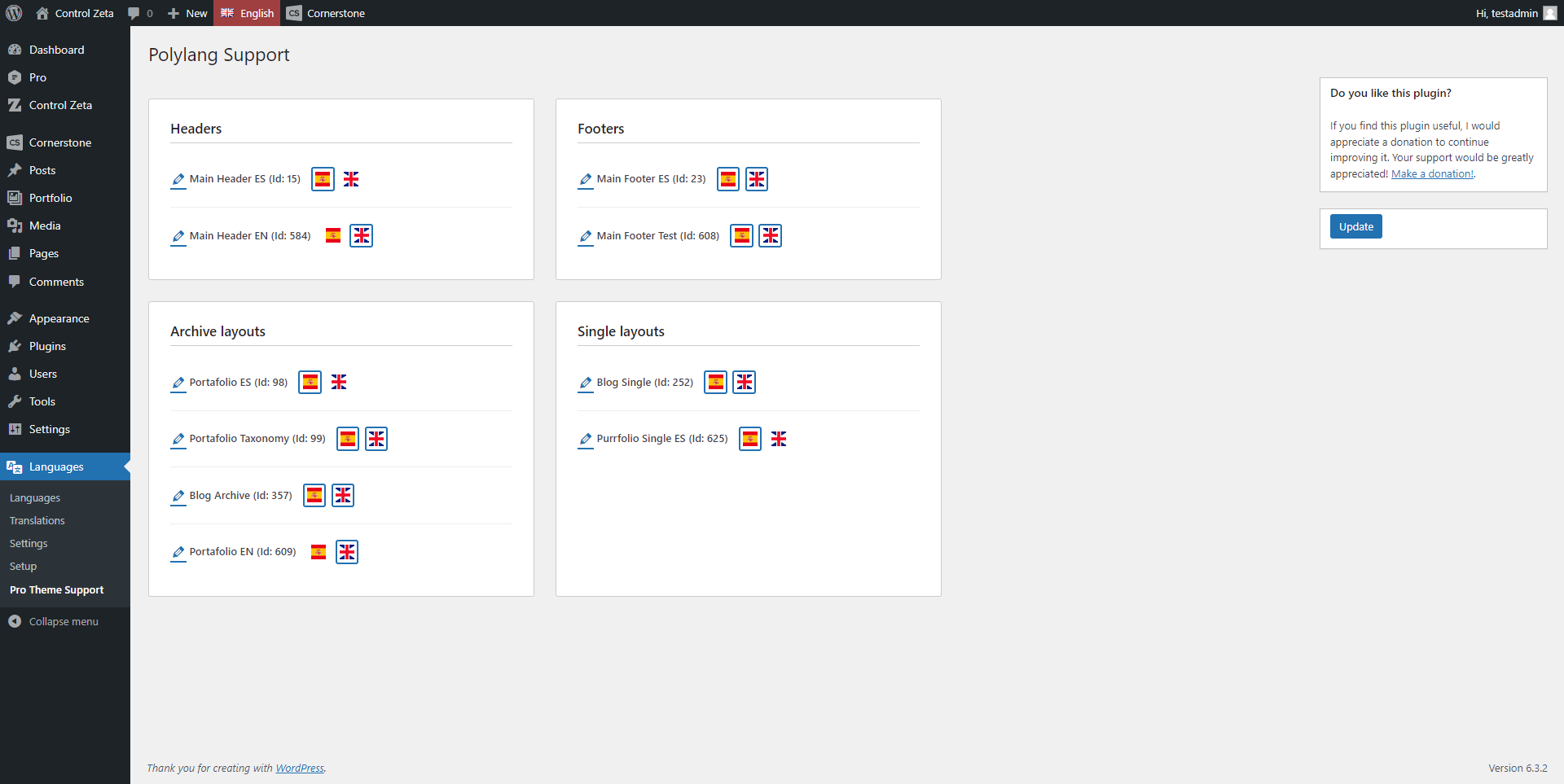
Assign each active language with Pro elements you have made in settings. You can find this plugin's settings in Wordpress admin menu Languages -> Pro Theme Support.
You can assign each CS element to one or multiple active languages. Just click on the flag to select or deselect the assignment. The native CS assignment will be applied alongside the language assignment of this plugin, so if you have multiple elements of the same type assigned to the same language, the assignment conditions and priorities you have defined in CS will be applied.
Language CS provider
This plugin also includes a custom looper provider that returns the languages configured in Polylang, allowing it to be used in Cornerstone with its respective functionality (see the custom looper provider documentation for details). To call the provider, you should use the languages key in the Custom field. Its purpose is to facilitate the integration of a language selector in Cornerstone templates and layouts. The provider returns two variables: current, which contains the slug of the current language, and languages, which returns the list of languages configured on the website (for more information, refer to the documentation for pll_the_languages).
Screenshots
- Plugin settings
Do you wanna help?
If you want to collaborate in improving this plugin and have any ideas to do so, feel free to clone this repository, create your own branch, and make your pull requests.
Also, if you've found it helpful and want to help me continue improving it, you can make a donation here.
Changelog
1.5.1
Fixed
- Components (cs_global_block) now appear in the builder document list across all language views.
- "Copy from" dropdown in the builder translate popup no longer appears empty for CS layout types not yet linked in Polylang.
1.5.0
Added
- Full Cornerstone builder language UI support, replicating CS's native WPML integration for Polylang sites.
- Language picker in the builder (language switcher and document list filter).
- Create translations of pages, posts and CS layouts directly from the builder UI.
- CS layout types (headers, footers, archives, singles) visible in all language views in the builder document list.
- Global block (Component) language resolution: Components resolve to their Polylang translation for the current language.
- WooCommerce Archive layout builder preview now loads the correct language shop page.
- Preview frame fix for Polylang directory mode: prevents canonical redirect from breaking the builder preview.
- App URL fix for directory mode: bypasses Polylang's home_url() filter so the builder URL is always reachable.
- Polylang Pro compatibility: excludes language assignment meta from Pro's copy/sync to prevent cross-language overwrites.
1.4.0
Added
- WooCommerce Single and Archive layout support (cs_layout_single_wc / cs_layout_archive_wc via cs_match_layout-single-wc_assignment and cs_match_layout-archive-wc_assignment).
1.3.1
Added
- Integrate plugin-update-checker v5.6 for automatic updates from GitHub releases.
1.3.0
Refactor
- Replace WordPress Plugin Boilerplate with namespaced PSR-4 classes.
- Add
spl_autoload_registerautoloader forPolylangTcoPro\namespace. - Extract dependency checks and admin notices to
Bootstrapclass. - Move integration logic, admin UI and plugin bootstrap to
src/. - Rename and reorganize admin views, remove boilerplate docblocks.
Improved
- Optimize DB query in
getItems()to select only required columns. - Add null check for
json_decode()result ingetItems(). - Use spaceship operator in priority sorting.
- Deduplicate admin hook string via class constant.
- Add
defined('WPINC')guard to all view partials.
1.2.0
Security
- Fix SQL injection vulnerability in
get_items()using$wpdb->prepare(). - Add
current_user_can()check and sanitize POST input inupdate(). - Escape all output in admin views to prevent XSS.
Fixed
- Sync internal version constant with plugin header.
- Replace always-true
isset($_POST)with!empty($_POST). - Remove deprecated
&$thissyntax. - Remove dead AJAX hook registration.
Cleanup
- Implement post_meta cleanup on plugin uninstall.
- Remove unused options property and
settings()method.
1.1.5
Fixed
- Fixed Pro theme detection when using child themes.
- Improved activation notice with diagnostic information.
1.1.4
Fixed
- Fixed SQL query to exclude trashed records by enforcing
post_status = tco-data.
1.1.3
Fixed
- Fixed plugin header version (1.1.2 incorrectly showed as 1.1.1).
- Update readmes and tested up to 6.9
No functional changes.
1.1.2
- Fix: The use of 'prepare' in the SQL query within 'get_items' has been discontinued as placeholders were not being used.
- Added a box in the sidebar with the link to the support page on GitHub.
1.1.1
- Now plugin also check if Polylang Pro is enabled or not
1.1.0
- Language assignment improved in order to assign a language to each Cornerstone element (headers, footers and layouts) and mantain CS native assignments.
- Minor updates in plugin's file/directory structure and documentation.
1.0.0
- Initialized project.
Releases
12 releases. Each count is every asset in that release; expand a row for the breakdown.