WP Manifestindependent plugin directory
manifest / ecommerce / raipay-woocommerce

RaiPay for WooCommerce WP Registry grade D-. Critical findings · 1 findingWP RegistryCritical findings · 1 findingOpen the reportD-

WooCommerce payment gateway to pay in RaiBlocks via RaiPay

★ 24stars
83release downloads
0.1.3latest · never

Install

Download raipay-woocommerce-0.1.3.zip From the 0.1.3 release on GitHub, Jan 17, 2018

Upload it under Plugins → Add New Plugin → Upload Plugin, then activate.

Install straight from GitHub with WP-CLI:

wp plugin install https://github.com/coenjacobs/raipay-woocommerce/releases/download/0.1.3/raipay-woocommerce-0.1.3.zip
No built-in updater. New versions won't appear under Dashboard → Updates. Install new releases yourself, or let Git Updater track the repository.

WooCommerce payment gateway plugin that allows your customers to pay with RaiBlocks via RaiPay.

Important note: Remember RaiPay and this plugin are still in beta and things may not go smoothly. Always test on a non-production environment before you attempt to run this on a production website.

Install

Until this plugin is available on WordPress.org, you can grab a ready to install zip from the releases. Upload this zip in your WordPress administration panel and activate it.

Configuration

After activating the plugin, there are a couple minor configuration steps required in order to start accepting payments via RaiPay.

RaiPay settings

After registering at RaiPay for an account, you will need to provide your vendor ID to the plugin. You can find the settings pictured below via WordPress administration panel > WooCommerce > Settings > Checkout (tab) > RaiPay (link):
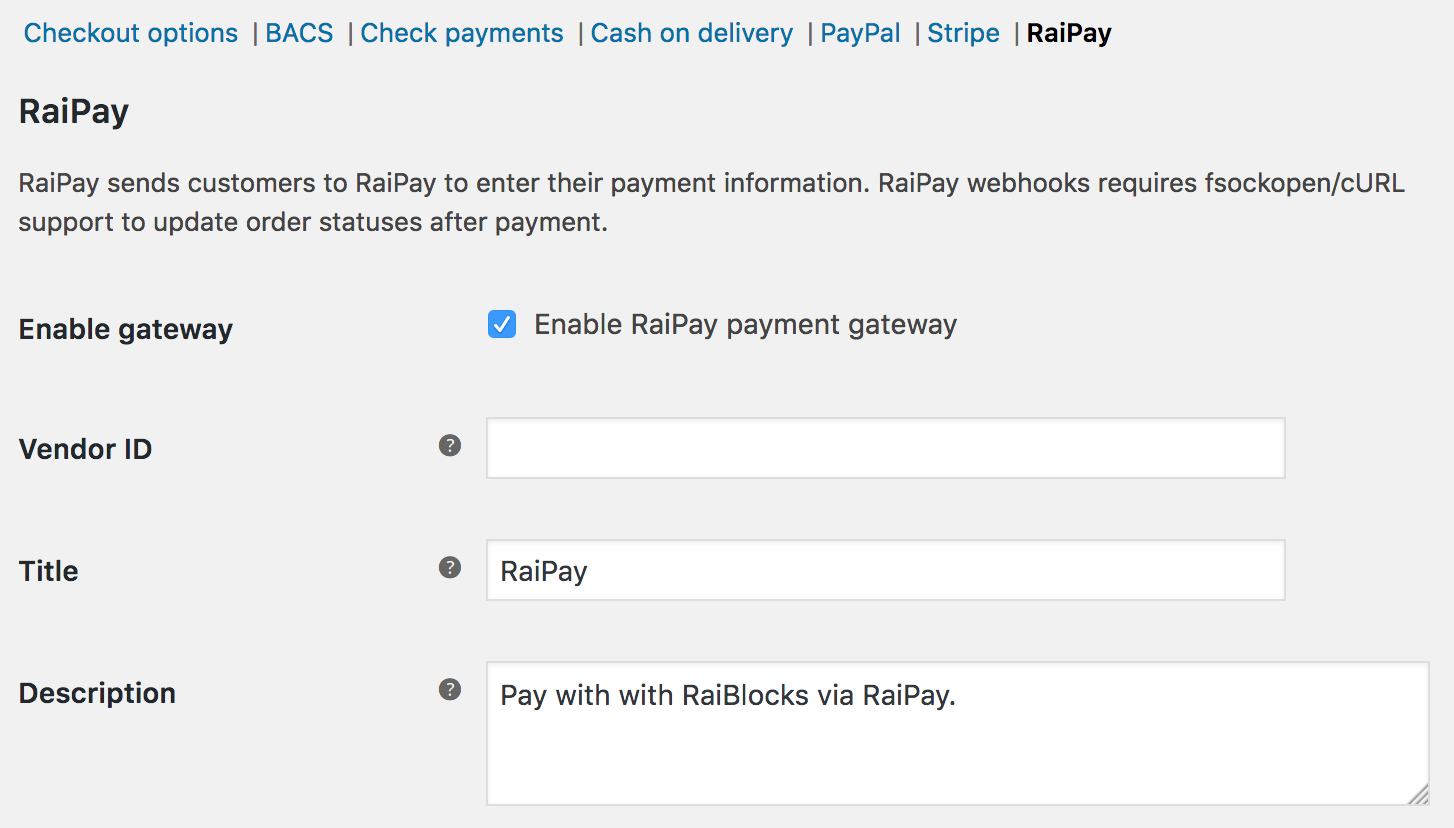
RaiPay configuration in WooCommerce checkout settings

Currency

You can select RaiBlocks (XRB) as the currency of your store after activating this plugin. You can find these settings via WordPress administration panel > WooCommerce > Settings > General (tab) > Currency options. Prices need to be specified in 6 decimals in order to work with most wallet configurations (as they don't support more decimals when sending XRB):
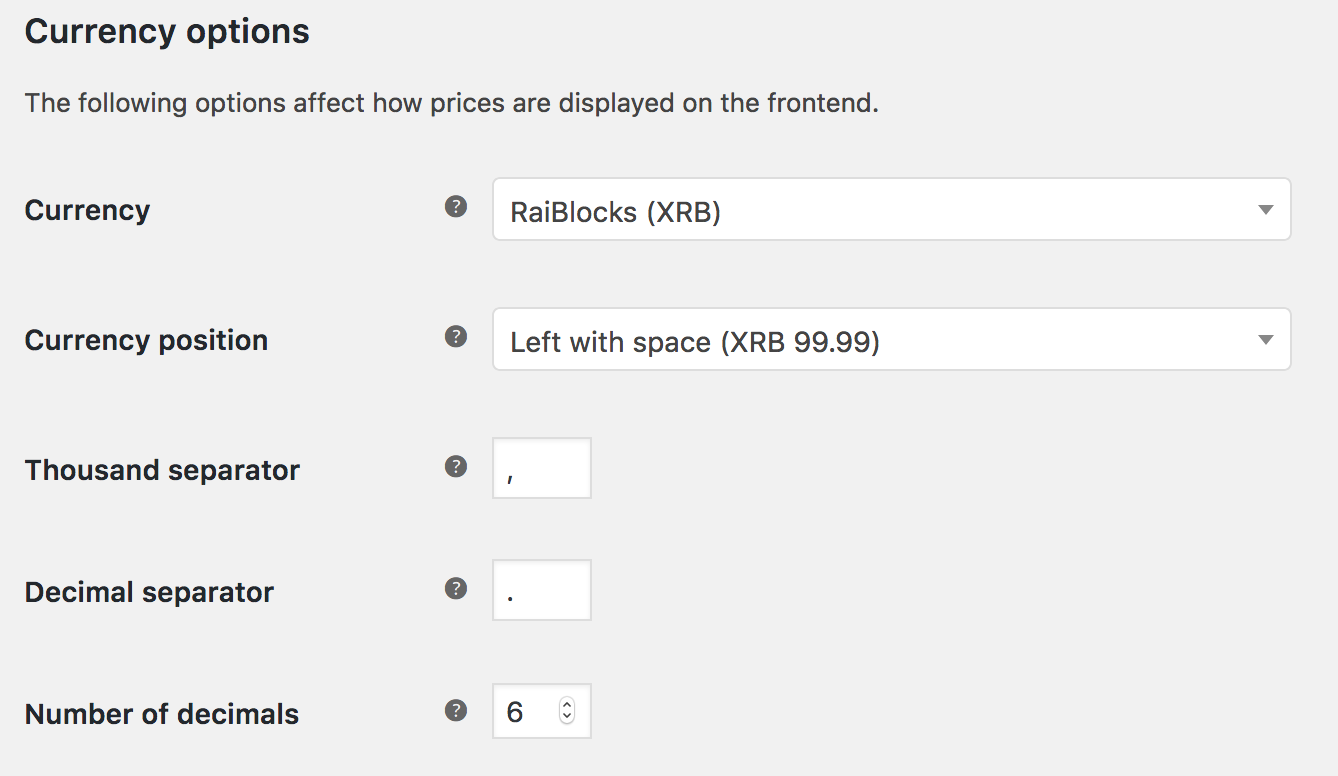
WooCommerce currency configuration for RaiBlocks (XRB)

Alternatively, RaiPay can dynamically convert USD prices into XRB prices. You can leave your prices in USD and RaiPay will do the converting for you. RaiPay currently does not support any other currencies than XRB and USD.

Donate

This plugin is completely free to use. Feel free to donate me some XRB if you enjoy the plugin and want to thank me for building it: xrb_3isszzzi45guyqsr4rmqm1yjqm5fin913kmwqyqfzwkroyodux1nuxqpinb3

License

GPLv2 or later

Releases

4 releases. Each count is every asset in that release; expand a row for the breakdown.

Tag
Published
Assets
Downloads
0.1.3 latest
Jan 17, 2018 8 years ago
raipay-woocommerce-0.1.3.zip
43
Jan 13, 2018 8 years ago
raipay-woocommerce-0.1.2.zip
19
Jan 12, 2018 8 years ago
raipay-woocommerce-0.1.1.zip
13
Jan 12, 2018 8 years ago
raipay-woocommerce-0-1-0.zip
8
D- grade

Security

RaiPay for WooCommerce 0.1.3 · audited by WP Registry

Critical findings.

1 critical
Audited release
0.1.3
Findings
1
Worst severity
critical
Content hash
f8cd305fc040a9c9814779e2…

Findings

  • critical Unauthenticated RaiPay webhook completes arbitrary WooCommerce orders when payment token meta is empty

    missing_auth

    Listener::setup() hooks webhook_listener on init whenever Plugin::is_valid_for_use() is true (store currency in USD/EUR/GBP and ~30 others). That does not require the RaiPay gateway to be enabled. webhook_listener fires on any request with $_GET['raipayListener']==='raipayWebhook' (no capability, nonce, HMAC, or login), then handle_webhook json_decodes php://input. If paid_at is non-null it takes intval(str_replace('order-','',$data->tag)) as the order id, loads get_post_meta($order_id,'raipay_woocommerce_payment_token',true), and on strict equality with $data->token calls $order->payment_complete($data->token). WordPress returns '' for missing single meta, so a JSON body {"paid_at":"1","tag":"order-123","token":""} matches every WooCommerce order that never went through RaiPay (and, on HPOS without post-meta sync, likely RaiPay orders too, because process_payment writes the token only via update_post_meta). There is no check that the order payment method is raipay, no amount/currency comparison, and no server-side GET back to api.raipay.io. Order IDs are sequential. Observable result is unpaid orders of any gateway moving to processing/completed with stock, emails, and downloads. Even for orders that do have a token, that value is the public checkout path https://raipay.io/checkout/{token} returned from process_payment, so the same webhook is also a self-service pay-bypass for the placing customer. Upstream last pushed 2018-01-17; RaiBlocks/RaiPay is defunct, so this handler will not grow a real signature.

    src/WooCommerce/Listener.php:13-56

    Recommendation

    Do not register the webhook unless the RaiPay gateway is enabled. Reject empty/missing tokens. Verify a RaiPay HMAC (or re-fetch the payment from api.raipay.io with the merchant credential) and require paid amount/currency/tag to match the WooCommerce order before payment_complete. Read/write the token via WC_Order meta APIs. Given the project has had no commits since 2018-01-17 and RaiPay is gone, deactivate and remove the plugin.

WP Registry hashes the installable build and reports on that exact bytes-for-bytes copy. Embargoed findings are withheld until they are disclosed, so a clean verdict means nothing public is outstanding. WP Manifest does not audit code itself.