Polished Content WP Registry grade B. Medium-severity findings · 1 findingWP RegistryMedium-severity findings · 1 findingOpen the reportB
WordPress Gutenberg Block Animation Builder w/ Intersection Observer
Install
This is the repository archive. It installs, but the folder name will carry the branch suffix and updates will not flow.
Install straight from GitHub with WP-CLI:
wp plugin install https://github.com/codingjack/polished-content/archive/refs/heads/master.zipWordPress Gutenberg Block Animation Builder
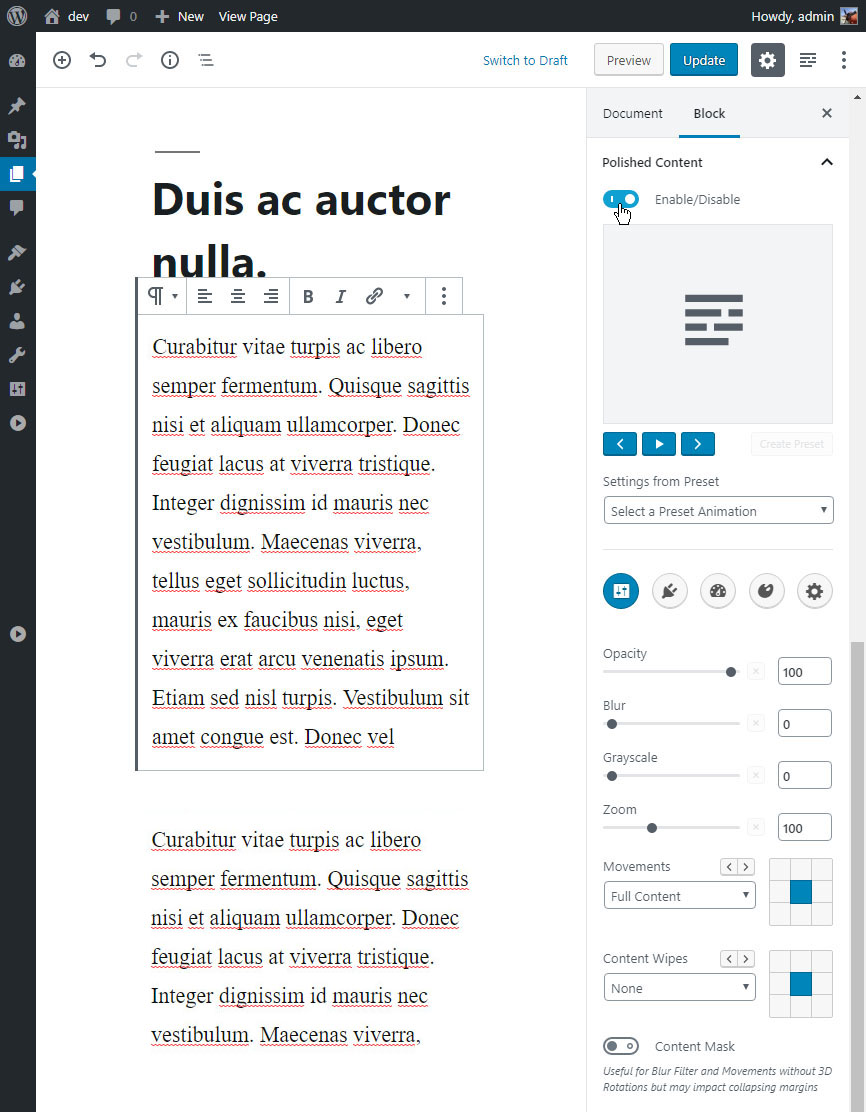
Description
Polished Content is a WordPress Plugin that allows you to add robust animations to existing Gutenberg Blocks. Animations will only ever occur when the content is in view, and can be repeated and reversed as the page scrolls. The animations can then happen as smooth, "singular" animations or can be connected to the page's scroll position for a more dynamic experience.
In addition to the several standard animation options such as movements, zooms, blurs, you also have full control over duration, easing, scroll behavior, auto-reverse, and many more options to animate your content in different ways. The plugin includes several built-in preset animations and you can also create your own. And animations can also be copied and pasted into other blocks using the built-in right-click menu.
Polished Content uses the HTML5 Intersection Observer to help determine when and how content should be animated, and also includes an IE/Edge fallback for animating the CSS clip-path. In addition, animations can be enabled/disabled individually on different screen widths.
Getting Started
Download the plugin and then upload and install the plugin to your WordPress site. Then visit the plugin's settings page and select the block types you'd like to animate. Then select a Block in your page/post editor and add an animation as shown in the screenshot above.
Built With / Techology Used
Authors
- Jason McElwaine - Initial work
License
- This original work in this project is dual licensed under the terms of the MIT license and GPL-2.0+
- The included Greensock scripts are licensed using its Standard License
- The Intersection Observer Polyfill included is licensed under W3C License
Supported Blocks
Polished Content includes support for several 3rd party Custom Block plugins. All of the available blocks that can be animated are listed in this screenshot. Support for additional blocks can be manually added to the "blocks.php" file inside the main admin folder.
Considerations
All of the built-in supported blocks have been tested and will work out of the box in most cases. But not all options will play nice 100% of the time, as blocks are wrapped in an animated wrapper which can sometimes lead to layout/positioning issues depending on the animation used. However, the animation editor has several "helper" options in the "formatting" section that resolve most issues, including an option to add a custom Class to the animation's wrapper which can then be targetted in the "Custom CSS" section in the plugin's main settings page.
Not limited to Gutenberg Blocks
The Gutenberg editor is required to create an animation, but inside the editor there's an option to copy the animation's classes. And then those classes can be added to any of your WP site's content (see the "Custom JS" section in the plugin's settings page for an API example). However, the plugin's script will normally only load if a page/post's "the_content()" contains an element with the expected animation classes, so if you add the classes to your site's header or footer you will need to set the plugin's "Script Loading" option to "Global" in the plugin's main settings page.
Releases
3 releases.
These releases are tags only. The author does not attach a packaged zip, so there are no download counts to report.