WP Manifestindependent plugin directory
manifest / analytics / expertstatsplugin

Codeable - Expert's Stats WP Registry grade B. Medium-severity findings · 2 findingsWP RegistryMedium-severity findings · 2 findingsOpen the reportB #10 in Analytics & Tracking

A stats dashboard for codeable experts.

★ 38stars
97release downloads
≈30active sites
v0.3.0latest · 6 years ago

Install

Download expertstatsplugin-v.0.3.0.zip From the v0.3.0 release on GitHub, Sep 2, 2020

Upload it under Plugins → Add New Plugin → Upload Plugin, then activate.

Install straight from GitHub with WP-CLI:

wp plugin install https://github.com/codeablehq/expertstatsplugin/releases/download/v0.3.0/expertstatsplugin-v.0.3.0.zip
No built-in updater. New versions won't appear under Dashboard → Updates. Install new releases yourself, or let Git Updater track the repository.

Codeable Expert Stats Plugin Readme

Codeable Expert Stats plugin makes it easy for you to track and monitor your success as an expert on Codeable via an easy-to-understand dashboard for your personal/agency WordPress site.

Processes

If you are opening an issue please use labels!

Description

The dashboard and stats provided by the Codeable web app for experts is a bit lackluster which leaves a big gap for actively monitoring and tracking your success. This plugin aims to solve that problem by providing the data in a visual format that experts can learn from, track progress, and optimize their performance as Codeable experts. Now you can visualize your own performance on Codeable in many new ways and know where you need to focus to improve and grow on Codeable.

Features

  1. All your regular stats from Codeable now in your WordPress dashboard.
  2. Filter stats by date range
  3. Monthly averages of revenue and fees
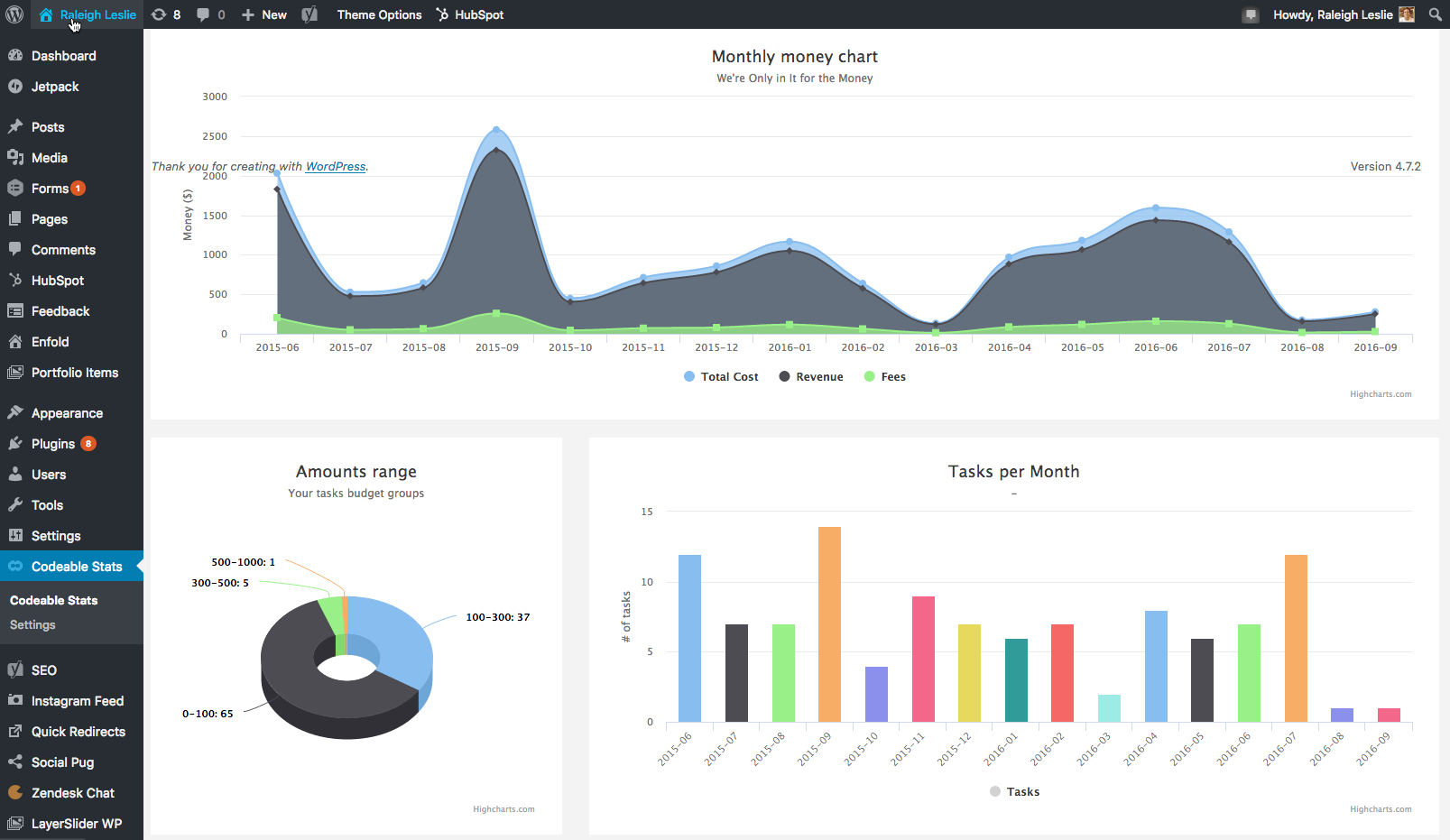
  4. Monthly money chart
  5. Best month and best month’s revenue
  6. Amounts range - Your tasks budget groups pie chart
  7. Tasks per month bar graph
  8. Client data - Fully sortable by revenue, avg. per task, total tasks, more…
  9. Client data - Individual client detail modal
  10. PERT Calculator

Installation

Note: SSL enabled sites highly encouraged for the use of this plugin please.

  1. Upload the expertstatsplugin-master folder and it's contents to the /wp-content/plugins/ directory or install the .zip via the WP plugins panel in your WordPress admin dashboard
  2. Activate the plugin through the 'Plugins' menu in WordPress
  3. That's it! You should now be able to access the Plugin's options via Codeable Stats link on WordPress dashboard menu. You will need to enter your Codeable Username and Password under Settings then ‘Fetch remote data’.

Get Automatic Updates When New Versions Released (Since version 0.0.4)

Use GitHub Updater plugin to allow automatic updates of this plugin from the GitHub repo.

Follow these steps:

  1. Download and install the plugin https://github.com/afragen/github-updater to your wp site;
  2. Ensure you have access to the private repo for this plugin!
  3. In Github, click your picture (top right) to get the dropdown; and hit "Settings"
  4. Under here select "Personal Access Tokens" and generate a new token (or use an existing one with the right permissions!) - give it a name like "github updater" or similar for future reference.
  5. Check (tick, select) the box next to "Repo" and the three under this can stay selected.
  6. Copy your token and keep it in a safe place if you want to use it again.
  7. On your wp website, open Settings > Github Updater and if you already have the expertstatsplugin installed, this will show up. You will need to place your key to get updates.

If you don't have it installed, you can:

  1. Hit the "Add plugin" tab
  2. Paste in https://github.com/codeablehq/expertstatsplugin/ under URL
  3. Leave the "github" part
  4. Paste in the github key you just generated,
  5. Hit "Install plugin"

This will give you the normal WP update notification when a new version ships, and its a 1 click update.

Migrating from Old Version

You may want to truncate these tables, replace wp_ with your database prefix

TRUNCATE TABLE wp_codeable_amounts;
TRUNCATE TABLE wp_codeable_clients;
TRUNCATE TABLE wp_codeable_tasks;
TRUNCATE TABLE wp_codeable_transactions;
TRUNCATE TABLE wp_codeable_transcactions;

Frequently Asked Questions

There was a problem fetching remote data from Codeable

Be sure that you set PHP timeout to 120 or more on your first fetch or if you have deleted the cached data.

Screenshots

[Money Charts]()
[Client Data]()

[Client Data Detail Modal ]()

Releases

3 releases. Each count is every asset in that release; expand a row for the breakdown.

Tag
Published
Assets
Downloads
v0.3.0 latest
Sep 2, 2020 6 years ago
expertstatsplugin-v.0.3.0.zip
35
Aug 2, 2019 7 years ago
expertstatsplugin-v.0.2.0.zip
30
Jul 22, 2019 7 years ago
expertstatsplugin-v.0.1.0.zip
32

Active-site estimate ≈30 comes from the median of recent superseded releases. Method.

B grade

Security

Codeable - Expert's Stats 0.3.0 · audited by WP Registry

Medium-severity findings.

2 medium
Audited release
0.3.0
Findings
2
Worst severity
medium
Content hash
0dd4a5bf4d99394d9134937d…

Findings

  • medium Logged-in users can dump Codeable CRM data and trigger API sync without capability or nonce checks

    missing_capability

    wp_ajax_wpcable_reload_tasks, wp_ajax_wpcable_sync_start, and wp_ajax_wpcable_sync_process are registered for every logged-in user. None of the three call current_user_can() or wp_verify_nonce(). A Subscriber POSTing action=wpcable_reload_tasks to admin-ajax.php receives the full task list JSON (private notes, client names, avatars, task titles, contractor/client dollar amounts) that the plugin otherwise only renders on manage_options screens. The same user can call wpcable_sync_start then wpcable_sync_process to drive wpcable_api_data::process_queue, which authenticates to https://api.codeable.io/ with the site's stored Bearer token, writes wpcable_account_details / wpcable_average / wpcable_balance / wpcable_revenue / wpcable_api_queue, and can mark open tasks lost. Because admin-ajax.php reads action from $_REQUEST and there is no nonce, a CSRF GET/POST from any logged-in session also works. Sibling wpcable_ajax_update_task is nonce-only (action wpcable-task, no current_user_can); that nonce is localized only on the tasks admin page and is uid-scoped, so a Subscriber cannot update rows unless another bug leaks a nonce for their uid.

    functions/admin-tasks.php:32-65

    Recommendation

    On every wp_ajax_ handler require current_user_can('manage_options') and check_ajax_referer() (or wp_verify_nonce of a localized admin nonce). Do not treat is_user_logged_in() as authorization. Fail closed with wp_send_json_error / wp_die(-1) instead of returning the CRM payload.

  • medium Plugin admin pages reflect unsanitized error/success and date query parameters as HTML

    xss_reflected

    codeable_get_message_param() reads $_REQUEST['error'] or $_REQUEST['success'], base64-decodes the value, splits on commas, urldecodes, and returns the strings. codeable_admin_notices() (called from the stats, tasks, and settings callbacks) then echo implode('<br />', $errors) / $success unless the token is the hardcoded 'credentials' or 'fetched'. Those admin pages require manage_options, so this is administrator reflected XSS: a crafted link such as admin.php?page=codeable_settings&error=PHNjcmlwdD5hbGVydCgxKTwvc2NyaXB0Pg== (base64 of <script>alert(1)</script>) executes in the admin session. Magic quotes wrap the base64 blob, not the decoded HTML, so they do not neutralize the payload. Sibling sinks on the stats page echo $_GET['date_from'], date_to, compare_date_from, and compare_date_to into input value attributes with no esc_attr, which is an attribute-context breakout on the same manage_options screen.

    functions/helpers.php:67-168

    Recommendation

    Treat error/success query values as an allowlist of known message keys, not as HTML. Escape any residual text with esc_html() (or wp_kses with an explicit tag list if bold labels are required). Echo all date query args with esc_attr(). Prefer passing messages via a short-lived transient instead of the URL.

WP Registry hashes the installable build and reports on that exact bytes-for-bytes copy. Embargoed findings are withheld until they are disclosed, so a clean verdict means nothing public is outstanding. WP Manifest does not audit code itself.