Install
This is the repository archive. It installs, but the folder name will carry the branch suffix and updates will not flow.
Install straight from GitHub with WP-CLI:
wp plugin install https://github.com/code-soup/boxnow-delivery-croatia-woocommerce/archive/refs/heads/master.zipBoxNow Delivery for WooCommerce
WordPress plugin that integrates BoxNow locker delivery service with WooCommerce for Croatian market.
Disclaimer
This is an unofficial plugin. The developer of this plugin is not affiliated with, endorsed by, or sponsored by BoxNow.
This plugin is provided "as is" without warranty of any kind, express or implied, including but not limited to the warranties of merchantability, fitness for a particular purpose and noninfringement.
In no event shall the authors or copyright holders be liable for any claim, damages or other liability, whether in an action of contract, tort or otherwise, arising from, out of or in connection with the plugin or the use or other dealings in the plugin. Use at your own risk. Test thoroughly in a staging environment before production use.
Requirements
- WordPress 6.0 or higher
- WooCommerce 8.0 or higher
- PHP 8.1 or higher
- BoxNow API credentials
Installation
- Upload plugin folder to
/wp-content/plugins/ - Activate via WordPress admin panel
- Configure API credentials in WooCommerce → Settings → BoxNow
Configuration
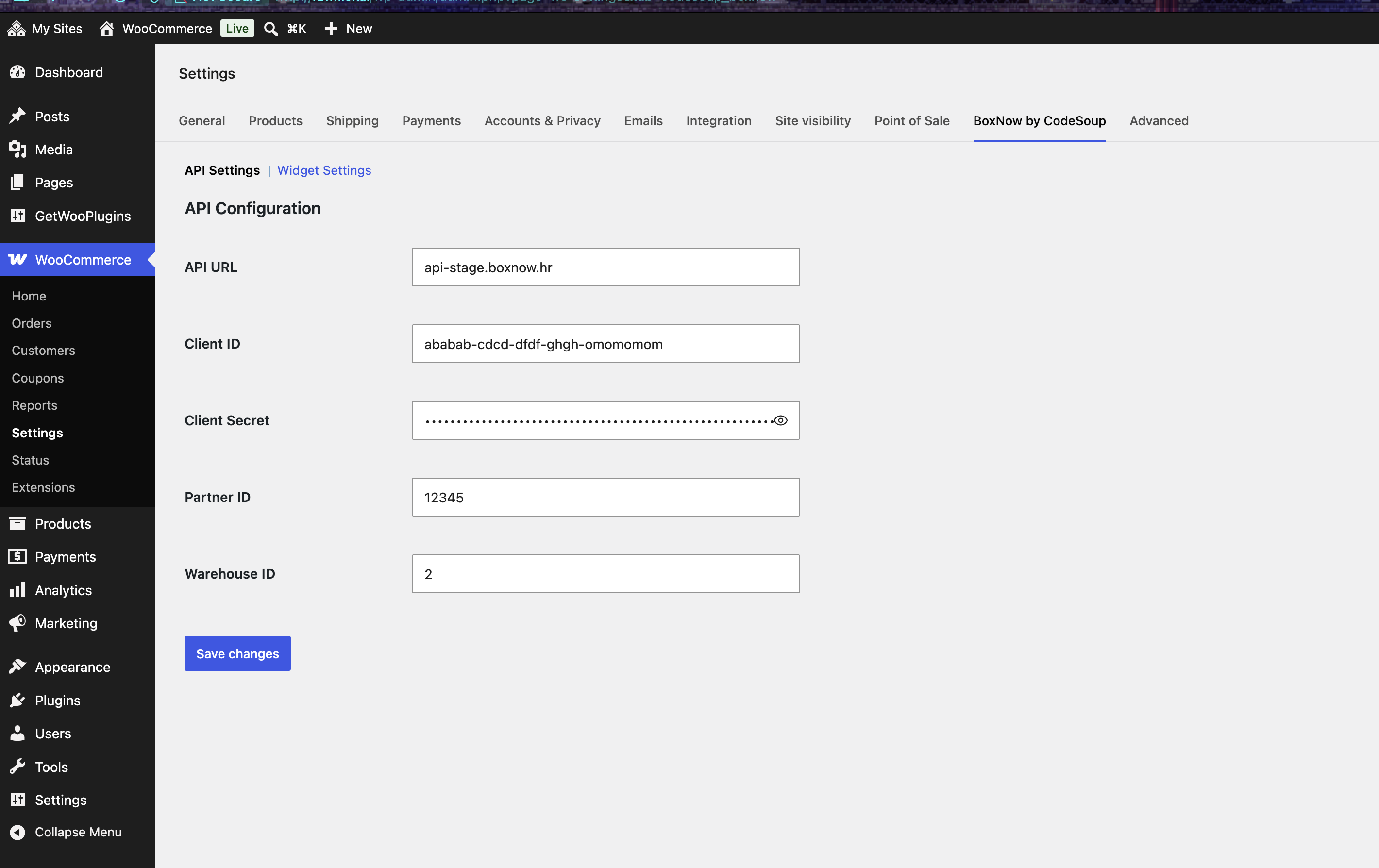
API Settings
Navigate to WooCommerce → Settings → BoxNow → API Settings
Required:
- API URL - BoxNow API endpoint (default: api.boxnow.hr)
- Client ID - BoxNow API client identifier
- Client Secret - BoxNow API client secret
- Partner ID - BoxNow partner identifier
- Warehouse ID - Comma-separated warehouse IDs for origin locations
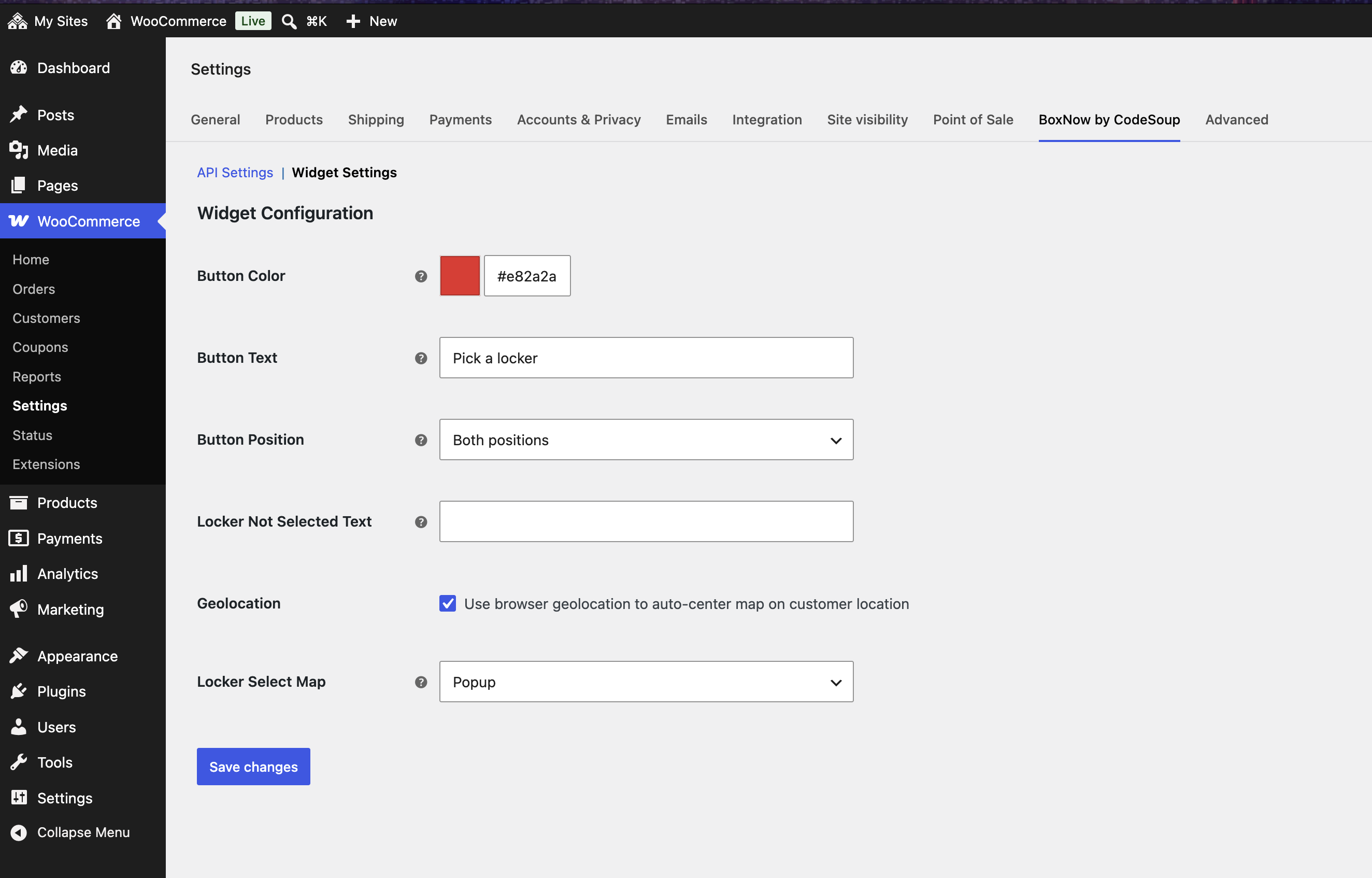
Widget Settings
Configure locker selection widget display options.
Available Options:
- Button Color - Color for locker selection button
- Button Text - Custom text for locker selection button
- Button Position - Checkout placement position
- Locker Not Selected Text - Error message when checkout attempted without locker selection
- Geolocation - Use browser geolocation to center map on customer location
- Locker Select Map - How the locker selection map appears
Locker Select Map Options:
- Popup - Opens locker map in modal overlay (default)
- Embedded - Displays locker map inline on checkout page
- Custom - Manual placement via shortcode
[codesoup_boxnow_pick_locker]- full control over map positioning
Screenshots
API Settings
Configure BoxNow API credentials and warehouse settings.
Widget Configuration
Customize locker selection button and map display options.
Features
Shipping Method
- Adds "BoxNow Locker Delivery" shipping method to WooCommerce
- Configurable shipping cost
- Tax class support
- Min/max order amount restrictions
Locker Selection
- Interactive locker map widget on checkout
- Search by address or postcode
- Store selected locker with order
Order Processing
- Automatic parcel creation when order completes
- Parcel tracking via order meta
- Store locker details with order
API Integration
- Create delivery requests
- Cancel parcels
- Retrieve parcel status
- Print parcel labels (PDF)
Order Meta Keys
Plugin stores following meta data on orders:
Locker Information:
_boxnow_locker_id- Selected locker ID_boxnow_locker_name- Locker name_boxnow_locker_address- Locker street address_boxnow_locker_city- Locker city_boxnow_locker_postcode- Locker postal code_boxnow_locker_country- Locker country code
Parcel Information:
_boxnow_parcel_id- BoxNow parcel tracking ID_boxnow_parcel_ids- Array of parcel IDs (for multiple parcels)_selected_warehouse- Origin warehouse ID
Filters
codesoup_boxnow_shipping_method_title
Modify shipping method title displayed on checkout.
add_filter( 'codesoup_boxnow_shipping_method_title', function( $title ) {
    return 'Locker Pickup';
} );
codesoup_boxnow_shipping_cost
Modify shipping cost calculation.
add_filter( 'codesoup_boxnow_shipping_cost', function( $cost, $package ) {
    return 5.00;
}, 10, 2 );
codesoup_boxnow_api_request_args
Modify API request arguments before sending.
add_filter( 'codesoup_boxnow_api_request_args', function( $args, $endpoint ) {
    $args['timeout'] = 30;
    return $args;
}, 10, 2 );
Actions
codesoup_boxnow_order_completed
Fires after BoxNow order is marked complete and parcel created.
add_action( 'codesoup_boxnow_order_completed', function( $order_id, $parcel_id ) {
    // Custom logic
}, 10, 2 );
codesoup_boxnow_parcel_cancelled
Fires after parcel is cancelled.
add_action( 'codesoup_boxnow_parcel_cancelled', function( $parcel_id, $order_id ) {
    // Custom logic
}, 10, 2 );
Development
File Structure
includes/
├── core/                    # Core plugin classes
├── constants/               # Constant definitions
├── integrations/            # Third-party integrations
│   └── woocommerce/         # WooCommerce specific
├── services/                # Business logic
│   ├── api/                 # BoxNow API client
│   ├── orders/              # Order handling
│   └── ajax/                # AJAX handlers
└── traits/                  # Reusable traits
Logging
Plugin uses WooCommerce logging system. Logs written to WooCommerce log file.
View logs: WooCommerce → Status → Logs → Select codesoup-boxnow-*
Support
Report issues at: https://github.com/code-soup/woo-box-now-delivery-croatia/issues
License
GPL-3.0+
This program is free software: you can redistribute it and/or modify it under the terms of the GNU General Public License as published by the Free Software Foundation, either version 3 of the License, or (at your option) any later version.
This program is distributed in the hope that it will be useful, but WITHOUT ANY WARRANTY; without even the implied warranty of MERCHANTABILITY or FITNESS FOR A PARTICULAR PURPOSE. See the GNU General Public License for more details.
You should have received a copy of the GNU General Public License along with this program. If not, see https://www.gnu.org/licenses/gpl-3.0.html