Install
This is the repository archive. It installs, but the folder name will carry the branch suffix and updates will not flow.
Install straight from GitHub with WP-CLI:
wp plugin install https://github.com/clearanceclarence-software/routemark/archive/refs/heads/main.zip
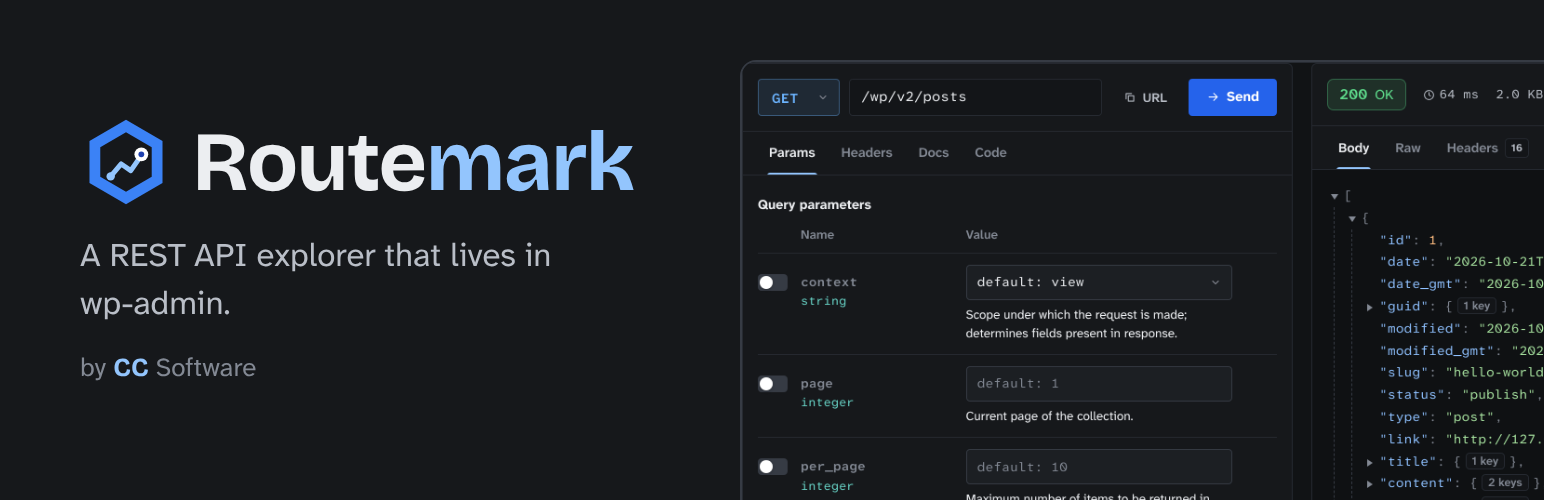

Routemark is a WordPress plugin that lists every REST API route on your site, shows you what each one expects, and lets you send requests to it from wp-admin, logged in as yourself. It's the stuff you'd normally do with Postman, a browser console and a lot of guessing, but on one page under Tools.
It works with whatever is installed. Core, WooCommerce, form plugins, your theme, that one plugin a previous developer left behind: if it registers a route, Routemark shows it and tells you who added it.
Requires WordPress 6.6+ and PHP 7.4+. Free and GPL. It doesn't talk to any outside server.
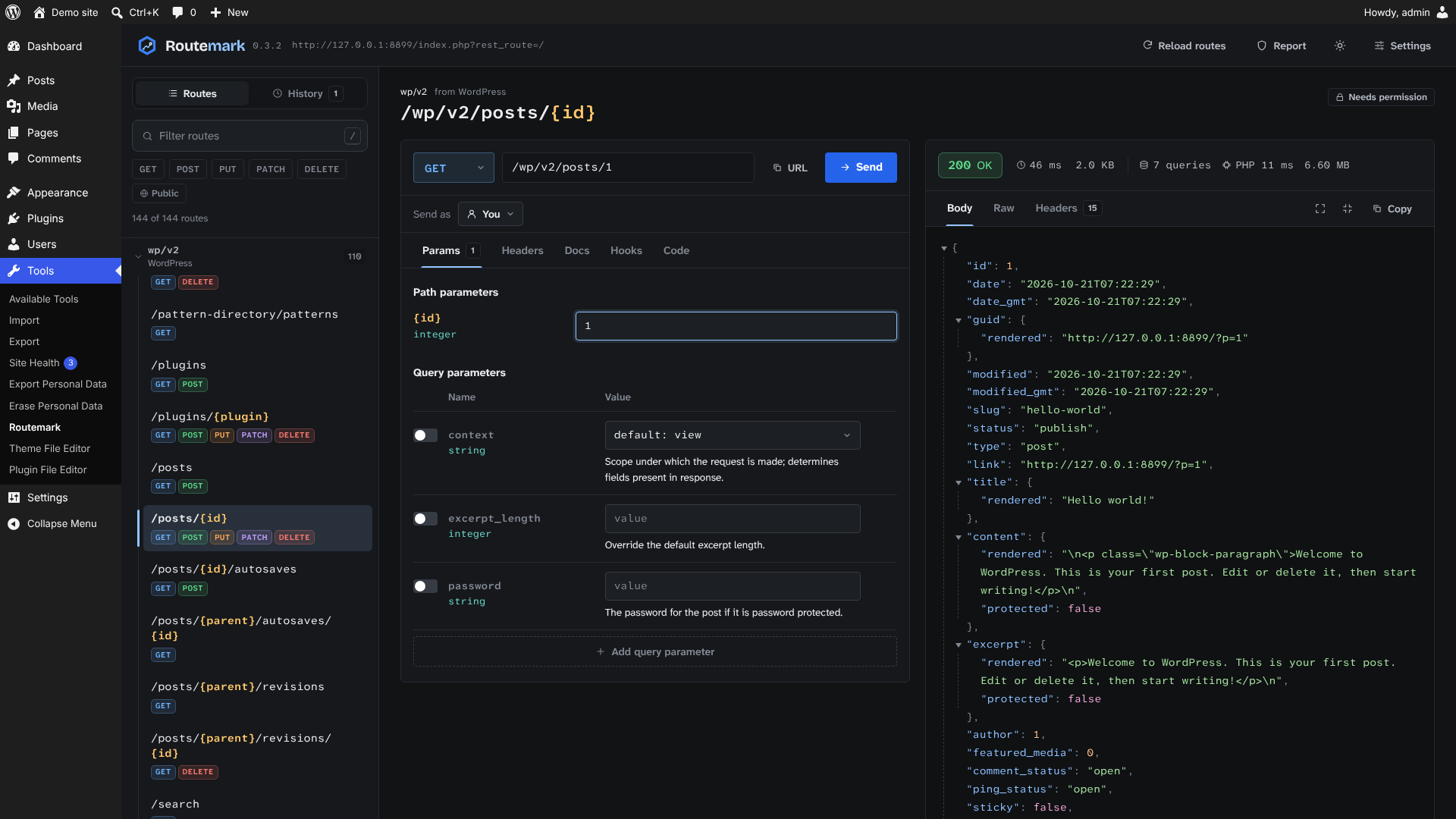
What you'd use it for
"Which plugin added this endpoint?"
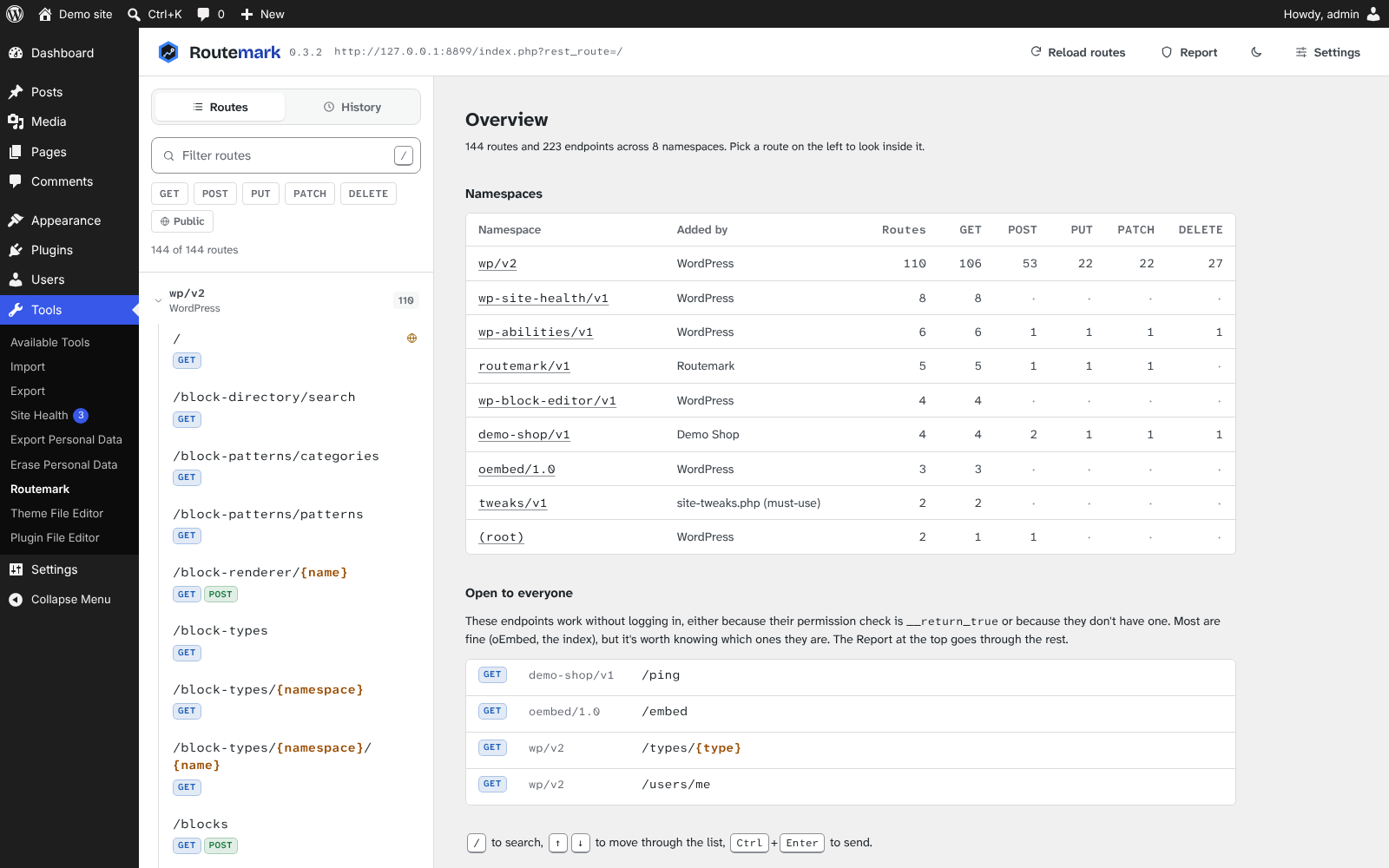
You've taken over a site with 30 plugins and something keeps showing up under /wp-json/. Open the overview and the namespaces table tells you which plugin, theme or must-use plugin registered each one. Type a plugin name in the filter ("woo", "form") and you get just its routes.
Checking what's open to the public
The overview has a list of every endpoint that anyone can call without logging in (permission callback set to __return_true). Most of them are fine, like oEmbed or a store's cart endpoint. But if your own custom endpoint is in that list and you didn't mean it to be, you'll want to know before someone else finds it.
Auditing a site you've just taken over
Open Report at the top. It goes through every route and lists what's worth a look, grouped by plugin with the worst first: routes registered with no permission_callback at all (WordPress logs a notice, then runs them for anyone), routes that let anyone change data, arguments with no type or callbacks so they reach the handler unchecked, and routes with no schema. Every finding has an "Open as logged out" button, so you can go from "this looks open" to "yes, a visitor can call it" in one click. Copy as text gives you the list for a ticket:
## Leaky Forms
- [High] POST /leaky/v1/submit: No permission check. ...
- [High] POST /leaky/v1/subscribe: Anyone can change data. ...
- [Medium] GET /leaky/v1/stats: No permission check. ...
The report only reads how routes were registered. It can't see what a permission callback actually allows, which is what Send as is for.
"Where did this field come from?" and "Why is this slow?"
Every response shows how many database queries WordPress ran for it, how long PHP took and peak memory, measured on the server, so 300 queries for 10 posts stands out straight away. The Hooks tab lists everything hooked into the route: for /wp/v2/posts that's rest_prepare_post, rest_post_query, rest_pre_insert_post and the rest, plus the filters every REST request goes through. Each callback shows its priority, the function and the plugin it comes from:
rest_prepare_post
  20  demo_shop_price()                          Demo Shop
rest_post_query
  10  closure in plugins/demo-shop/demo-shop.php:19   Demo Shop
Testing your own endpoint while you build it Register a route, hit Reload routes, and it's there with its arguments listed. Fill in the parameters and send. There's no nonce to copy and no application password to set up, because you're already logged in. When it returns a 400, the WordPress error code and message are shown at the top instead of buried in the JSON.
"What does an editor actually get back?"
Permission bugs are hard to test from your own admin account, because everything works for you. Under the address bar there's Send as: switch it to Logged out, to one user per role, or search for a specific person, and send the same request again. You see exactly what that user gets, 403s and missing fields included. A POST sent as an author creates a post by that author, so it's real, same as everything else.
Send as: You            GET /wp/v2/settings   200 OK
Send as: Jane (Editor)  GET /wp/v2/settings   403 rest_forbidden
Send as: Logged out     GET /wp/v2/settings   401 rest_forbidden
Front-end or headless work Before you write the fetch call, look up the route: which arguments it takes, their types and defaults, which values an enum allows, and what the response schema looks like. Then send it, check the result, and copy it as code:
apiFetch( {
    path: "/wp/v2/posts?per_page=5&status=publish",
    method: "GET",
} ).then( ( data ) => console.log( data ) );
Debugging a WooCommerce integration
Something syncing products is getting odd results. Send the same request yourself, look at the raw response and the headers (X-WP-Total, X-WP-TotalPages), change one parameter and send again. History keeps what you've tried, so you can go back to an earlier request.
Calling a route from PHP instead
Sometimes the answer is "don't do an HTTP request at all". The Code tab also gives you the rest_do_request() version, handy for a cron job or WP-CLI command:
$request = new WP_REST_Request( 'GET', '/wc/v3/products' );
$request->set_query_params( array(
    'stock_status' => 'outofstock',
) );
$response = rest_do_request( $request );
$data     = rest_get_server()->response_to_data( $response, false );
Handing a request to someone else Copy as cURL and send it to a colleague or paste it in a ticket. They swap in their application password and run it:
curl -X POST 'https://example.com/wp-json/wp/v2/posts' \
  -u 'USERNAME:APPLICATION_PASSWORD' \
  -H 'Content-Type: application/json' \
  -d '{
  "title": "Hello from Routemark",
  "status": "draft"
}'
Install
Download routemark-x.y.z.zip from Releases, then in WordPress go to Plugins > Add New > Upload Plugin. Open it from Tools > Routemark.
Use the zip attached to the release, not the "Source code" zip GitHub adds automatically. That one is this repo and needs building first.
A couple of things worth knowing before you start:
- Only administrators can open it (
manage_options). - Requests are real. A DELETE deletes. Try things on a local or staging site first. By default Routemark asks you to click Send twice for DELETE, and in Settings you can make that apply to anything that isn't a GET.
- Request history stays in your browser and never goes in the database. Passwords, tokens and auth headers are blanked before it's saved.
 |
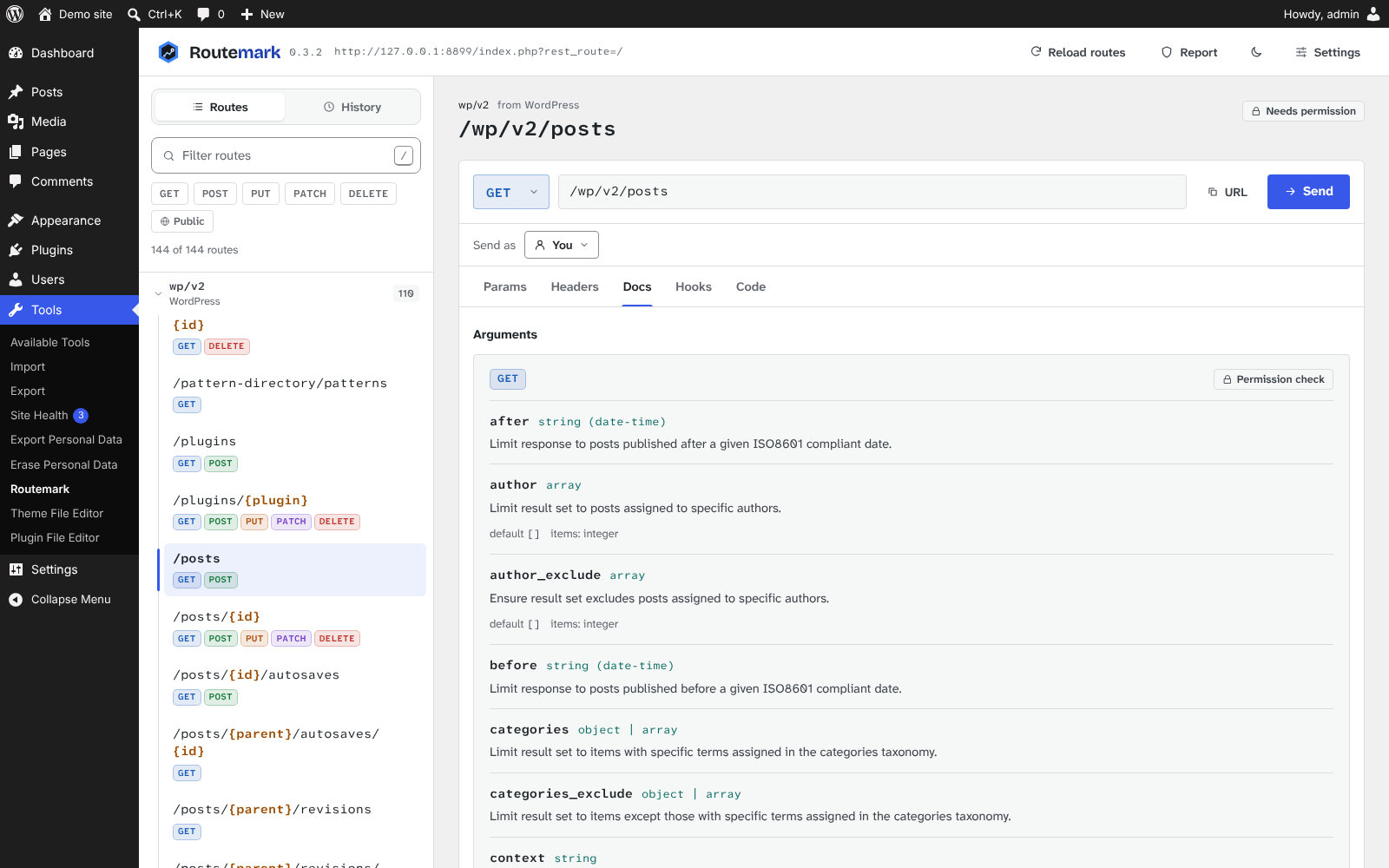 |
| Overview: namespaces, who added them, and what's public | Docs tab: arguments, types, defaults and allowed values |
Development
You need Node 20+ and a WordPress 6.6+ site to load it in.
npm ci
npm start          # rebuild on change
npm run build      # one-off build into build/
npm run typecheck
npm run zip        # build + dist/routemark-<version>.zip
Symlink or copy the folder into wp-content/plugins/ and activate it. On XAMPP that's C:\xampp\htdocs\<site>\wp-content\plugins\routemark.
Tests
The tests run against a real WordPress: the REST endpoints over HTTP, and the screens in Chromium, with Playwright. wp-env gives you that WordPress in Docker on http://localhost:8888, with Routemark and four fixture plugins active:
- Demo Shop: well-behaved. A controller that extends core's, an open read-only route, and two filters on posts.
- Leaky Forms: one badly registered route for each thing the Report should catch. Never put it on a real site.
- Routemark Test Setup: creates the test users (jane, ali, sam, admin2, all with password
password) and a few helper routes. - Routemark Example Add-on: uses every extension point, including a tab that throws on purpose.
npm run build
npm run env:start   # needs Docker
npm run test:e2e    # or test:e2e:ui to watch them run
npm run env:stop
To run them against another site, set it up the same way (activate the plugins in tests/e2e/fixtures/plugins, copy tests/e2e/fixtures/mu-plugins/site-tweaks.php into mu-plugins, debug display off) and run WP_BASE_URL=http://your-site npm run test:e2e. If Playwright's own Chromium isn't installed, PW_CHROMIUM_PATH points it at another one.
CI runs the whole lot on every push and pull request.
routemark.php                 plugin header, constants, bootstrap
uninstall.php                 deletes the settings meta when the plugin is deleted
includes/
  class-admin.php             Tools page, loads the app
  class-routes-controller.php GET routemark/v1/routes
  class-route-source.php      works out which plugin/theme registered a route
  class-settings.php          per-user settings, GET/POST routemark/v1/settings
  class-send-as.php           Send as: switching user for one request, GET routemark/v1/users
  class-request-stats.php     query count, PHP time and memory for requests sent from the app
  class-hooks.php             GET routemark/v1/hooks, who's hooked into a route
src/lib/extensions.tsx        the extension points add-ons use (wp.hooks)
src/                          the React app (TypeScript)
scripts/zip.mjs               builds the install zip from an explicit file list
tests/e2e/                    Playwright tests, plus the fixture plugins they run against
.wp-env.json                  the test WordPress: Routemark plus the fixtures
webpack.config.js             stock wp-scripts config, minification off
postcss.config.js             same for CSS
.wordpress-org/               icon, banners, screenshots and the Playground blueprint for the plugin directory
How a few things work
WordPress doesn't record who registered a route, so Route_Source looks at the route's callback, finds the file its class or function lives in and matches that against wp-includes, the plugins folder, mu-plugins and the theme. It uses the class of the actual object, not the class that declares the method, because lots of plugins extend WP_REST_Posts_Controller and should still get the credit. Symlinked plugin folders are mapped back through $wp_plugin_paths.
For the report, the routes endpoint also tags each endpoint with how its permission is checked (missing, open for __return_true, or check) and which args declare nothing at all. That has to happen in PHP, because the callbacks are stripped before anything is sent to the browser. A typed arg isn't flagged even when its callbacks are set to null, because core's post controllers do exactly that for title and content and clean them up later. WordPress registers the index routes and /batch/v1 itself without a permission callback, so those count as open and checked.
Route patterns like (?P<id>[\d]+) become {id} by walking the string and counting parens. A single regex won't do it, because core's plugins route has a group nested inside the named one.
Requests go through @wordpress/api-fetch with parse: false, so we get the raw Response for status, headers and timing. In that mode it throws the Response on 4xx/5xx instead of returning it, which send() catches.
Settings::schema() is the one list of what each setting can be. It feeds the REST args, the defaults and the check when reading from user meta. The TypeScript Settings type mirrors it.
The Hooks tab gets its list from GET routemark/v1/hooks?route=…. It only accepts a route that's actually registered, then works out what the route's controller handles: post_type or taxonomy (read from the controller, they're protected properties), user or comment. It fills those into core's hook name patterns (rest_prepare_{s}, rest_{s}_query, rest_pre_insert_{s} and so on) and reads the callbacks from $wp_filter, naming the plugin behind each one with the same lookup the route list uses.
Server numbers come from Request_Stats. The app sends X-Routemark-Stats: 1. At priority 1 on rest_pre_dispatch, before any Send as switch, it checks you're an admin and notes the time and query count. At the very end of rest_post_dispatch, which is the last moment headers can be added, it puts the difference in an X-Routemark-Stats response header as JSON, along with the whole-request totals from timer_float() and get_num_queries().
Extending Routemark
Other plugins can add to Routemark through regular WordPress hooks. Everything an add-on registers runs inside a try/catch or a React error boundary, so a broken add-on shows an error where its part would be and Routemark keeps working. tests/e2e/fixtures/plugins/routemark-example-addon uses every one of these, in plain JavaScript with no build step, and is a good place to start.
PHP
| Hook | Type | What it's for |
|---|---|---|
routemark_loaded |
action | Routemark is active. Hook your add-on in here, and check ROUTEMARK_API_VERSION first. |
routemark_app_data |
filter | The data the app starts with (window.routemarkSettings). Put yours under your own key. |
routemark_enqueue_assets |
action | Only on the Routemark page. Enqueue your script with the $handle it passes as a dependency. |
routemark_menu_title |
filter | The name in the Tools menu and the browser tab, e.g. Routemark Pro. |
add_action( 'routemark_loaded', function () {
    if ( 1 !== ROUTEMARK_API_VERSION ) {
        return;
    }
    add_action( 'routemark_enqueue_assets', function ( $handle ) {
        wp_enqueue_script( 'my-addon', plugins_url( 'addon.js', __FILE__ ), array( $handle, 'wp-hooks', 'wp-element' ), '1.0.0', true );
    } );
} );
Add Requires Plugins: routemark to your plugin header so WordPress won't activate it without Routemark.
JavaScript (through wp.hooks)
| Hook | Type | Gets | Return / do |
|---|---|---|---|
routemark.panels |
filter | list | Add { id, label, icon?, render( { routes, settings, openRoute } ) } for a top bar button and a full-width view. icon is one of window.routemark.icons, the default is a puzzle piece. |
routemark.brand |
filter | {} |
Return { edition, version }: edition shows as a badge after the wordmark (keep it short, Pro), version goes after Routemark's own (Pro 0.1.0). |
routemark.workspaceTabs |
filter | list | Add { id, label, render( { route, draft, path, url, sendAs, result } ) } for a tab next to Params, Docs and the rest. |
routemark.responseActions |
filter | list | Add { id, label, onClick( context ) } for a button in the response toolbar. |
routemark.snippetLanguages |
filter | list | Add { id, label, build( { path, url, draft } ) } for a language in the Code tab. |
routemark.reportFindings |
filter | findings, routes | Add findings to the Report. Give your own kind a title and detail. |
routemark.requestSent |
action | { route, draft, path, url, sendAs, result } |
Runs after every request sent from the workspace. |
wp.hooks.addFilter( 'routemark.workspaceTabs', 'my-addon', ( tabs ) => [
    ...tabs,
    {
        id: 'notes',
        label: 'Notes',
        render: ( { route } ) => wp.element.createElement( 'p', null, 'Notes for ' + route.route ),
    },
] );
openRoute( route, { sendAs } ) in a panel opens a route in the workspace, optionally switched to someone ({ id: 0 } is logged out). window.routemark.ui has a few of Routemark's own components (Icon, Method, PathText, JsonView, CopyButton, Toggle) so an add-on's screens can match. Filters added after the page has rendered still show up.
ROUTEMARK_API_VERSION (PHP) and window.routemark.apiVersion (JS) only go up when a change would break an add-on.
Security
The PHP only prints a few fixed strings, through esc_html__(), esc_html_e() and esc_url(). Data for the page goes in through wp_add_inline_script() as JSON with JSON_HEX_TAG | JSON_HEX_AMP. Everything else is rendered by React, with no dangerouslySetInnerHTML.
The only input is the settings endpoint. Its args use rest_validate_request_arg and rest_sanitize_request_arg against the schema, so bad values get a 400. Nothing reads $_GET, $_POST or $_SERVER.
All requests use cookie auth with the wp_rest nonce, which api-fetch sends as X-WP-Nonce. Every endpoint also checks current_user_can( 'manage_options' ).
Send as is the one place we change who the current user is, so it's kept narrow. The app sends X-Routemark-As (a user ID, 0 for logged out) and X-Routemark-Nonce (a routemark_send_as nonce). In rest_pre_dispatch, which runs after WordPress has already checked the cookie and the wp_rest nonce, Send_As checks:
- the header is a plain number;
- the nonce belongs to the real user;
- the real user has
manage_options; - for anyone other than logged out, the real user also has
edit_useron the target.
If any of those fail you get a 403 routemark_send_as_denied. If they all pass it calls wp_set_current_user(), and switches back in rest_pre_echo_response, after embeds are resolved. It only acts on a REST request coming in over HTTP, never on an internal rest_do_request(), and only once per request, so batch sub-requests don't switch again. The response gets an X-Routemark-As header so the app can tell you if something else answered the request before the switch happened.
Run phpcs in the repo root to check against the WordPress Coding Standards (it picks up phpcs.xml.dist). It should come back clean.
Releasing
- Bump the version in
routemark.php(header andROUTEMARK_VERSION),package.jsonandStable taginreadme.txt, and add a changelog entry toreadme.txt. - Commit, then
git tag v0.3.3 && git push --follow-tags. - The release workflow checks the tag matches the version, builds the zip and attaches it to a GitHub release.
Everything in .wordpress-org/ goes in the assets/ folder of the plugin's SVN repository on WordPress.org, not in the zip. That includes blueprints/blueprint.json, which gives the plugin page a Live Preview button: it opens Routemark in WordPress Playground, logged in, with an editor, an author and a subscriber to try Send as with.
The zip only holds routemark.php, uninstall.php, readme.txt, includes/, build/ and licenses/. The JS in build/ is compiled but not minified, and readme.txt links back here for the source, which is what WordPress.org asks for. So keep this repo public.
Brand

Routemark is a CC Software plugin, so it uses the CC Software look. The name is one word with a capital R. In the wordmark, "Route" is in the text color and "mark" is in blue.
The mark is the CC Software hex well with a route running to a marker inside it. The well is always graphite, so the same mark works on light and dark backgrounds.
Blue #3B82F6 |
Outer hex |
Light blue #93C5FD |
Route line, "mark" in the dark theme |
Dark blue #1E40AF |
"mark" on light backgrounds, marker center |
Graphite #16181B |
Hex well, icon background, dark theme |
The light theme has no palette of its own. It uses wp-admin's grays and the user's admin color scheme (--wp-admin-theme-color), so it looks like the rest of the dashboard. The dark theme uses the blues above, with #2563EB for the main button.
The wordmark is set in Bricolage Grotesque. Everything else uses Atkinson Hyperlegible Next and Mono, picked because they keep l, I and 1 apart, which matters when you're reading IDs and keys all day. All three are bundled with the plugin under the OFL.
Ideas for later
- TypeScript types generated from route schemas
- OpenAPI export
- Saved requests and environments (local, staging, live)
Routemark was called Restbench before its WordPress.org review. Same plugin, new name.
License
GPL-2.0-or-later. See LICENSE. The bundled fonts are under the SIL Open Font License 1.1, see licenses/.