Install
This is the repository archive. It installs, but the folder name will carry the branch suffix and updates will not flow.
Install straight from GitHub with WP-CLI:
wp plugin install https://github.com/cirinojr/cirino-images-compressor/archive/refs/heads/main.zipNo built-in updater. New versions won't appear under Dashboard → Updates. Install new releases yourself, or let Git Updater track the repository.
WordPress plugin for practical image optimization in the Media Library, with a safe fallback chain and clear operational controls.
Overview
Cirino Images Compressor helps editors reduce image size without changing their normal WordPress workflow.
The plugin focuses on:
- Real file size reduction with configurable quality levels
- Safe processing (backup-first behavior and keep-original-if-larger checks)
- Broad compatibility through fallback engines when preferred tools are not available
Features
Optimization levels
losslessbalancedaggressiveultra
Format-aware pipeline
- JPEG/JPG: re-encode with configurable quality, optional progressive output, optional metadata stripping
- PNG: optimization flow that prioritizes
pngquant+oxipngwhen available, with transparency preservation - WebP: optional generation for originals and WordPress sub-sizes
- AVIF: optional generation only when server support is available
Fallback chain
- Local binaries (
pngquant,oxipng,cwebp,avifenc) - Imagick
- GD / default WordPress encoder
Safety and reliability
- Real MIME-type validation
- SVG skip protection
- Backup before overwrite
- Keep-original-if-larger rule
- Temporary-file strategy for WebP/AVIF generation before final replace
- Retry ceiling for repeatedly failing attachments
- Throttled admin fallback processing while status polling is active
WordPress integration
- Works with Media Library originals and generated sizes
- Supports bulk processing with status reporting in
Tools > Images Compressor - Uses native hooks:
wp_editor_set_qualityimage_editor_output_formatwp_image_editorswp_generate_attachment_metadata
Installation
- Copy the plugin folder to
wp-content/plugins/cirino-images-compressor. - Activate the plugin in the WordPress admin.
- Open
Tools > Images Compressor. - Choose optimization settings and start bulk optimization.
Usage
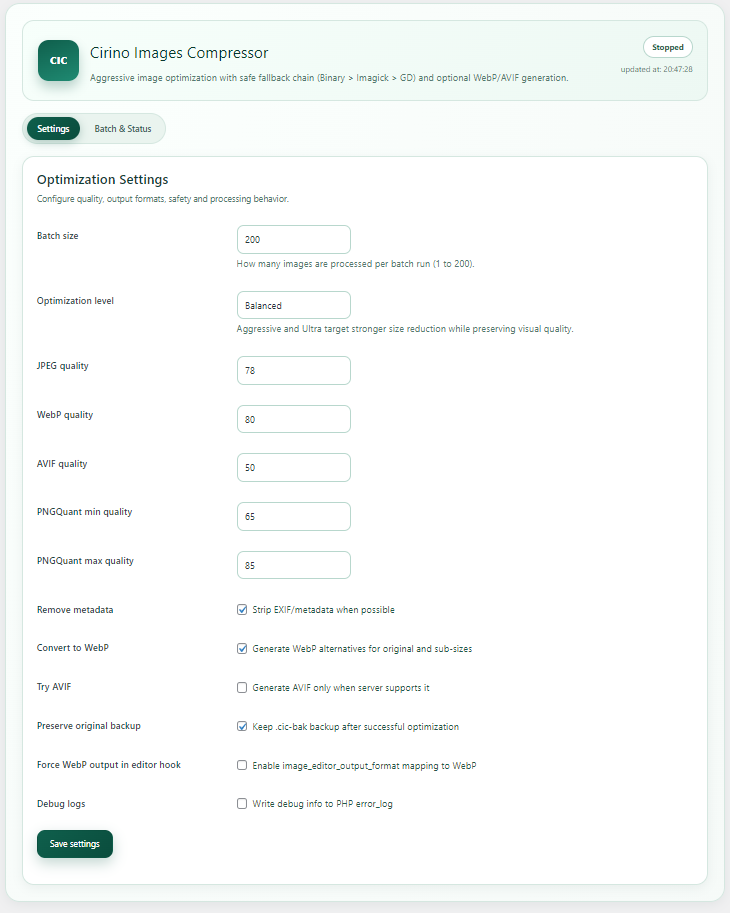
- Set batch size and optimization level.
- Configure JPEG/WebP/AVIF quality values as needed.
- Optionally enable WebP and AVIF generation.
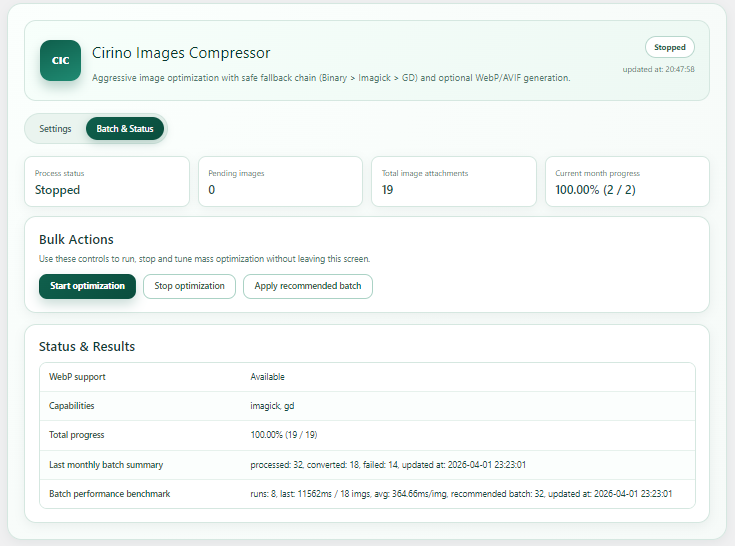
- Start optimization and monitor progress in the Batch & Status tab.
Screenshots
Settings
Batch and status
Project structure
includes/class-cic-capabilities-detector.php: environment capability detectionincludes/class-cic-optimizer-interface.php: optimizer provider contractincludes/class-cic-binary-optimizer-provider.php: local binary optimizer providerincludes/class-cic-imagick-optimizer-provider.php: Imagick optimizer providerincludes/class-cic-gd-optimizer-provider.php: GD optimizer providerincludes/class-cic-file-conversion-service.php: conversion and fallback orchestrationincludes/class-cic-converter.php: batch workflow and attachment processingincludes/class-cic-admin-page.php: admin UI and controls
Local development
Run tests locally:
composer install
composer test
WordPress.org release package
This repository includes development resources (tests/, vendor/, docs, and Composer files) that are useful for GitHub workflows.
For WordPress.org releases, use .distignore to exclude development-only files from the final plugin package.
Repository assets
This README references the following image files:
docs/images/banner.pngdocs/images/screenshot-settings.pngdocs/images/screenshot-batch.png
License
GPLv2 or later.