Beckin Google Injector WP Registry grade A. No security issues foundWP RegistryNo security issues foundOpen the reportA
Beckin Google Injector is a lightweight WordPress plugin that adds Google Analytics 4 and Google Tag Manager to your site with a simple settings screen.
Install
Upload it under Plugins → Add New Plugin → Upload Plugin, then activate.
Install straight from GitHub with WP-CLI:
wp plugin install https://github.com/christopher-silvey/beckin-google-injector/releases/download/1.1.2/beckin-google-injector.zipDownload
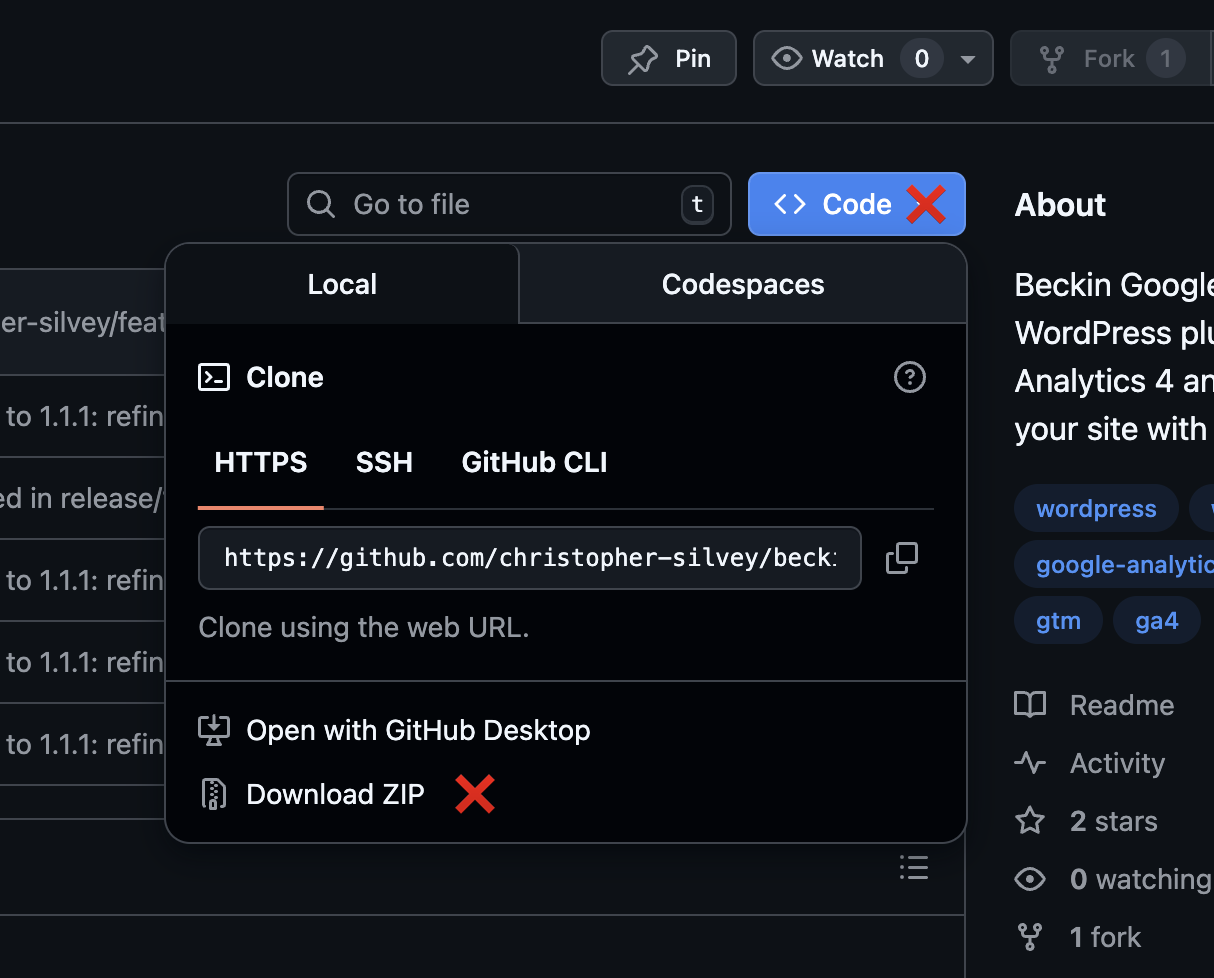
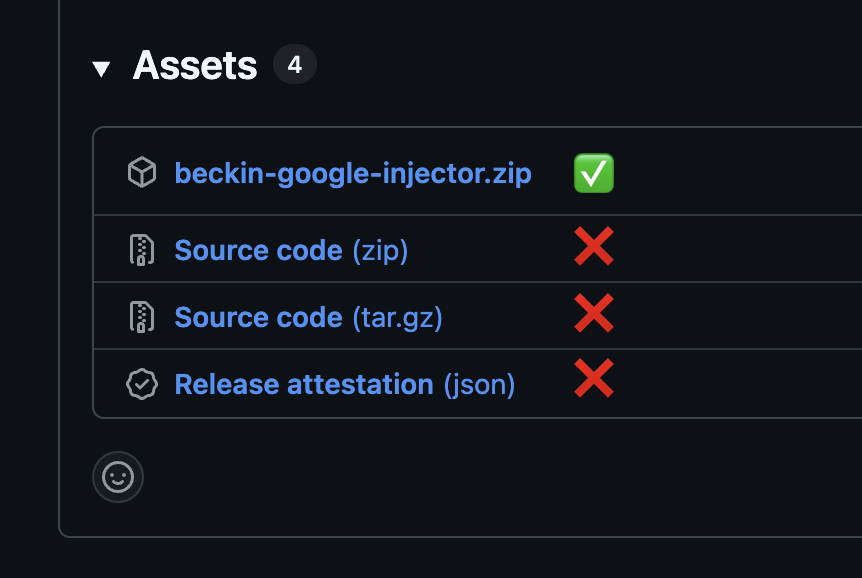
Always download the plugin from the Releases page, not from the "Code" button.
- Latest version:
Download beckin-google-injector.zip
The auto generated "Source code" zips (beckin-google-injector-main.zip, etc.) are for developers and are not in the correct naming format for WordPress installation.
Beckin Google Injector
Beckin Google Injector is a lightweight WordPress plugin that adds Google Analytics 4 and Google Tag Manager to your site with a simple settings screen. Enter your GA4 Measurement ID and/or your GTM Container ID, choose whether to load scripts for logged in staff, and pick header or footer placement.
Features
- Simple settings page under Settings → Beckin Google Injector
- GA4 Measurement ID field with validation (must look like
G-XXXXXXXXXX) - GTM Container ID field with validation (must look like
GTM-XXXXXXX) - Supports GA4 only, GTM only, or both (for other tags through GTM)
- Option to load or skip scripts for logged in staff (administrators, editors, authors, contributors) (recommended: skip)
- Script placement control, header or footer (header is recommended for accuracy)
- Uses
wp_enqueue_scriptandwp_add_inline_scriptso it plays nicely with caching and optimization plugins - Self hosted automatic updates powered by GitHub and Plugin Update Checker
- Safety notice when both GA4 and GTM are configured, reminding you not to also fire GA4 as a GTM tag with the same Measurement ID to avoid double counting
Requirements
- WordPress 6.8 or higher
- PHP 8.0 or higher
Installation
Tip: Do not use the auto generated "Source code" downloads or the downloaded zip file from the "Code" button. Always use
beckin-google-injector.zipfrom Releases, notbeckin-google-injector-main.zip, etc, so the plugin folder name properly matches the plugin slug. i.e.beckin-google-injector.zip
Automatic installation (uploading the ZIP)
- Download the latest
beckin-google-injector.zipfrom the Releases page (or the link above). - Log into your WordPress admin.
- Click Plugins → Add New.
- Click the Upload Plugin button at the top.
- Click Choose File and select the
beckin-google-injector.zipfile. - Click Install Now.
- When the installation completes, click Activate Plugin.
Manual installation
- Download the latest
beckin-google-injector.zipfrom the Releases page (or the link above). - Extract the contents of the zip file.
- Upload the
beckin-google-injectorfolder into yourwp-content/pluginsdirectory. - In the WordPress admin, go to Plugins → Installed Plugins.
- Activate Beckin Google Injector.
Configuration
- Go to Settings → Beckin Google Injector.
- (Optional) Paste your GA4 Measurement ID (for example
G-XXXXXXXXXX) to inject GA4 directly. - (Optional) Paste your GTM Container ID (for example
GTM-XXXXXXX) to inject Google Tag Manager. - Choose whether to load scripts for logged in staff (administrators, editors, authors, contributors).
- Choose script placement:
- Header (recommended) so GA4 and GTM load earlier.
- Footer if you prefer it.
- Save changes.
Once saved, the plugin will start loading GA4 and/or GTM on the frontend according to your settings. If you configure both GA4 and GTM, make sure you do not also fire GA4 as a tag inside GTM with the same Measurement ID, or your pageviews and events may be double counted.
Automatic Updates
This plugin uses Plugin Update Checker and a GitHub repository for self hosted updates.
- Repository URL:
https://github.com/christopher-silvey/beckin-google-injector
Support This Project
If this plugin saves you time or helps you ship cleaner analytics & tracking for clients, you can support ongoing development in a few quick ways:
- Sponsor my work on GitHub
- Buy me a coffee
- ⭐ Star this repository to help others discover it
- 👀 Watch this repository to get notified about new releases and improvements
Changelog
1.1.2
- Marked the plugin as compatible with WordPress 6.9.
- Updated the installation section with a clearer tip and side-by-side screenshots showing the correct ZIP to download from Releases.
- Added a
docs/imagesfolder for README screenshots only (no runtime code changes).
1.1.1
- Fine tuned the Plugin Update Checker configuration so it lines up cleanly with the new GitHub repository and tagged releases.
- Updated the Automatic Updates and installation documentation to make the GitHub download and install flow clearer.
1.1.0
- Switched Plugin Update Checker to use the new GitHub repository instead of Bitbucket.
- Updated the Automatic Updates documentation to reference the GitHub repo for self hosted updates.
1.0.6
- Removed the
.gitignorefile from the distributed plugin so hidden files are not shipped. - Added a
languagesdirectory with a placeholder index file to match the plugin headerDomain Pathand satisfy Plugin Check.
1.0.5
- Removed
.gitignorefrom the distributed plugin so hidden files are not shipped. - Fixed the plugin header "Domain Path" warning by ensuring the
languagesdirectory exists and matches the header value. - Reduced the readme tag list to 5 tags to satisfy the WordPress readme parser and Plugin Check.
1.0.4
- Ran phpcbf with the WordPress coding standard across all plugin files to normalize formatting, spacing, and docblocks.
- No functional changes in this release. This is a housekeeping update to keep the codebase aligned with WordPress coding standards.
1.0.3
- Aligned GA4 and GTM markup with Google’s official install snippets by adding the standard
comment and wrapping the GTM loader script withcomments. - Wrapped the GTM `
Releases
2 releases. Each count is every asset in that release; expand a row for the breakdown.
Active-site estimate ≈10 comes from the median of recent superseded releases. Method.