Install
This is the repository archive. It installs, but the folder name will carry the branch suffix and updates will not flow.
Install straight from GitHub with WP-CLI:
wp plugin install https://github.com/chekcreative/chek-description-list/archive/refs/heads/main.zip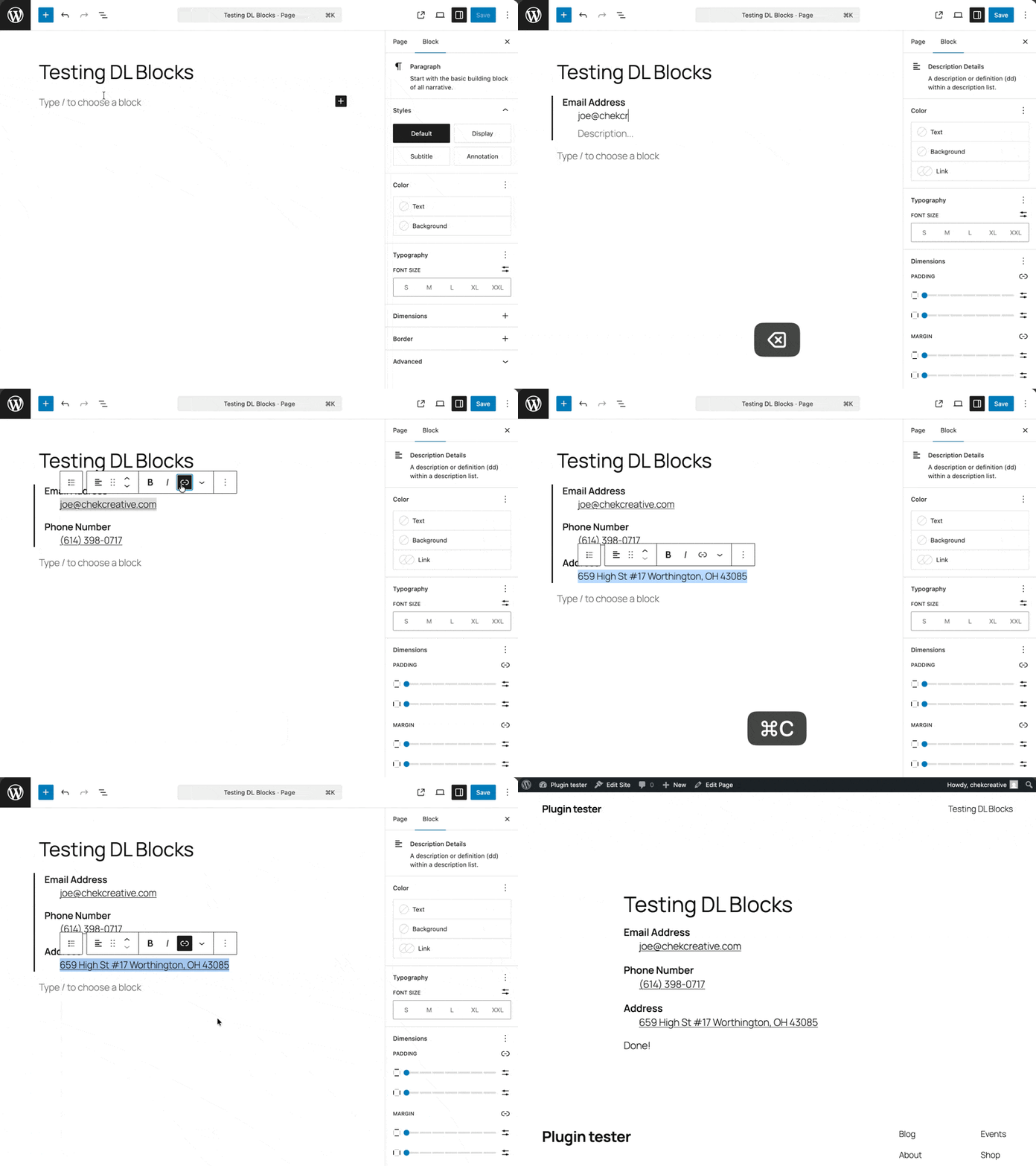
Gutenberg blocks for semantic HTML description lists (<dl>, <dt>, <dd>).
WordPress doesn't ship a native block for description lists. This plugin adds one — three blocks that nest together to produce valid, accessible <dl> markup.
Blocks
| Block | Element | Description |
|---|---|---|
| Description List | <dl> |
Container block. Add it from the inserter or type /description. |
| Description Term | <dt> |
A term or name. Automatically created inside the list. |
| Description Details | <dd> |
A description or definition. Supports multiple per term. |
Keyboard behavior
| Key | Context | Action |
|---|---|---|
| Enter | Non-empty DT | Creates a DD after it |
| Enter | Non-empty DD | Creates another DD (multiple descriptions per term) |
| Enter | Empty DD | Replaces with a new DT (start a new term group) |
| Backspace | Empty DT or DD | Removes the block; if the DL is now empty, removes the DL too |
| Tab | DT, cursor at start | Transforms DT → DD |
| Shift+Tab | DD, cursor at start | Transforms DD → DT |
You can also transform between DT and DD via the block toolbar's "Transform to" menu.
Styling
Minimal defaults are applied so the list looks reasonable out of the box:
<dt>is bold (font-weight: 600)<dd>is indented2remfrom the start- Extra vertical space separates term groups (
dd + dt)
All styles use low-specificity selectors and are easy to override in your theme.
The blocks also support WordPress's built-in color, typography, and spacing controls via the block inspector.
Requirements
- WordPress 6.7+
- PHP 7.4+
Installation
From a release zip
- Download the latest
.zipfrom Releases. - In WordPress, go to Plugins → Add New → Upload Plugin.
- Upload the zip and activate.
From source
git clone <repo-url> wp-content/plugins/chek-description-list
cd wp-content/plugins/chek-description-list
npm install
npm run build
Activate the plugin in WordPress.
Development
# Start webpack in watch mode
npm start

# Run tests
npm test

# Run tests in watch mode
npm run test:watch

# Lint
npm run lint:js
npm run lint:css

# Format
npm run format
Building a release zip
npm run build:zipThis produces dist/chek-description-list.zip, containing only the files needed to run the plugin (no source, tests, or dev config).
Project structure
chek-description-list/
├── chek-description-list.php       # Plugin entry point
├── build/                          # Compiled blocks (webpack output)
├── src/
│   ├── description-list/           # DL container block
│   ├── description-term/           # DT block
│   ├── description-details/        # DD block
│   └── shared/hooks/               # Shared keyboard hooks (useBackspace, useTab)
└── tests/
    ├── js/                         # Jest unit tests (65 tests, 8 suites)
    └── php/                        # PHPUnit tests (requires WP test bootstrap)
License
GPL-2.0-or-later. See LICENSE.