Install
This is the repository archive. It installs, but the folder name will carry the branch suffix and updates will not flow.
Install straight from GitHub with WP-CLI:
wp plugin install https://github.com/chaitanyarai899/commentorai-wordpressplugin/archive/refs/heads/main.zipNo built-in updater. New versions won't appear under Dashboard → Updates. Install new releases yourself, or let Git Updater track the repository.
CommentorAI: Manage user comments and reply with AI on your wordpress site
Comments Reply with GPT (OpenAI) is a plugin that uses OpenAI's GPT to automatically reply to comments on your WordPress website. The plugins auto detects sentiments of comments and auto filters + removes spam comments and comments with curses or bad lanaguge. This plugin adds a "Reply with AI" button to each comment's actions, which, when clicked, sends the comment text to OpenAI's ChatGPT API and returns a suggested response.
Jump straight to:
Installation
- Upload the plugin files to the
/wp-content/plugins/WordPress-ChatGPT-Comments-Reply/core.phpdirectory, or install the plugin directly through the WordPress plugins screen. - Activate the plugin from the 'Plugins' screen in WordPress.
- Go to the Settings->Plugin Settings screen to configure the plugin. You will need to provide your OpenAI API key to use the plugin.
- Use the "Reply with A.I." button to generate automatic replies to comments on your WordPress site.
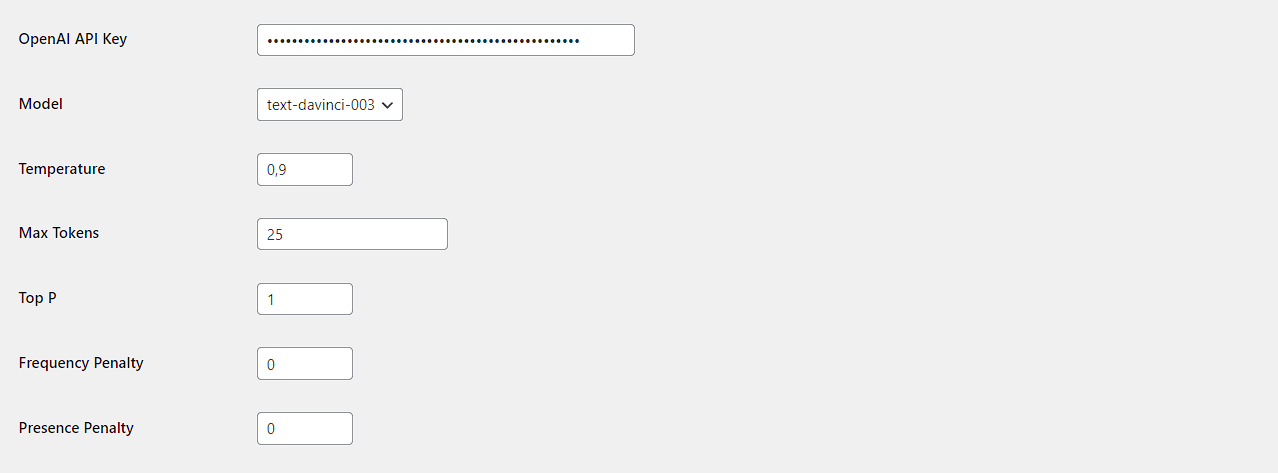
Plugin Options and Settings
You can configure the following settings in the plugin:
- OpenAI API Key: Enter your OpenAI API key to use the plugin.
- Model: The default model is 'gpt-3.5-turbo' (best cost to benefit ratio according to my tests).
- Temperature: Set the temperature parameter to control the creativity of the generated replies. The default temperature is 0.9.
- Max Tokens: Set the maximum number of tokens to generate for the reply. The default value is 100.
- Top P: Set the top-p parameter to control the diversity of the generated replies. The default value is 1.
- Frequency Penalty: Set the frequency penalty parameter to control the likelihood of the same word being repeated in the generated replies. The default value is 0.0.
- Presence Penalty: Set the presence penalty parameter to control the likelihood of new words being introduced in the generated replies. The default value is 0.0.
Screenshots
Option-Page