Install
This is the repository archive. It installs, but the folder name will carry the branch suffix and updates will not flow.
Install straight from GitHub with WP-CLI:
wp plugin install https://github.com/cedlelensois-lang/wp-chrono-timeline-block/archive/refs/heads/main.zipLightweight Gutenberg block for WordPress to build vertical (one-sided or alternating), horizontal and tabbed timelines, with 7 themes, ready-made templates, icons, images, lightbox, custom colors and scroll animation. No build step, translation-ready (English / French).
Features
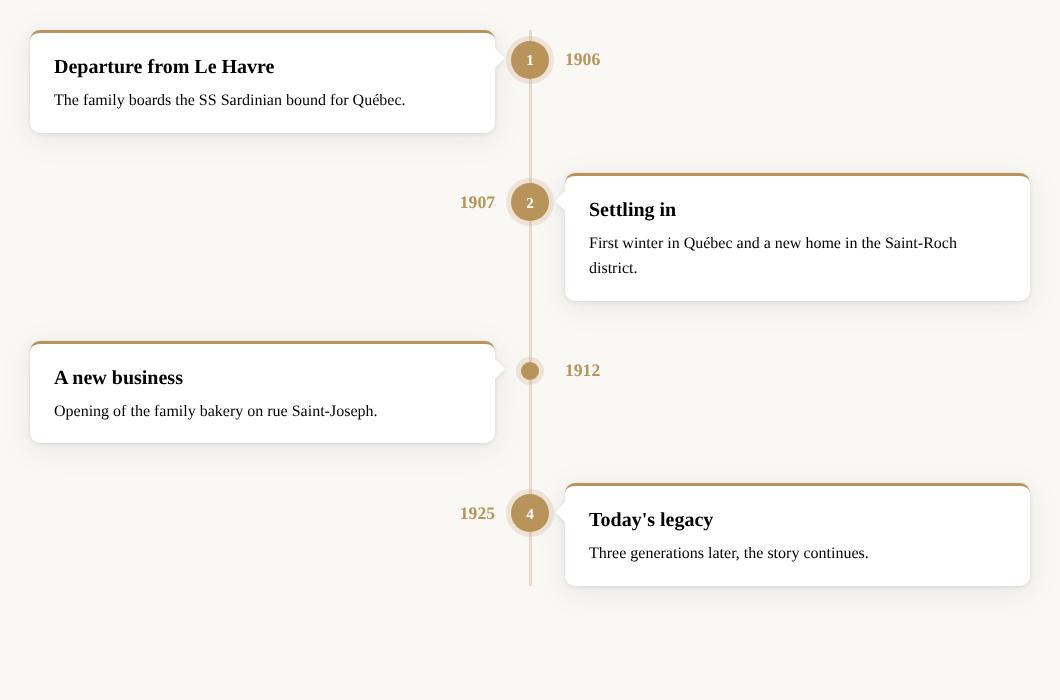
- 5 layouts: vertical alternating, vertical with the line on the left, vertical with the line on the right, horizontal (scrollable, swipe-friendly) and tabs (clickable date bar showing one event at a time, keyboard accessible)
- Responsive: the alternating layout automatically switches to one side on mobile
- Dual orientation: horizontal and tabbed timelines can switch to a vertical layout on phones
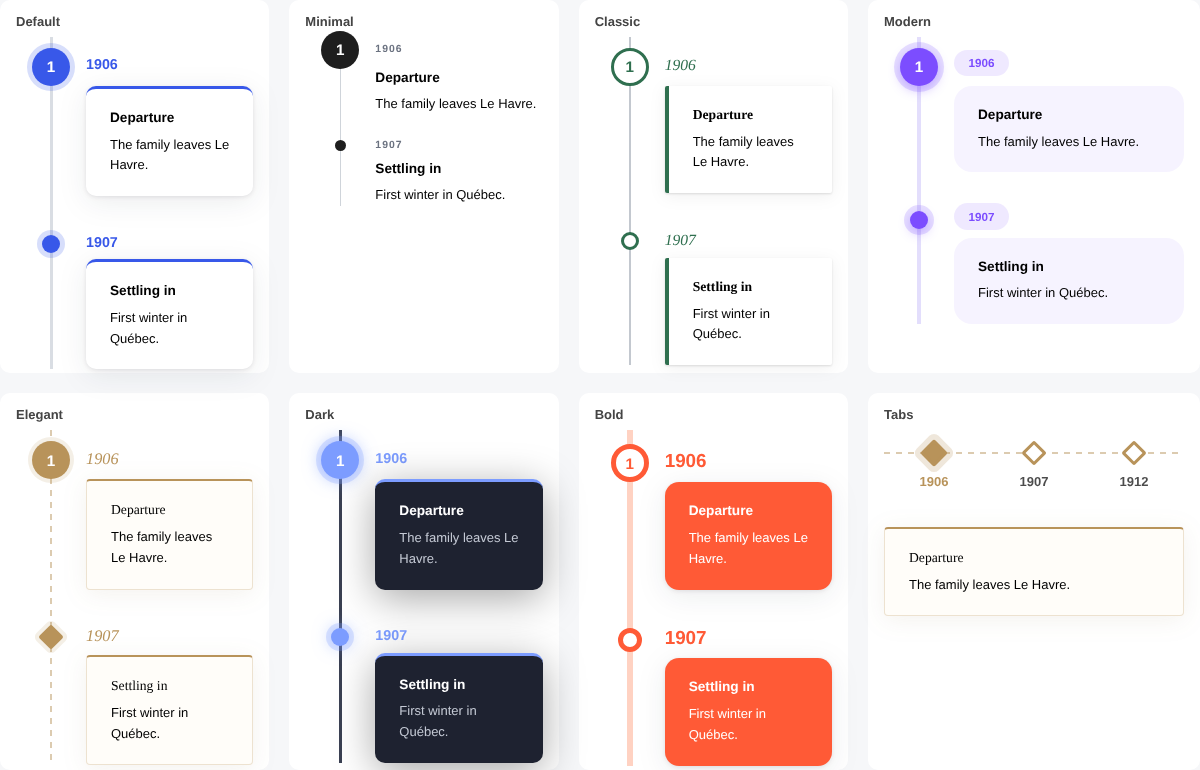
- 7 themes: Default, Minimal, Classic, Modern, Elegant, Dark and Bold — each works with every layout, and your own colors override the theme
- Templates: preconfigured layout + theme combinations available straight from the block inserter (e.g. "Timeline – Elegant, alternating", "Timeline – Bold, tabs")
- Events with date, title, rich text and optional image
- Markers: dot, Dashicon (24 icons) or short text (number, letter, emoji), with a per-event accent color
- Image click action: none, full-size lightbox (with previous/next navigation, keyboard and screen-reader support) or open in a new tab
- Styling: line, dot, card, title and date colors (uses your theme palette), line thickness, dot size, card radius, spacing, shadow on/off
- Date position: opposite the card or above it
- Scroll animation, automatically disabled for users who prefer reduced motion
- Theme-proof: the timeline line does not rely on
::before, so aggressive theme CSS can't hide it - Automatic updates from GitHub: new releases show up in Dashboard → Updates like any other plugin, with one-click and auto-update support
- Translation-ready: English source strings, French translation included (
fr_FR),.pottemplate provided
Requirements
- WordPress 6.3 or later
- PHP 7.4 or later
Installation
- Download this repository as a ZIP (Code → Download ZIP).
- In WordPress, go to Plugins → Add New → Upload Plugin, choose the ZIP and click Install Now, then Activate.
You can also copy the folder directly into wp-content/plugins/.
Updates
The plugin checks this repository's releases twice a day (results are cached for 6 hours) and offers the update in WordPress like any plugin from WordPress.org. You can also click Check for updates under the plugin name on the Plugins screen to check immediately, and enable auto-updates there.
Publishing a new version:
- Bump
Version:andCTB_VERSIONinchrono-timeline-block.php, and add a### x.y.zentry to the changelog below. - Commit and push.
- Push a tag with the version number (e.g.
v1.4.2or1.4.2).
The Release GitHub Action (.github/workflows/release.yml) then checks that the tag matches the plugin version, builds chrono-timeline-block.zip (plugin files only), and publishes the GitHub release with the zip attached and the changelog entry as release notes.
Pre-releases and drafts are ignored. The Update URI header guarantees WordPress.org is never queried for this plugin.
Usage
- In the block editor, type
/timeline(or/frise) and insert the Timeline block. - Select an event to edit its date, title and text, add an image from the toolbar, and pick a marker and accent color in the sidebar.
- Select the parent Timeline block (use the "Select parent" button or the List View) to pick a theme and change the layout, colors and dimensions. Tip: search for "Timeline –" in the inserter to start from a ready-made template.
- Click Add an event under the timeline to add more steps.
Translations
The interface follows the site language (or the user's profile language).
| Language | Status |
|---|---|
| English | Built-in (source) |
French (fr_FR) |
Included |
To add a language, start from languages/chrono-timeline-block.pot using Poedit or Loco Translate. JavaScript strings also need a JSON file (chrono-timeline-block-{locale}-ctb-editor.json), which wp i18n make-json can generate.
File structure
chrono-timeline-block.php   Plugin bootstrap (registers scripts, styles, blocks, translations)
blocks/timeline/            Parent block metadata (block.json)
blocks/timeline-item/       Event block metadata (block.json)
assets/editor.js            Editor UI for both blocks (no build step required)
assets/editor.css           Editor-only styles
assets/style.css            Front-end and editor styles
assets/view.js              Front-end scroll animation and lightbox
languages/                  .pot template and French translation (.po, .mo, .json)
Changelog
1.4.3
- Releases are now built and published automatically by a GitHub Action when a version tag is pushed (plugin zip attached)
1.4.1
- Plugin renamed to "WP Chrono timeline block" in the WordPress admin
1.4.0
- Automatic updates from GitHub releases (with "Check for updates" link, release notes in "View details", auto-update support)
1.3.0
- New tabs layout (one event at a time, with clickable date bar)
- Dual orientation option: horizontal / tabs on desktop, vertical on mobile
- 7 themes (Default, Minimal, Classic, Modern, Elegant, Dark, Bold) with a visual picker
- 7 ready-made templates in the block inserter
1.2.0
- Bilingual interface: English source strings with bundled French translation
1.1.1
- Fix: timeline line hidden by some themes
- Fix: white gap around the card arrow
1.1.0
- Image click action: lightbox or open in a new tab
1.0.0
- Initial release
License
GPL-2.0-or-later. See LICENSE.