Install
This is the repository archive. It installs, but the folder name will carry the branch suffix and updates will not flow.
Install straight from GitHub with WP-CLI:
wp plugin install https://github.com/cedaro/gravity-forms-iframe/archive/refs/heads/develop.zipOn Packagist as cedaro/gravity-forms-iframe:
composer require cedaro/gravity-forms-iframeEmbed a Gravity Form in an iframe on any site.
Contributors: Brady Vercher
License: GPL-2.0+
The typical process to embed a Gravity Form on a site where the plugin isn't installed requires:
- Developing a custom page template with necessary code to output form scripts and styles.
- Creating a new page in WordPress.
- Inserting the form shortcode in the new page.
- Manually writing an iframe tag with the page permalink and giving it a static height.
With the Gravity Forms Iframe add-on, just enable a setting to allow the form to be embedded and copy the code snippet. That's it. As a bonus, the iframe automatically resizes whenever the form height changes -- for instance, when fields are shown or hidden due to conditional logic.
Features
- Selectively enable embedding for individual forms.
- Auto-resizing iframes.
- Override embed templates in a theme or child theme.
- Override settings via the embed src query string.
- Extends the Gravity Forms add-on API to seamlessly integrate with the WordPress and Gravity Forms interface.
- Protocol-relative URLs for embedding on secure sites (both sites need SSL).
Settings
The form title and description can be hidden independent of regular form display by toggling a checkbox after enabling the embedding setting.
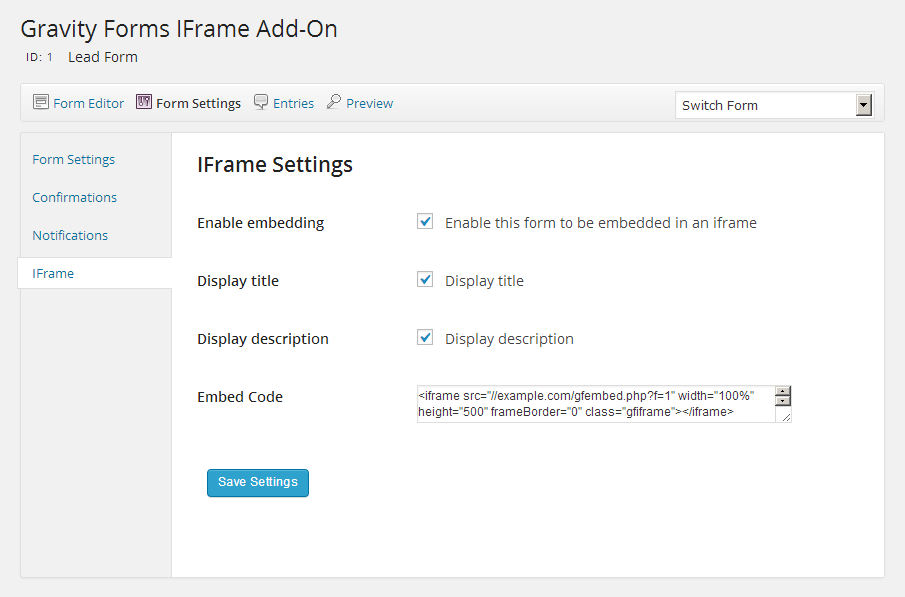 The form's iframe settings panel.
Overrides for Individual Iframes
If the title and description settings need to be changed per embed, they can be modified in the iframe src query string.
dt: Set to1to display the form title;0to hide.dd: Set to1to display the form description;0to hide.
Example: gfembed/?f=1&dt=0&dd=0
Auto-resizing Script
If the auto-resizing functionality isn't needed for a particular form, adjust the iframe's height attribute to accomodate the form and don't include the `