Install
This is the repository archive. It installs, but the folder name will carry the branch suffix and updates will not flow.
Install straight from GitHub with WP-CLI:
wp plugin install https://github.com/cedaro/cpt-archives/archive/refs/heads/develop.zipCPT Archives 
A WordPress plugin to manage post type archive titles, descriptions, and permalink slugs from the dashboard.
Contributors: Brady Vercher
Requires: WordPress 4.0+ & PHP 5.4+
License: GPL-2.0+
Description
CPT Archives allows for editing a post type's archive properties by registering a new cpt_archive custom post type that's connected to the post type (that's a mind bender). In fact, since it's really nothing more than a CPT, it can be further extended with plugins to add meta boxes for customizing your archive pages in new and interesting ways. By default, archive titles, descriptions and permalinks can be managed through a familiar interface.
Another benefit is that a new "Archive" section appears on the Appearance → Menus screen, making it easy to add your post type archives to a menu without using a custom link. Even if your archive slug is changed, you won't have to update the URL in your menu.
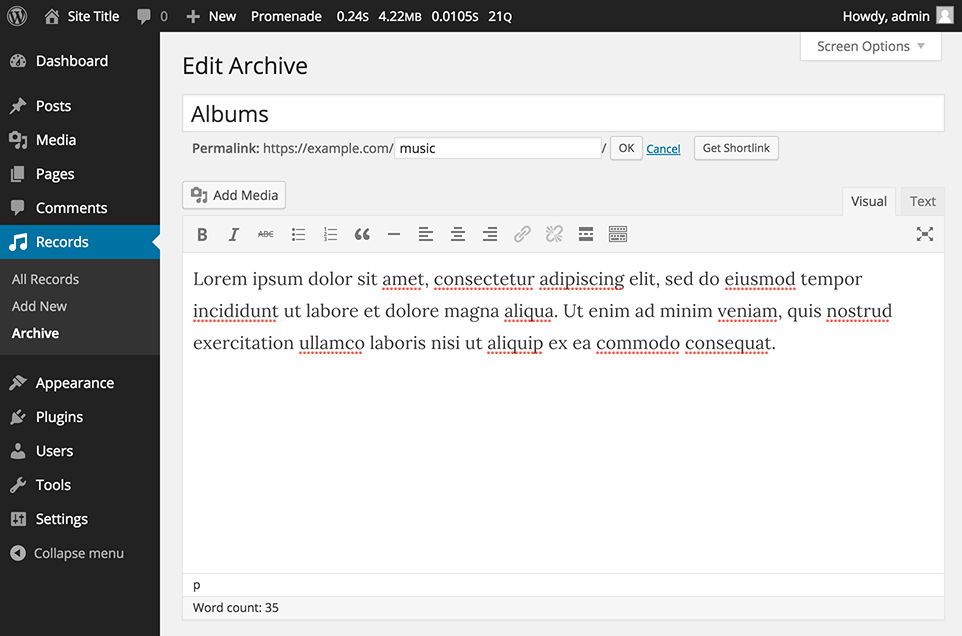
Example of an Edit Archive screen. The archive title, description and permalinks can all be updated.
Usage
To register archive support for an existing post type, add a quick snippet to your theme's functions.php file or in a custom plugin like this:
add_action( 'init', function() {
    add_post_type_support( 'my_post_type', 'archive' );
} );
This automatically adds a submenu in the post type's menu that points directly to the archive edit screen. Behind the scenes, when you register support for an archive this way, a new cpt_archive post is created and connected to the post type, so you don't have to do anything else.
Advanced Registration
For more control, an alternative API is available for registering archives:
add_action( 'init', function() {
    if ( empty( $GLOBALS['cptarchives'] ) ) {
        return;
    }

    $GLOBALS['cptarchives']->register_archive( 'my_post_type', array(
        'customize_rewrites' => true,
        'show_in_menu'       => true,
        'supports'           => array( 'title', 'editor', 'thumbnail' ),
    ) );
} );| Argument | Description |
|---|---|
customize_rewrites |
Whether the post type's rewrites can be customized. Defaults to true. Accepts false, 'archives', and 'posts'. |
show_in_menu |
Whether the archive should be added to the admin menu. Defaults to true. Also accepts a top level menu item id. |
supports |
A list of post type features that should be enabled on the archive edit screen. |
Post Type Archive Templates
CPT Archives works with default archive template tags. Additional data for the archive post object can be retrieved using the $cptarchives global (be sure it exists before using it).
The archive-my_post_type.php template for the example CPT registered above could look something like this:
<?php get_header(); ?>

<?php the_archive_title( '<h1 class="archive-title">', '</h1>' ); ?>

<?php the_archive_description( '<div class="archive-description">', '</div>' ); ?>

<figure class="archive-featured-image">
  <?php echo get_the_post_thumbnail( $cptarchives->get_archive_id() ); ?>
</figure>

<div class="archive-meta">
  <?php echo $cptarchives->get_archive_meta( 'meta_key', true ); ?>
</div>

<?php while ( have_posts() ) : the_post(); ?>
  <?php get_template_part( 'content' ); ?>
<?php endwhile; ?>

<?php get_footer(); ?>
Installation
Upload
- Download the latest release from GitHub.
- Go to the Plugins → Add New screen in your WordPress admin panel and click the Upload button at the top next to the "Add Plugins" title.
- Upload the zipped archive.
- Click the Activate Plugin link after installation completes.
Manual
- Download the latest release from GitHub.
- Unzip the archive.
- Copy the folder to
/wp-content/plugins/. - Go to the Plugins → Installed Plugins screen in your WordPress admin panel and click the Activate link under the CPT Archives item.
Read the Codex for more information about installing plugins manually.
Git
Clone this repository in /wp-content/plugins/:
git clone git@github.com:cedaro/cpt-archives.git
Then go to the Plugins → Installed Plugins screen in your WordPress admin panel and click the Activate link under the CPT Archives item.