MECE Taxonomy Kanban
WordPress plugin that lets you manage and visualize taxonomy relationships as an interactive Kanban board. Built around the MECE principle (Mutually Exclusive, Collectively Exhaustive), it turns taxonomy cleanup and post organization into a visual, intuitive workflow.
Install
This is the repository archive. It installs, but the folder name will carry the branch suffix and updates will not flow.
Install straight from GitHub with WP-CLI:
wp plugin install https://github.com/casswigley/mece-taxonomy-kanban/archive/refs/heads/master.zipMECE Taxonomy Kanban is a WordPress plugin that lets you manage and visualize taxonomy relationships as an interactive Kanban board.
Built around the MECE principle (Mutually Exclusive, Collectively Exhaustive), it turns taxonomy cleanup and post organization into a visual, intuitive workflow.
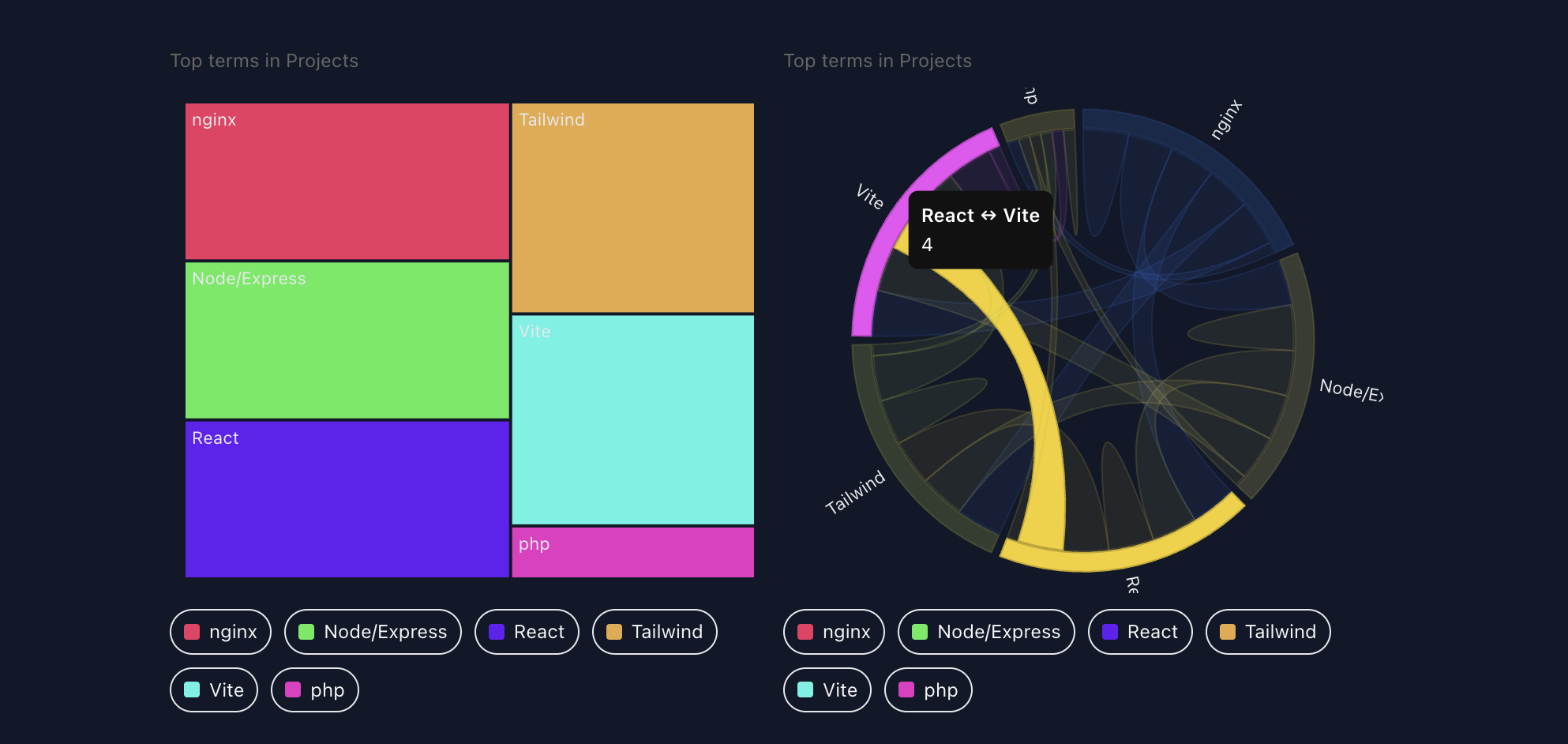
🚀 Features
- Drag-and-drop taxonomy management — move posts between term columns or assign terms to posts.
- Inline editing — rename, create, or delete terms without leaving the board.
- Palette system — choose from 30+ color palettes (
warm,cool,material,vivid,forest, etc.). - Dark-mode ready — automatically adapts when
<html class="dark">is active. - Two modes:
- MECE Mode: posts grouped by taxonomy term.
- Non-MECE Mode: draggable term cards assignable to posts.
- Tailwind-compatible variables for easy integration with modern WP admin themes.
- Taxonomy Kanban Block embeds compact visualizations in content
🧩 Modes Explained
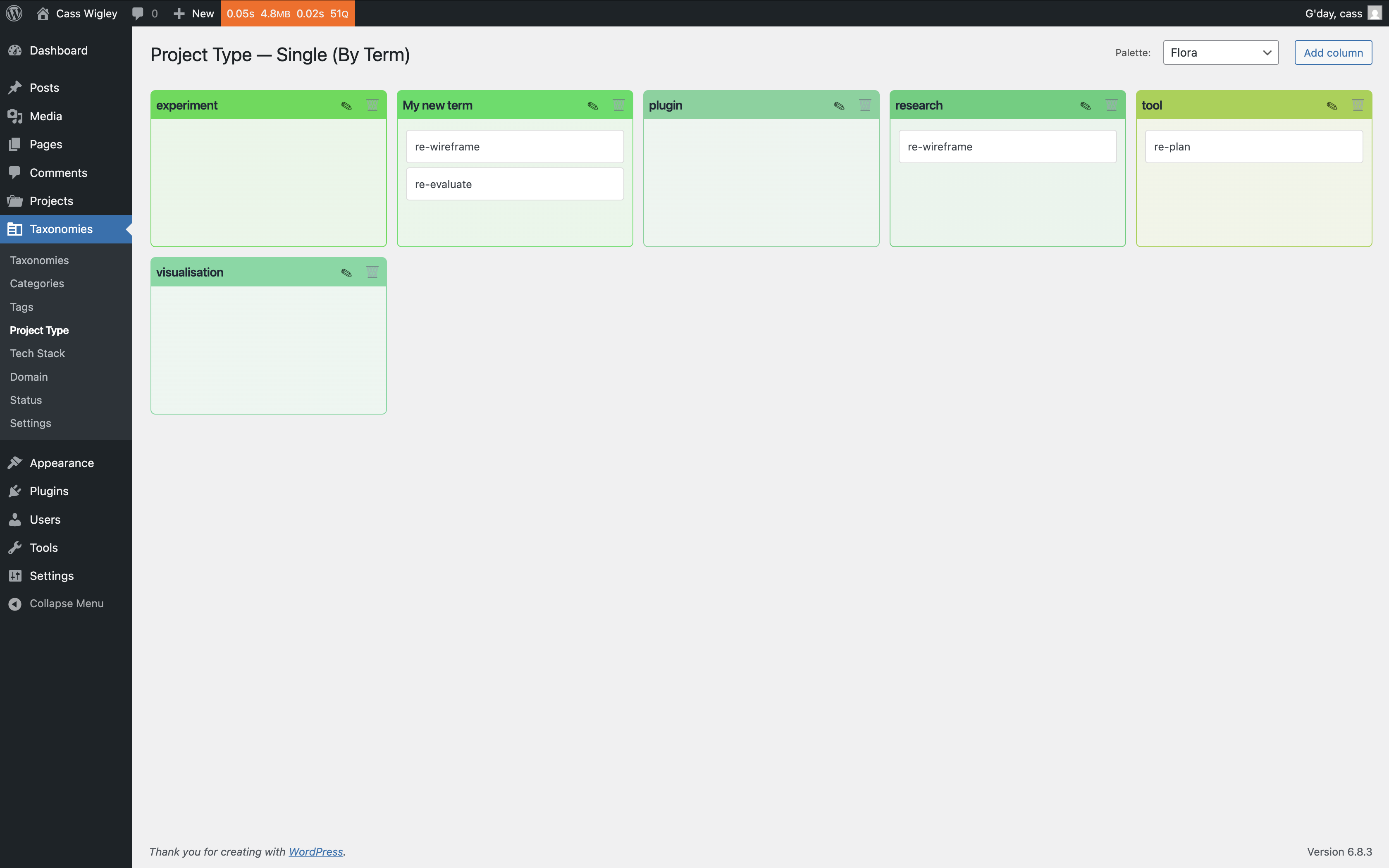
🟩 Single MECE Mode
This mode enforces Mutual Exclusivity: each post is assigned to a single taxonomy term.
You’ll see one column per term (plus “Uncategorised”), with posts listed beneath.
Drag a post card from one column to another to reassign its taxonomy instantly.
Use the “+ Add Term” button to create new columns and rename them inline.
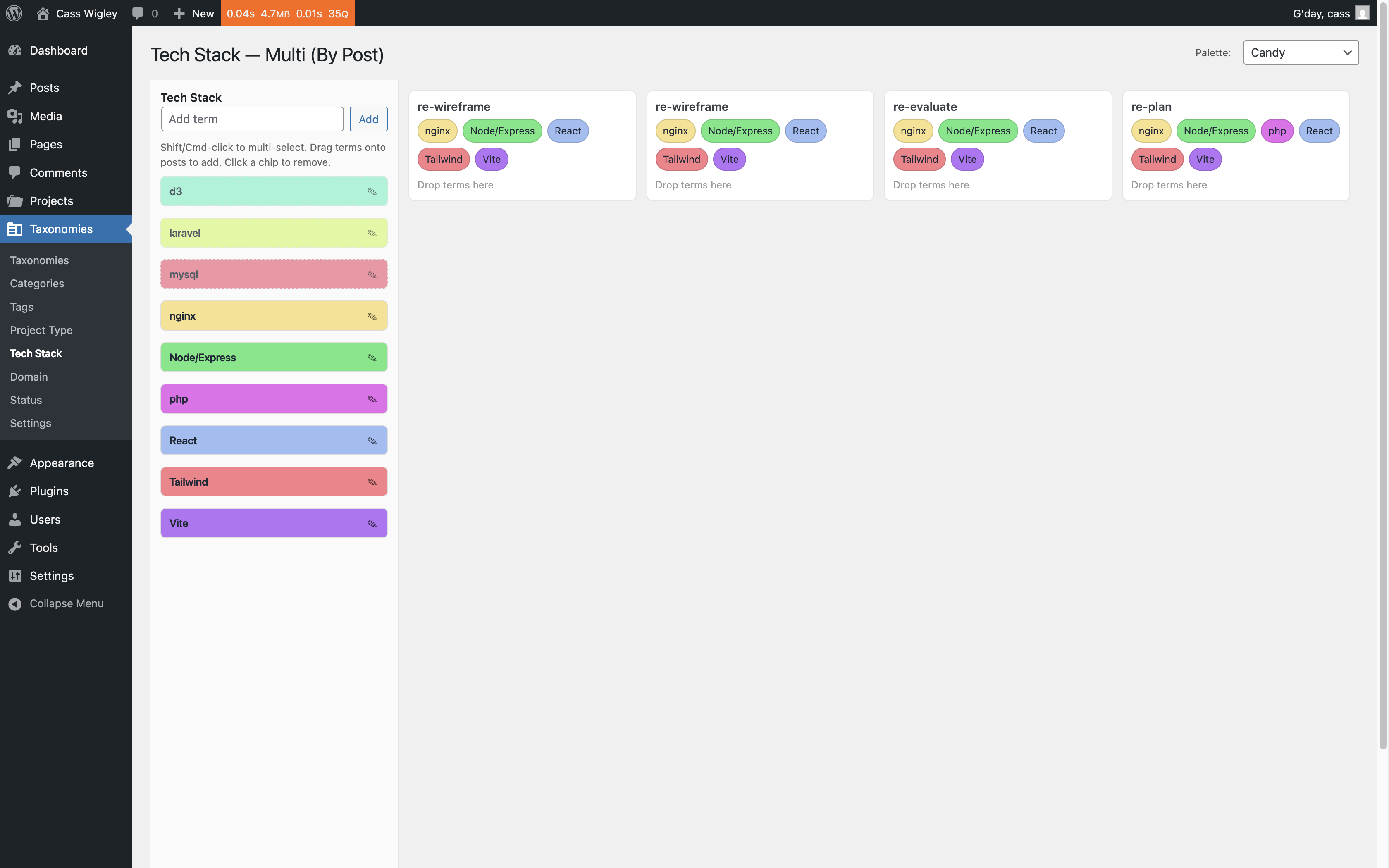
🟦 Multi Affinity Mode
This mode supports Collective Exhaustiveness: posts may belong to multiple terms.
On the left, you’ll see a draggable list of all terms (tags or other taxonomies).
On the right, posts appear as cards; drag one or more terms onto a post to assign them.
Click a term chip to remove it. Changes are saved live via AJAX.
🧭 Dashboard Widgets
The plugin includes a set of dashboard widgets for at-a-glance visibility:
- MECE Overview Chart: Displays category distribution and orphaned posts.
- Cumulative Flow Diagram (CFD): Shows how taxonomy assignments evolve over time.
- Recent Changes: Lists the latest taxonomy edits (created, renamed, or moved).
- Palette Preview: Displays the currently selected palette for the active taxonomy.
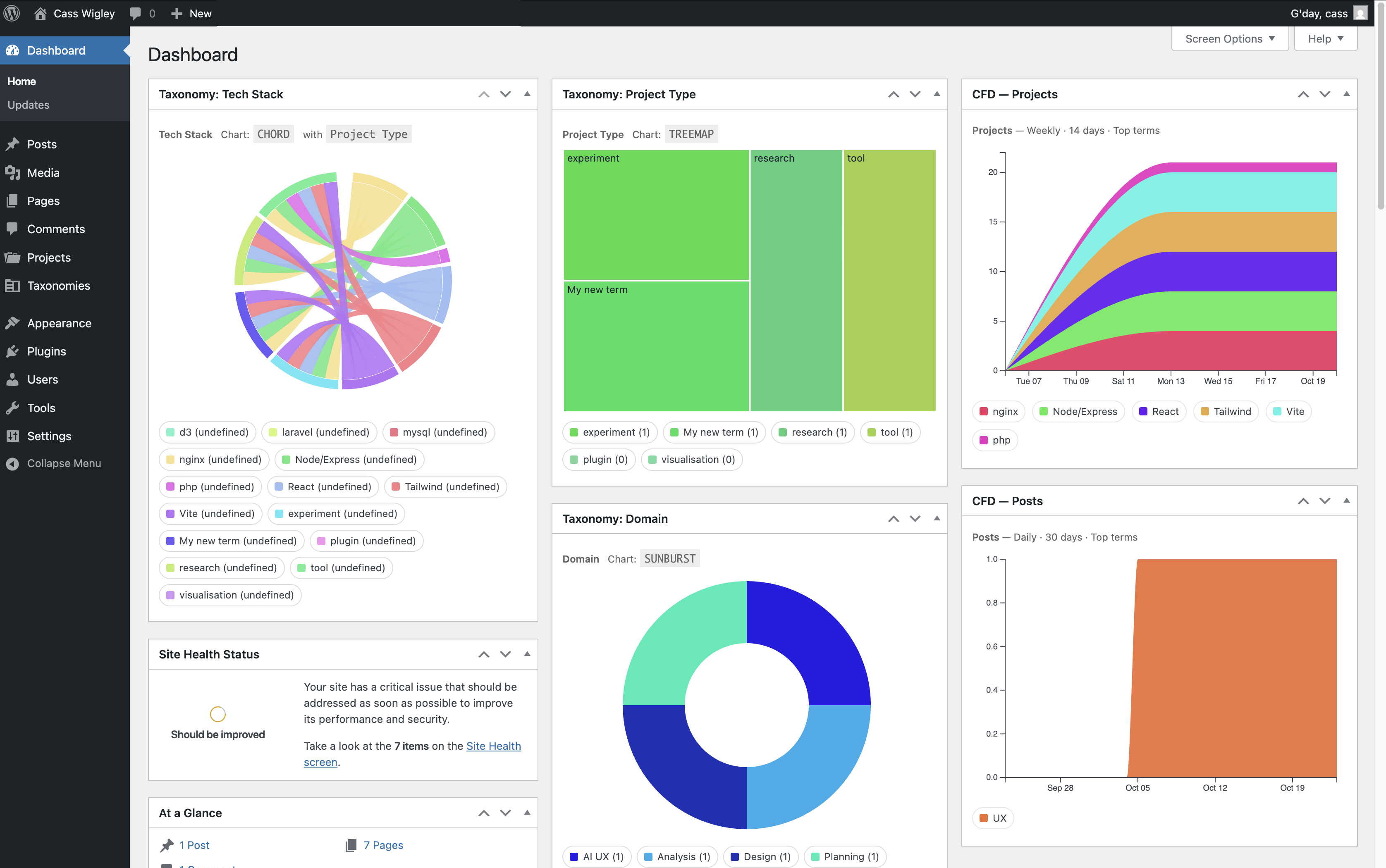
Widgets can be enabled or disabled under Screen Options → Dashboard Widgets in the WordPress admin.
🧱 Available Blocks
1️⃣ Taxonomy Kanban Block
Block name: mece/tax-kanban
Displays the interactive Kanban board directly in the editor or front end.
Options include:
- Taxonomy selection
- Mode (MECE vs Affinity)
- Palette choice
- Dark-mode inheritance
Features:
- Fully interactive in Preview mode
- Inline term creation and drag-drop post reassignment
- Palette stored with the block instance
2️⃣ Inline Charts Block
Block name: mece/inline-charts
Embeds compact visualizations in content or dashboards.
Chart types include:
- Chord diagrams (term relationships)
- Parallel sets (term intersections)
- Treemaps (taxonomy distribution)
- Bar / line charts (term counts)
3️⃣ Cumulative Flow Diagram (CFD) Block
Block name: mece/inline-cfd
Renders animated cumulative flow charts showing how posts progress between taxonomy terms over time.
4️⃣ Taxonomy Charts Block
Block name: mece/tax-charts
Displays summary visualizations of taxonomy data such as term counts or relationships.
Supports pie, donut, bar, and sunburst charts.
5️⃣ CFD Dashboard Block
Block name: mece/cfd
A wide layout CFD block for admin or reporting pages — connects directly to dashboard widget data.
🧩 Shared Features
All MECE blocks include:
- Live D3.js visualizations
- Tailwind + dark-mode styling
- Palette selector integration
- Editor preview toggle
- Width controls (
content,wide,full)
🧩 Usage
- Install and activate the plugin.
- Navigate to Posts → Taxonomy Kanban.
- Select a taxonomy (e.g., Categories, Tags, or custom taxonomies).
- Use the palette dropdown to style your board.
- Drag posts or terms to reorganize; changes save instantly via AJAX.
🧠 Technical Notes
- JavaScript interface built on jQuery UI Sortable/Draggable.
- Color palettes generated using Golden-Angle + Halton sequence for perceptual evenness.
- AJAX endpoints:
mece_create_term,mece_rename_term,mece_delete_term,mece_set_post_term,mece_add_post_term,mece_remove_post_term. - LocalStorage preserves the selected palette per taxonomy.
- Works with both hierarchical and non-hierarchical taxonomies.
📦 Development
Clone the repository and build assets:
npm install
npm run build
To package for deployment:
npm run build && zip -r mece-taxonomy-kanban.zip . -x "node_modules/*" "src/*"📝 License
GPLv2 or later
© 2025 Cass Wigley / Mecca Medialight
https://www.gnu.org/licenses/gpl-2.0.html
Part of the Cass D3 Visualisations family — plugins that explore data, design, and taxonomy through D3.js and modern WordPress blocks.