GatherPress Relations WP Registry grade A. No security issues foundWP RegistryNo security issues foundOpen the reportA #6 in Events & Booking
Connects persons to events, productions, or any post type — with individual roles per relation. Built on GatherPress shadow taxonomies and WordPress post_type_supports.
Install
Upload it under Plugins → Add New Plugin → Upload Plugin, then activate.
Install straight from GitHub with WP-CLI:
wp plugin install https://github.com/carstingaxion/gatherpress-relations/releases/download/0.1.1/gatherpress-relations.zipConnects persons to events, productions, or any post type — with individual roles per relation. Built on GatherPress shadow taxonomies and WordPress post_type_supports.
Description
GatherPress Relations registers a gatherpress_person post type and a relationship system that lets you assign people to any supporting post type with a specific role. A person can be a Speaker at one meetup, a Host at another, and a Moderator at a third — each connection carries its own role and department.
The plugin ships two blocks and a sidebar panel:
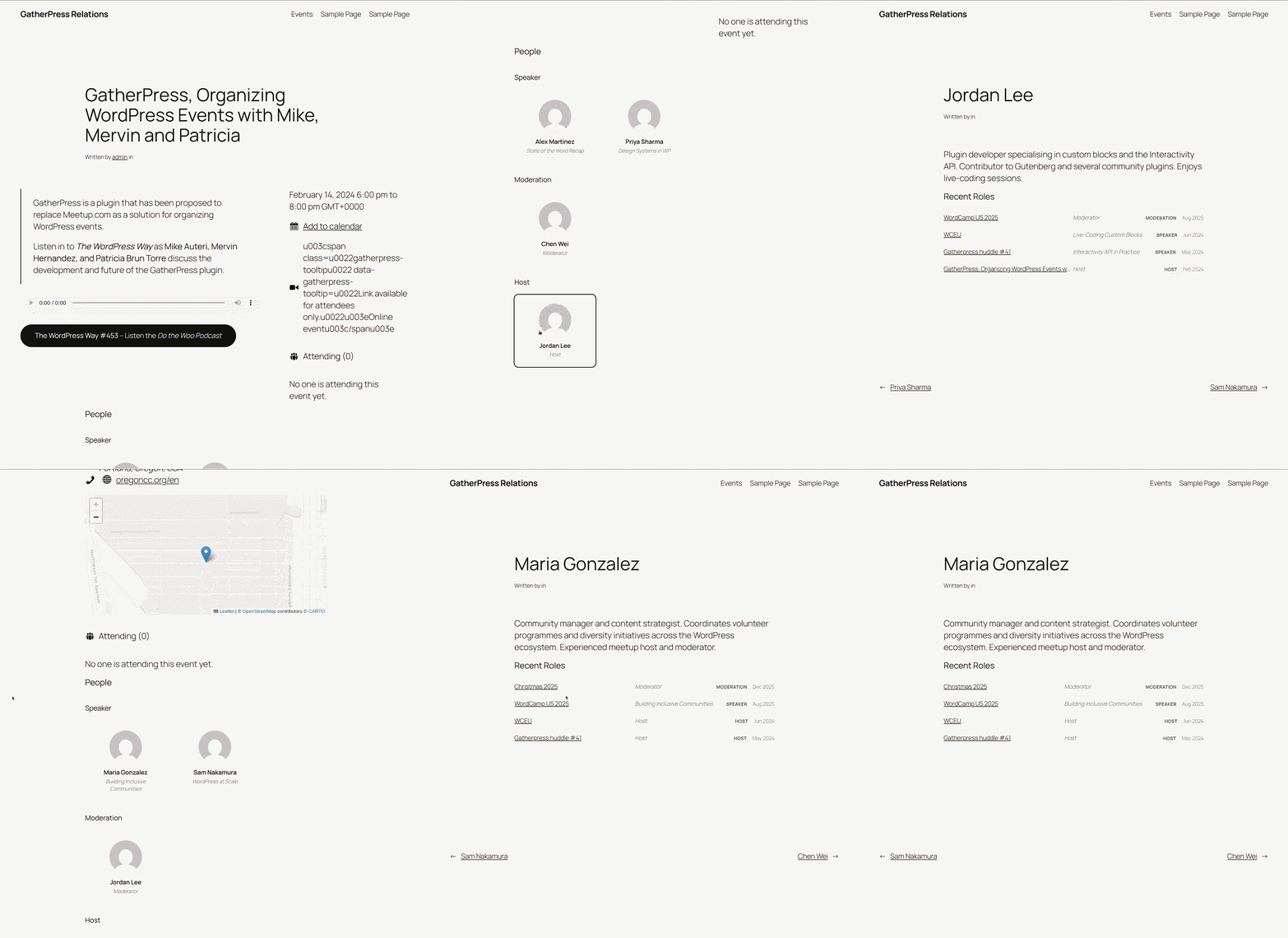
- Cast & Crew List — renders a grouped roster of people connected to the current post, with headshots, names, roles, and links to person pages. Three style variations: simple list (default), compact table, and cards.
- Recent Relations — displays a source post's recent relations across all connected consumer posts, with linked titles, department badges, and dates. Place it on a person or sponsor template to show their full history. Labels adapt to the current post type.
- Manage Cast & Crew sidebar — available on every supporting post type, even when no block is inserted. Search for people, assign roles and departments, reorder entries.
Example: WordPress meetup group
A meetup group uses GatherPress for events. With this plugin:
- Create person posts for your regular contributors.
- On each event, open the Cast & Crew sidebar panel and assign people with roles like Speaker, Moderation, or Host.
- The Cast & Crew List block on the event page shows who's involved and in what capacity.
- On a person's page, the Recent Relations block lists every event they've participated in, with their role at each.
The default departments reflect this use case: Speaker, Moderation, and Host. Departments are filterable — theater groups, conferences, or any other domain can customise them via the gatherpress_relations_departments filter.
How it works
- People are post types, not taxonomy terms or users. They get the full block editor, featured images, REST API endpoints, and single-page templates.
- Shadow taxonomies (from GatherPress core's
gatherpress-shadow-sourcesupport) create the many-to-many relationship between people and consumer posts. Each published person automatically gets a hidden taxonomy term that consumer posts tag themselves with. - Roles are junction metadata stored as
_gatherpress_relationspost meta on the consumer post — a JSON array of{ slug, id, type, role, department, order }entries. Roles are contextual to each relationship, not global categories. - All wiring is driven by
post_type_supports. No post type slug is hard-coded in the relationship layer. Two support strings control the system:gatherpress-relations-from— declares a consumer post type (the one that carries relation entries and tags itself with shadow terms).gatherpress-relations-to— declares a connectable source post type (the one whose shadow taxonomy gets wired onto consumers).
// Make "my_event" a consumer that can receive person/sponsor connections:
add_post_type_support( 'my_event', 'gatherpress-relations-from' );

// Make "my_sponsor" a connectable source (requires gatherpress-shadow-source too):
add_post_type_support( 'my_sponsor', 'gatherpress-relations-to' );
The plugin discovers all supporting types at init:100 via get_post_types_by_support() and wires everything automatically.
Requirements
- WordPress 6.4+
- PHP 8.0+
- GatherPress (declared as a required plugin)
Optional: gatherpress-productions for the gatherpress_play post type.
Installation
- Install and activate GatherPress.
- Upload
gatherpress-relationsto/wp-content/plugins/or install via the WordPress plugin screen. - Activate.
The gatherpress_person post type and both blocks are immediately available. GatherPress events (gatherpress_event) are automatically bridged into the relations system.
Customising departments
The default departments are:
| Slug | Label |
|---|---|
speaker |
Speaker |
moderation |
Moderation |
host |
Host |
Override them per source type:
add_filter( 'gatherpress_relations_departments', function ( array $departments, string $source_type ): array {
    if ( 'gatherpress_person' === $source_type ) {
        return [
            'cast'             => __( 'Cast', 'textdomain' ),
            'direction'        => __( 'Direction', 'textdomain' ),
            'design'           => __( 'Design', 'textdomain' ),
            'stage_management' => __( 'Stage Management', 'textdomain' ),
            'musicians'        => __( 'Musicians', 'textdomain' ),
            'production'       => __( 'Production', 'textdomain' ),
            'other'            => __( 'Other', 'textdomain' ),
        ];
    }
    return $departments;
}, 10, 2 );
The second parameter is the source post type slug (e.g., gatherpress_person, gatherpress_sponsor), not the consumer. This means departments follow the connectable type — sponsors always get their tiers, people always get their roles, regardless of which consumer post type they're assigned to. Both the editor sidebar and the frontend rendering use this filter.
Screenshots
Developer documentation
Architecture details, class structure, hook execution order, meta schema, and editor hook API are documented in docs/developer/README.md.
Changelog
All notable changes to this project will be documented in the CHANGELOG.md.
License
GPLv2 or later. See LICENSE.
Releases
2 releases. Each count is every asset in that release; expand a row for the breakdown.
Active-site estimate ≈110 comes from the median of recent superseded releases. Method.