GatherPress References WP Registry grade A. No security issues foundWP RegistryNo security issues foundOpen the reportA
Display references such as clients, festivals and awards in a structured, chronological format.
Install
Upload it under Plugins → Add New Plugin → Upload Plugin, then activate.
Install straight from GitHub with WP-CLI:
wp plugin install https://github.com/carstingaxion/gatherpress-references/releases/download/0.2.4/gatherpress-references.zipDisplay references such as clients, festivals and awards in a structured, chronological format.
Description
The GatherPress References block displays a generated list of references from past events. It automatically organizes references by year and type (e.g., clients, festivals, awards).
This plugin requires the GatherPress plugin to be installed and activated. It works with GatherPress events (gatherpress_event post type) to provide specialized reference management for theater productions and similar use cases.
Perfect for creating dynamic reference pages, portfolios, and annual summaries of achievements.
Usage Examples
These examples demonstrate the plugin's flexibility across different use cases, from theater productions to conference management and blog organization.
Default Theater Production Examples
The default configuration uses theater productions with clients, festivals, and awards. These examples work out-of-the-box after plugin activation.
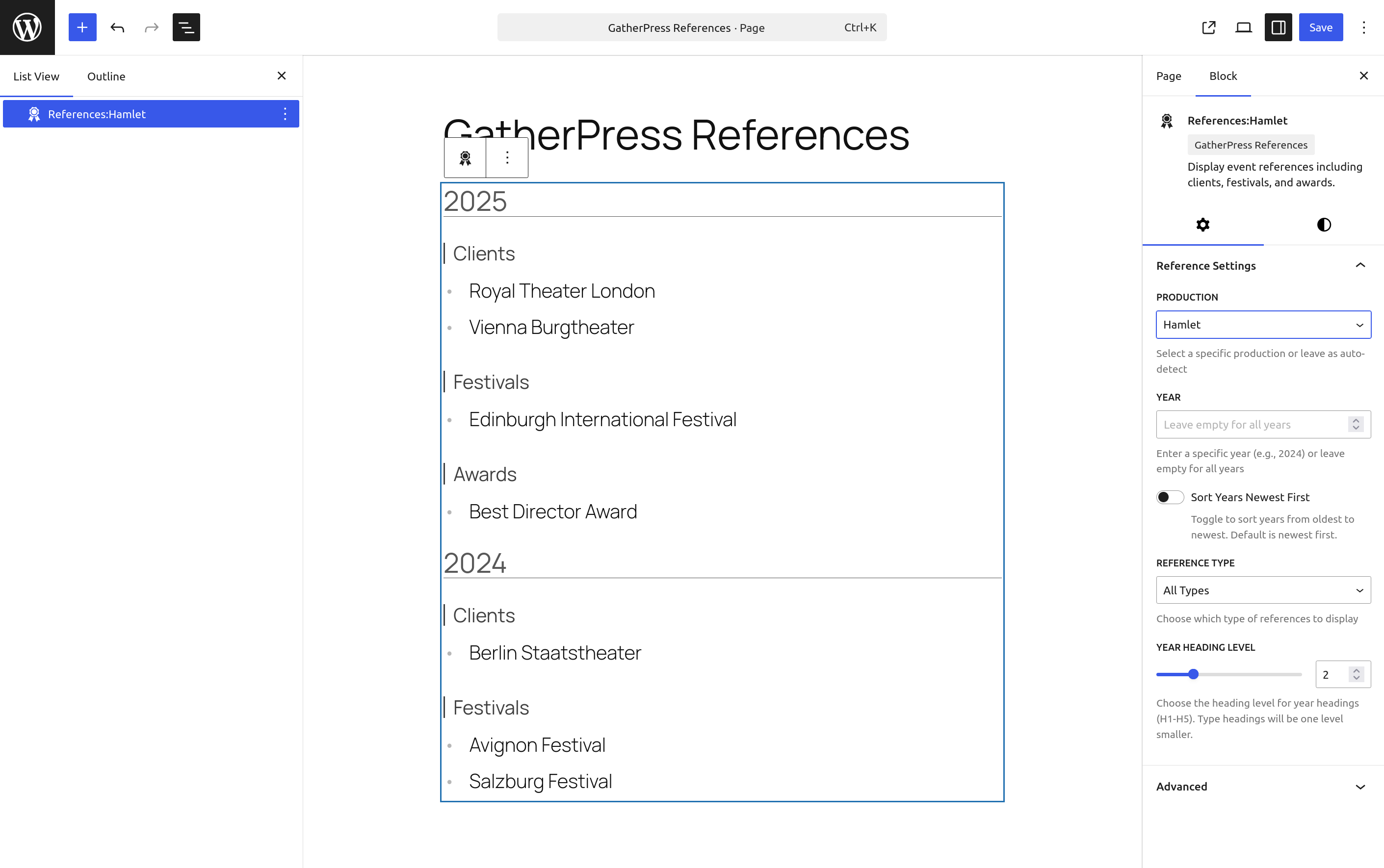
Example 1: Show All References for a Specific Reference TermUse Case: Production detail page showing all achievements
Settings:
- Reference Term: Select specific term (e.g., Hamlet production)
- Year: Leave empty (all years)
- Reference Type: All Types
Result: Displays all clients, festivals, and awards for that term across all years, organized chronologically.
Example 2: Annual Report Page
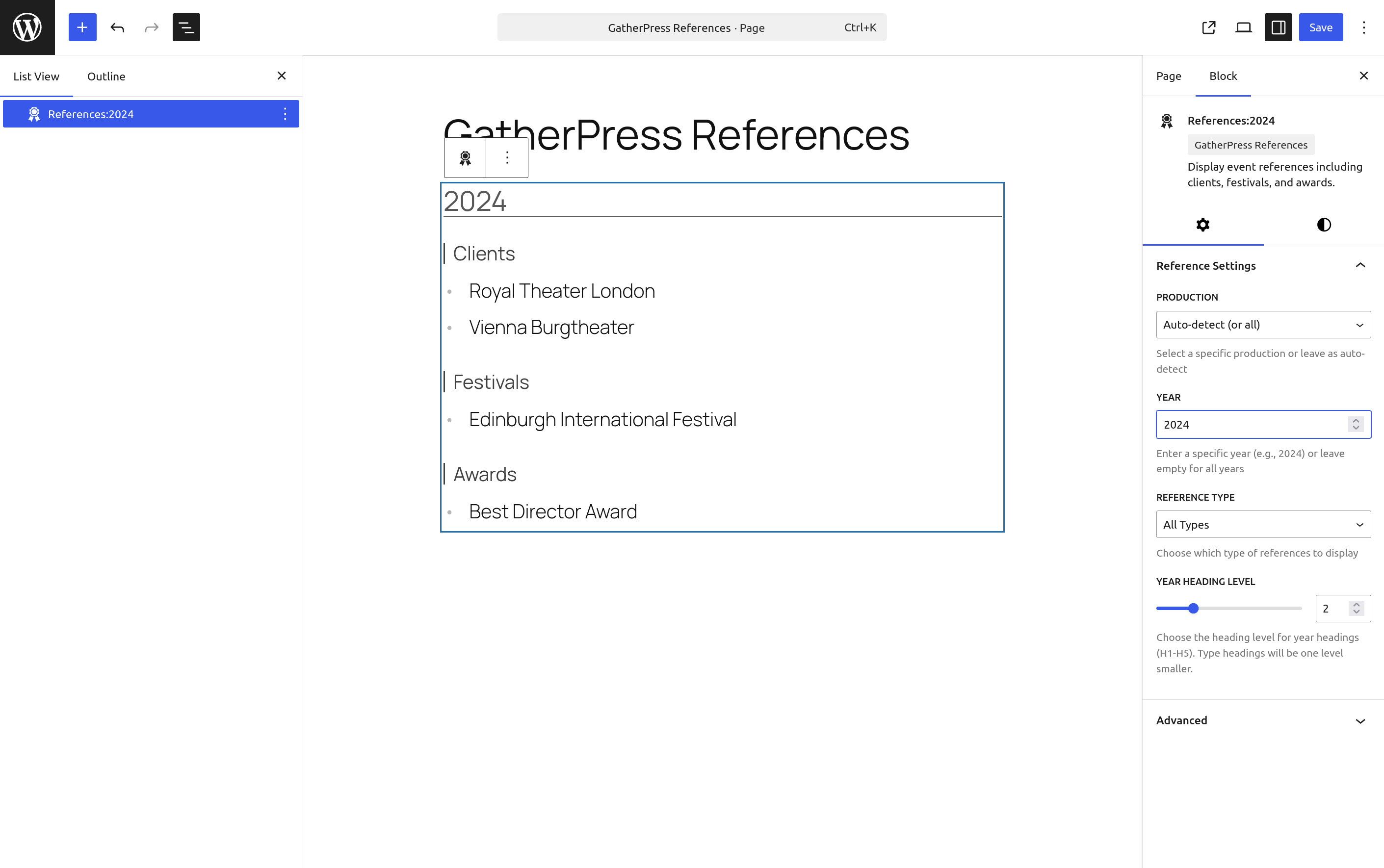
Use Case: Yearly summary of all activities
Settings:
- Reference Term: All (or auto-detect)
- Year: Enter specific year (e.g., 2024)
- Reference Type: All Types
Result: Shows all references from 2024 regardless of reference term, grouped by type.
Example 3: Awards Page
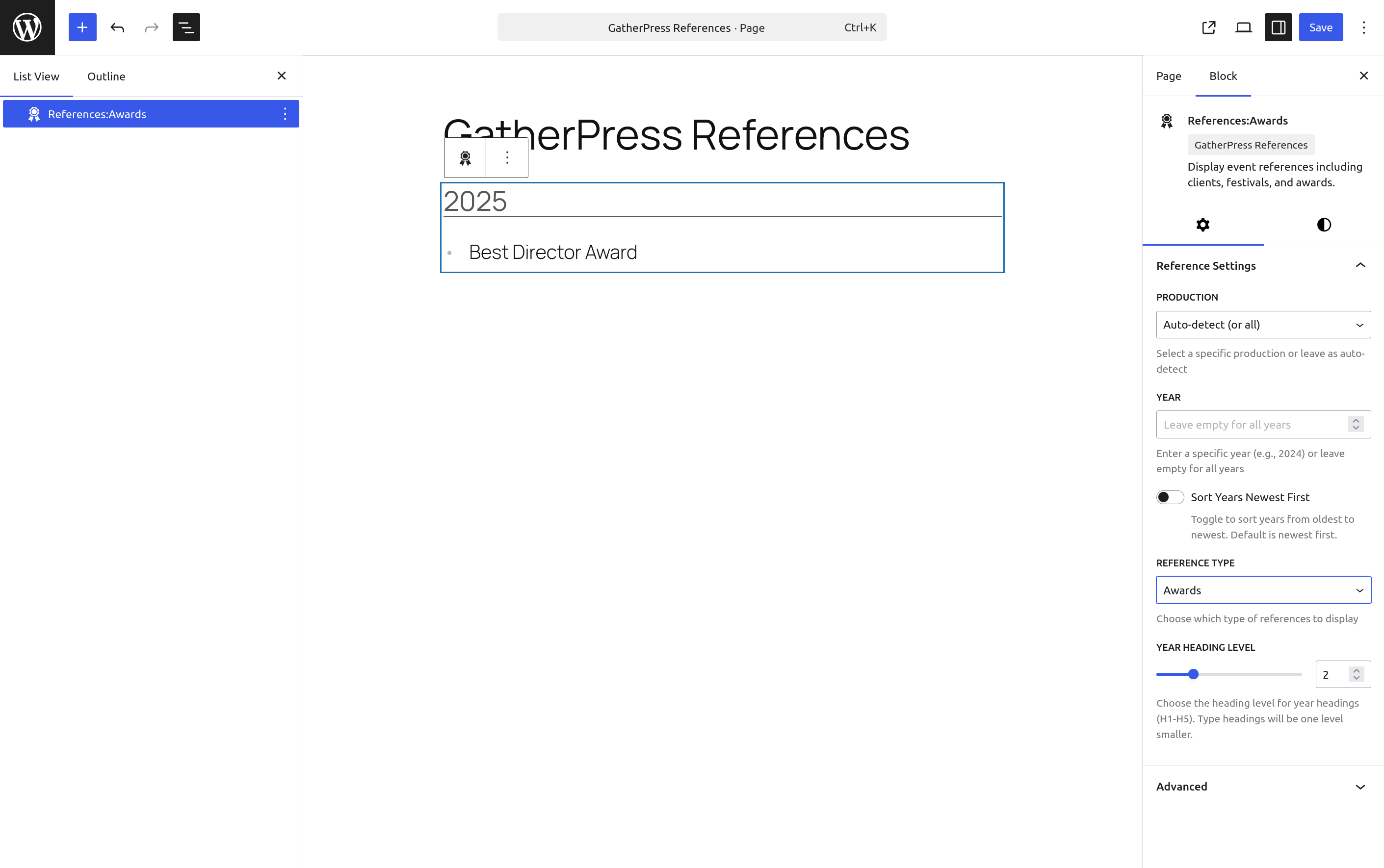
Use Case: Dedicated page highlighting awards won
Settings:
- Reference Term: All (or auto-detect)
- Year: Leave empty (all years)
- Reference Type: Awards
Result: Lists all awards received across all reference terms and years, organized by year.
Example 4: Production Awards for Specific Year
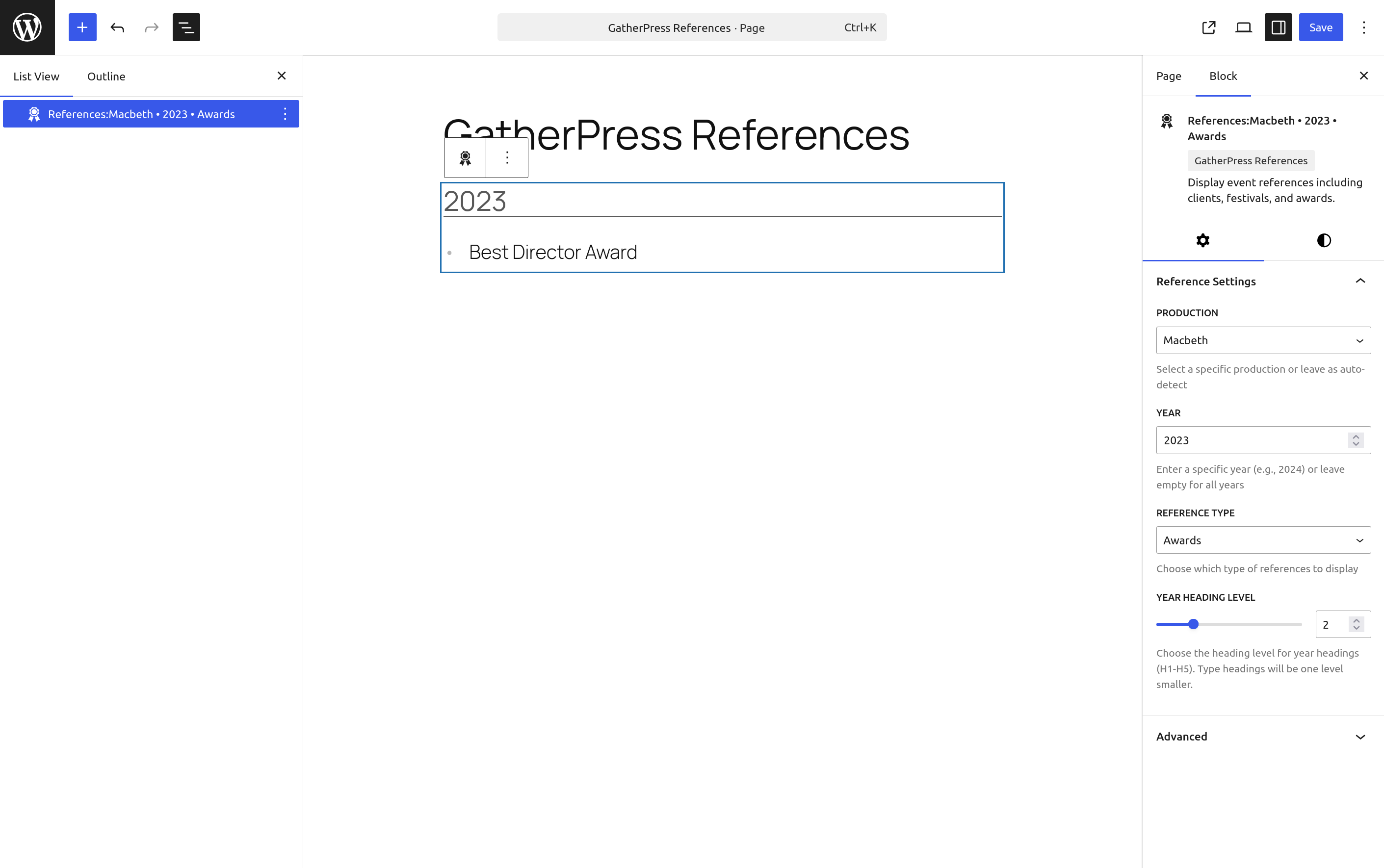
Use Case: Show what a production achieved in a particular year
Settings:
- Reference Term: Select specific term (e.g., Macbeth production)
- Year: Enter specific year (e.g., 2023)
- Reference Type: Awards
Result: Displays only awards that Macbeth received in 2023.
Example 5: Festival Participation History
Use Case: Portfolio page showing festival presence
Settings:
- Reference Term: All (or auto-detect)
- Year: Leave empty
- Reference Type: Festivals
Result: Complete chronological list of festival participations across all reference terms.
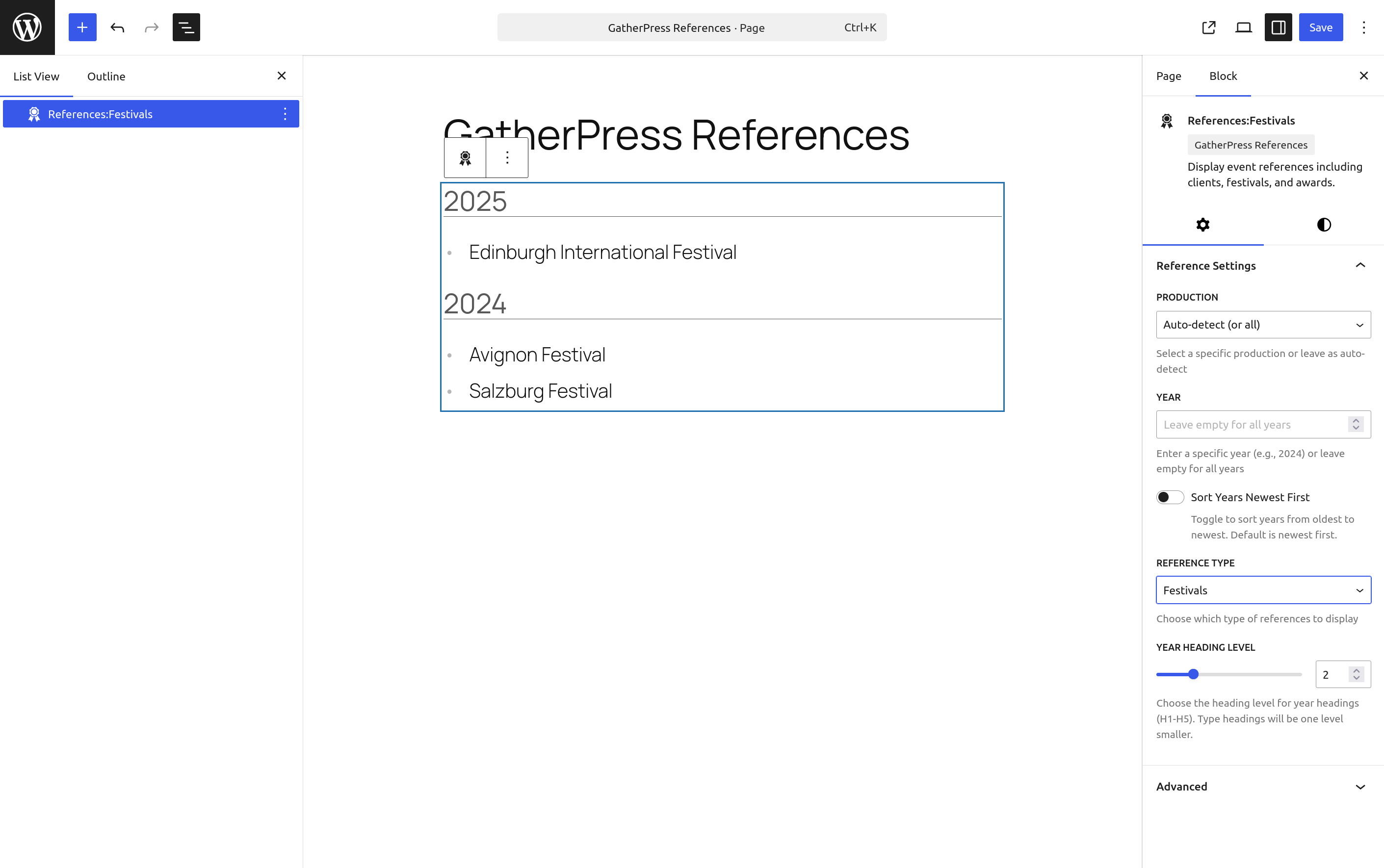
GatherPress Built-in Taxonomies
Leverage GatherPress's native Topics and Venues taxonomies for powerful event organization and reference display.
Example 6: Conference Sessions by Topic and VenueUse Case: Multi-track conference showcasing sessions organized by topic across different venues
Settings:
- Reference Term: Select topic (e.g., "WordPress Development")
- Year: Leave empty (all conferences)
- Reference Type: Venues
Result: Shows all venues where WordPress Development sessions were held, organized by year. Perfect for conference retrospectives showing topic distribution across locations.
Real-world Application: A WordCamp network could use this to show:
- Which cities hosted specific topics
- Topic evolution across different venues over time
- Venue diversity for recurring conference topics
Configuration Code:
add_action( 'registered_post_type_gatherpress_event', function() {
    $config = array(
        'ref_tax'   => 'gatherpress_topic',    // Main reference: Topics
        'ref_types' => array( 'gatherpress_venue' ), // Sub-reference: Venues
    );

    add_post_type_support( 'gatherpress_event', 'gatherpress-references', $config );
} );
Example 7: Venue Portfolio with Topic Distribution
Use Case: Showcase a venue's event history with topic variety
Settings:
- Reference Term: Select venue (e.g., "Downtown Conference Center")
- Year: Leave empty (all years)
- Reference Type: Topics
Result: Displays all topics covered at the venue over time, organized chronologically. Shows the venue's versatility and event diversity.
Real-world Application:
- Venue marketing: "We've hosted 50+ different event topics since 2018"
- Event planning: See what topics have been successful at specific venues
- Diversity reporting: Demonstrate topic breadth at your venue
Configuration Code:
add_action( 'registered_post_type_gatherpress_event', function() {
    $config = array(
        'ref_tax'   => 'gatherpress_venue',    // Main reference: Venues
        'ref_types' => array( 'gatherpress_topic' ), // Sub-reference: Topics
    );

    add_post_type_support( 'gatherpress_event', 'gatherpress-references', $config );
} );
Regular WordPress Posts
Extend the plugin beyond events to organize regular blog posts with WordPress's built-in taxonomies.
Example 8: Blog Post Archive by Category and TagsUse Case: Create a dynamic reference guide of blog content organized by category with tag breakdowns
Settings:
- Post Type: Post
- Reference Term: Select category (e.g., "Tutorials")
- Year: Leave empty (all years)
- Reference Type: Tags
Result: Shows all tags used in the Tutorials category, organized by publication year. Creates a visual taxonomy map of your content evolution.
Real-world Application:
- Content audit: See which tags were popular each year
- Editorial planning: Identify gaps in tag coverage
- Reader navigation: "See all tutorial topics we've covered since 2020"
Configuration Code:
add_action( 'init', function() {
    $config = array(
        'ref_tax'   => 'category',              // Main reference: Categories
        'ref_types' => array( 'post_tag' ),     // Sub-reference: Tags
    );

    add_post_type_support( 'post', 'gatherpress-references', $config );
}, 20 );
Example 9: Multi-Author Blog Tag Distribution
Use Case: Author portfolio page showing their topic expertise through tags
Settings:
- Post Type: Post
- Reference Term: Select author
- Year: 2024
- Reference Type: Tags
Result: Shows all tags the author wrote about in 2024, demonstrating their expertise areas and content focus for that year.
Real-world Application:
- Author bio pages: "Topics I've covered this year"
- Editorial analytics: Track author specialization over time
- Guest author portfolios: Showcase contribution breadth
Configuration Code:
// First, register a custom 'author' taxonomy for better organization
function register_author_taxonomy() {
    register_taxonomy( 'blog_author', 'post', array(
        'labels' => array(
            'name' => 'Authors',
            'singular_name' => 'Author',
        ),
        'hierarchical' => true,
        'show_in_rest' => true,
        'public' => true,
    ));
}
add_action( 'init', 'register_author_taxonomy' );

// Configure references
add_action( 'init', function() {
    $config = array(
        'ref_tax'   => 'blog_author',           // Main reference: Authors
        'ref_types' => array( 'post_tag', 'category' ), // Topics & Categories
    );

    add_post_type_support( 'post', 'gatherpress-references', $config );
}, 20 );
Creative Advanced Use Cases
Example 10: Recipe Blog - Cuisine Types and Dietary TagsUse Case: Food blog organizing recipes by cuisine with dietary restriction filters
Settings:
- Reference Term: "Italian"
- Year: Leave empty
- Reference Type: Dietary
Result: Shows all dietary variations of Italian recipes (Vegan, Gluten-Free, etc.) organized by year published. Helps readers find dietary-appropriate recipes within their favorite cuisines.
Real-world Application:
- Recipe filtering: "All our vegan Italian recipes since 2020"
- Content diversity: Show dietary inclusivity across cuisines
- Meal planning: "Italian breakfast, lunch, and dinner options"
Configuration Code:
// Register custom taxonomies
function register_recipe_taxonomies() {
    // Cuisine taxonomy (hierarchical)
    register_taxonomy( 'cuisine', 'post', array(
        'labels' => array(
            'name' => 'Cuisines',
            'singular_name' => 'Cuisine',
        ),
        'hierarchical' => true,
        'show_in_rest' => true,
    ));

    // Dietary restrictions (non-hierarchical)
    register_taxonomy( 'dietary', 'post', array(
        'labels' => array(
            'name' => 'Dietary Tags',
            'singular_name' => 'Dietary Tag',
        ),
        'hierarchical' => false,
        'show_in_rest' => true,
    ));

    // Meal type
    register_taxonomy( 'meal_type', 'post', array(
        'labels' => array(
            'name' => 'Meal Types',
            'singular_name' => 'Meal Type',
        ),
        'hierarchical' => false,
        'show_in_rest' => true,
    ));
}
add_action( 'init', 'register_recipe_taxonomies' );

// Configure references
add_action( 'init', function() {
    $config = array(
        'ref_tax'   => 'cuisine',               // Main: Cuisine type
        'ref_types' => array( 'dietary', 'meal_type' ), // Dietary & Meal types
    );

    add_post_type_support( 'post', 'gatherpress-references', $config );
}, 20 );
Example 11: E-Learning Platform - Courses by Topic and Skill Level
Use Case: Educational site showcasing course progression and topic breadth
Settings:
- Post Type: Course
- Reference Term: "JavaScript"
- Year: Leave empty
- Reference Type: Skill Levels
Result: Shows the learning path for JavaScript courses - Beginner, Intermediate, Advanced - organized by when courses were published. Demonstrates curriculum evolution.
Real-world Application:
- Course catalog: "Our JavaScript curriculum has grown from 3 beginner courses in 2020 to 15 courses across all levels"
- Student guidance: See available skill progressions for topics
- Instructor metrics: Show teaching breadth across levels and topics
Configuration Code:
// Register custom post type and taxonomies
function register_course_types() {
    // Course post type
    register_post_type( 'course', array(
        'labels' => array(
            'name' => 'Courses',
            'singular_name' => 'Course',
        ),
        'public' => true,
        'has_archive' => true,
        'show_in_rest' => true,
        'supports' => array( 'title', 'editor', 'thumbnail' ),
    ));

    // Topic taxonomy
    register_taxonomy( 'course_topic', 'course', array(
        'labels' => array(
            'name' => 'Course Topics',
            'singular_name' => 'Course Topic',
        ),
        'hierarchical' => true,
        'show_in_rest' => true,
    ));

    // Skill level
    register_taxonomy( 'skill_level', 'course', array(
        'labels' => array(
            'name' => 'Skill Levels',
            'singular_name' => 'Skill Level',
        ),
        'hierarchical' => false,
        'show_in_rest' => true,
    ));

    // Instructor
    register_taxonomy( 'instructor', 'course', array(
        'labels' => array(
            'name' => 'Instructors',
            'singular_name' => 'Instructor',
        ),
        'hierarchical' => false,
        'show_in_rest' => true,
    ));
}
add_action( 'init', 'register_course_types' );

// Configure references
add_action( 'registered_post_type_course', function() {
    $config = array(
        'ref_tax'   => 'course_topic',          // Main: Course topics
        'ref_types' => array( 'skill_level', 'instructor' ),
    );

    add_post_type_support( 'course', 'gatherpress-references', $config );
});
Example 12: Podcast Network - Shows by Category and Guest Appearances
Use Case: Podcast network showcasing show diversity and notable guest appearances
Settings:
- Reference Term: "Tech Talk Tuesday"
- Year: 2024
- Reference Type: Guests
Result: Shows all guests who appeared on Tech Talk Tuesday in 2024, organized chronologically. Great for show marketing and guest prospecting.
Real-world Application:
- Show promotion: "We've featured 50+ industry leaders in 2024"
- Guest outreach: "Join names like [Previous Guest List]"
- Audience discovery: Browse guests by genre across shows
- Network analytics: Show guest diversity across the network
Configuration Code:
// Register podcast taxonomies
function register_podcast_taxonomies() {
    register_taxonomy( 'podcast_show', 'post', array(
        'labels' => array(
            'name' => 'Podcast Shows',
            'singular_name' => 'Podcast Show',
        ),
        'hierarchical' => true,
        'show_in_rest' => true,
    ));

    register_taxonomy( 'podcast_guest', 'post', array(
        'labels' => array(
            'name' => 'Podcast Guests',
            'singular_name' => 'Podcast Guest',
        ),
        'hierarchical' => false,
        'show_in_rest' => true,
    ));

    register_taxonomy( 'podcast_genre', 'post', array(
        'labels' => array(
            'name' => 'Podcast Genres',
            'singular_name' => 'Podcast Genre',
        ),
        'hierarchical' => false,
        'show_in_rest' => true,
    ));
}
add_action( 'init', 'register_podcast_taxonomies' );

// Configure references
add_action( 'init', function() {
    $config = array(
        'ref_tax'   => 'podcast_show',          // Main: Show name
        'ref_types' => array( 'podcast_guest', 'podcast_genre' ),
    );

    add_post_type_support( 'post', 'gatherpress-references', $config );
}, 20 );
Filter Combinations Matrix
This matrix shows all possible filter combinations and their expected behaviors:
| # | Reference Term | Year | Type | Expected Result |
|---|---|---|---|---|
| 1 | Any/All | All | All | Show all events, all types (no filters) |
| 2 | Specific | All | All | Show events for reference term, all types |
| 3 | Specific | All | Specific | Show events for reference term with specific type |
| 4 | Any/All | All | Specific | Show all events with specific type |
| 5 | Any/All | Specific | All | Show all events from year, all types |
| 6 | Specific | Specific | All | Show reference term events from year, all types |
| 7 | Specific | Specific | Specific | Show reference term events from year with specific type |
| 8 | Any/All | Specific | Specific | Show all events from year with specific type |
Filter Logic:
- All filters use AND logic when combined
- Any/All for Reference Term means no term filter is applied
- All for Type means no type filter is applied
- All for Year means no year filter is applied
Installation
- Install and activate GatherPress plugin first (required dependency)
- Upload the plugin files to the
/wp-content/plugins/gatherpress-referencesdirectory. - Activate the plugin through the Plugins screen in WordPress.
- The plugin will register custom taxonomies based on configuration (by default: Productions, Clients, Festivals, and Awards).
- Add terms to these taxonomies via the Events admin menu.
- Assign taxonomy terms to event posts.
- Insert the block into any post or template.
- Use the block settings to filter by reference term, year, or reference type.
Frequently Asked Questions
Does this plugin work without GatherPress?
No, this plugin is specifically designed as a GatherPress add-on and requires GatherPress to be installed and activated. It extends GatherPress functionality to add reference management.
What taxonomies does this plugin create?
By default, the plugin registers four custom taxonomies associated with the GatherPress gatherpress_event post type:
_gatherpress_play: Hierarchical taxonomy for productions (the default reference taxonomy)gatherpress_client: Clientsgatherpress_festival: Festival participationsgatherpress_award: Awards received
These work alongside GatherPress's existing event taxonomies and can be customized via post type support configuration.
Can I use this plugin with regular WordPress posts?
Yes! While designed for GatherPress events, the plugin works with any post type. Add support using add_post_type_support() with your desired taxonomies. See Example 8 and 9 for complete code examples.
Can I use GatherPress's built-in taxonomies (Topics and Venues)?
Absolutely! Examples 6 and 7 show how to leverage GatherPress's native Topics and Venues taxonomies for powerful event organization and reference displays.
Can I show only awards for a specific production?
Yes. Use the block settings to select a specific production and set the type filter to Awards.
Does it work automatically on reference term archive pages?
Yes. When placed on a reference taxonomy term archive, the block automatically detects the term context and shows only its references.
How do I customize the block's appearance?
The block supports theme.json styling:
- Colors (background, text, links)
- Typography (font family, size, line height)
- Spacing (margin, padding, block gap)
- Borders (color, radius, width)
You can also use custom CSS:
.wp-block-gatherpress-references- Main container.references-year- Year headings.references-type- Type headings.references-list- Reference lists
Can I change the heading levels?
Yes. The block includes a Year Heading Level control in the block settings. You can set year headings to H1–H5, and type headings will automatically be one level smaller.
Can I change the year sort order?
Yes. The block includes a Sort Years toggle control. By default, years are sorted newest first (descending). Toggle it on to sort from oldest to newest (ascending). This control only appears when showing all years (no specific year filter).
How do I add demo data for testing?
The Playground contains a Demo Data Generator, that can be used to create a bunch of real data to test the plugin.
Go to Events → Demo Data in the WordPress admin and click Generate Demo Data to create:
- 5 theater productions
- 20 GatherPress event posts
- 8 client terms
- 6 festival terms
- 6 award terms
All demo data is marked for easy cleanup via the Delete Demo Data button.
Does this affect my existing GatherPress events?
No, this plugin only adds optional taxonomies to GatherPress events. Your existing events remain unchanged unless you explicitly assign the new taxonomy terms to them.
Screenshots
- Show All References for a Specific Production
- Annual Report Page
- Awards Page
- Production Awards for Specific Year
- Festival Participation History
Developer Documentation
There is some developer documentation available at docs/developer/README.md
Filter Hooks Reference
The plugin provides several filter hooks for customization, documented in docs/developer/hooks/Hooks.md
Changelog
All notable changes to this project will be documented in the CHANGELOG.md.
Releases
6 releases. Each count is every asset in that release; expand a row for the breakdown.