GatherPress Location Hierarchy WP Registry grade A. No security issues foundWP RegistryNo security issues foundOpen the reportA
Automatically creates hierarchical location taxonomy terms for GatherPress events using geocoded address data.
Install
Upload it under Plugins → Add New Plugin → Upload Plugin, then activate.
Install straight from GitHub with WP-CLI:
wp plugin install https://github.com/carstingaxion/gatherpress-location-hierarchy/releases/download/0.1.2/gatherpress-location-hierarchy.zipAutomatically creates hierarchical location taxonomy terms for GatherPress events using geocoded address data.
Description
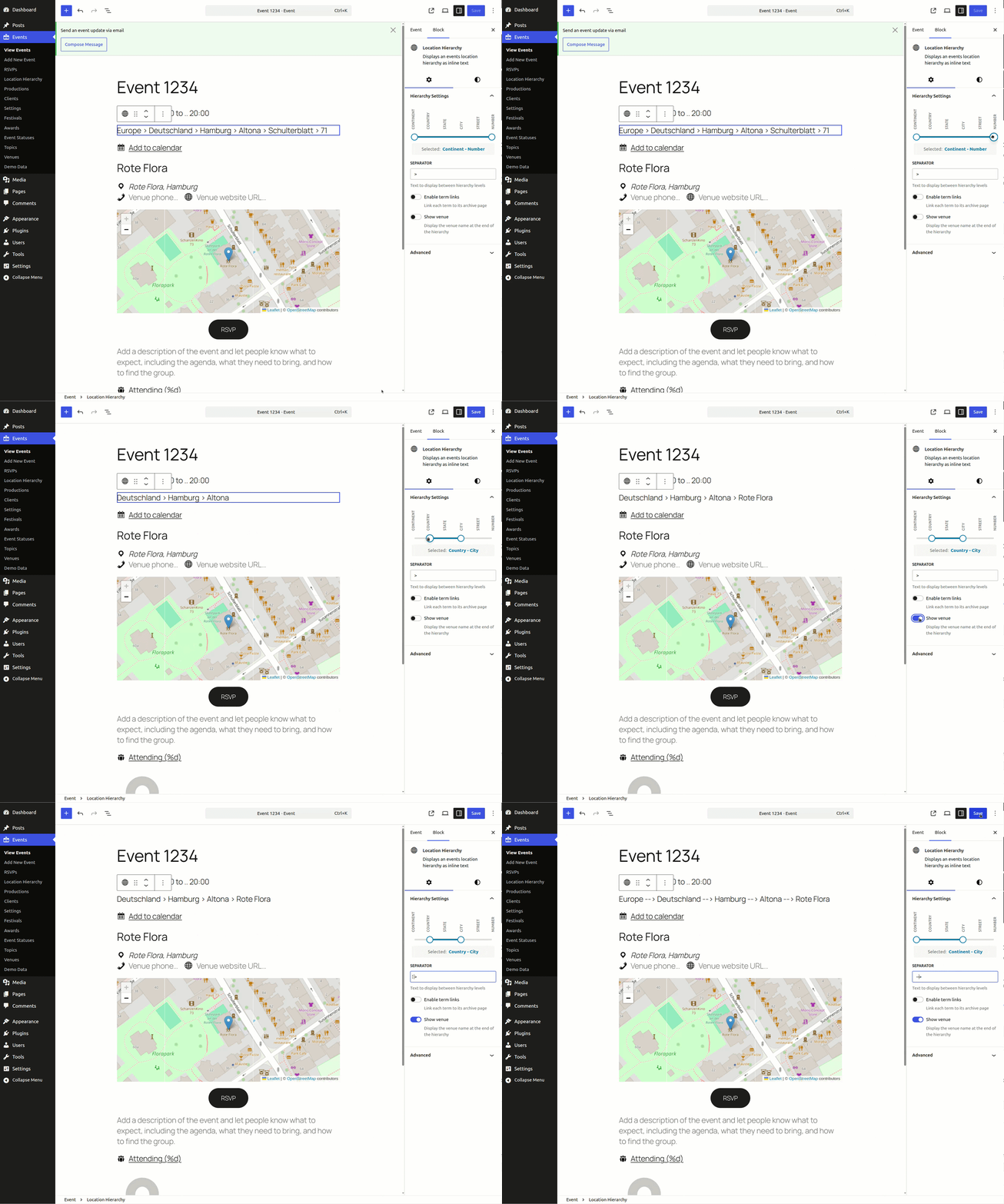
This plugin extends GatherPress by adding a hierarchical location taxonomy. When an event is saved, the plugin geocodes the venue address and creates taxonomy terms organized by continent, country, state, city, street, and street number. A Gutenberg block displays these hierarchies with configurable level filtering.
What This Plugin Does
- Creates a custom hierarchical taxonomy
gatherpress_location - Geocodes venue addresses using the Nominatim (OpenStreetMap) API
- Automatically generates taxonomy terms in 6 levels: Continent > Country > State > City > Street > Street+Number
- Establishes parent-child relationships between terms
- Associates created terms with events
- Provides a Gutenberg block for displaying location hierarchies
- Generates canonical URLs for taxonomy archives with single child terms
Display Block Features
Hierarchy Level Control:
- Dual-handle range control for selecting start and end levels
- 6 levels available: Continent, Country, State, City, Street, Number
Display Options:
- Customizable separator between terms (default: " > ")
- Optional term links to taxonomy archive pages
- Optional venue display at end of hierarchy
- Venue links to GatherPress venue post when enabled
- Venue respects term link setting (links if enabled, plain text if disabled)
- Full WordPress block editor support (alignment, colors, spacing, border, typography)
Context Awareness:
- Works inside single event posts
- Works inside query loops querying for events
Installation
Requirements
- WordPress 6.0 or higher
- PHP 7.4 or higher
- GatherPress plugin installed and activated
Installation Steps
- Upload plugin files to
/wp-content/plugins/gatherpress-location-hierarchy/ - Activate the plugin through the WordPress Plugins menu
- Location terms are created for all existing events automatically on activation (!)
Configuration
- (Optional) Navigate to Settings > GatherPress Location and set default geographic terms
- Create or edit GatherPress events with venue addresses
- Location terms are generated automatically on save
- Add "Location Hierarchy" block to templates or posts
Frequently Asked Questions
How does geocoding work?
The plugin sends venue addresses to Nominatim API (OpenStreetMap) including the site language for localized results. Response includes coordinates and address components. Results are cached locally in the WordPress database using transients (1-hour expiration). Cache key format: gpvh_geocode_{md5(address)}.
How do I display only specific hierarchy levels?
Use the block's dual-range control:
- Continent only: Levels 1-1
- Country through City: Levels 2-4
- City and Street: Levels 4-5
- Full hierarchy: Levels 1-6 (plugin default)
For a more general solution, you can use the gatherpress_location_hierarchy_levels filter, which allows to define the hierarchy levels the plugin works with.
add_filter( 'gatherpress_location_hierarchy_levels', function() {
    return [2, 4]; // Only Country, State, City
} );
Can I customize block appearance?
The block supports WordPress color controls (text, background, link), typography, spacing, and border settings. Custom CSS can target .wp-block-gatherpress-location-hierarchy class.
Can I manually edit location terms?
No. Even terms are standard WordPress taxonomy terms accessible through the admin interface, exactly this admin interface is not available normally. You can enable the common admin UI for the taxonomy by enabling WP_DEBUG or running the plugin on a local or development environment type. Manual edits persist unless all terms are deleted and event is resaved, which will trigger geocoding and recreates terms.
What regions are supported?
All regions returned by Nominatim are supported. Enhanced handling for German-speaking regions (DE, AT, CH, LU) uses specific administrative structure (Bundesländer/Cantons). City-states like Berlin receive special handling to avoid duplicate entries.
How does this relate to GatherPress venues?
This plugin creates a separate gatherpress_location taxonomy. GatherPress's venue system (venue post type and _gatherpress_venue taxonomy) remains unchanged. The location taxonomy provides geographic organization while GatherPress manages venue details (address, phone, website).
How do I query events by location?
Use standard WordPress taxonomy queries:
$args = array(
    'post_type' => 'gatherpress_event',
    'tax_query' => array(
        array(
            'taxonomy' => 'gatherpress_location',
            'field'    => 'slug',
            'terms'    => 'bavaria',
        ),
    ),
);
$query = new WP_Query( $args );
Does this affect performance?
Performance considerations:
- API calls only occur when events are saved (not on page load)
- 1-hour caching reduces API requests
- Standard WordPress taxonomy queries
- No frontend JavaScript required
- Canonical URL generation adds minimal overhead (single query per taxonomy archive)
What are canonical URLs and why are they used?
Canonical URLs tell search engines which page is the "main" version when multiple URLs show identical content. When a location term has only one child, both taxonomy archives display the same events (duplicate content). The plugin adds a canonical link tag pointing to the child's archive, consolidating SEO value and preventing search engine confusion.
Example: If Europe has only Germany as child, /events/in/europe/ shows canonical tag pointing to /events/in/europe/germany/.
How does slug generation work?
Term slugs are generated using WordPress's remove_accents() with locale parameter, then sanitize_title(). This ensures:
- French accents are removed (é→e, è→e, à→a)
- German ß becomes "ss"
- Special characters are converted to hyphens
- Unsafe characters are stripped
- Consistent transliteration across languages
- Countries use country_code as slug (via filter)
Documentation
Changelog
All notable changes to this project will be documented in the CHANGELOG.md.
Privacy
This plugin sends venue addresses to Nominatim API (https://nominatim.openstreetmap.org) when events are saved.
The site language is also sent for localized results. Only venue addresses and language codes and the admin-email option are transmitted. No user data or personal information is sent.
Geocoding results are cached locally in the WordPress database using transients (1-hour expiration). No data is sent to services other than Nominatim.
Review OpenStreetMap's privacy policy at: https://wiki.osmfoundation.org/wiki/Privacy_Policy
Credits
This plugin uses the Nominatim API provided by OpenStreetMap Foundation. Nominatim is licensed under GPL v2.
Releases
2 releases. Each count is every asset in that release; expand a row for the breakdown.