Install
This is the repository archive. It installs, but the folder name will carry the branch suffix and updates will not flow.
Install straight from GitHub with WP-CLI:
wp plugin install https://github.com/carstingaxion/gatherpress-event-status/archive/refs/heads/main.zipDisplay and manage event status for GatherPress with Schema.org compatibility.
Description
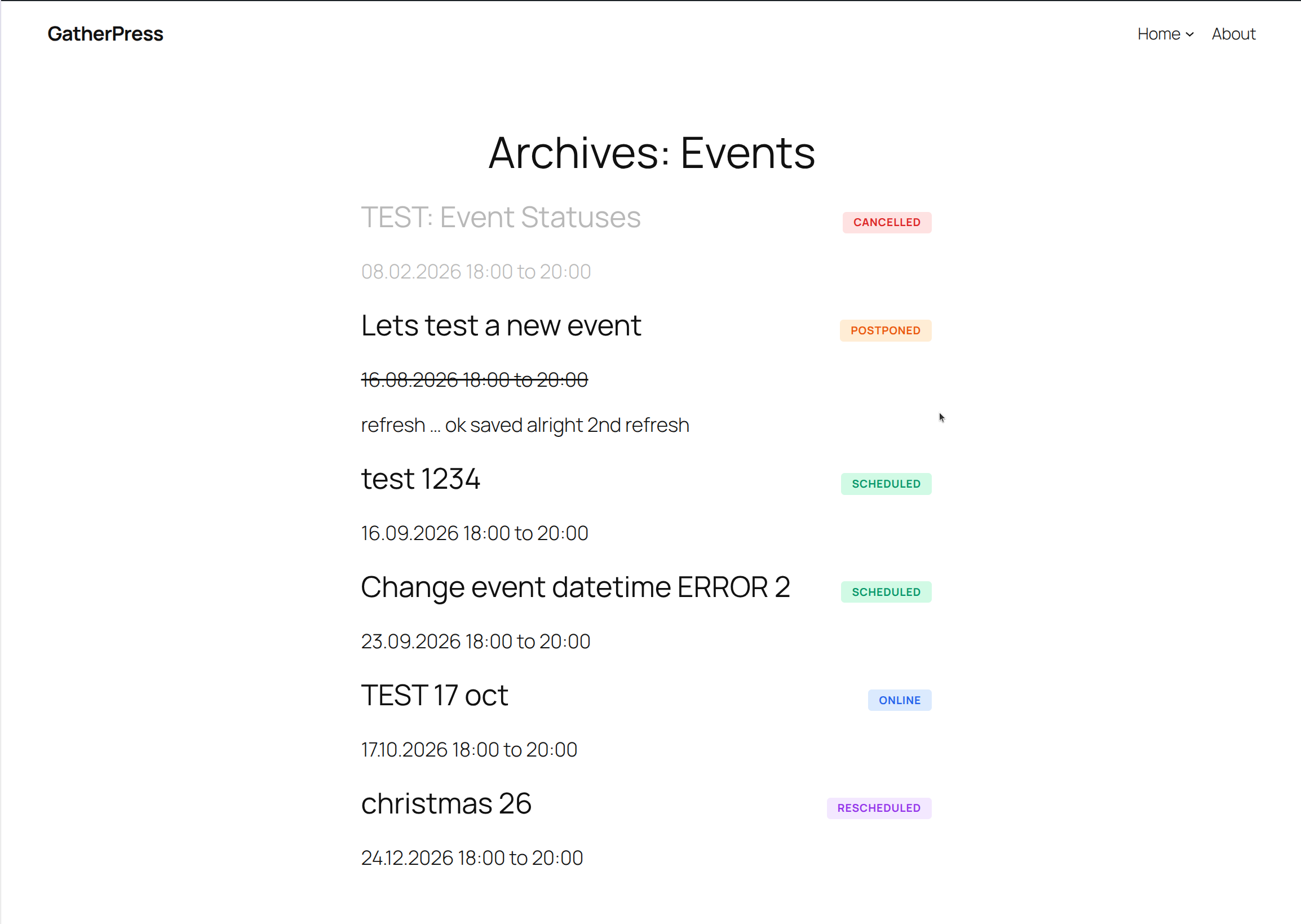
The GatherPress Event Status plugin provides a comprehensive solution for managing and displaying event statuses in GatherPress. It automatically registers a hierarchical taxonomy for event statuses and creates default terms based on Schema.org EventStatusType standards.
Features
-
Automatic registration of
gatherpress_eventstatustaxonomy ongatherpress_eventpost type -
Creates five default event status terms following
schema.org/EventStatusTypestandards:- EventScheduled (default)
- EventCancelled
- EventMovedOnline
- EventPostponed
- EventRescheduled
-
Automatic assignment of "EventScheduled" status to new events
-
Beautiful, accessible status display in both single and archive views
Event Status Automation
The following table outlines automatic triggers and resulting behaviors for each event status:
| Event Status | Automatic Triggers | Resulting Actions & Behavior |
|---|---|---|
| Scheduled | • New event creation • Event publication • Removal of other status terms |
• Default green status badge displayed • Event appears in standard listings • Full event details visible • Standard archive display with green "Scheduled" badge • No visual overlays or restrictions |
| Cancelled | • Manual assignment by event organizer • Integration triggers (API/webhooks) • Bulk status updates |
• Red status badge with warning styling • Semi-transparent overlay on archive items • Cancellation message prominently displayed • Event remains visible but de-emphasized • Search engines receive updated Schema.org markup • Attendee notification hooks available |
| Moved Online | • Manual assignment by event organizer • Venue change to virtual location • Integration triggers |
• Blue status badge indicating virtual format • Online event messaging displayed • Standard visibility in listings • Updated Schema.org eventAttendanceMode • No overlay or visual de-emphasis • Virtual venue details remain prominent |
| Postponed | • Manual assignment by event organizer • Date cleared but event preserved • Integration triggers |
• Orange status badge indicating delay • Postponement message displayed • Event remains in listings • No specific date shown until rescheduled • Attendee notification hooks available • Archive items remain fully visible |
| Rescheduled | • Manual assignment after date change • Event date modified • Integration triggers |
• Purple status badge indicating new timing • Rescheduling message displayed • Updated date/time prominently shown • New Schema.org schedule markup • Standard visibility maintained • Previous date context available |
Status Behavior Details
Visual Indicators:
- Each status has a unique color scheme and styling
- Archive views display colored badges in the top-right corner
- Single event views show full status cards with descriptions
- Cancelled events receive an additional overlay for de-emphasis
Accessibility:
- All status indicators include ARIA roles and labels
- Status changes are announced to screen readers (aria-live)
- High contrast mode support ensures visibility
- Keyboard navigation fully supported
SEO & Schema.org:
- Event status values align with Schema.org EventStatusType
- (Search engines (can) receive accurate event status information (in the future))
- Cancelled/postponed events remain indexed but marked appropriately
Technical Implementation
The taxonomy is fully integrated with the block editor, appearing in the inspector controls for easy status management. Archive views automatically receive appropriate CSS classes for status-specific styling.
Installation
- Upload the plugin files to the
/wp-content/plugins/gatherpress-event-statusdirectory. - Activate the plugin through the 'Plugins' screen in WordPress.
- The
gatherpress_eventstatustaxonomy and default terms are automatically created upon activation. - Add the "GatherPress Event Status Block" to any GatherPress event post to display the current status.
Frequently Asked Questions
Does this require GatherPress to be installed?
Yes, this block is designed to work with the GatherPress plugin and requires the gatherpress_event post type to be registered.
Can I add custom event statuses?
Yes, the gatherpress_eventstatus taxonomy is hierarchical and supports adding custom terms through the WordPress admin interface or programmatically.
What happens if I deactivate and reactivate the plugin?
The plugin checks for existing terms before creating them, so your custom terms and assignments will be preserved.
Can I customize the status messages?
Yes, the status messages can be customized. The messages are in fact the term descriptions, which can be changed within the taxonomy terms admin-list screen.
How does the default status assignment work?
When a new GatherPress event is created, WordPress automatically assigns the "EventScheduled" status using the default_term functionality built into WordPress.
Can an event have multiple statuses?
Yes, the taxonomy supports multiple term assignments. For example, an event could be both "Rescheduled" and "Moved Online" if both apply.
Screenshots
- Archive view showing multiple events with different status styles
- Event query block showing multiple events with different status styles
- Event status block showing "Event Cancelled" with red styling on a singular event
Changelog
All notable changes to this project will be documented in the CHANGELOG.md.
Developer Notes
Hooks Available
gatherpress_eventstatus_default_terms- Filter the default event status termsgatherpress_eventstatus_description- Filter the status message output
CSS Classes
The plugin uses BEM methodology with the following structure:
.event-status- Block base class.event-status__label- Status label element.event-status__message- Status message element.event-status--scheduled- Modifier for scheduled events.event-status--cancelled- Modifier for cancelled events.event-status--moved-online- Modifier for moved online events.event-status--postponed- Modifier for postponed events.event-status--rescheduled- Modifier for rescheduled events
Archive views automatically receive taxonomy-based classes (e.g., .gatherpress_eventstatus-eventscheduled) for targeted styling.