Disciple.Tools - Journeys WP Registry grade A. No security issues foundWP RegistryNo security issues foundOpen the reportA
Track contact and group journeys
Install
Upload it under Plugins → Add New Plugin → Upload Plugin, then activate.
Install straight from GitHub with WP-CLI:
wp plugin install https://github.com/cairocoder01/dt-journeys/releases/download/v0.1.3/dt-journeys.zip
Disciple.Tools - Journeys
Journeys turns Disciple.Tools' contact and group fields into guided, trackable steps. Instead of disciples and leaders having to know which fields to fill in next, a Journey defines an ordered (or open-ended) set of stages — with instructions, links, attachments, and the record fields relevant to that step — so multipliers always know the next step to take, and leadership can see how far along each contact or group has come.
Features
- Journey & Stage definitions — build reusable journey templates (e.g. a Bible story set, a ministry model like T4T or Zume, a follow-up process) made of ordered stages, each with a name, short description, long-form instructions, links (with optional custom display names), file attachments, and the record fields relevant to fill in at that step.
- Sequential or non-sequential — a journey can be a strict step-by-step timeline, or a simple checklist of stages that can be completed in any order.
- A Journeys tile on every contact and group — start a journey, work through its stages (Complete / Skip / Stalled), add a note, and see progress at a glance; a contact's tile also rolls up journeys active on the groups they belong to.
- Nothing is locked in — a stage's status can be revisited and corrected at any time, and a journey instance can be removed outright if it was started by mistake.
- Full history — every start, stage change, completion, and removal is recorded in the record's existing activity log and comments, so it shows up alongside everything else already tracked there.
- Delegatable permissions — any user who can already access a contact/group can progress its journeys; building and editing journey/stage definitions is reserved for admins or a role you delegate it to.
Usage
Will Do
- Track a contact or group's progress through one or more discipleship/ministry journeys at once.
- Let you build your own journeys and stages, tailored to how your ministry actually operates.
- Surface the record fields relevant to a stage right where you're working, without leaving the tile.
Will Not Do
- Replace Disciple.Tools' existing Faith Milestones or Seeker Path fields — Journeys complements them as an additional, structured way to track a process, not a rebuild of what's already there.
- Provide a cross-record dashboard or importable journey presets yet — those are planned for a future release.
Requirements
- Disciple.Tools Theme installed on a Wordpress Server
Installing
- Install as a standard Disciple.Tools/Wordpress plugin in the system Admin/Plugins area.
- Requires the user role of Administrator.
Contribution
Contributions welcome. You can report issues and bugs in the Issues section of the repo. You can present ideas in the Discussions section of the repo. And code contributions are welcome using the Pull Request system for git. For a more details on contribution see the contribution guidelines.
Screenshots
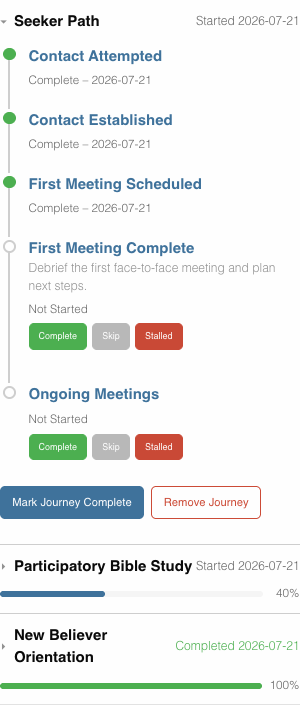
The Journeys tile on a contact record — one journey expanded to its full timeline, two others collapsed to a percent-complete summary:
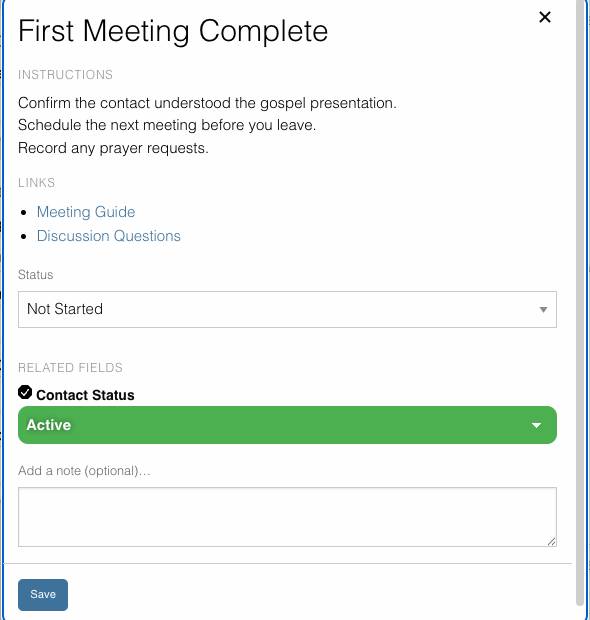
A stage's pop-out — instructions, links (with custom display names), status, a related record field, and a note, all in one place:
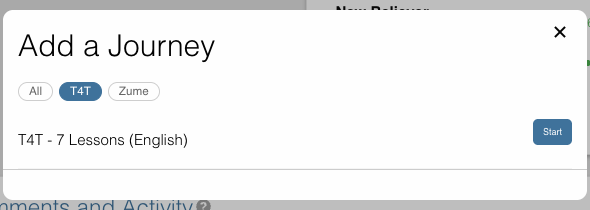
Adding a journey, filtered by category:
Releases
4 releases. Each count is every asset in that release; expand a row for the breakdown.