Install
Upload it under Plugins → Add New Plugin → Upload Plugin, then activate.
Install straight from GitHub with WP-CLI:
wp plugin install https://github.com/cairocoder01/dt-family-groups/releases/download/v0.1/dt-family-groups.zip
Disciple.Tools - Family Groups
A Disciple.Tools plugin for tracking family relationships, marital status, and family dynamics among contacts and groups.
Purpose
Ministry contexts often require understanding family units — who is married to whom, which children belong to which parents, and what family challenges a household is navigating. This plugin adds structured family data to Disciple.Tools contacts and groups without requiring a separate system.
Features
Contacts — Family Tile
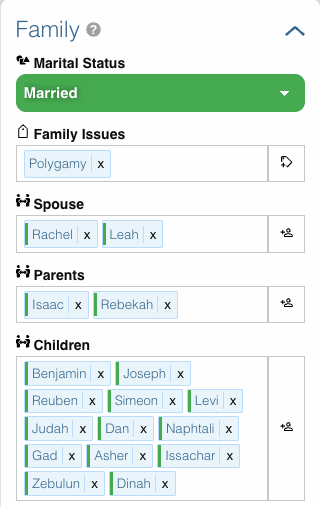
A Family tile is added to every contact record with the following fields:
| Field | Type | Description |
|---|---|---|
| Marital Status | Key Select | Single, Married, Divorced, Widowed (color-coded) |
| Family Issues | Tags | Open-ended tags for marital/family challenges (e.g. domestic conflict, grief) |
| Spouse | Connection | Bidirectional link to spouse contact(s) |
| Parents | Connection | Link to parent contact(s) |
| Children | Connection | Link to child contact(s) |
Spouse links are bidirectional — adding a spouse on one contact automatically reflects on the other. Parent/child links share the same underlying connection (contacts_to_family_children) so the relationship is consistent from both sides.
Groups — Family Tile & Group Type
A Family group type option is added to the standard Group Type field, alongside Pre-Group, Group, Church, and Team.
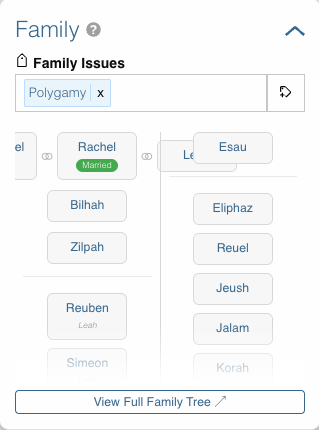
A Family tile is added to every group with:
| Field | Type | Description |
|---|---|---|
| Family Issues | Tags | Tags for family/marital challenges at the group level |
Generational Family Tree (Family-type groups only)
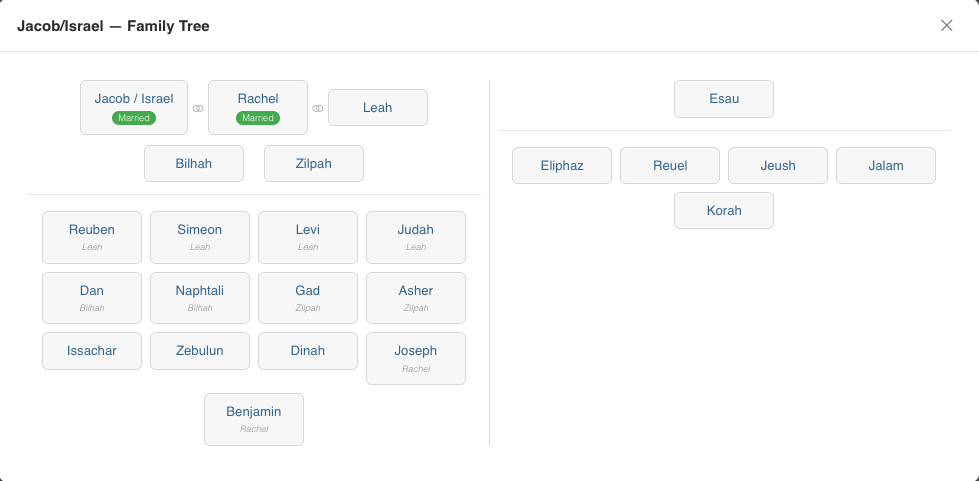
When a group's type is set to Family, the Family tile displays a visual generational tree built from the family relationships of the group's members:
- Members with no in-group parents appear as the top generation
- Spouses are shown side-by-side with a ⚭ connector
- Each generation is stacked below the previous one
- Marital status is color-coded on each person card
- Names link directly to the contact record
The tree is rendered client-side via a REST API call (GET /wp-json/dt-family-groups/v1/family-tree/{group_id}) and requires no page reload.
Requirements
- Disciple.Tools Theme v1.19 or later installed on a WordPress server
Installing
- Download the latest release zip from GitHub Releases.
- In WordPress admin, go to Plugins → Add New → Upload Plugin.
- Upload the zip and activate.
- Requires the user role of Administrator to configure.
Usage
- Open any Contact record — a Family tile will appear in the tile list.
- Set Marital Status, add Family Issues tags, and link Spouse, Parents, or Children.
- Open any Group record — set Group Type to Family.
- Add contacts as members of the family group.
- The Family tile on the group will display a generational tree of all members with their in-group family relationships.
Contribution
Contributions welcome. Report issues in the Issues section. Submit code via Pull Requests.
Releases
1 release. Each count is every asset in that release; expand a row for the breakdown.