Install
This is the repository archive. It installs, but the folder name will carry the branch suffix and updates will not flow.
Install straight from GitHub with WP-CLI:
wp plugin install https://github.com/byot3711/chat-commerce-suite/archive/refs/heads/main.zipNo built-in updater. New versions won't appear under Dashboard → Updates. Install new releases yourself, or let Git Updater track the repository.
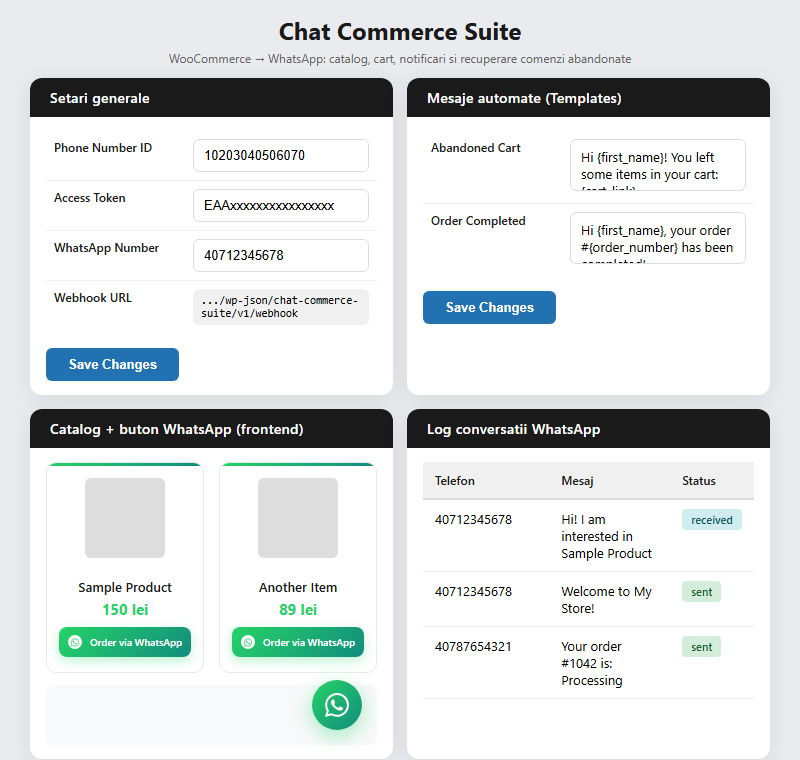
Turn any WooCommerce store into a WhatsApp sales channel. Adds a product catalog, order button, abandoned cart recovery, and automatic order status notifications — all sent through the official WhatsApp Business Cloud API.
Features
- Order via WhatsApp button on every product page, linking straight to a pre-filled chat with your store number.
- Catalog shortcode (
[wa_catalog]) that renders a responsive product grid with WhatsApp ordering built in. - Abandoned cart recovery — automatically messages customers who leave items in their cart after a configurable delay.
- Order status notifications sent to customers on hold, processing, completed, and cancelled — fully customizable templates.
- Two-way webhook that logs incoming messages and replies to simple commands (
status,products,contact). - Message log in the admin area so you can see exactly what was sent and received.
- Clean settings screen under WooCommerce → Chat Commerce.
Requirements
- WordPress 5.0+
- WooCommerce 3.0+
- PHP 7.2+
- A WhatsApp Business Cloud API app (Phone Number ID + access token) from Meta for Developers
Installation
- Download or clone this repository into
wp-content/plugins/chat-commerce-suite. - Activate Chat Commerce Suite from the WordPress Plugins screen.
- Go to WooCommerce → Chat Commerce and enter your Phone Number ID, access token, and a verify token of your choice.
- In your Meta app, set the webhook Callback URL to:
https://yourdomain.com/wp-json/chat-commerce-suite/v1/webhookand use the same verify token you configured in step 3.
Usage
Product page button
Enabled automatically after activation — no setup required beyond adding your WhatsApp number in General settings.
Catalog shortcode
[wa_catalog columns="3" limit="12" category="shoes"]| Attribute | Default | Description |
|---|---|---|
columns |
3 |
Number of grid columns (2, 3, or 4) |
limit |
-1 |
Max products to display (-1 = all) |
category |
— | Restrict to a product category slug |
Message templates
Editable under Message Templates, with placeholders:
{first_name} {last_name} {order_number} {cart_link} {order_total}Configuration reference
| Setting | Location |
|---|---|
| API credentials | General |
| Webhook verify token | General |
| Abandoned cart delay | Abandoned Cart |
| Notification statuses | Order Notifications |
| Catalog appearance | Catalog |
| Message history | Logs |
License
GPL-2.0-or-later. See LICENSE for details.