Must-Use Loader WP Registry grade A. No security issues foundWP RegistryNo security issues foundOpen the reportA
This small WordPress plugin include all plugins in subdirectories from Must Use plugin folder
Install
This is the repository archive. It installs, but the folder name will carry the branch suffix and updates will not flow.
Install straight from GitHub with WP-CLI:
wp plugin install https://github.com/bueltge/must-use-loader/archive/refs/heads/master.zipThis small plugin scan and include all plugins in subdirectories from the Must Use plugin folder.
Description
The WordPress Must Use Plugins are acceptable to include without doings in the back end. But WordPress does not load plugins in subdirectories. They must be at the root of the Must Use plugin directory, on default /wp-content/mu-plugins/. This small plugin scan includes all plugins in subdirectories from the Must Use plugin folder.
The plugin has a simple cache, and you flush this cache if you go to the network plugin page; view is enough.
Screenshots
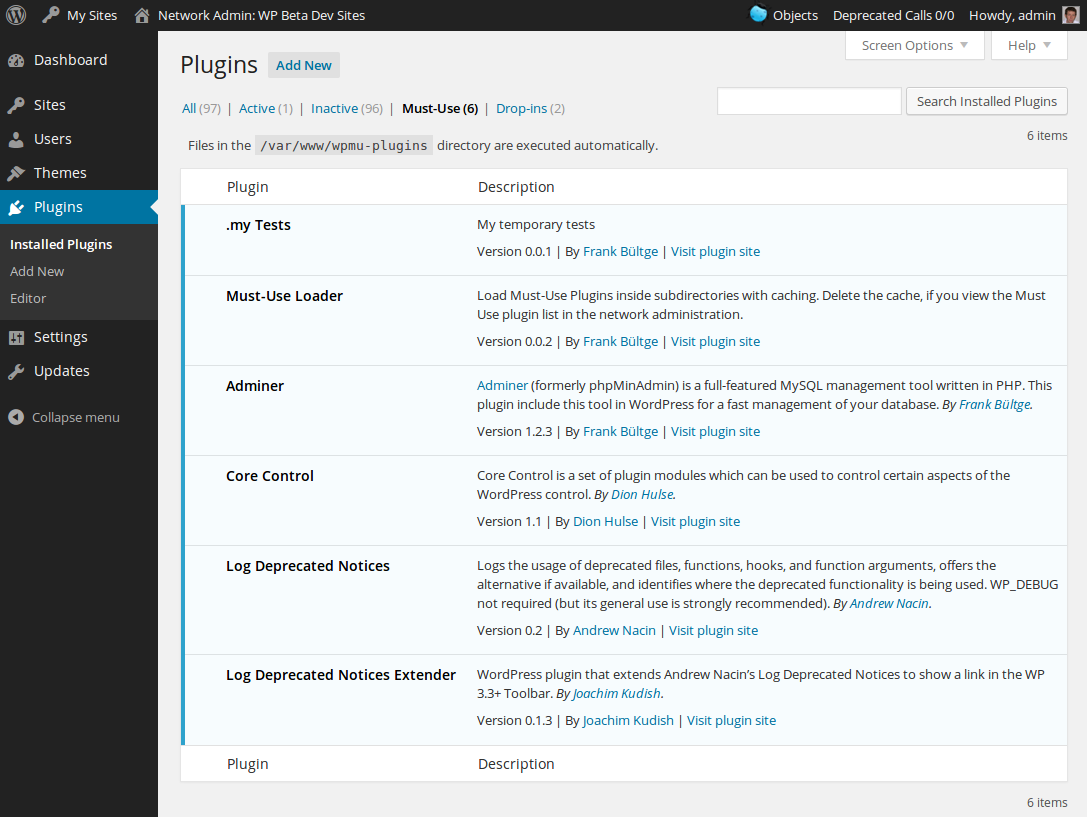
Installation
Manual
- Download the php file
- Copy to your Must Use plugin folder, default
/wp-content/mu-plugins/ - Alternative define your Must Use folder in the
wp-config.phpand copy the plugin in this folder - Check in the network plugin page, if it works
Alternative via Composer
The plugin is available as Composer package and can be installed via Composer.
composer require bueltge/must-use-loaderOr to create as a project in your environment.
composer create-project bueltge/must-use-loader --no-devThe package is on packagist and the package name is bueltge/must-use-loader.
Alternative via Git
- Go to your Must Use folder
cd path git init .git remote add origin https://github.com/bueltge/must-use-loader.gitgit fetch origingit checkout master- Check in the network plugin page, if it works
Customization
Custom Must Use Plugin directory
Define it in the wp-config.php of your install, as the following source.
// Custom mu plugin directory
define( 'WPMU_PLUGIN_DIR', dirname( __FILE__ ) . '/wpmu-plugins' );
define( 'WPMU_PLUGIN_URL', 'http://' . $_SERVER['HTTP_HOST'] . '/wpmu-plugins' );
Exclude plugins from loader
On default, exclude the plugin all plugin files, there start with an underline _.
But you can remove plugins detected by the "Must Use Loader" from the loading process by using the must_use_loader.mu_plugins filter.
Example:
function prefix_unset_autoloading( $mu_plugins ) {

    unset( $mu_plugins['plugin-folder/plugin-file.php'] );
    return $mu_plugins;
}
add_filter( 'must_use_loader.mu_plugins', 'prefix_unset_autoloading' );
Other Notes
Bugs, technical hints or contribute
Please give me feedback, contribute and file technical bugs on this GitHub Repo, use Issues.
License
Good news, this plugin is free for everyone! Since it's released under the MIT, you can use it free of charge on your personal or commercial blog. But if you enjoy this plugin, you can thank me and leave a small donation for the time I've spent writing and supporting this plugin. And I don't want to know how many hours of my life this plugin has already eaten ;)
Contact & Feedback
The plugin is designed and developed by me (Frank Bültge, Twitter)
Please let me know if you like the plugin or you hate it or whatever ... Please fork it, add an issue for ideas and bugs.
Disclaimer
I'm German, and my English might be gruesome here and there. So please be patient with me and let me know of typos or grammatical farts. Thanks
Releases
4 releases.
These releases are tags only. The author does not attach a packaged zip, so there are no download counts to report.