WP Manifestindependent plugin directory
manifest / multisite / multisite-global-media

Multisite Global Media WP Registry grade D+. High-severity findings · 2 findingsWP RegistryHigh-severity findings · 2 findingsOpen the reportD+ #1 in Multisite & Networks

Share a media library across the WordPress Multisite network

★ 231stars
11krelease downloads
≈180active sites
0.3.1latest · 6mo ago

Install

Download multisite-global-media-release.zip From the 0.2.0 release on GitHub, Mar 21, 2022

Upload it under Plugins → Add New Plugin → Upload Plugin, then activate.

Install straight from GitHub with WP-CLI:

wp plugin install https://github.com/bueltge/multisite-global-media/releases/download/0.2.0/multisite-global-media-release.zip
No built-in updater. New versions won't appear under Dashboard → Updates. Install new releases yourself, or let Git Updater track the repository.

Multisite Global Media is a WordPress plugin that shares media across the Multisite network.

Description

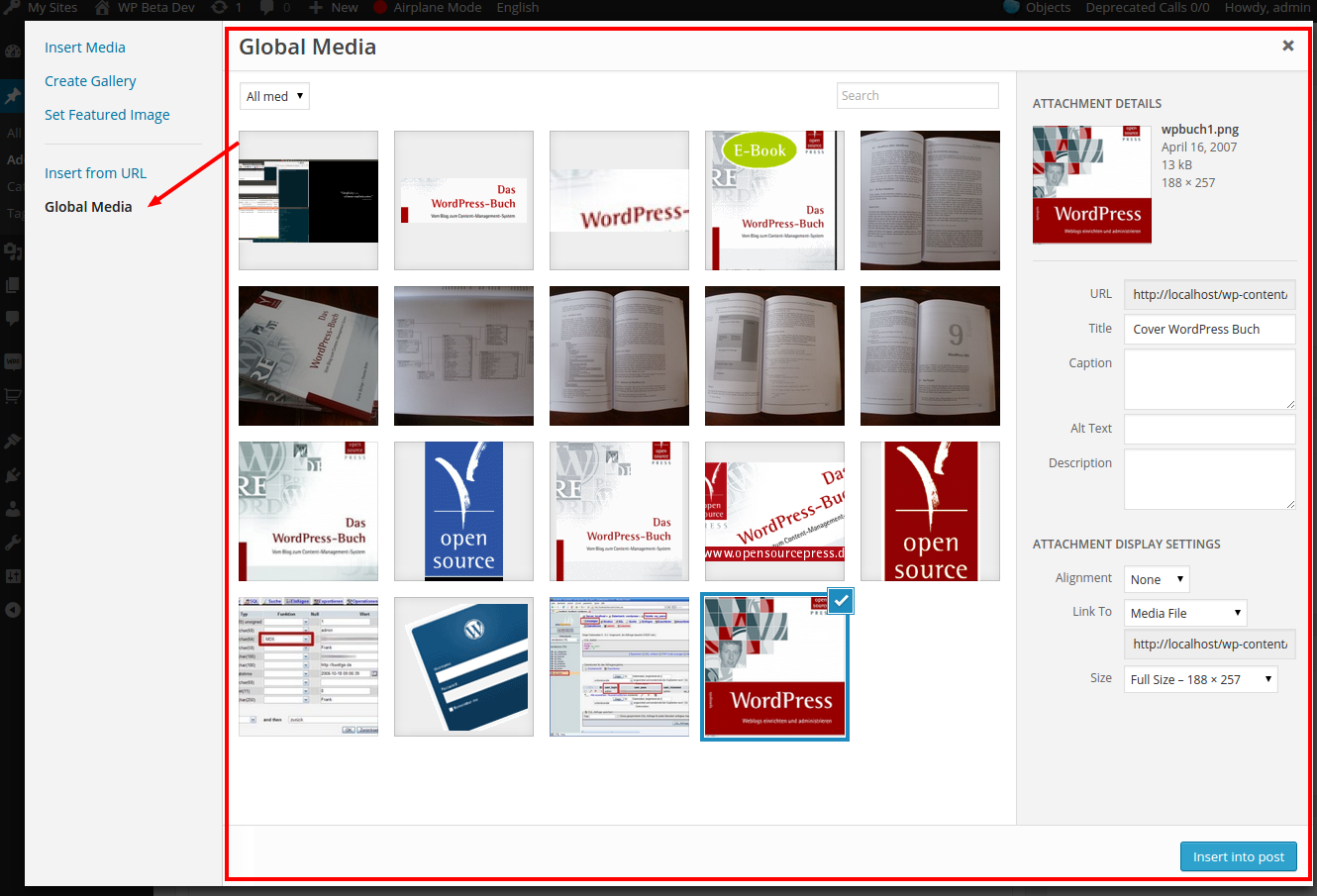
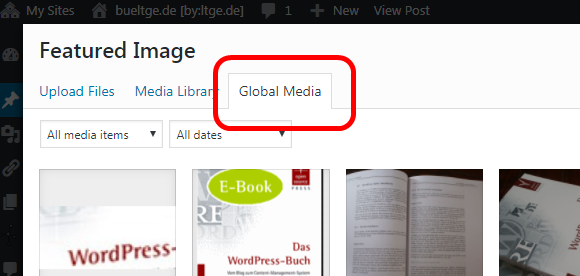
This small plugin adds a new tab to the media library, which allows you to share media from one site to all the other sites of the network. By default, the Site ID is set to '1'. You can set/change this Site ID via the filter hook global_media.site_id which is run in a custom plugin like so

 add_filter( 'global_media.site_id', function() {
     return 1234;
 } );

To get Global Media to work, please follow these steps:

  1. Decide which blog/site will host the shared media for the network.
  2. Add media to the media library for the chosen blog/site.
  3. Find the Site ID of your chosen site by going to your Network WP Admin. In the left-hand menu, choose "All Sites", and then click on "edit" under the site you need. In the address bar, you will see site-info.php?id=4 where the last number is the ID.

Finding the site ID

  1. If the Site ID of your chosen site is '1', then you don't need to make any changes. If it's a different ID number, then please read the section below about modifying the Site ID via hook and a custom plugin.

Note: A useful enhancement in the Multisite context is the plugin Multisite Enhancement. It also helps to identify the site and get his site ID.

Set your Site ID for the Global Mediathek

If you need to change the default Site ID '1' to another value, then you can do so by creating a small custom plugin.

  1. In /wp-content/mu-plugins/ create a new folder mgm-set-my-site-id.
  2. In /wp-content/mu-plugins/mgm-set-my-site-id/ create a new file mgm-set-my-site-id.php.
  3. Add the following content to 'my-plugin.php'. Change the return value to your chosen Site ID.
<?php
/**
 * Plugin Name: Multisite Global Media Site ID
 * Plugin URI:  https://github.com/bueltge/multisite-global-media/
 * Description: Set my Multisite Global Media site in the network.
 * Version:     1.0.0
 * Network:     true
 */

add_filter( 'global_media.site_id', function() {
    return 1234;
} );
  1. Activation is not necessary if you store this plugin inside the Must Use Plugin directory /wp-content/mu-plugins/.

Installation

Manual

  • Download the plugin as zip (available inside the release), use a clone of the repo or use Composer, see below.
  • Install the plugin in your environment, recommend as Must Use plugin.
  • Optional: See here for a quick hint for a helping solution Must Use Loader. This plugin is not necessary, but helpful if you use more as one plugin as Must Use plugin and use it in sub-directories.
  • Set the Site ID for the Global Media Library, see above the description to change the ID with a hook in a custom plugin.
  • Active the plugin for the whole network if you don't store it as Must Use Plugin.

Composer

The plugin is also available as Composer package.

composer require bueltge/multisite-global-media

Screenshots

Media Modal

Usage in Featured Image

Contributing

Contributions are what makes the open-source community such an amazing place to learn, inspire, and create. Any contributions you make are greatly appreciated.

  1. Fork the Project
  2. Create your Feature Branch (git checkout -b feature/AmazingFeature)
  3. Commit your changes (git commit -m 'Add some AmazingFeature')
  4. Push to the Branch (git push origin feature/AmazingFeature)
  5. Open a Pull Request

Other Notes

Bugs, technical hints or contribute

Please give me feedback, contribute and file technical bugs on this GitHub Repo, use Issues.

License

Good news, this plugin is free for everyone! Since it's released under the GPLv2+.

Contact & Feedback

The plugin is designed and developed by Frank and team members from the Syde crew. Special thanks and praise to Dominik Schilling and Guido Scialfa for his help and engagement.

Please let me know if you like the plugin or you hate it or whatever.

Please fork it and improve the plugin. However, see the contributing note above. Add an issue for ideas and bugs. Also, we say thank you for improvements in the documentation and help in the support.

Releases

13 releases. Each count is every asset in that release; expand a row for the breakdown.

Tag
Published
Assets
Downloads
0.3.1 latest
Apr 20, 2026 6mo ago
tag only
—
Nov 26, 2025 11mo ago
tag only
—
Mar 21, 2022 4 years ago
multisite-global-media-release.zip
413
Apr 22, 2020 6 years ago
multisite-global-media_0-1-1.zip
9,082
Jan 2, 2020 6 years ago
multisite-global-media_0-1-0.zip
180
Sep 13, 2019 7 years ago
multisite-global-media_0-1-0-beta4.zip
98
Sep 12, 2019 7 years ago
multisite-global-media-0.1.0-beta-3.zip
26
Nov 5, 2018 7 years ago
multisite-global-media-0.1.0-beta.zip
988
Oct 18, 2018 8 years ago
multisite-global-media.zip
91
Oct 14, 2018 8 years ago
tag only
—
Sep 27, 2018 8 years ago
tag only
—
Aug 20, 2018 8 years ago
tag only
—
Jul 4, 2018 8 years ago
tag only
—

Active-site estimate ≈180 comes from the median of recent superseded releases. Method.

D+ grade

Security

Multisite Global Media 0.2.0 · audited by WP Registry

High-severity findings.

2 high
Audited release
0.2.0
Findings
2
Worst severity
high
Content hash
1c1ddfd01c4df86a440e9cff…

Findings

  • high Unauthenticated featured-image overwrite via rest_request_after_callbacks

    missing_auth

    Rest::restRequestAfterCallbacks is hooked to rest_request_after_callbacks and, for any route whose handler callback[0] is instanceof WP_REST_Posts_Controller, reads request params featured_media and id and calls update_post_meta($postId, '_thumbnail_id', $attachmentId) whenever the integer featured_media value contains the global-site prefix (Site::idSitePrefix(), default site 1 → '100000'). There is no current_user_can, no nonce, and no HTTP-method check. WP_REST_Request::get_param always consults GET query params, so GET /wp-json/wp/v2/posts/{id}?featured_media=1000001 is enough. WordPress core applies rest_request_after_callbacks even after permission_callback has failed (respond_to_request sets a WP_Error then still runs the filter), so the write also happens on unauthenticated POST/PUT to edit endpoints and on draft/private/nonexistent ids; the subsequent $response->get_data() call fatals on WP_Error (no get_data method) but the meta write is already committed. Default prefix is documented; other site ids are a small brute. Observable result: every public post/page/CPT featured image can be pointed at a global-library attachment or broken, including via a cross-origin GET (img/script src) with no cookies.

    src/Rest/Rest.php:77-104

    Recommendation

    Return early unless the request method is POST/PUT/PATCH and the current user can edit_post($postId). Do not run the meta write when $response is a WP_Error. Do not read featured_media from GET/query. After a successful authorized save, update _thumbnail_id only for prefixed ids and leave unprefixed handling to core set_post_thumbnail().

  • high WooCommerce product gallery meta written on every product save with no auth or nonce

    missing_capability

    Gallery::saveGalleryIds is hooked to woocommerce_new_product and woocommerce_update_product. Those actions fire from WC_Product_Data_Store_CPT::update() on any product save, including wc_update_product_stock() → $product->save() during order stock reduction (woocommerce_payment_complete / order status processing, on-hold, completed). The method never checks current_user_can, never verifies a nonce, and never requires that the ids use the global-media prefix. It always update_post_meta($product->get_id(), '_product_image_gallery', filter_input(INPUT_POST, 'product_image_gallery')). filter_input reads the original request body, so extra checkout fields survive WooCommerce's own parsing. An unauthenticated buyer using a same-request payment (COD, BACS, cheque, etc.) can set product_image_gallery to any comma-separated attachment ids (local or prefixed) and change the storefront gallery of purchased, stock-managed products. If the field is omitted, filter_input returns null and the gallery is wiped — including on ordinary stock-reducing orders with no attacker-supplied field. Admin REST/product-import saves that do not include that POST field are similarly destructive.

    src/WooCommerce/Gallery.php:57-79

    Recommendation

    Return unless the current user can edit the product and a valid product-save nonce is present. Only rewrite _product_image_gallery when product_image_gallery is actually submitted and contains a prefixed global-media id. Do not hook a POST-field writer to woocommerce_update_product, which also runs on stock changes and REST/API saves.

WP Registry hashes the installable build and reports on that exact bytes-for-bytes copy. Embargoed findings are withheld until they are disclosed, so a clean verdict means nothing public is outstanding. WP Manifest does not audit code itself.