Install
This is the repository archive. It installs, but the folder name will carry the branch suffix and updates will not flow.
Install straight from GitHub with WP-CLI:
wp plugin install https://github.com/buda-loco/wp-static-mirror/archive/refs/heads/main.zipTurn your WordPress site into plain files, and serve those files to the public. Visitors get pages that load as fast as your server can read a file. Attackers get nothing to attack, because for them WordPress isn't slow or hardened — it simply isn't there.
Why this exists
Here is the uncomfortable truth about most WordPress sites: they are brochures. A portfolio, a restaurant, a local business, a personal site — the content changes a few times a month, yet WordPress boots PHP, connects to a database, and runs every active plugin for every single visitor, to re-render a page that hasn't changed since March.
That architecture has two costs. The first is speed: you are paying a database
round-trip tax on every page view for dynamism you don't use. The second is the
one that keeps site owners up at night: everything that runs is attackable.
Point a log viewer at any WordPress site that's been online for a week and you
will find bots hammering wp-login.php, probing xmlrpc.php, and fingerprinting
your plugin versions against lists of known holes. The standard answer is a
stack of security plugins — which are themselves more code running on every
request.
I built this for my own client sites because I wanted a different answer: keep WordPress as the editing tool it's genuinely great at, and stop pointing it at the internet.
What it actually does
Two jobs, and you can use either one alone.
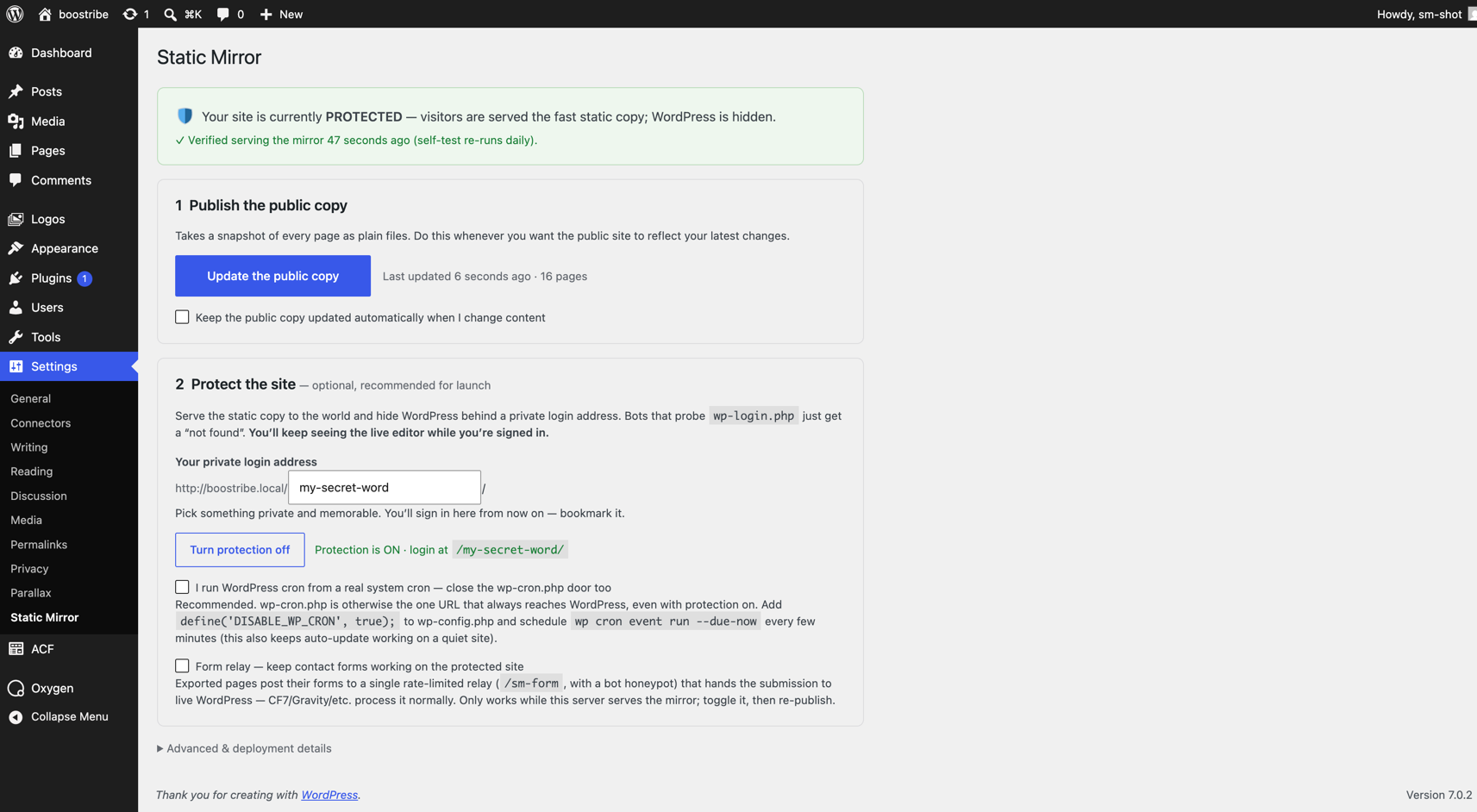
1. Export. The plugin visits your own site the way a visitor would, page by page, and saves everything — HTML, images, CSS, JavaScript, sitemaps, even your 404 page — into one folder of plain files. That folder is a complete, working copy of your site. You can upload it to Netlify, Vercel, S3, or the cheapest shared host on earth, and it will work, because it needs nothing: no PHP, no database, no updates, no maintenance.
2. Protect. This is the interesting part. Instead of moving the copy somewhere else, the plugin serves it from your same server, through a tiny file that runs before WordPress starts. When a visitor asks for a page, that file hands them the static copy and stops — WordPress never boots, the database is never opened. Only three things get through to the real WordPress:
- a secret login address you choose (your
wp-login.phpnow returns "not found", like any other page that doesn't exist), - you, while logged in — editors keep seeing and editing the live site normally, while the world sees the frozen copy,
- optionally, WordPress's scheduler and a rate-limited relay that keeps your contact forms working.
Everything else — /wp-json/, xmlrpc.php, admin-ajax.php, plugin
fingerprinting probes, login brute force — hits a static "not found" page
served without executing a line of WordPress. Not because each attack is
blocked, but because nothing was ever let through unless it was explicitly
named. Security people call this default-deny; it means nobody had to remember
to block anything.
The details that make it trustworthy
Any plugin can claim a feature list. These are the behaviors that took the most care, because they're the difference between a tool you trust and one you babysit:
- It proves protection works instead of assuming it. After you flip protection on — and every day after — the plugin makes three anonymous requests to its own site and verifies: the mirror is what visitors get, the secret door opens, the old login is gone. The settings page shows you the measured result and when it was measured.
- A broken publish can't take your site down. Exports build in a staging folder and only replace the live copy after passing a sanity check. If the crawl fails, the previous copy keeps serving and you get an error instead of a blank site. The last three publishes are kept for one-click rollback.
- Editing stays instant. With auto-update on, changing a page quietly rebuilds just that page and the lists it appears on, seconds after you save. A weekly full rebuild catches anything the shortcut missed.
- Contact forms keep working. Normally a static site can't receive a form. Exported forms here post to a single relay endpoint — rate-limited and bot-trapped — that hands the submission to your real form plugin and returns its real response.
- There is always a way back in. A bundled must-use plugin honors one line
in
wp-config.php(define('STATIC_MIRROR_OFF', true);) that switches everything off, even if you've forgotten the slug and the settings page is unreachable. Deactivating the plugin also fully restores normal serving.
The honest caveats
Read these before using it on anything that matters. Most of them are inherent to the idea, not bugs to be fixed later.
- Not for shops or member sites. Anything where an anonymous visitor triggers server code — WooCommerce carts and checkout, memberships, logged-in communities — will break in Protect mode, because that server code is exactly what's being switched off. The plugin detects common cases and refuses to enable protection until you explicitly confirm you understand. Editors and admins are unaffected; this is about your visitors.
- The public site is as fresh as your last publish. Auto-update closes most of the gap, but WordPress's built-in scheduler only fires when WordPress runs — which, on a protected quiet site, is rarely. If you use auto-update in Protect mode, set up a real server cron (the settings page shows you how). Otherwise, publishing is a button you press after editing.
- Forms with file uploads aren't supported. The relay forwards fields, not attached files. Plain contact forms work; "attach your CV" forms don't.
- Comments, per-visitor content, and server-side search change. Comments can't be submitted by anonymous visitors. Search is replaced by a client-side index that handles a few thousand posts comfortably but is a different beast than database search. Anything personalized shows every visitor the same frozen page.
- Your login moves — bookmark it. That's the point, but it means telling
every editor the new address. Rate limiting locks the secret door for 15
minutes after 5 failed attempts. Recover a forgotten slug with
wp option get static_mirror_slug, or use the escape hatch above. - It protects the WordPress layer, nothing below it. A stolen FTP password or a compromised host is outside this plugin's power. Fewer moving parts helps; it doesn't make hosting hygiene optional.
Is it for you?
If your site is a portfolio, a brochure, a restaurant, a venue, a personal or company site — content that editors change and visitors read — this gives you the speed and attack surface of a static site without giving up WordPress as your editor. If your site transacts with anonymous visitors, use it for the export capability and deploy elsewhere, or don't use it at all.
Getting started
- Install and activate the plugin (
static-mirror.phpis the whole plugin — one file you can read in a sitting). - Settings → Static Mirror → Publish the public copy. You now have a
complete static copy in
uploads/static-mirror/latest/, plus a zip. - Optionally: pick a secret login word and Turn protection on. The plugin self-tests and tells you, in plain words, whether it worked.
WP-CLI, if that's your thing:
wp static-mirror export
wp static-mirror protect on|off [--slug=<slug>]
wp static-mirror status
wp static-mirror rollback [--to=<export-*.zip>]
Who built this, and how
I'm a developer who builds WordPress sites for clients, and I wrote this plugin for my own use before publishing it. I want to be candid about the process: it was built in close collaboration with Claude Fable 5, a frontier AI model from Anthropic — including its security review of its own earlier work, which found and fixed real issues (a search index that could leak private custom fields, a rate limiter that misbehaved behind CDNs).
Every security-relevant path has been reviewed by a human who understands it, exercised by automated tests, and verified live against real sites — the self-test machinery exists precisely so the plugin's claims are checked by measurement, not by confidence. The whole plugin is a single readable file, so you (or your own AI of choice) can audit exactly what runs on your server. Judge it by that, not by how it was written.
Found a bug? Want something it doesn't do?
Open an issue — bugs, feature ideas, enhancements, or just "this confused me" reports are all welcome, and so are pull requests. If you're proposing a change, ARCHITECTURE.md lists the invariants your patch must not break; anything else is fair game. I use this on real client sites, so reports don't rot: I'm happy to review any time.
If this made your life better
This is free, GPL, and built in the gaps between client work. If it saved you a hacked site, a caching-plugin subscription, or just some sleep, you can buy me a coffee and fund the next improvement.
Architecture
ARCHITECTURE.md is the full technical specification — the export pipeline, the serving drop-in, and the list of invariants that must never be broken when changing the code.
License
GPL-2.0-or-later.