Ops Dashboard for WooCommerce
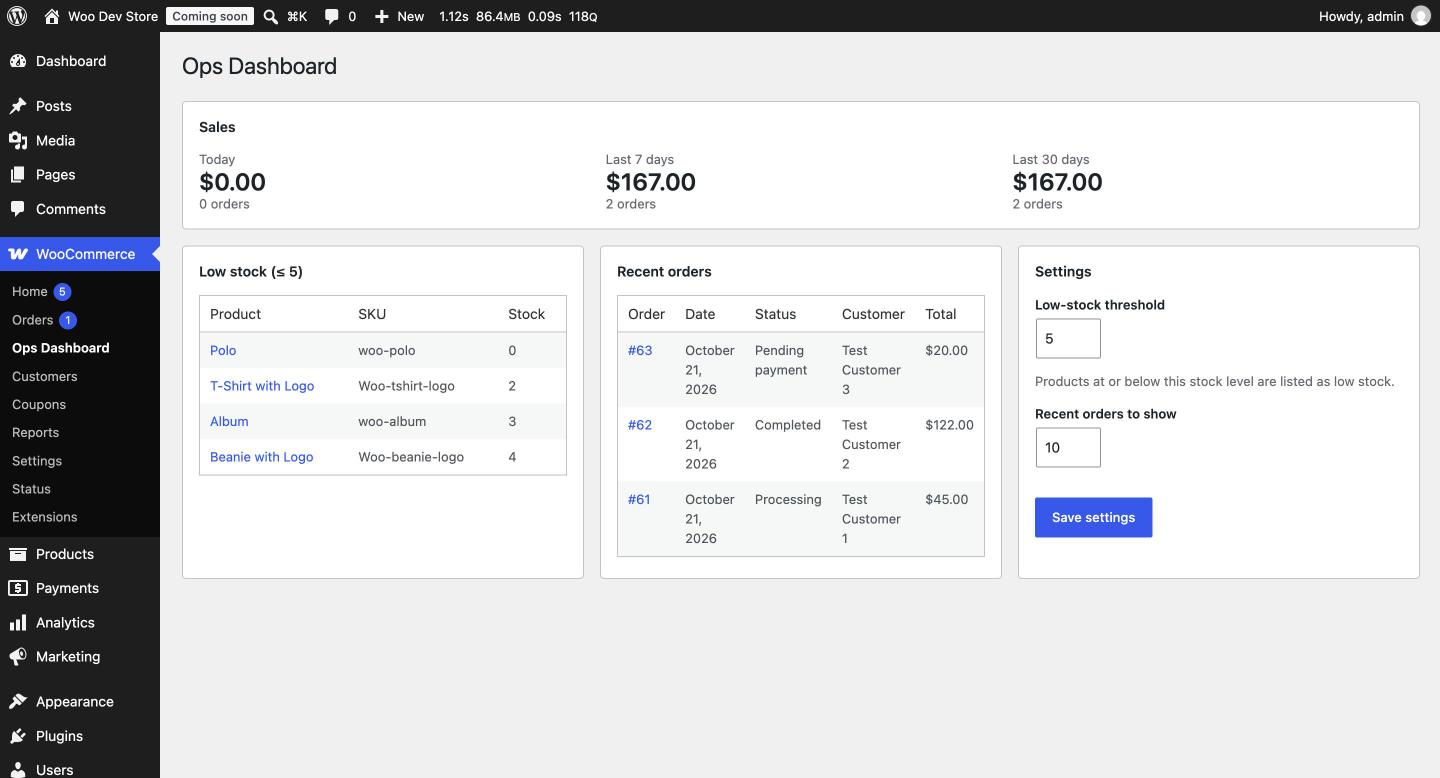
WooCommerce admin dashboard plugin (in progress): low-stock products, recent orders, and sales at a glance on one screen. Built with WooCommerce CRUD APIs (HPOS-compatible), WordPress security best practices, PHPUnit, and PHPCS in GitHub Actions CI.
Install
This is the repository archive. It installs, but the folder name will carry the branch suffix and updates will not flow.
Install straight from GitHub with WP-CLI:
wp plugin install https://github.com/bryanarius/ops-dashboard-for-woocommerce/archive/refs/heads/main.zipOne admin screen for store managers: low-stock products, recent orders, and sales at a glance, without clicking through several WooCommerce pages.
Status: in development
Features
- [x] Dashboard page under WooCommerce → Ops Dashboard
- [x] Low-stock panel with configurable threshold and links to edit each product
- [x] Recent orders panel (status, total, customer)
- [x] Sales summary: today, last 7 days, last 30 days
- [ ] Settings: low-stock threshold, number of recent orders
- [ ] AJAX filtering by category / stock status
- [ ] Stretch: daily low-stock email (WP-Cron), CSV export, REST endpoint
Built with
- PHP 8.1+, WordPress 6.5+, WooCommerce 8.2+
- WooCommerce CRUD APIs (
wc_get_products(),wc_get_orders()); HPOS-compatible - PHPUnit + Brain Monkey for unit tests
- PHPCS with WordPress Coding Standards
- GitHub Actions CI on PHP 8.1–8.3
Security
- Every screen and handler checks the
manage_woocommercecapability - Nonces on all form and AJAX requests
- Input sanitized on the way in, output escaped on the way out
Project structure
ops-dashboard-for-woocommerce.php   Plugin header, HPOS declaration, bootstrap
uninstall.php                       Cleanup when the plugin is deleted
includes/
  class-plugin.php                  Wires classes together
  class-settings.php                Option storage, defaults, Settings API
  data/                             Read-only queries (inventory, orders, sales)
admin/
  class-admin-page.php              Menu page, assets, rendering
  views/dashboard.php               Markup only
assets/                             Admin CSS and JS
tests/Unit/                         PHPUnit tests (no WordPress needed)
docs/decisions.md                   Design decisions and trade-offs
Installation
- Download or clone into
wp-content/plugins/ops-dashboard-for-woocommerce. - Activate WooCommerce, then this plugin.
- Go to WooCommerce → Ops Dashboard.
Development
composer install
composer lint      # PHPCS (WordPress Coding Standards)
composer lint:fix  # auto-fix what PHPCS can
composer test      # PHPUnit
For a local store with sample data, use LocalWP, install WooCommerce, and import its sample products (wp-content/plugins/woocommerce/sample-data/sample_products.csv). Symlink this folder into the site's wp-content/plugins/.
Known limitations
- Sales totals load every paid order in the period. Revenue is summed in PHP, so the 30-day figure can be slow on stores with thousands of orders a month. Not cached yet.
- Low-stock threshold uses the default (5). The Settings page to change it isn't built yet.
- Variations aren't counted as low stock. Only top-level products with stock management enabled are checked, so a low "Hoodie – Red" variation won't appear.
License
GPL-2.0-or-later