Install
This is the repository archive. It installs, but the folder name will carry the branch suffix and updates will not flow.
Install straight from GitHub with WP-CLI:
wp plugin install https://github.com/brasofilo/my-own-plugins-tab/archive/refs/heads/master.zipMy Own Plugins Tab
Version 2013.10.23
Separate your plugins from the others in the Plugins admin screen.
For developers:
see your plugins, and others', in separated tabs, quite useful when they start to count in dozens.
For everybody:
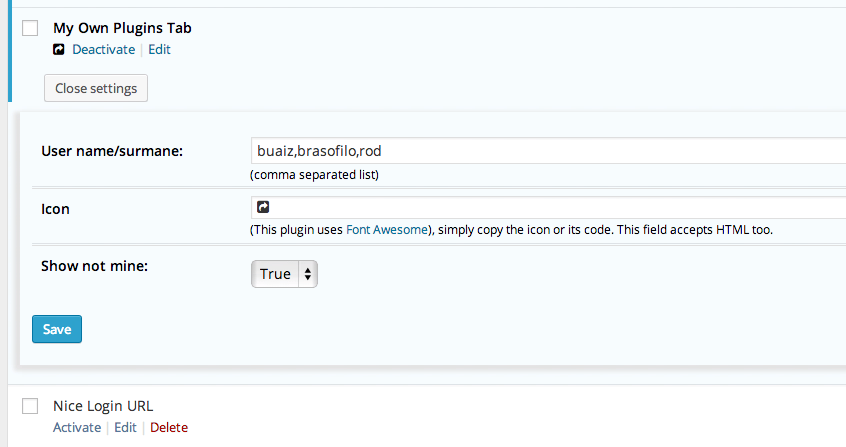
simply add a comma-separated list of authors and you'll be able to sort the plugins in two groups.
Related plugins
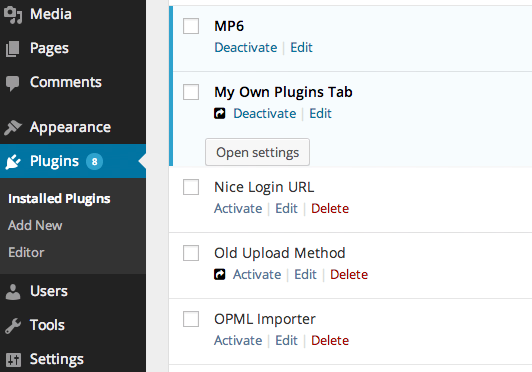
ICON MARKING my plugins
PLUGIN SETTINGS
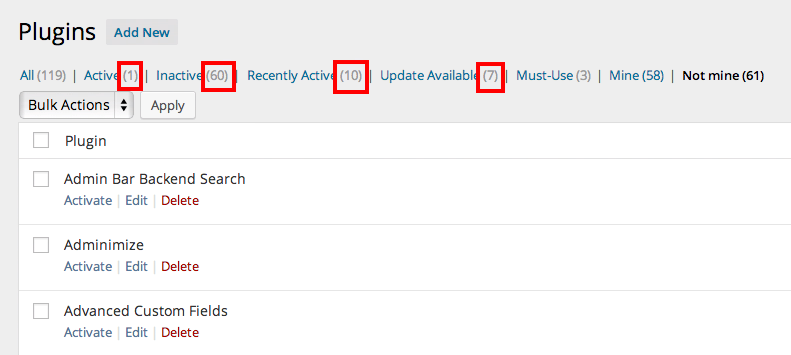
WHEN VIEWING
Marked counts reflect the screen being viewed -not mine in this case.
Credits
-
Uses Font Awesome, loaded from a CDN, fallback to bundled copies.
-
Plugin settings idea plugged from WP Maintenance Mode.
-
The plugin updater is an adaptatation from YahnisElsts / plugin-update-checker.
I have a testing plugin here: GitHub Plugin Update Checker.
FAQ
The plugin works in Multisite, further tests are needed to confirm/improve the behavior/settings.
Changelog
Version 2013.10.23
- CSS and Settings adjustments.
Version 2013.10.21
- Fixed updater, it was being blocked by
$pagenow==plugins.php, it runs also inupdate.phpandupdate-core.php.
Version 2013.10.19
- Trying to get Multisite right, I think it's ok
- Alternative local embed to FontAwesome CDN files
Version 2013.10.14
- Plugin launch
Licence
Released under GPL, you can use it free of charge on your personal or commercial blog.