Install
This is the repository archive. It installs, but the folder name will carry the branch suffix and updates will not flow.
Install straight from GitHub with WP-CLI:
wp plugin install https://github.com/boxybird/ucp-checkout-for-woocommerce/archive/refs/heads/main.zip

UCP Checkout for WooCommerce
Enable AI agents like ChatGPT, Gemini, and Claude to purchase products from your WooCommerce store using the Universal Commerce Protocol (UCP).





Status: Experimental - Not ready for production
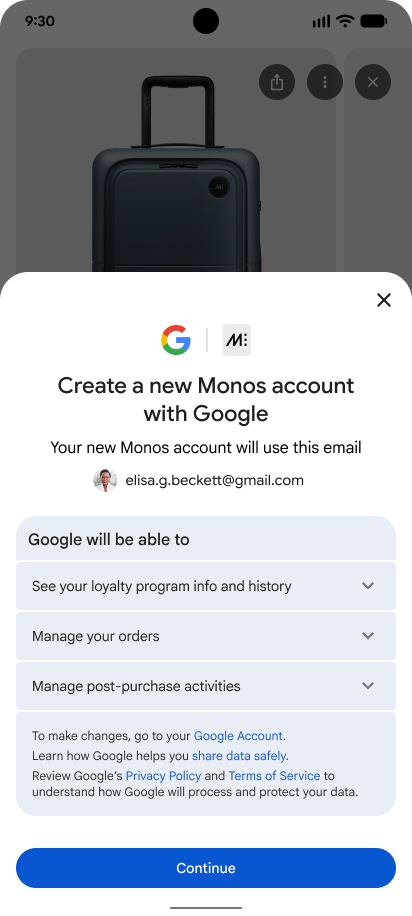
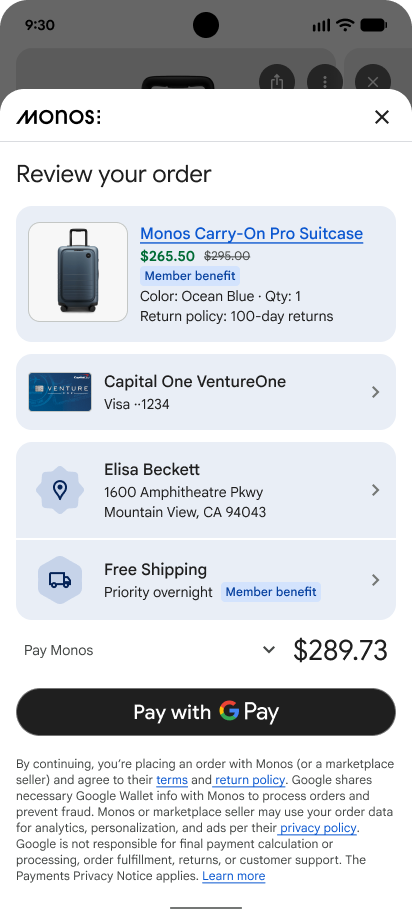
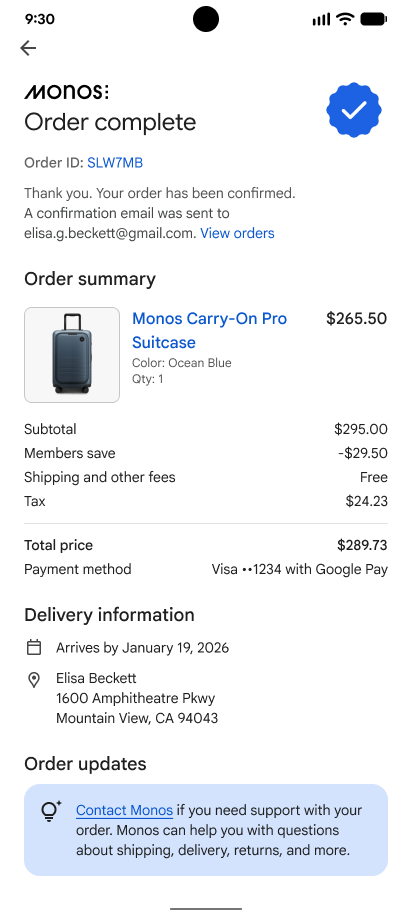
Seamless AI-powered checkout: Account linking → Order review → Confirmation
What is UCP?
The Universal Commerce Protocol (UCP) is an open standard that allows AI agents to interact with e-commerce stores programmatically. When a customer asks an AI assistant to "buy me a blue t-shirt from Example Store," UCP provides the standardized API that makes this possible.
This plugin implements the Checkout capability (dev.ucp.shopping.checkout) from UCP specification version 2026-01-11.
Requirements
- WordPress 6.0+
- WooCommerce 8.0+
- PHP 8.4+
- HTTPS enabled (required for production)
Installation
From GitHub
- Download the latest release or clone the repository
- Run
composer install --no-devto install dependencies - Upload the
ucp-checkout-for-woocommercefolder to/wp-content/plugins/ - Activate the plugin through the WordPress admin
- Verify your manifest is accessible at
https://your-store.com/.well-known/ucp
Your store is now discoverable by UCP-compatible AI agents.
For Store Owners
This section covers the WordPress admin features for managing and monitoring AI-powered checkouts.
Debug Dashboard
Access the debug dashboard at WooCommerce → UCP Debug in your WordPress admin.
Features
| Feature | Description |
|---|---|
| Real-time Statistics | Total requests, 24h/7d activity, error rates, avg response time |
| Request Logging | Every API call logged with method, endpoint, status, duration |
| Agent Tracking | See which AI agents (ChatGPT, Gemini, Claude) are using your store |
| Session Correlation | Track all requests belonging to a single checkout session |
| Advanced Filtering | Filter by type, endpoint, status code, session ID, agent, date range |
| Log Export | Export filtered logs as JSON for analysis |
| Retention Control | Configure automatic cleanup (1-90 days) |
Debug Mode
Toggle Debug Mode to control logging verbosity:
- Off (default): Logs metadata only (timestamps, status codes, endpoints)
- On: Logs full request/response bodies for troubleshooting
Privacy Note: Sensitive data (tokens, credentials, API keys) is automatically redacted from logs.
Understanding Log Types
| Type | Description |
|---|---|
request |
Incoming API request from an AI agent |
response |
Outgoing response sent back to the agent |
session |
Checkout session lifecycle events (created, updated, completed) |
payment |
Payment processing attempts and results |
error |
Exceptions and error conditions |
Supported Payment Gateways
The plugin automatically detects and integrates with your active WooCommerce payment gateways.
Fully Supported
| Gateway | Handler | Notes |
|---|---|---|
| Stripe | StripeUpeHandler |
Recommended. Supports modern Payment Elements. |
| WooCommerce Payments | StripeUpeHandler |
Powered by Stripe |
| PayPal Commerce | GenericTokenHandler |
PPCP gateway support |
| Square | GenericTokenHandler |
Credit card processing |
| Braintree | GenericTokenHandler |
PayPal's gateway |
Offline Payments
| Gateway | Handler | Notes |
|---|---|---|
| Check/Cheque | SimpleGatewayHandler |
Manual payment |
| Bank Transfer (BACS) | SimpleGatewayHandler |
Direct bank transfer |
| Cash on Delivery | SimpleGatewayHandler |
Pay on receipt |
Extending Payment Support
Developers can register custom payment handlers via the ucp_payment_handlers filter. See the Developer Guide below.
Product Compatibility
Some WooCommerce products require user configuration (selecting options, add-ons, bundle items) that AI agents cannot perform. The plugin automatically detects these products and returns an error when they're added to a checkout session, directing the buyer to complete the purchase on the product page instead.
Detected Plugins
| Plugin | Detection Logic |
|---|---|
| WooCommerce Composite Products | All composite products excluded (require component selection) |
| WooCommerce Product Bundles | Bundles with optional items, variable quantities, or variable products |
| WooCommerce Product Add-Ons | Products with required add-on fields |
| YITH WooCommerce Product Add-Ons | Products with required add-on options |
How It Works
When a product with required configuration is added to a checkout session, the API returns a validation error:
{
  "status": "validation_error",
  "messages": [
    {
      "type": "error",
      "code": "invalid_line_items.0.item.id",
      "message": "Product 'Custom Bundle' requires configuration (WooCommerce Product Bundles) and cannot be purchased via UCP. This product bundle requires selecting item options on the product page.",
      "severity": "recoverable"
    }
  ]
}
The AI agent should inform the buyer that this product requires manual configuration on the store's website.
Troubleshooting
Manifest Not Loading
- Visit
https://your-store.com/.well-known/ucpdirectly - Check for PHP errors in your server logs
- Ensure permalinks are enabled (Settings → Permalinks)
- Verify HTTPS is working
Checkout Sessions Failing
- Enable Debug Mode in the UCP Debug Dashboard
- Create a test checkout and review the logged request/response
- Check for validation errors in the response body
- Verify your payment gateway is properly configured in WooCommerce
Payment Processing Errors
- Check the
paymenttype logs in the Debug Dashboard - Verify your payment gateway's test/live mode matches your credentials
- For Stripe: ensure you're using PaymentMethod IDs (pm_xxx), not legacy tokens
For Developers & AI Platforms
This section covers the UCP API implementation for developers building AI agents or integrating with the protocol.
UCP Manifest
Your store's capabilities are advertised at:
GET https://your-store.com/.well-known/ucpExample Response:
{
  "ucp": {
    "version": "2026-01-11",
    "services": {
      "dev.ucp.shopping": {
        "version": "2026-01-11",
        "spec": "https://ucp.dev/specification/overview",
        "rest": {
          "schema": "https://your-store.com/.well-known/ucp/openapi.json",
          "endpoint": "https://your-store.com/wp-json/ucp/v1"
        }
      }
    },
    "capabilities": [
      {
        "name": "dev.ucp.shopping.checkout",
        "version": "2026-01-11",
        "spec": "https://ucp.dev/specification/checkout",
        "schema": "https://ucp.dev/schemas/shopping/checkout.json"
      }
    ]
  },
  "payment": {
    "handlers": [
      {
        "id": "stripe",
        "name": "dev.ucp.payment.stripe",
        "version": "2026-01-11",
        "spec": "https://ucp.dev/specification/payment-handlers/stripe",
        "instrument_schemas": ["https://ucp.dev/schemas/payment/card-instrument.json"],
        "config": {
          "supported_types": ["card"],
          "supported_networks": ["visa", "mastercard", "amex", "discover"]
        }
      },
      {
        "id": "ucp_agent",
        "name": "dev.ucp.payment.agent",
        "version": "2026-01-11",
        "spec": "https://ucp.dev/specification/payment-handlers/agent",
        "instrument_schemas": ["https://ucp.dev/schemas/payment/card-instrument.json"]
      }
    ]
  },
  "signing_keys": []
}
API Reference
All endpoints are under /wp-json/ucp/v1/. Prices are in minor units (cents).
Create Checkout Session
POST /wp-json/ucp/v1/checkout-sessions
Content-Type: application/json
Request:
{
  "line_items": [
    {
      "item": { "id": "123" },
      "quantity": 2
    }
  ],
  "currency": "USD"
}
Response:
{
  "ucp": {
    "version": "2026-01-11",
    "capabilities": [{ "name": "dev.ucp.shopping.checkout", "version": "2026-01-11" }]
  },
  "id": "ucp_sess_abc123def456",
  "status": "incomplete",
  "line_items": [
    {
      "item": {
        "id": "123",
        "title": "Blue T-Shirt",
        "unit_price": 2999,
        "image": "https://store.com/images/shirt.jpg"
      },
      "quantity": 2,
      "totals": [{ "type": "subtotal", "amount": 5998 }]
    }
  ],
  "currency": "USD",
  "totals": [
    { "type": "subtotal", "amount": 5998 },
    { "type": "total", "amount": 5998 }
  ],
  "payment": { "handlers": [...] },
  "links": {
    "privacy_policy": "https://store.com/privacy",
    "terms_of_service": "https://store.com/terms"
  },
  "expires_at": "2026-01-14T18:00:00Z"
}
Get Checkout Session
GET /wp-json/ucp/v1/checkout-sessions/{id}Returns the current state of a checkout session.
Update Checkout Session
PUT /wp-json/ucp/v1/checkout-sessions/{id}
Content-Type: application/json
Request:
{
  "line_items": [
    { "item": { "id": "123" }, "quantity": 3 }
  ],
  "buyer": {
    "shipping_address": {
      "first_name": "John",
      "last_name": "Doe",
      "street_address": "123 Main St",
      "address_locality": "Beverly Hills",
      "address_region": "CA",
      "postal_code": "90210",
      "address_country": "US",
      "email": "john@example.com",
      "phone": "555-1234"
    }
  }
}
When a shipping address is provided, the response includes calculated shipping options and tax.
Complete Checkout
POST /wp-json/ucp/v1/checkout-sessions/{id}/complete
Content-Type: application/json
Request:
{
  "payment_data": {
    "handler_id": "stripe",
    "credential": {
      "token": "pm_1ABC123def456"
    }
  },
  "buyer": {
    "shipping_address": {
      "first_name": "John",
      "last_name": "Doe",
      "street_address": "123 Main St",
      "address_locality": "Beverly Hills",
      "address_region": "CA",
      "postal_code": "90210",
      "address_country": "US",
      "email": "john@example.com",
      "phone": "555-1234"
    }
  }
}
Response:
{
  "ucp": { "version": "2026-01-11", "capabilities": [...] },
  "id": "ucp_sess_abc123def456",
  "status": "completed",
  "order": {
    "id": "1234",
    "status": "processing"
  },
  "line_items": [...],
  "totals": [...],
  "currency": "USD"
}
Cancel Checkout Session
POST /wp-json/ucp/v1/checkout-sessions/{id}/cancelResponse:
{
  "ucp": { "version": "2026-01-11", "capabilities": [...] },
  "id": "ucp_sess_abc123def456",
  "status": "canceled"
}
Session States
Sessions progress through these states per the UCP specification:
| Status | Description | Next Actions |
|---|---|---|
incomplete |
Missing required information | Update session with buyer info |
requires_escalation |
Needs human intervention | Redirect buyer to continue_url |
ready_for_complete |
All information collected | Call complete endpoint |
complete_in_progress |
Processing payment | Wait for completion |
completed |
Order placed successfully | Done |
canceled |
Session terminated | Create new session |
Error Handling
All errors follow the UCP error format:
{
  "status": "validation_error",
  "messages": [
    {
      "type": "error",
      "code": "invalid_line_items",
      "message": "line_items array is required",
      "severity": "recoverable"
    }
  ]
}
Error Statuses
| Status | Description |
|---|---|
error |
General error |
validation_error |
Invalid request parameters |
not_found |
Session or resource not found |
unauthorized |
Authentication required |
requires_escalation |
Human intervention needed |
Severity Levels
| Severity | Description |
|---|---|
recoverable |
Agent can fix via API (retry with correct data) |
requires_buyer_input |
Need information only buyer can provide |
requires_buyer_review |
Policy/regulatory authorization needed |
Extending Payment Handlers
Register custom payment handlers for additional gateways:
add_filter('ucp_payment_handlers', function(array $handlers): array {
    $handlers[] = new MyCustomPaymentHandler();
    return $handlers;
});
Your handler must implement PaymentHandlerInterface:
interface PaymentHandlerInterface
{
    public function supports(WC_Payment_Gateway $gateway): bool;
    public function getPriority(): int;
    public function prepare(WC_Order $order, WC_Payment_Gateway $gateway, array $paymentData): PrepareResult;
    public function process(WC_Order $order, WC_Payment_Gateway $gateway): PaymentResult;
    public function finalize(WC_Order $order, WC_Payment_Gateway $gateway, PaymentResult $result): void;
}
Optionally implement ManifestContributorInterface to customize your handler's manifest entry.
Development
Setup
composer installRunning Tests
composer testCode Quality
composer polish # Runs tests + Rector + PHPStanIndividual commands:
composer rector    # Code modernization
composer phpstan   # Static analysis
Resources
License
GPL-2.0-or-later