Install
This is the repository archive. It installs, but the folder name will carry the branch suffix and updates will not flow.
Install straight from GitHub with WP-CLI:
wp plugin install https://github.com/bluantinoo/wc-resync-webhooks/archive/refs/heads/main.zipA small WordPress plugin that sends chosen WooCommerce orders again to chosen order webhooks, on demand.
When WooCommerce feeds another system through webhooks (an ERP, a CRM, a booking or accounting system), sooner or later some orders never arrive: the receiving end was down, a webhook was paused during maintenance, a bug on the other side rejected them. WooCommerce has no button to send them again. The usual workaround is to edit each order so that the webhook fires, which also fires every other webhook and email tied to that change.
What it does
The plugin adds Tools → Resync Webhooks, for users who can manage WooCommerce. You list order IDs, tick one or more of the order webhooks on the site, and each order is delivered to each ticked webhook, with the payload and the signature WooCommerce would build for that webhook (same API version, same user context, same X-WC-Webhook-* headers). The page then shows the outcome of every delivery, as the endpoint answered it.
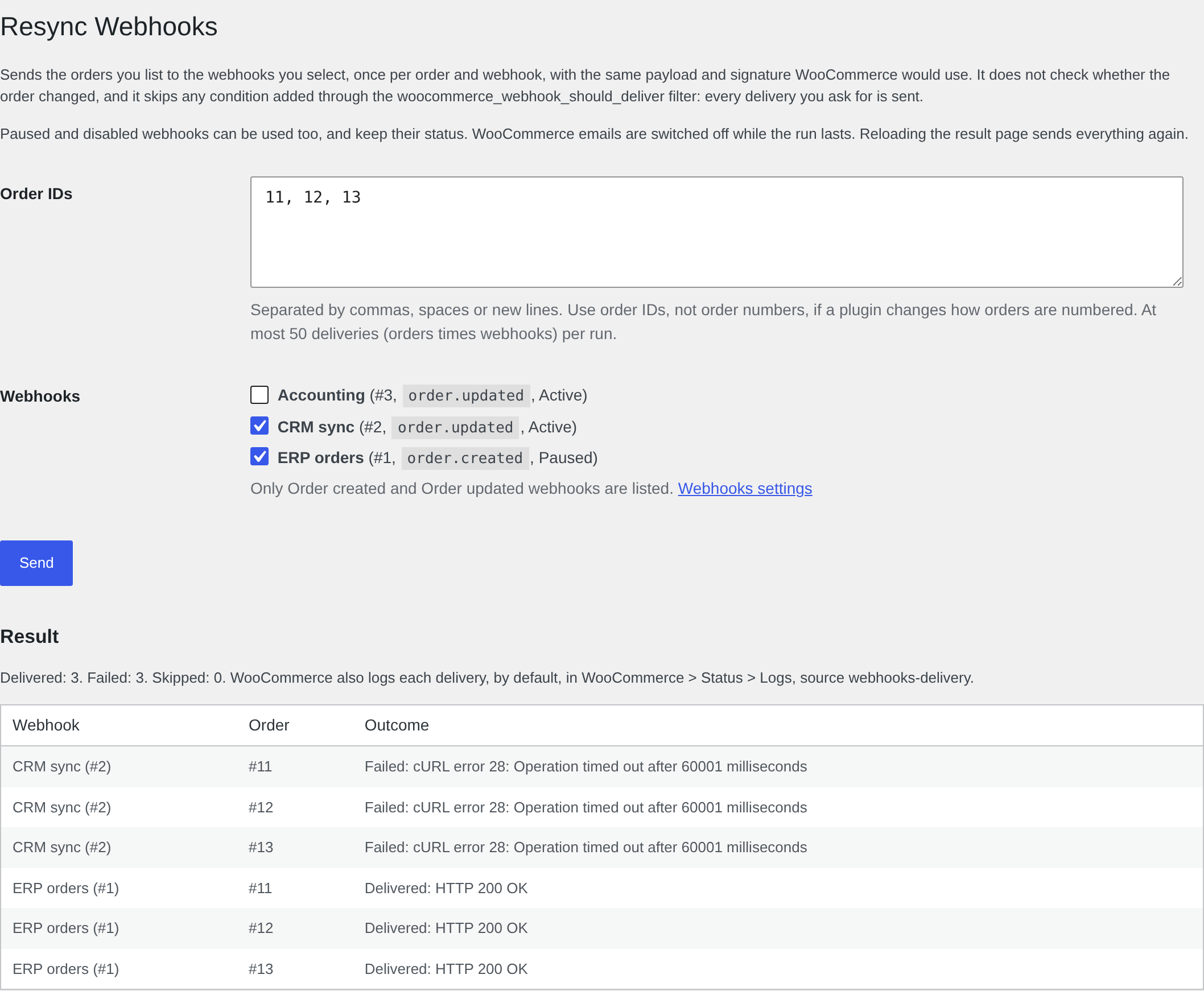
- Paused and disabled webhooks can be used, and keep their status.
- Only the ticked webhooks are called. Other webhooks, on the same topic or not, are not.
- Honest outcomes. WooCommerce's
WC_Webhook::deliver()returns nothing and throws nothing on HTTP errors; the plugin reads the response from thewoocommerce_webhook_deliveryaction and applies WooCommerce's own rule (any code from 200 to 302 is a success). - WooCommerce emails are off for the duration of the run: every email registered with the WooCommerce mailer. Sending a webhook does not send emails by itself; this is a precaution in case another plugin reacts to a delivery by changing an order.
- A dead endpoint costs at most three timeouts: after three failed deliveries in a row, the run stops sending to that webhook and reports how many orders were left out. With an endpoint that times out, that is still up to three minutes per webhook.
- Never two deliveries to the same webhook in the same second. WooCommerce builds the
X-WC-Webhook-Delivery-IDheader from the webhook ID and the current second, so two deliveries to the same webhook within one second would carry the same ID, and a receiver that discards duplicates by that header would drop one. The plugin waits for the next second when needed.
There are no settings, and the plugin keeps no records of its own.
What it does not do
- No queue. Deliveries run inside the admin request, one after the other, each with WooCommerce's timeout of one minute. A run is capped at 50 deliveries (orders times webhooks), because deliveries to the same webhook are at least one second apart (see above): 50 orders to one webhook take 50 seconds or more: split larger resyncs into batches. PHP's time limit is lifted for the run, but a proxy or PHP-FPM timeout in front of the site still applies, and a request killed halfway leaves the remaining orders unsent. Reloading the result page sends everything again.
- No conditions. It does not check whether an order changed. Conditions added through the
woocommerce_webhook_should_deliverfilter (for example "do not send updates for orders older than 30 days") are not applied, because WooCommerce applies them before delivering, not insidedeliver(). Every delivery you ask for is sent: on the receiving end, an old order may be treated as new. - Order created and order updated webhooks only. Order deleted and order restored webhooks are not listed: for a deletion WooCommerce sends only the order ID, and the receiver would take a live order as deleted. Webhooks about products, coupons or customers, and action webhooks, are not listed either. Refunds are not orders and are skipped.
- No check of the payload. It is built as the user who owns the webhook, as WooCommerce does. If that user was deleted or can no longer read orders, the payload is an error object; the endpoint may still answer 200, and the page then shows the delivery as successful.
- Deferred emails are not covered. With WooCommerce's deferred transactional emails turned on, an email triggered during the run is queued and sent later by Action Scheduler, in another request, where the plugin no longer switches emails off. Emails sent by other plugins through
wp_mail()directly are not covered either.
What WooCommerce does with the webhook
deliver() saves the webhook after every delivery: a success resets its failure count, a failure increases it, and by default a webhook that fails again after six failures in a row is set to Disabled by WooCommerce. If that happens during a run, the plugin puts the original status back right after that delivery and says so on the page. The failure count is left as WooCommerce recorded it, so the next real failure can disable the webhook again.
If an active webhook never got a 200 to the ping WooCommerce sends when a webhook is created, WooCommerce pings its endpoint again every time the webhook is saved, so also after every delivery. This happens with WooCommerce's own deliveries too; the page does not show these pings.
By default WooCommerce also logs every delivery in WooCommerce → Status → Logs, source webhooks-delivery, as it does for its own. Request and response bodies are only logged with WP_DEBUG on.
Requirements
- WordPress 6.5 or later
- PHP 7.4 or later
- WooCommerce 8.0 or later (tested with 8.0 and 11.3)
Compatible with both order storages (HPOS and posts).
Installation
- Download the zip of the latest release, or clone the repository into
wp-content/plugins/wc-resync-webhooks. - Activate Resync Webhooks for WooCommerce. WordPress refuses to activate it until WooCommerce is active.
- Go to Tools → Resync Webhooks.
Filters
// Maximum deliveries (orders times webhooks) in one run. Default 50.
add_filter( 'wc_resync_webhooks_max_deliveries', fn () => 100 );

// Failed deliveries in a row after which a run gives up on a webhook. Default 3.
add_filter( 'wc_resync_webhooks_max_consecutive_failures', fn () => 5 );
Updates
The plugin is not on wordpress.org: it updates itself from the GitHub releases of this repository, through the bundled Plugin Update Checker library (MIT). New versions show up in Dashboard → Updates and in wp plugin update, like any other plugin. The Update URI header tells WordPress not to look for this slug on wordpress.org, so a different plugin published there under the same name can never be offered as an update.
Only the zip attached to a release is installed. The site asks the GitHub API for the latest release about every 12 hours. GitHub sees what WordPress sends with every outgoing request: the server's IP address, and the WordPress version and site URL in the User-Agent.
Whoever can publish a release on this repository can ship code to every site that runs the plugin, which is true of any update channel. Releases are built by the workflow in .github/workflows/release.yml from a version tag on main.
License
GPL-2.0-or-later. See LICENSE.
Author
Diego Vagnoli, diegovagnoli.it