WooCommerce PawaPay Gateway WP Registry grade A. No security issues foundWP RegistryNo security issues foundOpen the reportA
A WooCommerce payment gateway plugin that integrates Mobile Money payments via the PawaPay API with automatic currency conversion. It supports multi-country, multi-operator payments, refunds and ensures secure transaction validation using webhooks and return URLs.
Install
Upload it under Plugins → Add New Plugin → Upload Plugin, then activate.
Install straight from GitHub with WP-CLI:
wp plugin install https://github.com/blakvghost/wc-pawapay-gateway-plugin/releases/download/v1.3.3/wc-pawapay-gateway-plugin.zipWooCommerce PawaPay Gateway Plugin
A WordPress payment gateway plugin that integrates Mobile Money payments via the PawaPay API with automatic currency conversion.
It supports multi-country, multi-operator payments, secure transaction validation via webhooks and return URLs, and provides full support for both WooCommerce Classic Checkout and Block Checkout.
Features
✅ Full integration with WooCommerce
✅ Mobile Money payments via the PawaPay Payment Page
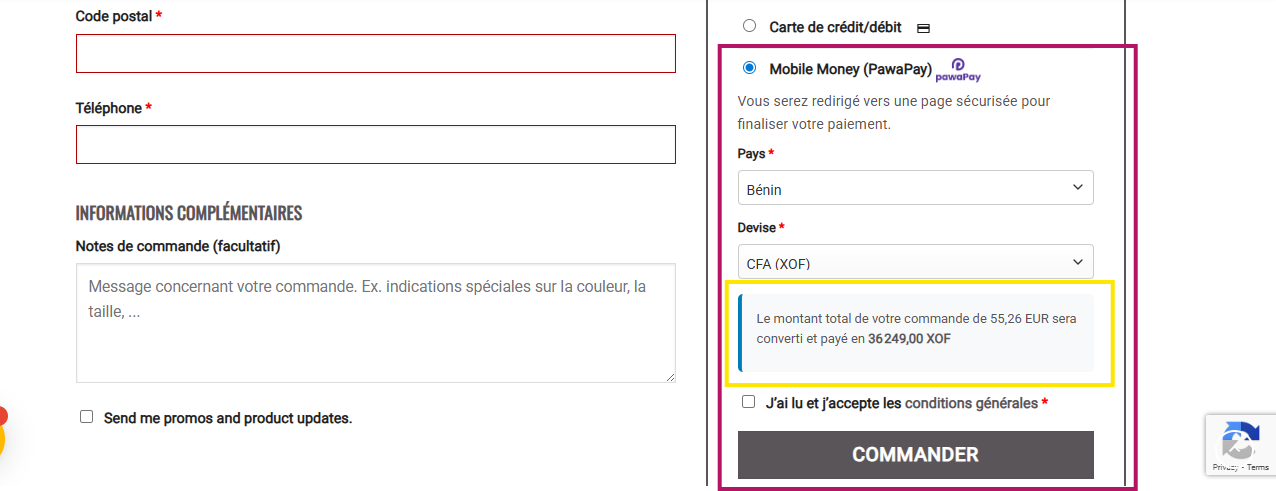
✅ Automatic currency conversion (any supported currency → XOF / XAF depending on country)
✅ Supports both free and API-key-based exchange rate providers
✅ Country and operator selection at checkout
✅ Mobile operator logos displayed at checkout
✅ Multi-country support (West & Central Africa)
✅ Sandbox and Production modes
✅ Secure webhook support for real-time status validation
✅ Supports both Block Checkout and Classic Checkout interfaces
✅ Admin PawaPay Dashboard with transaction history and refund management
✅ Email Notifications
✅ Complete refund system:
- Refunds directly from WooCommerce order details
- Dedicated refund interface in the PawaPay Dashboard
- Refund history tracking
Supported Countries
The list of supported countries and operators is automatically retrieved from your PawaPay merchant account.
Only countries and operators that are enabled for your account will appear at checkout.
You don’t need to manually configure them — the plugin dynamically loads this data from PawaPay’s API.
Currency Conversion
The plugin automatically converts any store currency into one of the settlement currencies supported by PawaPay (XOF / XAF).
How it works
- If you configure an ExchangeRate API key, the plugin uses the premium endpoint for accurate and reliable conversion.
- If no key is provided, it falls back to the free endpoint (less reliable but works without registration).
- Exchange rates are cached for 6 hours to reduce API requests.
Installation
-
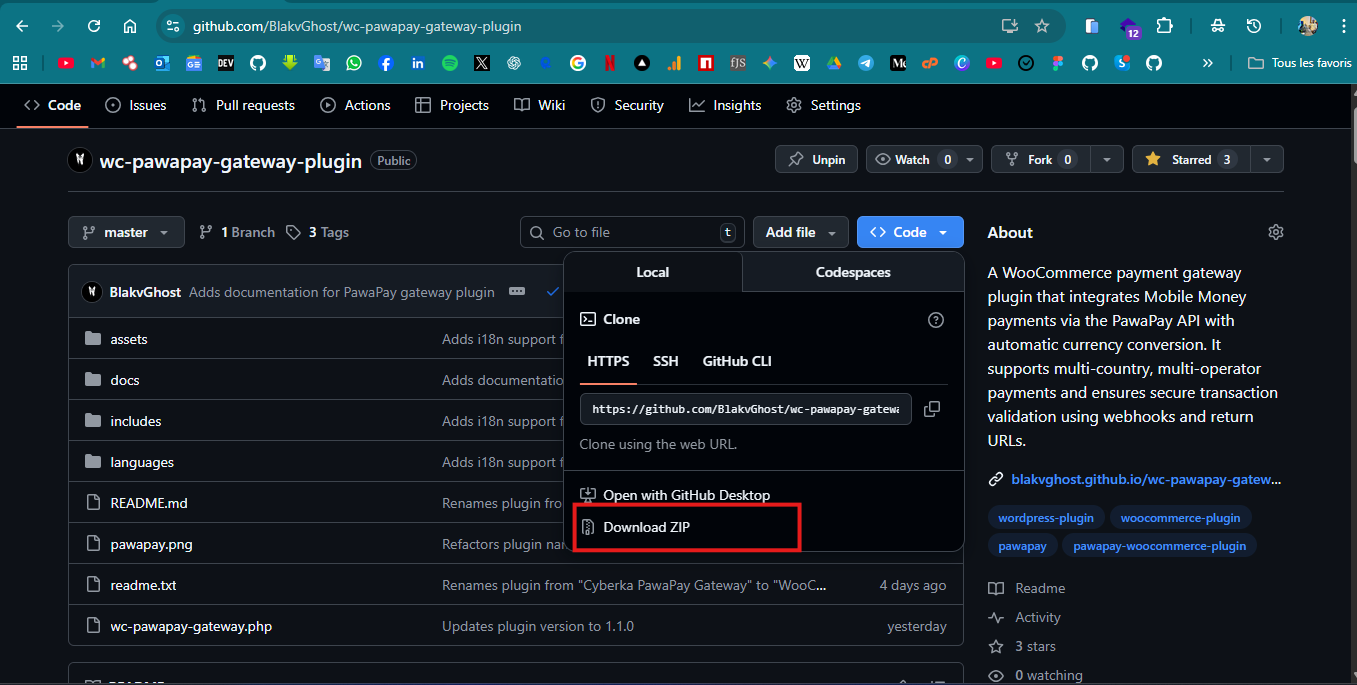
Download the plugin ZIP
-
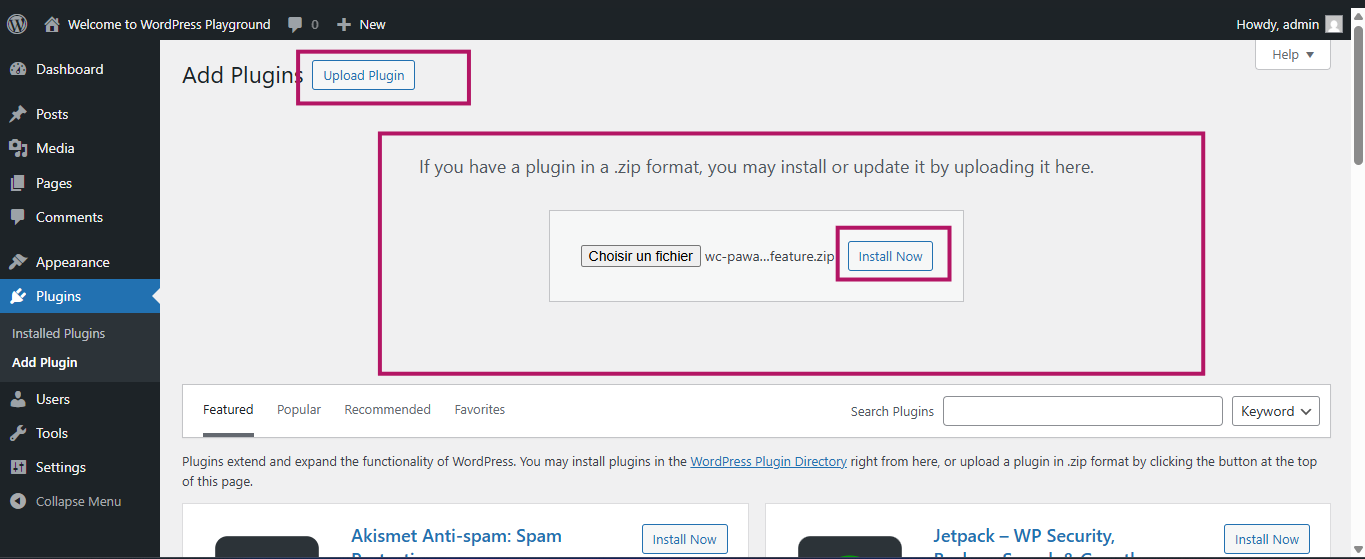
Go to WordPress Admin → Plugins → Add New
-
Click Upload Plugin and select the ZIP file
-
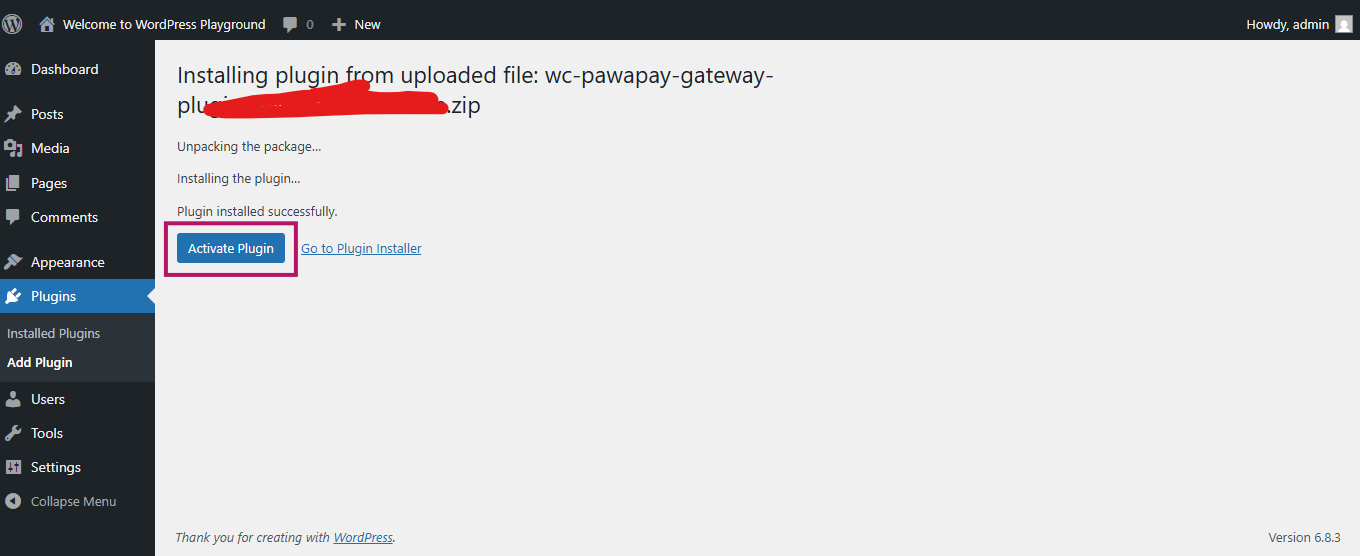
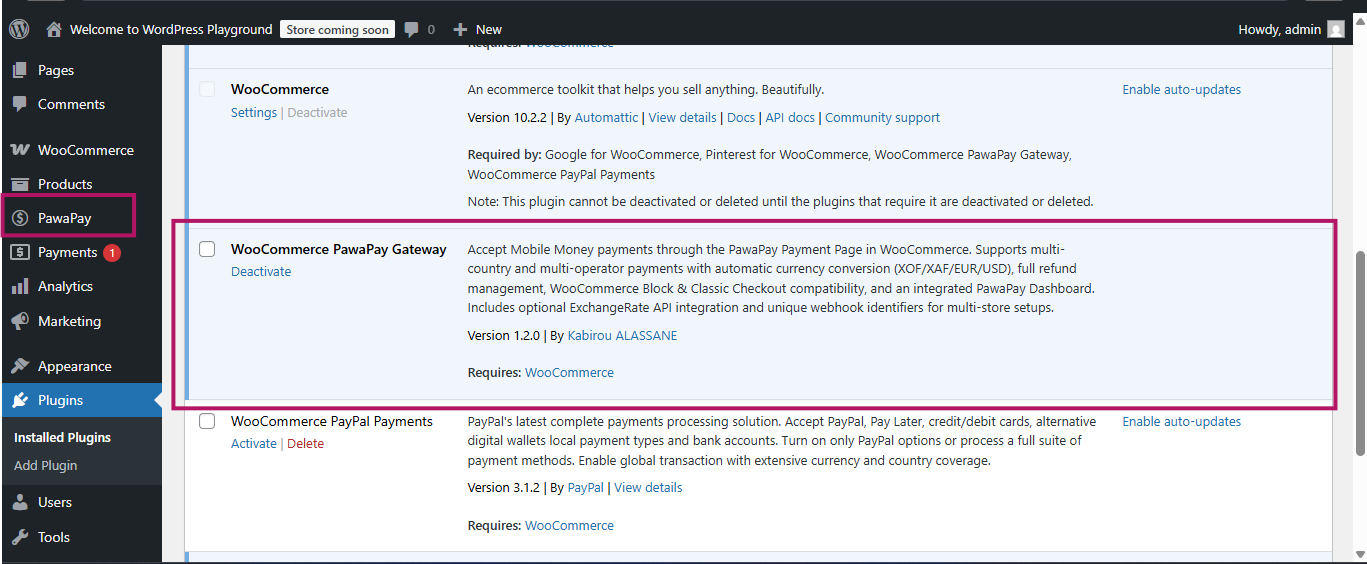
Activate the plugin
-
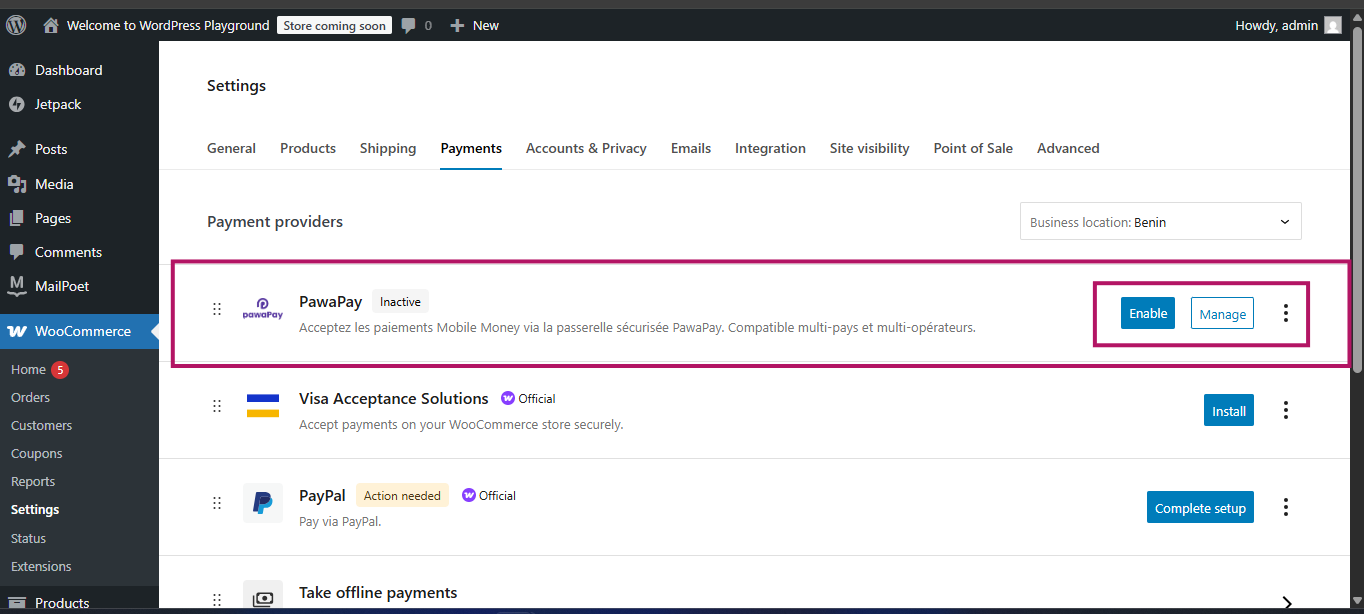
Go to WooCommerce → Settings → Payments
-
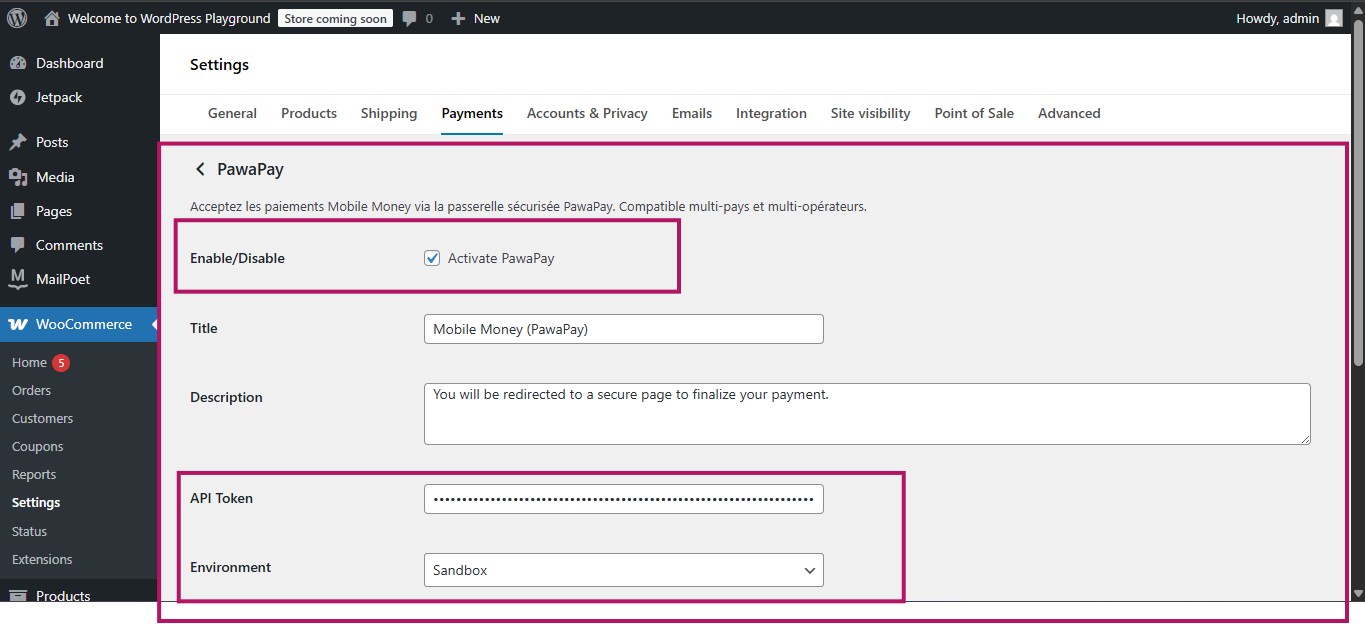
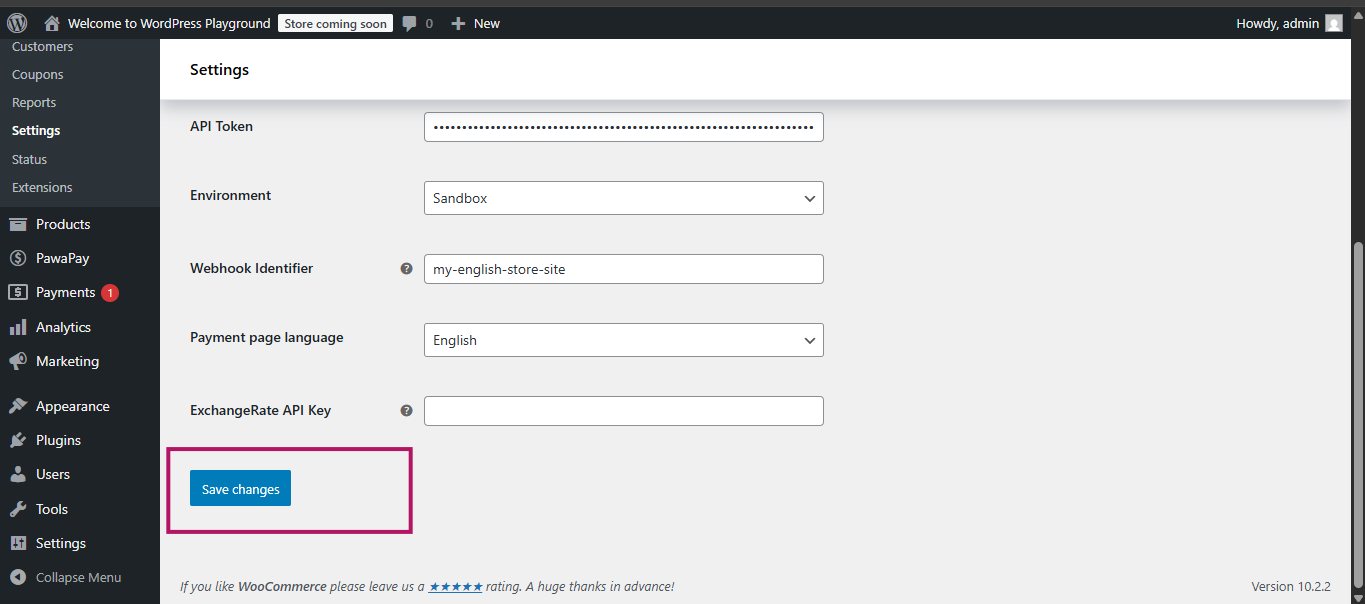
Enable and configure PawaPay
-
Visit your Checkout Page (Block or Classic) and confirm that PawaPay appears as a payment method.
Configuration
Required Settings
| Setting | Description |
|---|---|
| Title | The payment method name displayed at checkout (e.g., Mobile Money (PawaPay)) |
| Description | The message displayed under the payment method during checkout |
| API Token | Your PawaPay API token (available in your PawaPay dashboard) |
| Environment | Choose between Sandbox (test mode) and Production (live mode) |
| Webhook Identifier | A unique value that identifies your store. This is used in the payment metadata to distinguish webhooks when multiple stores share the same PawaPay account. |
| Payment Page Language | Select the language used on the PawaPay payment page (English or French) |
| ExchangeRate API Key (optional) | Enter your ExchangeRate API key for reliable currency conversion. Leave empty to use the free fallback endpoint. |
Example Configuration
- Title: Mobile Money (PawaPay)
- Description: You will be redirected to a secure page to complete your payment.
- API Token: sk_test_XXXXXX
- Environment: Sandbox
- Webhook Identifier: myshop-unique-id
- Payment Page Language: ENGLISH
- ExchangeRate API Key: your_api_key_here (optional)
Return URLs & Webhooks
On payment success or failure, PawaPay redirects the customer back to your store using the configured returnUrl.
The plugin also supports PawaPay webhooks, ensuring that WooCommerce order statuses always match the actual payment state.
Webhook Configuration
In your PawaPay dashboard, configure the following URLs:
Payment Webhook URL: https://your-domain.com/wp-json/pawapay/v1/deposit-callback
Refund Webhook URL: https://your-domain.com/wp-json/pawapay/v1/refund-callback
Notes
- If the webhook is not configured, the payment status will only update when the customer clicks “Return to Store.”
- When configured correctly, WooCommerce will automatically reflect real payment states (Success, Failed, Pending).
- Ensure your domain is HTTPS and publicly accessible.
- Always test in Sandbox Mode before going live.
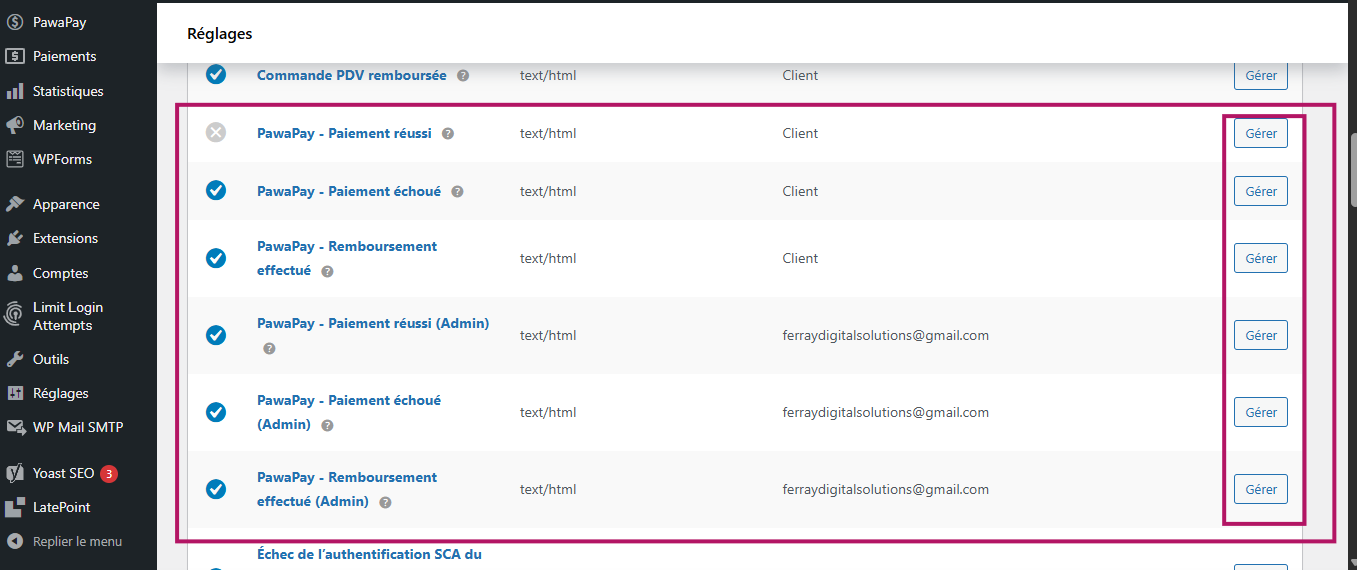
Email Notifications
The plugin automatically sends email notifications related to payment and refund events — both to the customer and the store admin, provided that email notifications are enabled in WooCommerce → Settings → Emails.
Supported Email Events
-
Payment Success
-
Customer receives a confirmation email for successful payment.
-
Admin receives a notification email with full payment details.
-
-
Payment Failed
-
Customer receives an email notifying them that their payment attempt failed.
-
Admin is alerted with the failed transaction details.
-
-
Refund Success
-
Customer receives an email confirming that their payment has been refunded.
-
Admin is notified with refund details and reference ID.
-
-
Refund Failed
- Admin receives an email when a refund attempt fails (with reason and response message).
Requirements
WooCommerce email notifications must be enabled (WooCommerce → Settings → Emails)
Ensure that the From email address and email templates are correctly configured
SMTP or transactional email service (like WP Mail SMTP, SendGrid, or Brevo) is recommended for better deliverability
Refund System
You can process refunds using two different methods:
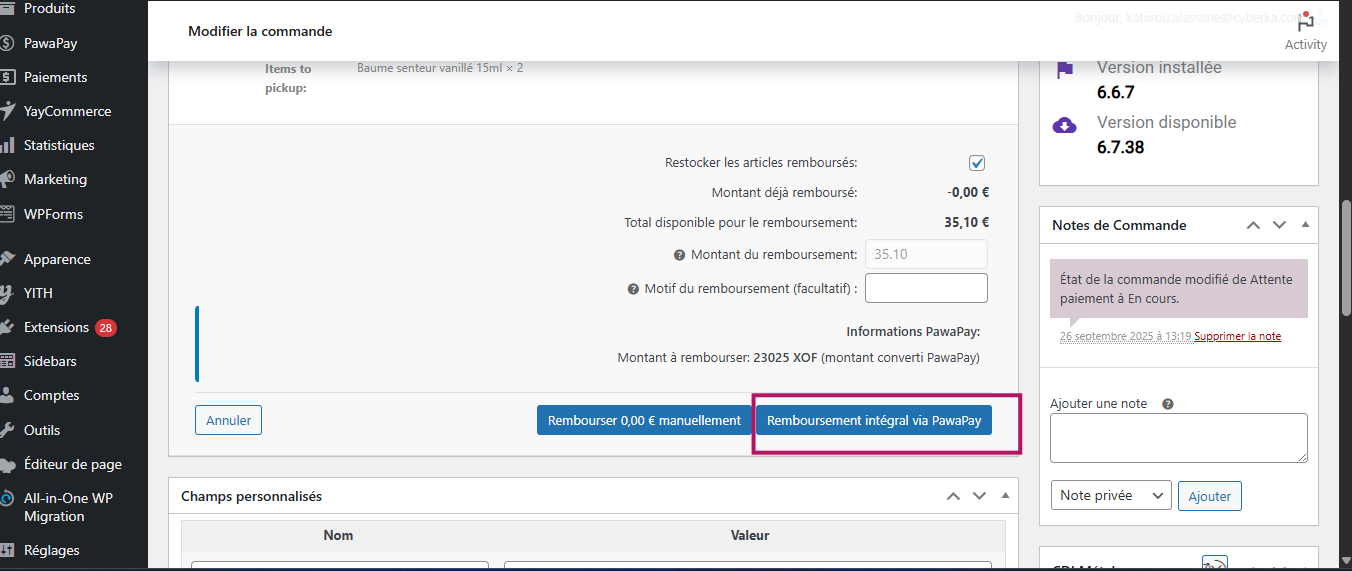
1. From WooCommerce Order Details
- Go to WooCommerce → Orders
- Open an order paid with PawaPay
- Click Refund inside the order details
- The plugin automatically sends the refund request to PawaPay via API
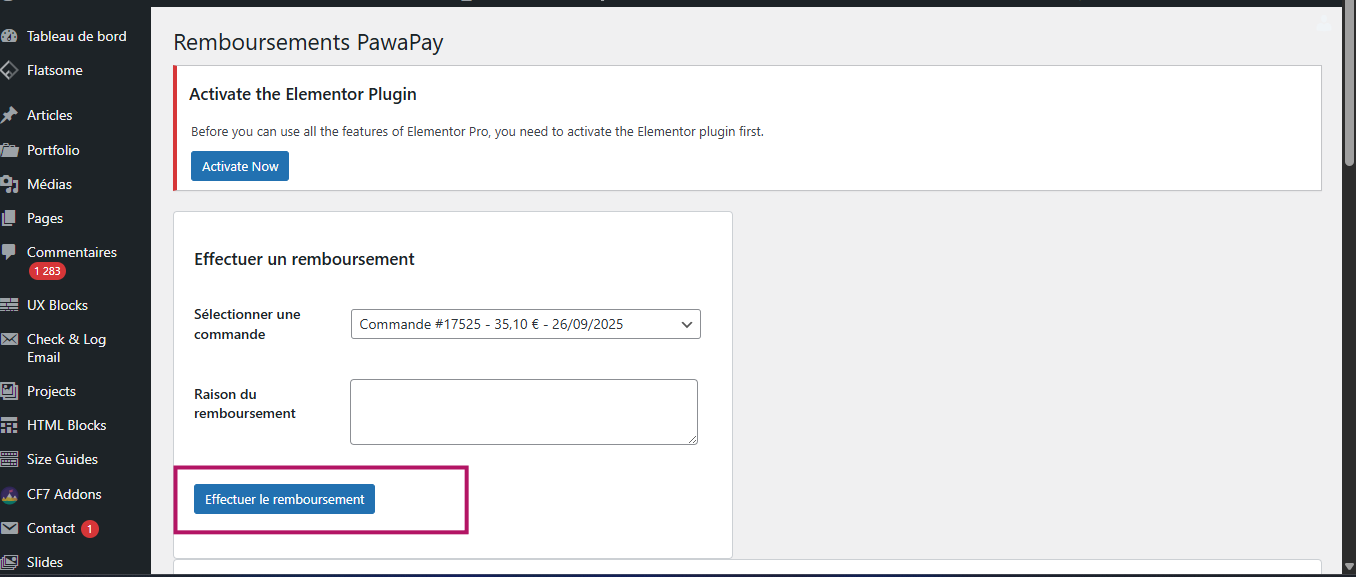
2. From the PawaPay Dashboard
- Go to PawaPay → Refunds in the WordPress admin menu
- Use the dedicated refund interface to process refunds
- Select the order, specify the amount and reason, and confirm
- A complete refund history is stored for your reference
Refund Features
✅ Full and partial refunds
✅ Automatic synchronization with PawaPay API
✅ Automatic WooCommerce order status updates
✅ Detailed refund history and logs
✅ Automatic order notes with refund details
Admin Dashboard
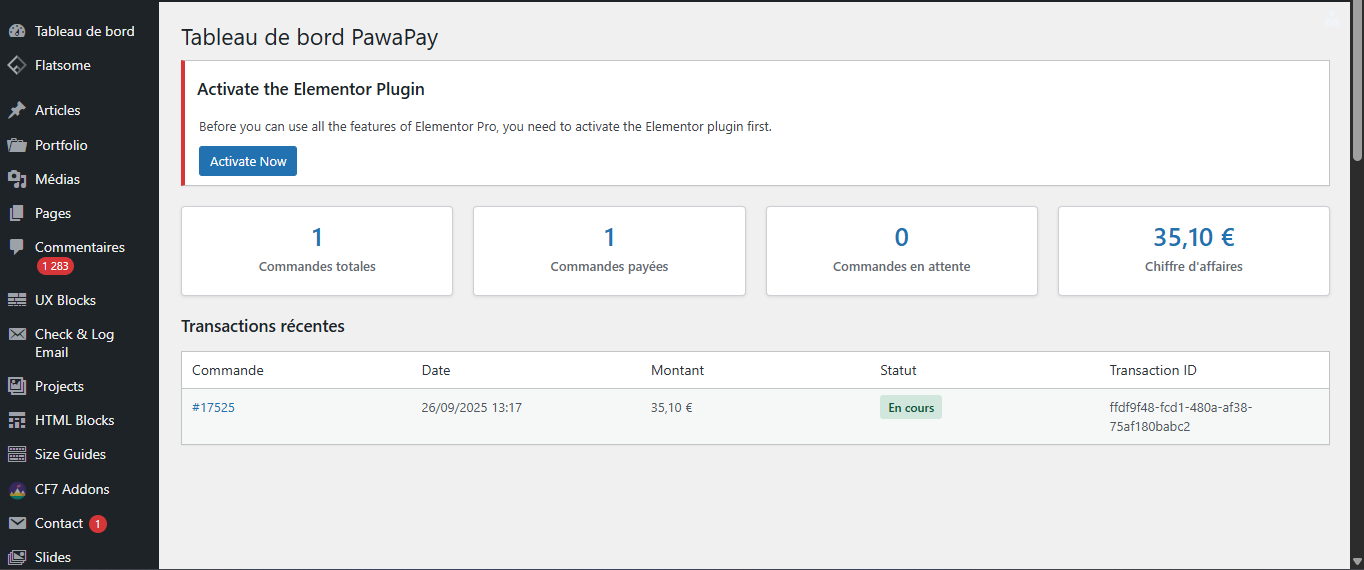
The plugin adds a PawaPay section to the WordPress admin sidebar.
Menu Sections
- Dashboard – Overview of recent transactions and order statistics
- Transactions – Complete list of all PawaPay payments
- Refunds – Dedicated refund interface and refund history
Available Statistics
- Total orders
- Paid orders
- Pending orders
- Total revenue
WooCommerce Blocks Support
Full Compatibility
The plugin fully supports the new WooCommerce Block Checkout experience:
- Seamless integration into the payment block
- Responsive and user-friendly interface
- Real-time validation
- Works with all modern block-based themes
- Dynamic currency conversion support
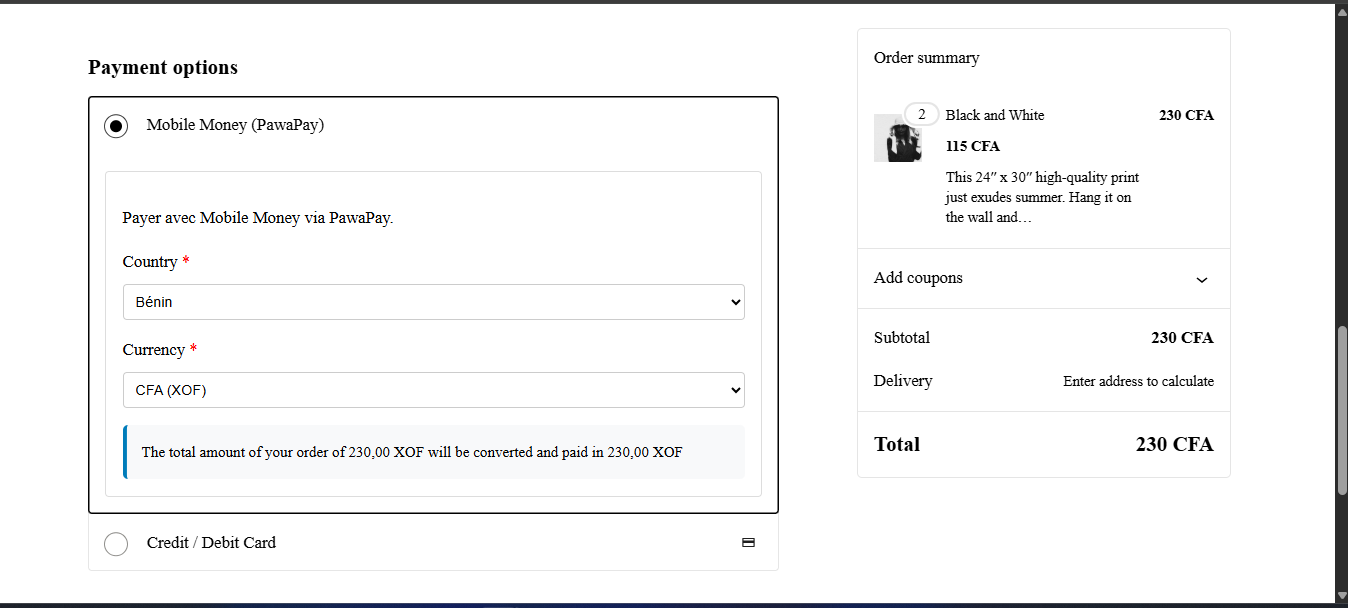
Classic Checkout
The plugin also works perfectly with the Classic Checkout interface used in traditional WooCommerce setups.
Hooks & Filters
Actions
pawapay_before_payment_processing– Before creating a paymentpawapay_after_payment_processing– After creating a paymentpawapay_payment_success– When a payment succeedspawapay_payment_failed– When a payment fails
Filters
pawapay_supported_countries– Modify supported countriespawapay_supported_currencies– Modify supported currenciespawapay_provider_list– Modify mobile operator listpawapay_payment_description– Customize payment description
Troubleshooting
Gateway not visible at checkout
- Ensure WooCommerce is active
- Check that your store currency is supported
- Verify that your PawaPay API token is valid
Currency conversion errors
- The free endpoint may be unreliable — use an API key for better stability
WooCommerce Block Checkout issues
- Update WooCommerce and WooCommerce Blocks to the latest version
- Clear your website cache
Roadmap
- [ ] Advanced analytics and transaction dashboard
- [ ] Support Payout
Support
- Check PawaPay Documentation
- Open an issue on the GitHub repository
- Contact Kabirou ALASSANE
License
This plugin is licensed under the GNU General Public License v3.0 (GPLv3) or later.
You can redistribute and/or modify it under the terms of the GPL as published by the Free Software Foundation.
Contributors
- Developed & maintained by Kabirou ALASSANE
Note:
This plugin requires a valid PawaPay API key to process payments.
Sign up at PawaPay to get your credentials.
Releases
7 releases. Each count is every asset in that release; expand a row for the breakdown.