Install
Upload it under Plugins → Add New Plugin → Upload Plugin, then activate.
Install straight from GitHub with WP-CLI:
wp plugin install https://github.com/bladecp/bladecp-wordpress/releases/download/v0.1.0/bladecp-migrator-0.1.0.zip
Move a WordPress site to BladeCP Fast Deploy in a few clicks.
The official open-source plugin that checks, packages and uploads your site, then follows the migration until you approve it.






Download BladeCP Migrator (.zip) · Release notes · SHA-256 checksum
Features ·
Architecture ·
Installation ·
How it works ·
External services ·
Security ·
Quality ·
FAQ ·
Support
Português (Brasil) · Español
[!NOTE] BladeCP Migrator
0.1.0is the first public release. It moves a site to BladeCP, an external hosting service, so you need a BladeCP account to connect. Nothing is sent before you use it.
BladeCP Migrator is the official open-source plugin that moves one WordPress site to BladeCP Fast Deploy. The whole flow lives on one screen under Tools > BladeCP Migrator: check the site, connect to BladeCP, start the migration, review the preview and approve. Your current site keeps working the whole time, and the plugin only reads from it.
Built for ordinary hosting
| One screen | Short, resumable steps | Your approval |
|---|---|---|
| Check, connect and migrate from Tools, with plain-language messages and a six-stage trail of the migration. | Every step is time-boxed and saves its progress, so low PHP limits and timeouts only make the work slower. | BladeCP builds a preview of the migrated copy. Approving completes the migration; pointing the domain is optional. |
What it does
- Checks the site first. WordPress and PHP versions, site type, HTTPS, encryption support, PHP limits, files, database and free disk space, with anything that blocks the migration explained before you connect.
- Connects without copying keys. You sign in to BladeCP in the browser, choose the server that receives the site and come back automatically.
- Packages files and database. A tar stream in gzip members and a
database export in small batches, compatible with
mysqldump, written without ZipArchive, shell commands or loading files into memory. - Uploads in resumable parts. Parts are streamed from disk; an interrupted upload resumes without sending again what BladeCP already has.
- Follows the migration. Phases in plain language, the preview link, the domain confirmation when BladeCP asks for it, and the actions to approve, cancel or retry.
- Leaves nothing behind. Disconnect removes the key at any time, and deleting the plugin removes its settings, scheduled task and working folder.
What is moved and what is not
Moved: every file of the WordPress folder and the database tables with the site's table prefix.
Not moved: cache folders and archives of other backup plugins, the original
wp-config.php (BladeCP writes a new one with the new database credentials and
fresh security keys), symbolic links, unreadable files and email accounts.
Not supported yet: Multisite networks, sites served from a subfolder (for
example example.com/blog), WordPress installed in its own folder apart from
the site address, and packages larger than 50 GB.
Architecture
The plugin keeps the work on your site in short steps and talks to BladeCP only over HTTPS, with a key bound to one migration.
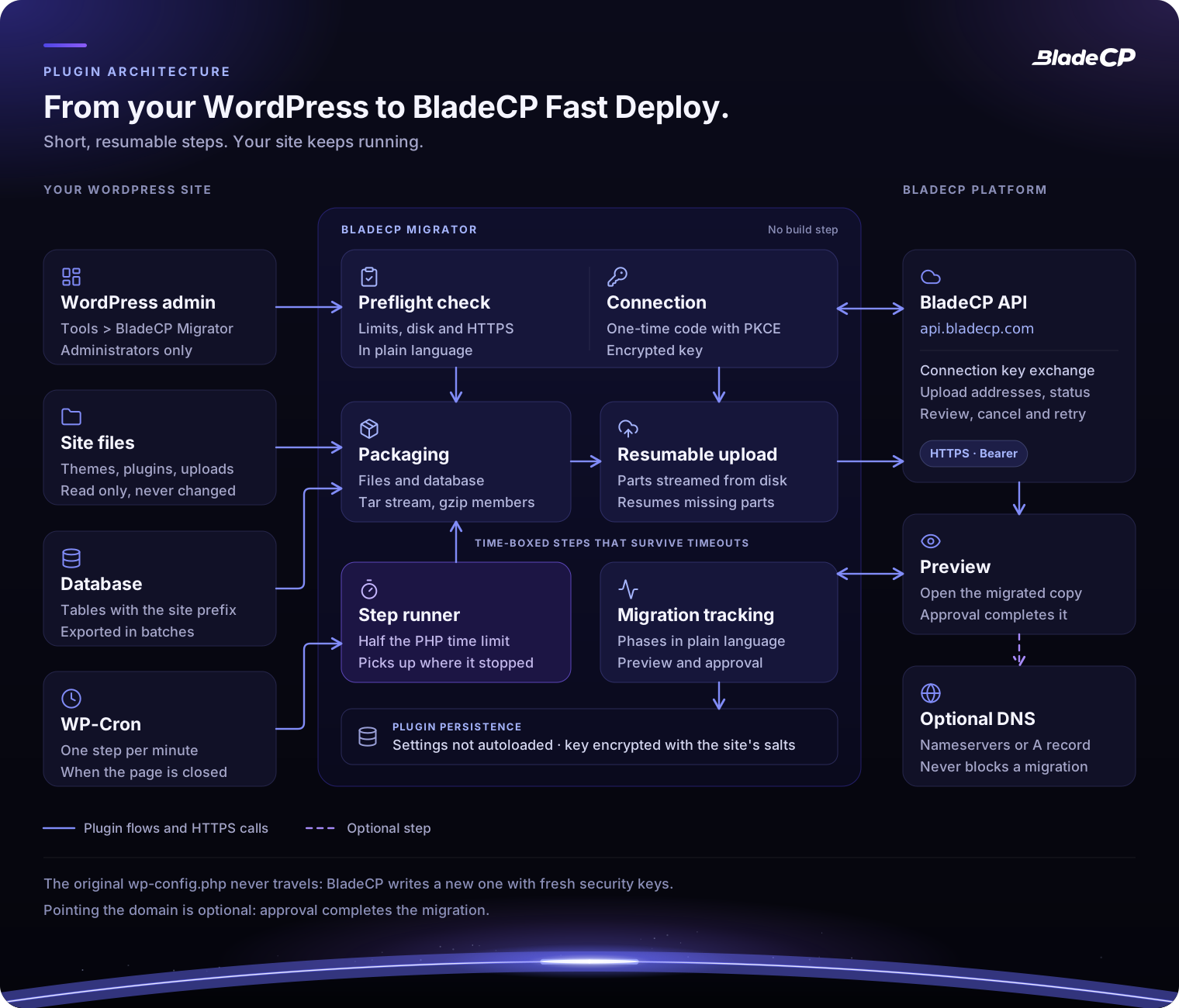
Logical view of the plugin. Open the diagram at full size.
| Part | Responsibility |
|---|---|
| Screen | Tools > BladeCP Migrator, for administrators only, with a nonce on every action |
| Check | Versions, site type, HTTPS, encryption, limits, files, database and disk space |
| Connection | One-time code with PKCE and an encrypted key bound to one migration |
| Packaging | Files and database tables in a tar stream of gzip members |
| Upload | Multipart, streamed from disk, resumable after any interruption |
| Step runner | Half the PHP time limit per step, driven by the open page or by WP-Cron |
| Tracking | Phases, preview, domain confirmation, approval, cancel and retry |
Requirements and compatibility
| Component | Requirement |
|---|---|
| WordPress | 6.0 or newer. Tested up to 7.1. |
| PHP | 7.4 or newer, 64-bit |
| Encryption | OpenSSL with AES-256-GCM, or sodium |
| Recommended PHP extensions | cURL (uploads streamed from disk) and zlib (compressed package) |
| Site | A single site served over HTTPS from the root of its domain |
| Database | MySQL or MariaDB, as supported by your WordPress |
| Disk space | Enough free space to build the package next to the site; the check estimates it |
| Network | Outbound HTTPS to api.bladecp.com and to the upload addresses BladeCP returns |
| Languages | English, Portuguese (Brazil) and Spanish |
| Account | A BladeCP account |
See compatibility for the validation snapshot.
Installation
Install from the WordPress.org directory when it lists the plugin, or from a GitHub Release, not from a source snapshot. No Composer or build step is needed.
-
Download
bladecp-migrator-0.1.0.zipand itsSHA256SUMSfile. -
Verify the zip from the folder that holds both files:
shasum -a 256 -c SHA256SUMSOn Linux, run
sha256sum -c SHA256SUMSinstead. -
In WordPress, open Plugins > Add New Plugin > Upload Plugin, choose the zip and click Install Now.
-
Activate the plugin and open Tools > BladeCP Migrator.
| File | Purpose |
|---|---|
| bladecp-migrator-0.1.0.zip | Installable plugin, with a single bladecp-migrator/ folder |
| SHA256SUMS | Checksum to verify the zip |
| RELEASE_NOTES.md | Notes that accompany this version |
The automatic Source code archives from GitHub contain the repository; to install the plugin, use the zip above. See the installation guide for updates and removal.
How the migration works
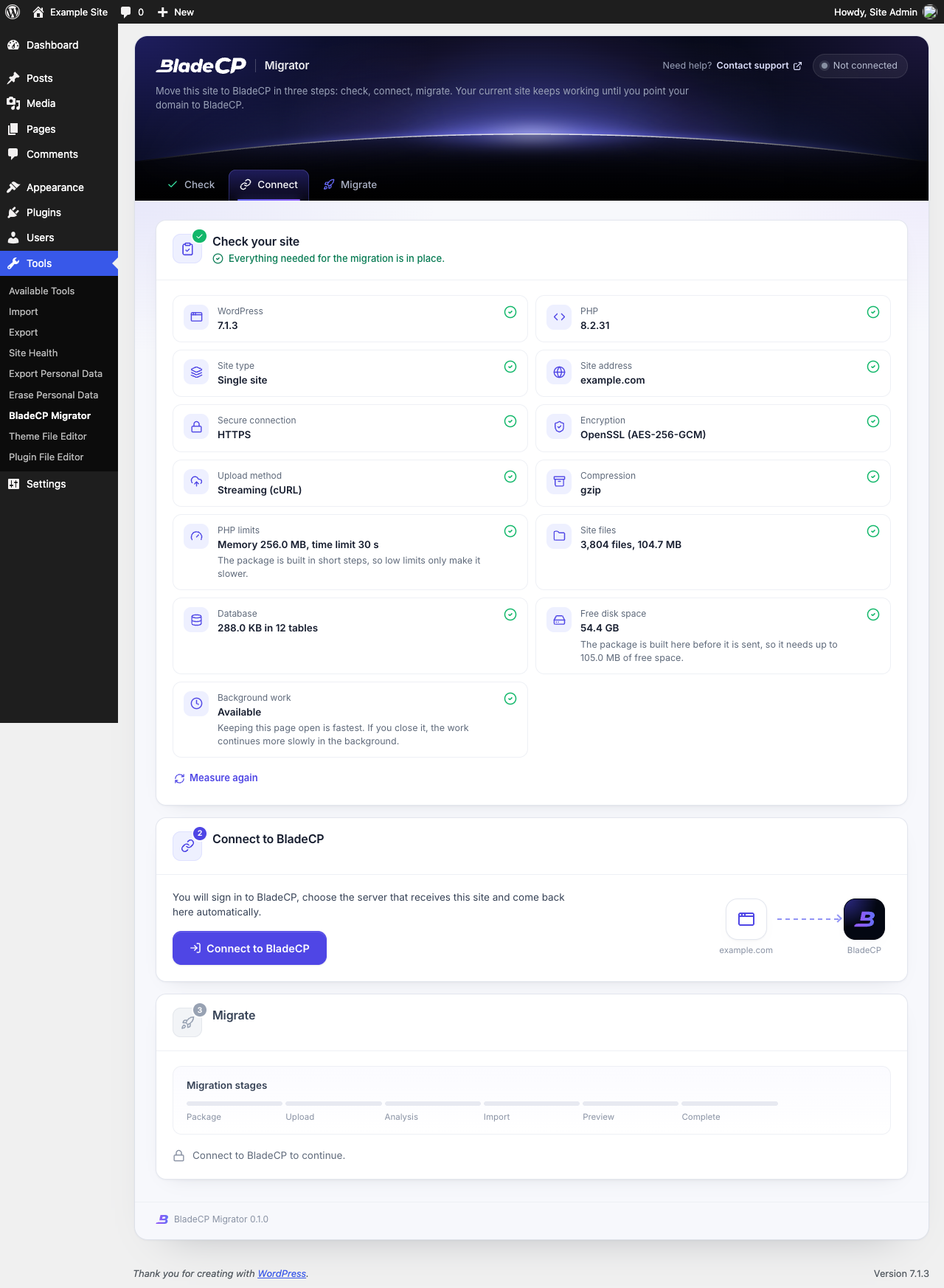
- Check your site. The plugin measures the site in short steps and shows what blocks the migration, if anything, before you connect.
- Connect to BladeCP. The BladeCP Hub opens in your browser. Sign in, choose the server that receives the site and come back automatically. The plugin receives a key that only works for that migration and expires after 30 days.
- Start the migration. One click builds the package and sends it to BladeCP in parts. Keep the page open for the fastest progress; if you close it, WP-Cron continues in the background.
- Review and approve. The same screen shows each phase. Open the preview of the migrated copy, confirm the domain when BladeCP asks for it, and approve. Approval completes the migration.
- Point the domain whenever you want. It is optional and never blocks the migration: the screen shows the BladeCP nameservers and, as an alternative, the A record.
| Check | Review and approve |
|---|---|
 |
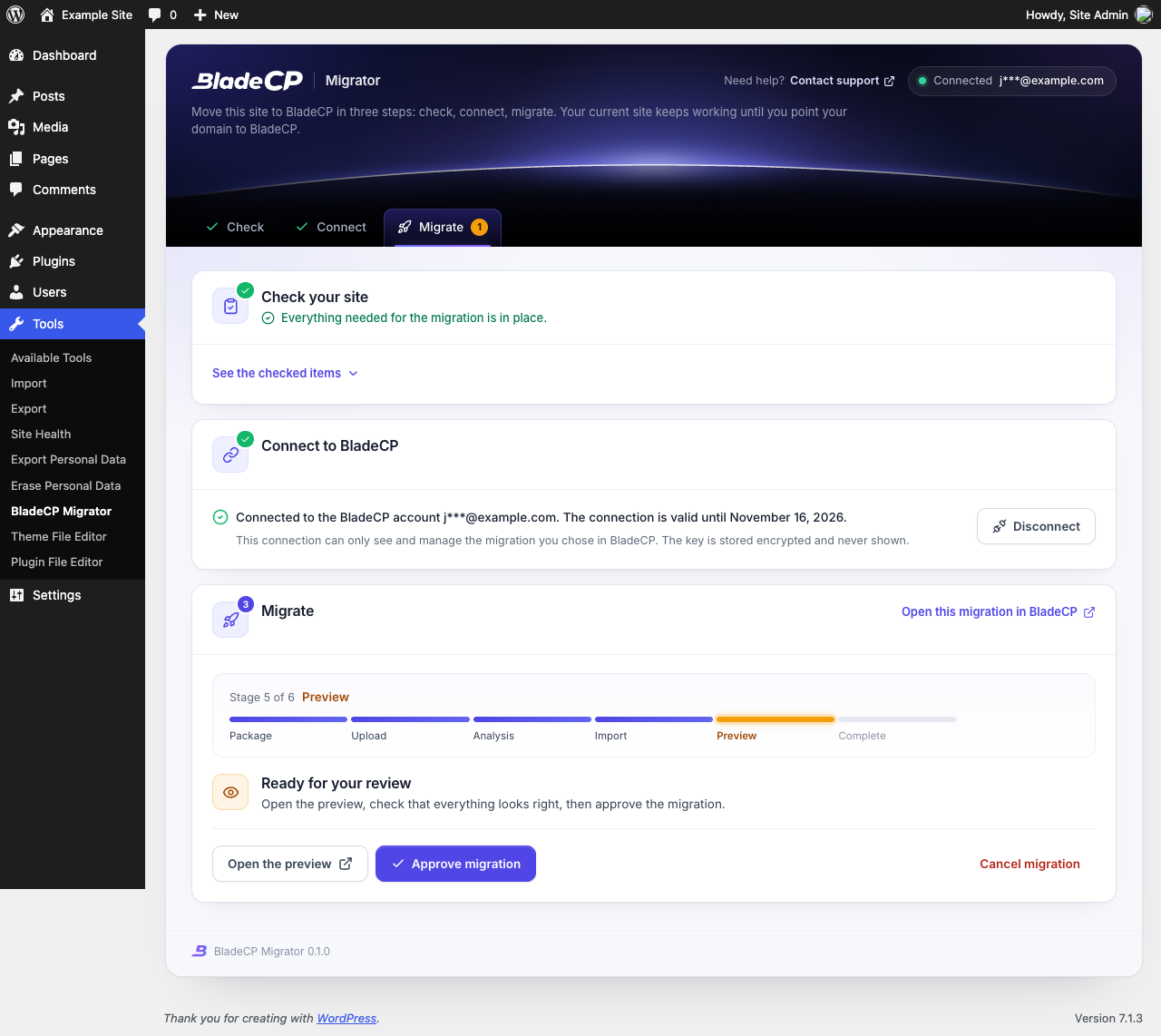 |
The captures show the plugin installed from its zip in a disposable WordPress
with neutral data, such as example.com. See the
configuration guide for each step.
External services
The plugin is an interface to BladeCP. It contacts BladeCP only after an administrator uses it; the check runs entirely on your site.
| Service | When | What is sent |
|---|---|---|
BladeCP Hub (hub.bladecp.com) |
You click Connect to BladeCP | Your browser opens the Hub with this site's address, the address of the plugin screen, a random state and a one-time PKCE challenge |
BladeCP API (api.bladecp.com) |
When you come back from the Hub and while you follow or act on the migration | The one-time code and its verifier, then requests for upload addresses, upload confirmation, domain confirmation, approval, cancel or retry, with the plugin version and the screen language |
| BladeCP storage | After you click Start migration | The package, sent in parts over HTTPS to the addresses the API returns: your WordPress files and the tables with your prefix, never your original wp-config.php |
Terms and conditions · Privacy policy. The same disclosure is in the "External services" section of readme.txt.
Security
- Administrators only. The screen requires
manage_options, and every action checks a nonce. - A connection that cannot be replayed. The one-time code uses PKCE (S256) and a single-use state of your user that expires in 15 minutes. The return address is always this site's own admin page.
- An encrypted key for one migration. The key is encrypted with the site's security keys (AES-256-GCM through OpenSSL, or sodium), kept in a setting that is not autoloaded, never displayed or logged, and it expires after 30 days.
- Nothing extra leaves the site. Requests go only to
api.bladecp.com, to the Hub in your browser and to the HTTPS upload addresses BladeCP returns. The plugin's own settings stay out of the database export, so the key never travels with the site, and the originalwp-config.phpis never sent. - A protected working folder. The package is built in a randomly named folder that blocks web access, and it is deleted after the upload is confirmed.
- Nothing from other sites. Fonts, icons, styles and scripts ship with the plugin, and the plugin writes no logs.
To report a vulnerability privately, follow SECURITY.md. Please do not include keys, cookies or site data in a public issue.
Quality and validation
Version 0.1.0 was validated by the maintainers with 220 automated
checks: 99 plugin tests, on PHP 8.2, cover the check, the connection and
PKCE, encryption, the package format, the database export, the tar and gzip
writer, the resumable upload against a local HTTP server, the screen and the
translations, and 121 more cover the tooling that builds the public tree and
the zip. The tests badge represents that run.
- Plugin Check: no errors on the release zip, in a disposable WordPress 7.1.3, in new-submission mode with the static and runtime checks.
- PHP 7.4: every PHP file passes a syntax and compatibility check for PHP 7.4 as well as the current PHP.
- Modest hosting: the zip was installed on its own in WordPress 7.1.3 with a 64 MB memory limit and a 4 second time limit, and a database export from MariaDB 10.11 was imported again with identical table checksums.
- Reproducible zip: the same plugin files and release date always give the same zip and checksum.
This repository includes the structure and hygiene gate
(scripts/check-public-tree.sh). The public CI runs the PHP syntax check on
PHP 7.4 to 8.4, the gate and Plugin Check. Automated checks do not replace a
test on a copy of your own site.
Development and contributing
The files of this repository are the files that ship: there is no build step and no Composer dependency. Keep the code compatible with PHP 7.4.
git clone https://github.com/bladecp/bladecp-wordpress.git
cd bladecp-wordpress
find . -name '*.php' -not -path './.git/*' -print0 | xargs -0 -n1 php -l
bash scripts/check-public-tree.sh
bladecp-migrator.php Plugin header, constants, autoloader and hooks
uninstall.php Removes settings, scheduled task and working folder
includes/ Screen, connection, API client, job and package writer
assets/css, assets/js Screen styles and script, with no dependencies
assets/fonts The bundled Inter typeface (SIL OFL 1.1)
languages/ Portuguese (Brazil) and Spanish translations
docs/ Installation, configuration and operation guides
assets/readme/ README artwork
.wordpress-org/ Banners, icons and screenshots of the directory page
scripts/check-public-tree.sh Public structure and hygiene gateContributions are welcome. Read CONTRIBUTING.md before opening an issue or pull request, keep changes focused, run Plugin Check on your change, and never commit keys or site data. Approved contributions follow the project maintenance workflow before they appear in a later release.
| Guide | What you will find |
|---|---|
| Installation | Directory, release zip, checksum, updates and removal |
| Configuration | The three steps and the excluded paths filter |
| Compatibility | Requirements, modest hosting and validation snapshot |
| Troubleshooting | Connection, progress, disk space and skipped files |
| Release process | How public releases are prepared and verified |
| Repository governance | Issues, pull requests, history and releases |
| Changelog | Changes in each public version |
Frequently asked questions
Does the plugin change my current site?No. It reads your files and database to build the package. Your site keeps working until you point your domain to BladeCP.
Do I need a BladeCP account?Yes. You sign in to BladeCP when you connect, and you choose there the server that receives the site.
Is my database password sent to BladeCP?No. The package does not include your original wp-config.php. BladeCP writes
a new one for the new server, with fresh security keys.
Usually yes. The plugin works in short steps and picks up where it stopped, so low limits only make it slower. The check warns you when something really blocks the migration, such as missing disk space.
What happens if I close the page?The work continues in the background through WP-Cron, more slowly. When WP-Cron is disabled on your site, keep the page open.
Do I have to point my domain to BladeCP?No. Approval completes the migration. Pointing the domain is optional, and the screen shows the BladeCP nameservers or the A record whenever you want to do it.
How do I remove everything the plugin created?Delete the plugin in Plugins. It removes its settings, transients, scheduled task and working folder. A migration already in BladeCP is not cancelled.
Support
| Subject | Channel |
|---|---|
| Help with a migration | The Contact support link on the plugin screen |
| Reproducible bug or product request | GitHub Issues |
| Technical questions | dev@bladecp.com |
| Vulnerability | Security policy |
In public reports, use neutral data. Keep keys, cookies and site data in private channels.
License
BladeCP Migrator is released under the MIT License, copyright BladeCP. The bundled Inter typeface is under the SIL Open Font License 1.1 (assets/fonts/OFL.txt) and the Lucide icons under the ISC license (includes/LICENSE-lucide.txt). The plugin license does not replace the terms of BladeCP services.
BladeCP. Your site, our infrastructure.
Releases
1 release. Each count is every asset in that release; expand a row for the breakdown.