WithWine ACF Integration WP Registry grade A. No security issues foundWP RegistryNo security issues foundOpen the reportA
Automatically populate Advanced Custom Fields (ACF) Select, Radio Button and Checkbox fields with live Product and Product List data from the WithWine WordPress plugin.
Install
Upload it under Plugins → Add New Plugin → Upload Plugin, then activate.
Install straight from GitHub with WP-CLI:
wp plugin install https://github.com/benkanizay/withwine-acf-integration/releases/download/1.0.1/withwine-acf-integration-1.0.1.zipAutomatically populate Advanced Custom Fields (ACF) Select, Radio Button and Checkbox fields with live Product and Product List data from the WithWine WordPress plugin.
Rather than introducing custom ACF field types, this plugin works with ACF's native choice fields, allowing you to continue using all of ACF's built-in functionality including multiple selection, Stylized UI (Select2), return formats, conditional logic and more.
Features
- Populate native ACF Select, Radio Button and Checkbox fields with WithWine Products or Product Lists.
- No custom ACF field types required.
- Supports multiple selection, Stylized UI (Select2), return formats and conditional logic.
- Automatic transient caching for fast admin performance.
- Manual cache clearing from the plugin settings page.
- Public PHP helper for integrating cache invalidation with custom logic or third-party cache plugins.
- Displays the configured ACF field label and field type in the settings page.
- Warns when configured field keys cannot be found or belong to unsupported field types.
- Prevents duplicate field keys from being saved.
Requirements
- WordPress
- Advanced Custom Fields (Free or Pro)
- The WithWine WordPress plugin
The plugin checks that both ACF and WithWine are active before loading.
Installation
Option 1 (Recommended)
- Download the latest plugin ZIP from the repository's Releases page.
- In WordPress, go to Plugins → Add New Plugin → Upload Plugin.
- Upload the ZIP and activate WithWine ACF Integration.
- Ensure both Advanced Custom Fields and WithWine are active.
Option 2
Clone this repository directly into your site's wp-content/plugins/ directory, then activate WithWine ACF Integration.
Configuration
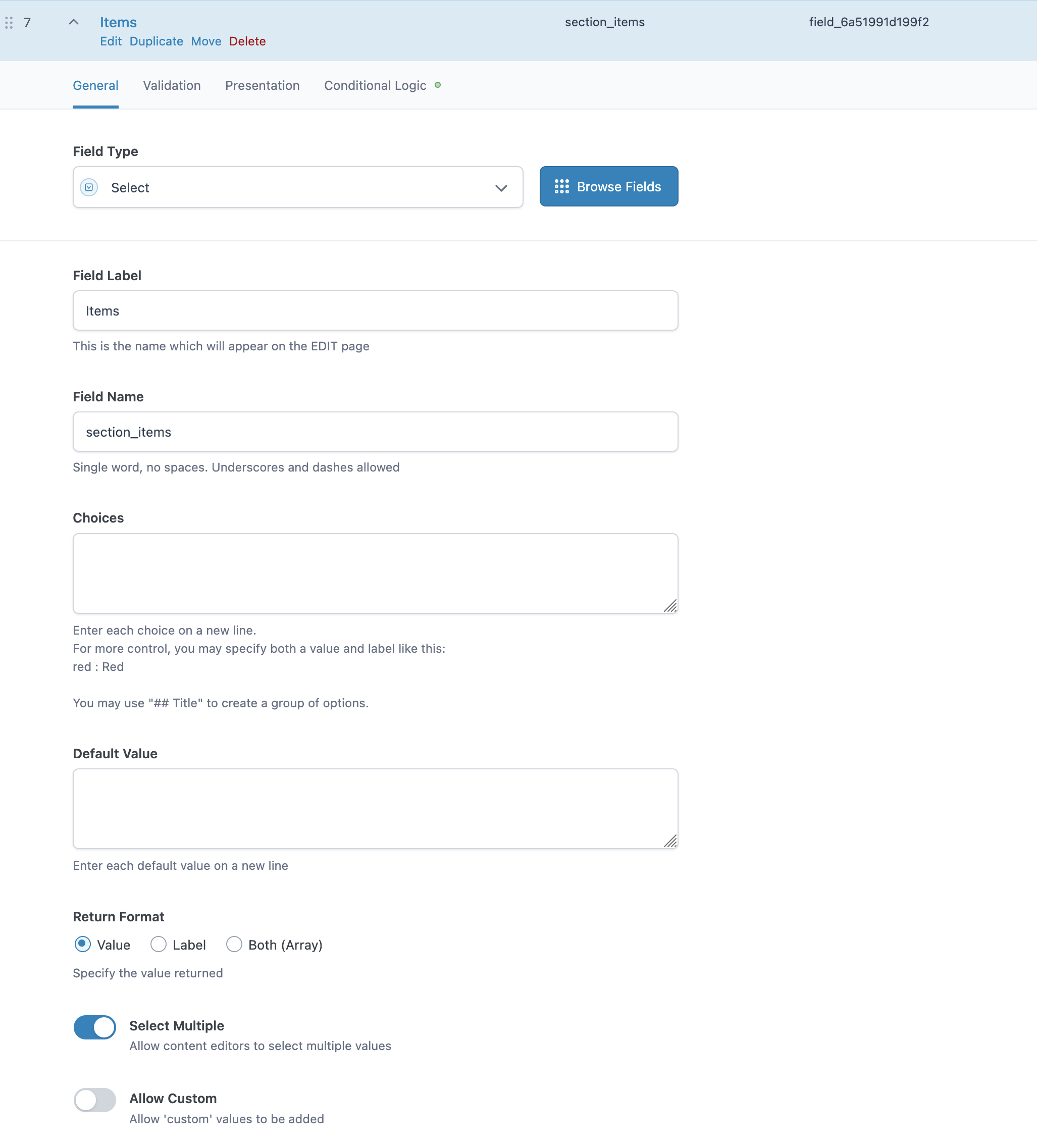
- Create or edit an ACF Select, Radio Button or Checkbox field.
- Copy the field's Field Key (for example
field_64abc123...). - Navigate to Settings → WithWine ACF.
- Add the field key under one of the following sections:
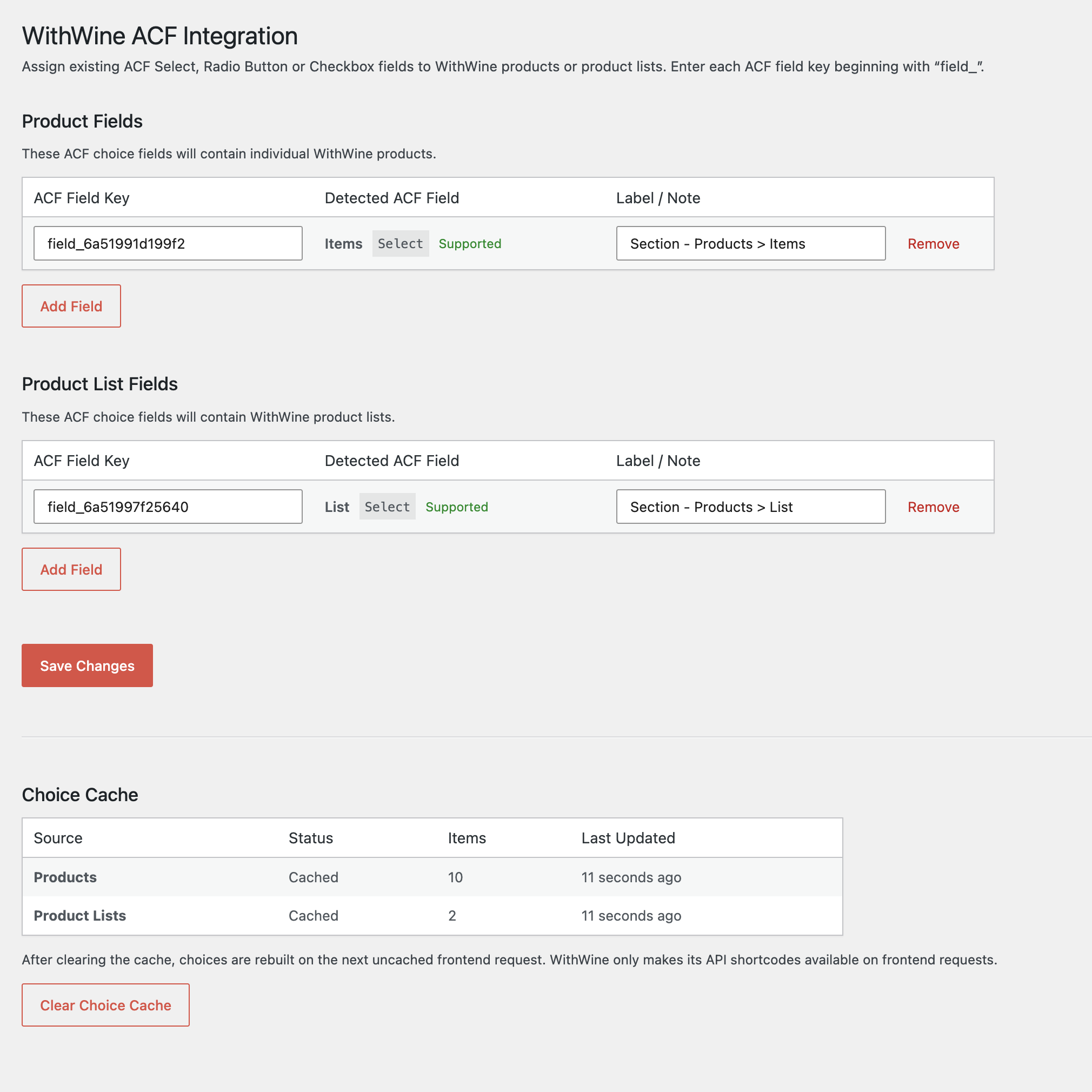
- Product Fields — populates the field with individual WithWine Products.
- Product List Fields — populates the field with WithWine Product Lists.
- Optionally add a note describing where the field is used.
- Save the settings.
The settings page displays the detected ACF field label and field type, making it easy to confirm you've configured the correct field.
How It Works
WithWine registers its API shortcodes during frontend requests rather than normal WordPress admin requests.
This plugin therefore:
- Retrieves Product and Product List data during a supported frontend request.
- Stores the results using WordPress transients.
- Uses the cached data whenever configured ACF fields are rendered in the WordPress admin.
This keeps the editor fast while avoiding unnecessary API requests.
Caching
The default cache lifetime is 24 hours.
The cache can be cleared at any time from:
Settings → WithWine ACF → Clear Choice Cache
The plugin does not automatically tie its choice cache to page-cache purges. Clearing a page cache whenever a post is saved could otherwise remove the available ACF choices before the editor reloads.
The next supported frontend request automatically rebuilds the cache after it has been cleared.
Clearing the cache programmatically
The plugin exposes a public helper that can be connected to any cache plugin or custom invalidation logic as needed:
withwine_acf_integration_clear_cache();Clear only Product choices:
withwine_acf_integration_clear_cache( 'products' );Clear only Product List choices:
withwine_acf_integration_clear_cache( 'product_lists' );For example:
add_action( 'your_cache_plugin_flush_action', function() {
    withwine_acf_integration_clear_cache();
} );
Only connect cache clearing to an event that genuinely means the WithWine Product or Product List data should be refreshed.
Stored Values
The plugin stores the corresponding WithWine ID as the field value.
For example:
- Product field → Product ID
- Product List field → Product List ID
The value returned by get_field() depends on the ACF field's configured Return Format.
$product = get_field( 'featured_product' );Checkbox and multi-select fields return an array of selected values.
Notes
- Duplicate field keys are automatically removed when settings are saved.
- Unsupported ACF field types are ignored.
- Existing field choices are left untouched if WithWine data cannot be retrieved.
- Notes stored beside field keys are for administration only and are never used by the plugin.
Screenshots
Plugin Settings
Configure which ACF choice fields should be populated with WithWine Products or Product Lists.
ACF Field Configuration
Use any native ACF Select, Radio Button or Checkbox field.
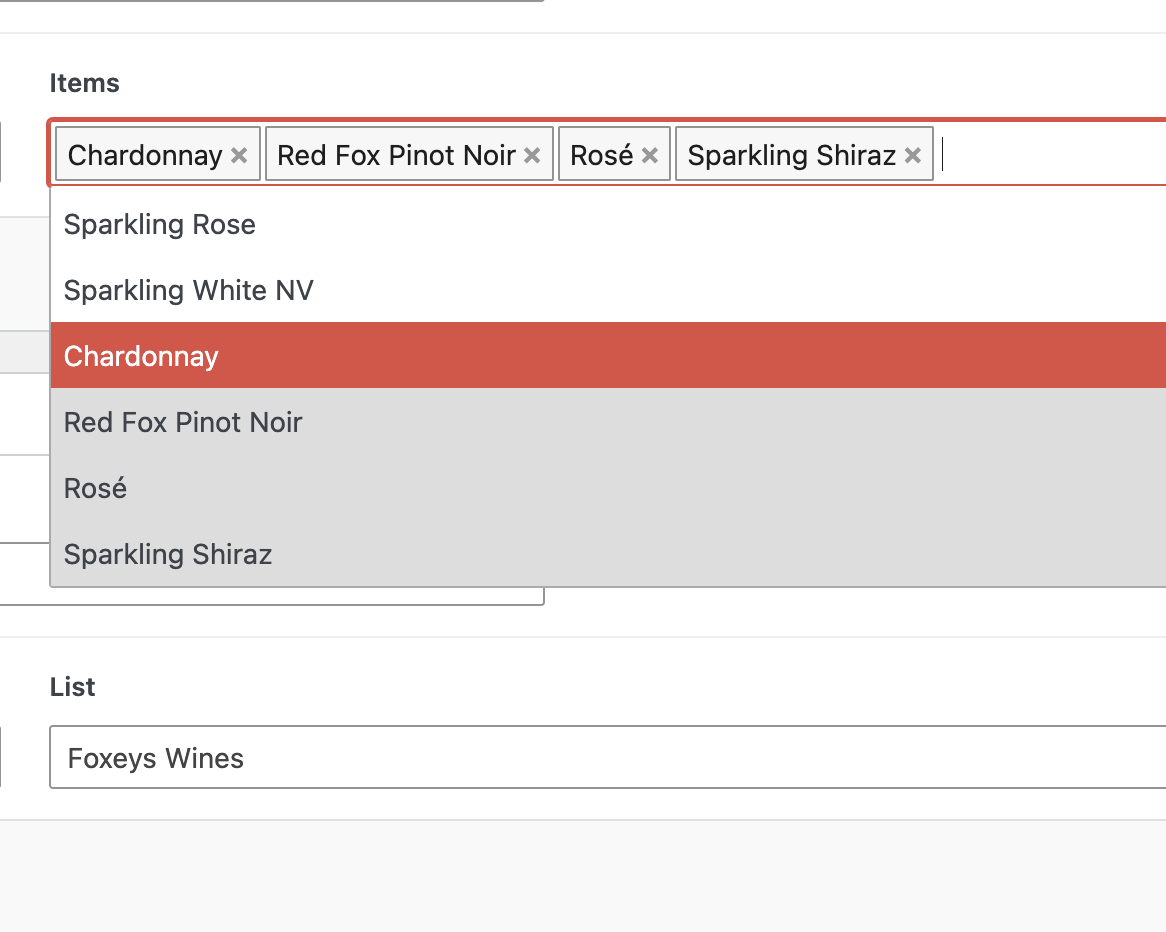
Populated Choice Field
Configured fields are automatically populated using cached WithWine data.
Contributing
Issues, feature requests and pull requests are welcome.
Disclaimer
This is an independent integration plugin and is not affiliated with or endorsed by WithWine or Advanced Custom Fields.
License
This plugin is licensed under the GNU General Public License v2 or later (GPL-2.0-or-later).
See license.txt for the full license.
Created by Ben Kanizay
If you find this plugin useful, please consider ⭐ starring the repository.
Releases
2 releases. Each count is every asset in that release; expand a row for the breakdown.