Install
This is the repository archive. It installs, but the folder name will carry the branch suffix and updates will not flow.
Install straight from GitHub with WP-CLI:
wp plugin install https://github.com/bendeveloperpro/relecture/archive/refs/heads/main.zipProofread, correct and annotate WordPress posts and pages in a three-column table, then export the review to Excel, CSV, Word, Markdown or JSON.
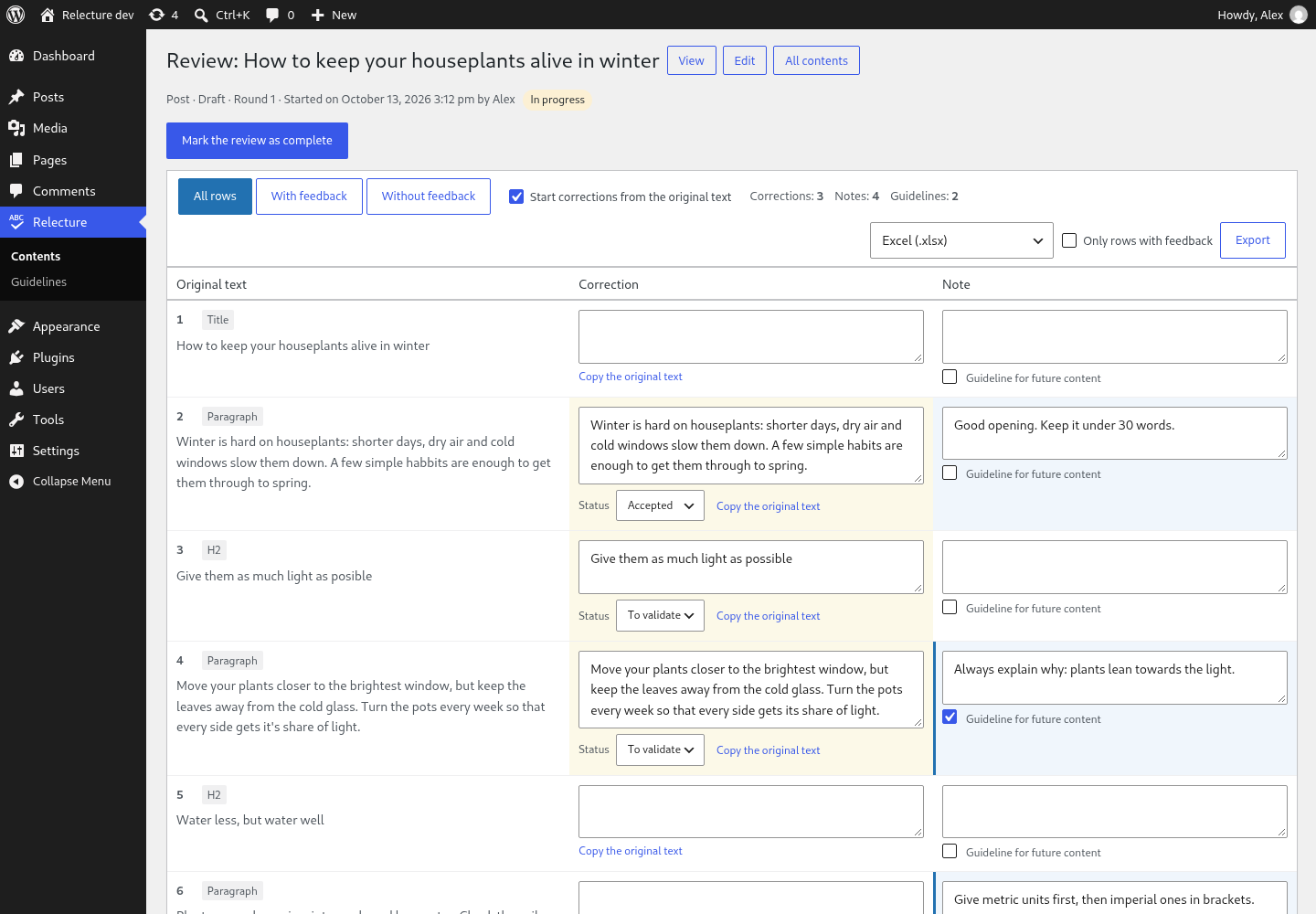
Relecture (French for “proofreading”) lays out the title and every text block of a content in a table — original text · correction · note — saved as you type. The content itself is never changed: a review is a separate snapshot that you hand over to a proofreader, a client or an AI, and apply when you decide to. Notes flagged as guidelines are gathered across reviews, ready to feed the instructions of your next articles.
Full functional and technical specification (in French): docs/cahier-des-charges.md.
Features
- Review table for posts, pages, synced patterns and public post types using the editor (block or classic): headings, paragraphs, list items, quotes and their source, pullquotes, buttons, captions, alternative texts, table cells, details, verse, custom HTML text. Code, shortcodes and dynamic blocks are left out.
- Autosave through the REST API, with an optimistic lock: two people editing the same row never overwrite each other silently.
- Correction statuses (to validate, accepted, rejected, applied) and review rounds (in progress → review complete → corrections applied, read-only).
- Snapshot sync: when the content changes, Relecture says so and can re-read it while keeping each correction and note attached to its text.
- Guidelines page: every note ticked “guideline for future content”, with bulk “mark as integrated”, exported as Markdown, CSV or JSON.
- Exports: Excel (.xlsx), CSV (UTF-8, locale-aware separator), Word (.docx, A4 landscape), Markdown and JSON. Written without any external library.
- REST API and WP-CLI for scripts and AI agents.
- No external request, no tracking. English source strings, French translation bundled.
Requires WordPress 6.5+ and PHP 7.4+ (tested on WordPress 6.5 and 7.1, PHP 7.4 lint and 8.3).
Install
Download or build relecture-<version>.zip (see Development), then
Plugins → Add New → Upload Plugin. Open Relecture in the admin menu, or use the
Review link under a post in the Posts and Pages lists.
Working with an AI or a script
Every row of an export carries its block name and its index path in the block tree, plus the source HTML in JSON: enough to find the text in the database or in the files the content is generated from.
WP-CLI
wp relecture start 42                                   # snapshot of post 42
wp relecture export 42 --format=md --only-with-feedback # corrections and notes, as Markdown
wp relecture export 42 --format=json > review.json      # same data, structured
wp relecture export 42 --format=docx --output=review.docx
wp relecture set-item-status 118 119 --correction=applied
wp relecture set-status 7 done
wp relecture guidelines --status=new --format=md        # guidelines not yet integrated
wp relecture list --status=ready
REST API (/wp-json/relecture/v1)
Authenticate with an application password. Every route checks that the user can edit the reviewed content.
| Method | Route | Purpose |
|---|---|---|
GET |
/reviews?post_id=&status= |
List reviews |
POST |
/reviews {"post_id": 42} |
Open (or start) the review of a post |
GET |
/reviews/<id> |
Review and rows (same structure as the JSON export) |
PATCH |
/reviews/<id> {"status": "done"} |
Change the status |
POST |
/reviews/<id>/resync |
New snapshot, feedback kept |
GET, PATCH |
/items/<id> {"correction": "…", "expected_version": 3} |
Read or change a row |
GET |
/guidelines?status=new |
Guidelines |
A PATCH with a stale expected_version answers 409: reload the row and try again.
For developers
| Hook | Type | Use |
|---|---|---|
relecture_post_types |
filter | Post types that can be reviewed |
relecture_can_review |
filter | Who may review a post (default: edit_post) |
relecture_excluded_blocks |
filter | Blocks skipped by the extraction |
relecture_block_segments |
filter | Rows of one block (for blocks storing text in attributes) |
relecture_post_segments |
filter | All rows of a post (add custom fields…) |
relecture_csv_delimiter |
filter | CSV separator |
relecture_review_started |
action | A review was started |
relecture_item_updated |
action | A row changed |
relecture_review_status_changed |
action | A review changed status |
Data lives in two tables, {prefix}relecture_reviews and {prefix}relecture_items, removed
on uninstall (define RELECTURE_KEEP_DATA to keep them).
Development
Requirements: Podman with podman-compose; for the checks, unzip, xmllint, LibreOffice
(soffice), msgfmt/msgmerge.
cd dev && podman-compose up -d && ./setup.sh   # WordPress 7.1.3 + test content → http://localhost:8090
cd ..
podman exec relecture_dev_cli wp eval-file wp-content/plugins/relecture/tests/smoke.php
tests/check-exports.sh                          # exports opened by independent tools
tests/security.sh                               # REST permissions, with application passwords
podman exec relecture_dev_cli wp plugin check relecture \
  --exclude-directories=dev,tests,docs,scripts,dist,vendor,.git,.wordpress-org \
  --exclude-files=.editorconfig,.gitattributes,.distignore,.gitignore,phpcs.xml.dist,README.md,CHANGELOG.md,SECURITY.md
podman run --rm -v "$PWD":/app:z -w /app docker.io/library/composer:2 sh -c 'composer install && vendor/bin/phpcs'
scripts/i18n.sh                                 # .pot, then fr_FR .mo / .l10n.php / .json
scripts/build-zip.sh                            # dist/relecture-<version>.zip
.wordpress-org/ holds the directory assets (icon, screenshots). To refresh the screenshots,
start an English instance seeded with dev/screenshots.php:
cd dev
RELECTURE_ENV=shots RELECTURE_PORT=8092 podman-compose -p relecture-shots up -d
RELECTURE_ENV=shots RELECTURE_PORT=8092 WP_LOCALE=en_US RELECTURE_SEED=screenshots ./setup.sh
The test accounts' passwords are written to dev/.credentials-dev (git-ignored). No build
step: assets/ holds the files WordPress loads.
Roadmap
- 1.1: word-level diff, visible non-breaking spaces, Abilities API (AI agents through MCP), personal data exporter and eraser, continuous integration.
- 2.0: apply accepted corrections from WordPress (with a revision), AI review through the WordPress 7.0+ AI client, Word export with tracked changes, CSV/XLSX import, review links for people without an account, sync with the editor's Notes.
License
GPLv2 or later. Report security issues privately, see SECURITY.md.