Install
This is the repository archive. It installs, but the folder name will carry the branch suffix and updates will not flow.
Install straight from GitHub with WP-CLI:
wp plugin install https://github.com/behzad79/dcashop-uttamap/archive/refs/heads/main.zipA custom Uttamap-powered location picker for WooCommerce, developed by Seyyed Behzad Mousaviyan. It connects the Dcashop two-step checkout with an interactive map, address lookup, and saved delivery coordinates, while keeping WooCommerce checkout and order management in place.
Release: v1.0.0 · First Public Release · WordPress / WooCommerce / PHP / JavaScript
📌 Overview
Dcashop Uttamap adds map-based location selection to the address modal used by the Dcashop two-step checkout. Customers can move the map to place a center marker, use their current location, optionally search for an address, and confirm the selected delivery position.
The plugin also provides a WooCommerce admin order map for orders with saved delivery coordinates.
✨ Features
- 📍 Interactive Location Picker — Place a delivery marker by moving the map.
- 🗺️ MapLibre + Uttamap — Loads an Uttamap map using MapLibre GL JS.
- 🔎 Optional Address Search — Search for locations when address search is enabled.
- 🎯 Use My Location — Browser-based geolocation with an Iran-area boundary check.
- 🏠 Address Lookup — Resolve the selected position into street, province, and city information when the provider returns these fields.
- ✍️ Manual Address Fallback — Continue with a manually entered address when an automatic result is unavailable.
- 📱 Responsive RTL Interface — Checkout map layouts for both desktop and mobile devices.
- 🛒 WooCommerce Checkout Integration — Works with the custom Dcashop two-step checkout address modal.
- 📦 Order Delivery Map — Show saved order coordinates in the WooCommerce admin order screen, with an external Google Maps link.
- 🔐 API Key Settings — Configure a public web key and an optional server-side secret key.
- ⚡ Optimized Requests — Includes a short server-side request limit and selective fallback for address lookup.
🔄 How It Works
- The customer opens the address/location dialog in the Dcashop checkout.
- The Uttamap map loads with a center location marker.
- The customer moves the map, uses My Location, or searches for an address (when enabled).
- The plugin resolves the chosen location through Uttamap and returns available address information to the checkout.
- The checkout handles the remaining address fields and stores delivery coordinates with the order.
- Authorized store administrators can view the stored location in the WooCommerce order details.
📸 Screenshots
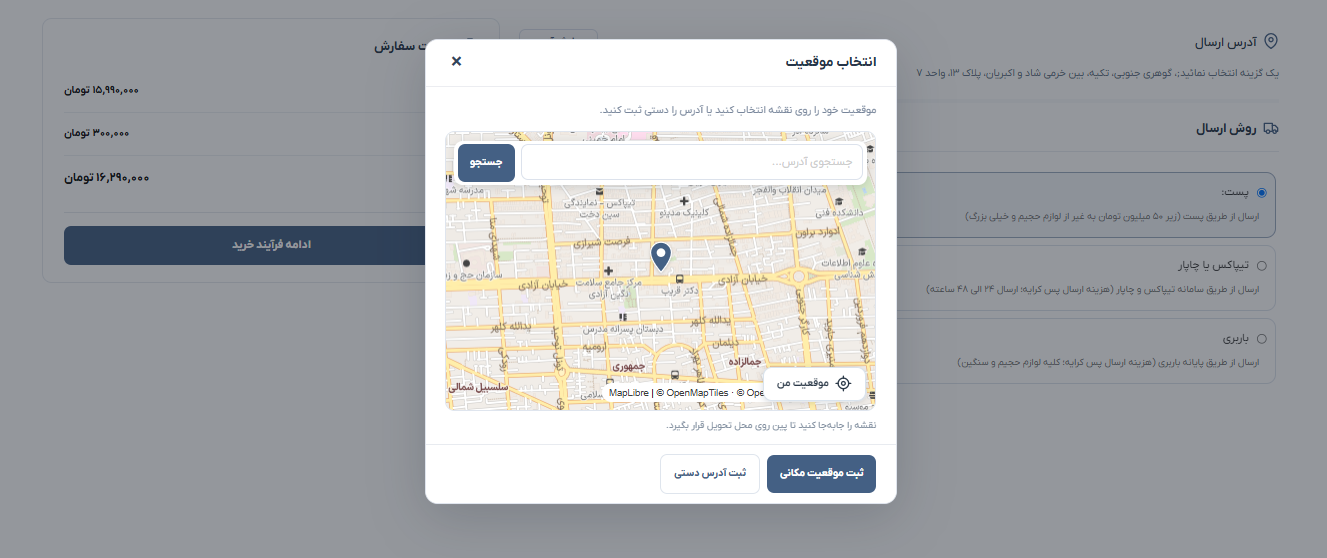
🖥️ 1. Checkout Map — Desktop
Interactive location selection within the shipping address dialog, including map navigation, search, and the location confirmation button.
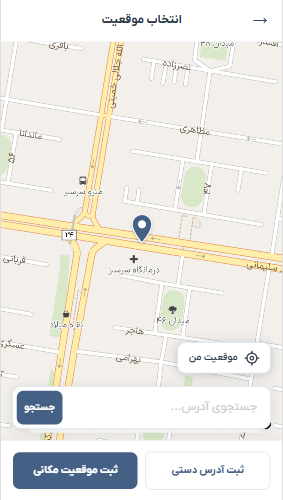
📱 2. Checkout Map — Mobile
Full-height mobile map with a centered delivery marker, accessible search field, geolocation action, and confirmation controls.
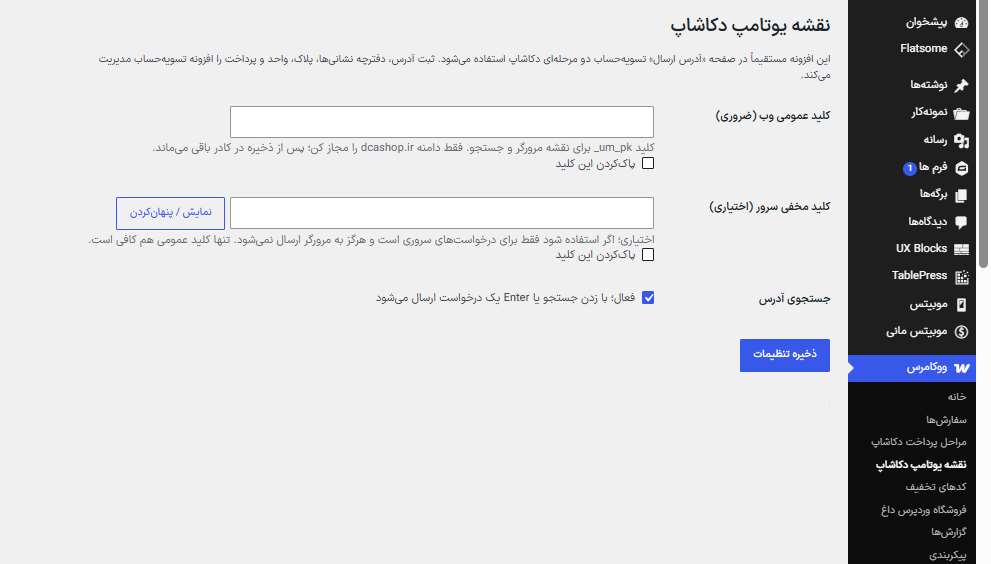
⚙️ 3. WordPress Map Settings
WooCommerce administration screen for managing Uttamap public and optional secret keys and enabling address search.
🧩 Requirements & Integration
- WordPress with WooCommerce enabled.
- PHP 7.4+ (the minimum stated in the plugin header).
- Classic WooCommerce checkout and the Dcashop Two-Step Checkout address interface for the integrated map modal.
- Uttamap public web API key (
um_pk_...) with access configured for your website domain. - Optional Uttamap server secret key (
um_sk_...) for server-side requests. - Network access to Uttamap services and the MapLibre GL JS CDN.
Compatibility note: This plugin was designed for the Dcashop checkout workflow. It is not a general-purpose replacement for every WordPress map or checkout extension.
🚀 Installation
- Back up the WordPress site before modifying the checkout.
- Ensure WooCommerce and the Dcashop Two-Step Checkout plugin are configured.
- Download
dcashop-uttamap-v1.0.0-wordpress.zipfrom the GitHub release assets. - In WordPress, open Plugins → Add New → Upload Plugin and upload the ZIP file.
- Activate Dcashop Uttamap.
- In WooCommerce → Dcashop Uttamap map settings, enter the Uttamap public web API key. A server secret key is optional.
- Enable or disable Address Search as required, then save the settings.
- Open the checkout address dialog and verify the map, geolocation, search (if enabled), address resolution, and saved delivery location.
- Place a test order in a staging environment and verify that the selected delivery location appears in the WooCommerce order details.
Important: Keep the secret server key private; it is not required in the browser. Restrict the public web key to the domain(s) used by your storefront.
🗺️ Address & Order Data
- Returns street, province, and city information only when Uttamap provides those components.
- Does not invent or automatically fill a postal code.
- Preserves the existing checkout coordinate field:
billing_map_lat_long. - Can read supported coordinate metadata from orders to display the delivery point in WooCommerce admin.
- Uses existing Dcashop checkout selectors and JavaScript integration identifiers for compatibility.
📂 Project Structure
dcashop-uttamap/
├── assets/
│   ├── checkout-map.js
│   ├── checkout-map.css
│   ├── admin-order.js
│   └── admin-order.css
├── screenshots/
│   ├── 01-checkout-map-desktop.png
│   ├── 02-checkout-map-mobile.png
│   └── 03-wordpress-map-settings.png
├── dcashop-uttamap.php
├── README.md
└── CHANGELOG.md
📦 Release
v1.0.0 — First Public Release
See CHANGELOG.md for release highlights.
👨💻 Developer
Seyyed Behzad Mousaviyan
WordPress & WooCommerce Developer
GitHub: @behzad79