Install
This is the repository archive. It installs, but the folder name will carry the branch suffix and updates will not flow.
Install straight from GitHub with WP-CLI:
wp plugin install https://github.com/behzad79/dcashop-two-step-checkout/archive/refs/heads/main.zip🛒 DcaShop Two-Step Checkout for WooCommerce
A custom two-step checkout plugin for classic WooCommerce, developed by Seyyed Behzad Mousaviyan. It separates address and shipping selection from payment while keeping the existing WooCommerce checkout and order-processing workflow.
Version: v1.0.0 · First public release
📌 Overview
Dcashop Two-Step Checkout gives the standard WooCommerce checkout a more structured, responsive, and RTL-friendly customer experience. Customers select or add an address, choose a shipping method, and continue to a dedicated payment step.
This plugin is built around the classic WooCommerce checkout, rather than the Checkout Block. It was developed for a specific store setup and should be tested before being used with other themes or checkout extensions.
✨ Features
- 🧭 Two-Step Checkout — Separate Shipping / Address and Payment steps.
- 🔗 Dedicated Step URLs — Supports routes such as
/checkout/shipping/and/checkout/payment/whencheckoutis the checkout page slug. - 🏠 Saved Addresses — Store up to five addresses (including the default), with selection, adding, editing, and deletion.
- 📍 Map-Based Location Selection — Uses the separate Dcashop Uttamap integration to select a delivery location.
- 📝 Address Details — Province, city, street address, plaque, unit, postal code, and saved map coordinates.
- 👤 Delivery Recipient — Confirm who will receive the order and manage recipient details.
- 🚚 WooCommerce Shipping — Keeps the store's configured shipping methods and shipping calculations.
- 💳 WooCommerce Payments — Uses existing WooCommerce payment gateways and checkout processing.
- 🎟️ Coupons & Wallet — Supports the checkout's existing coupon and wallet integrations where configured.
- 📱 Responsive RTL Interface — Designed for Persian-language storefronts on desktop and mobile.
- ⚙️ Preview Controls — Choose Off, Admin preview, or Enabled for everyone.
- 🔄 Backward Compatibility — Preserves existing WooCommerce and checkout address metadata keys.
🔄 How It Works
- Shipping: The customer checks their delivery address and chooses a shipping method.
- Manage Address: The customer selects an existing saved address or adds a new one.
- Pick a Location: The customer selects the address location on the map, or proceeds with manual address entry where appropriate.
- Complete Details: The customer confirms address fields and delivery-recipient information.
- Payment: The customer reviews the order and completes payment using an available WooCommerce gateway.
📸 Screenshots
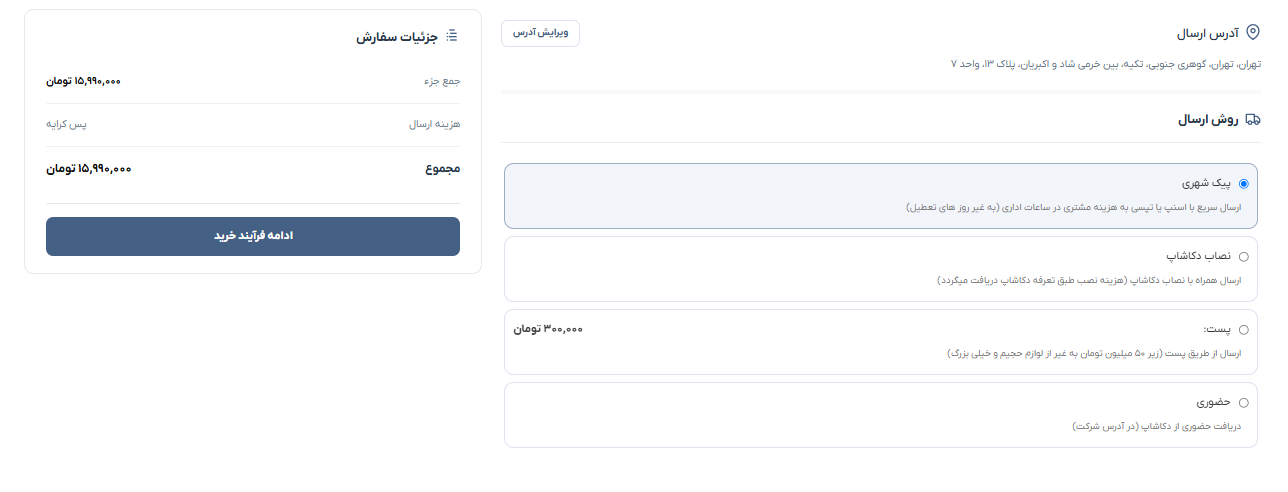
🚚 1. Shipping & Address Step
The first checkout step displays the selected delivery address, available shipping methods, and the order summary.
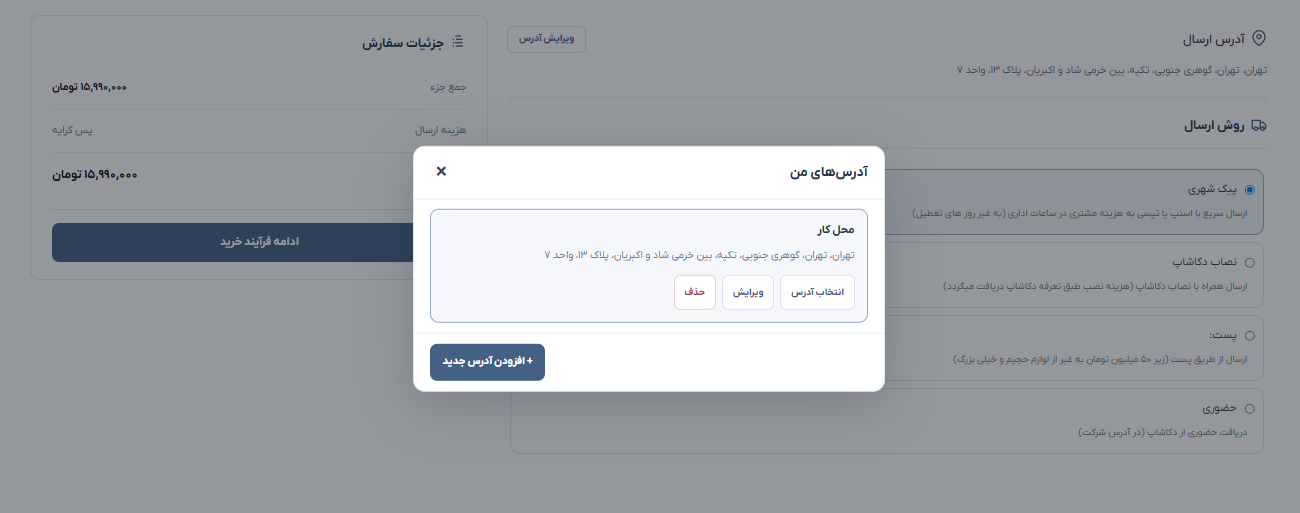
🏠 2. Saved Address Management
Customers can select, edit, delete, or add saved delivery addresses.
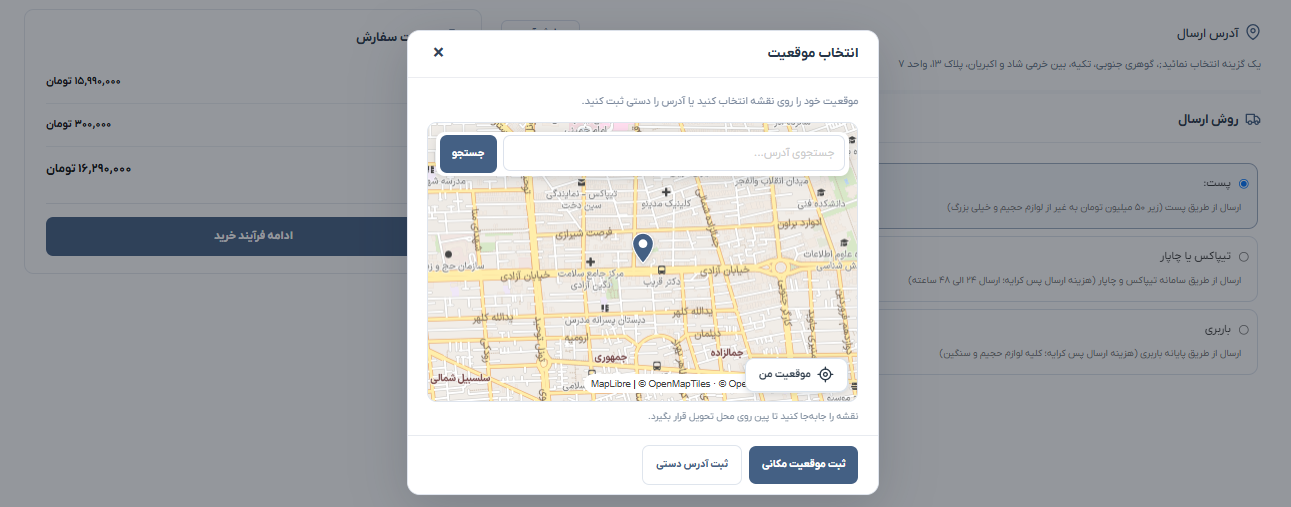
📍 3. Map Location Picker
The location dialog lets customers choose a delivery location on the map.
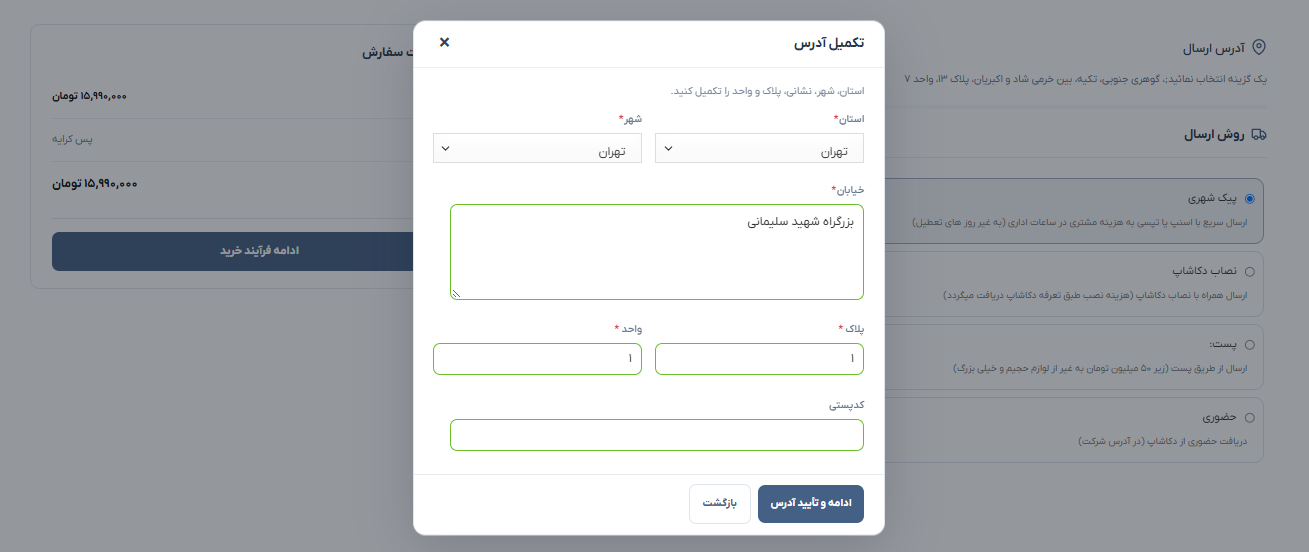
📝 4. Complete Address Details
Customers complete province, city, street, plaque, unit, and postal-code fields.
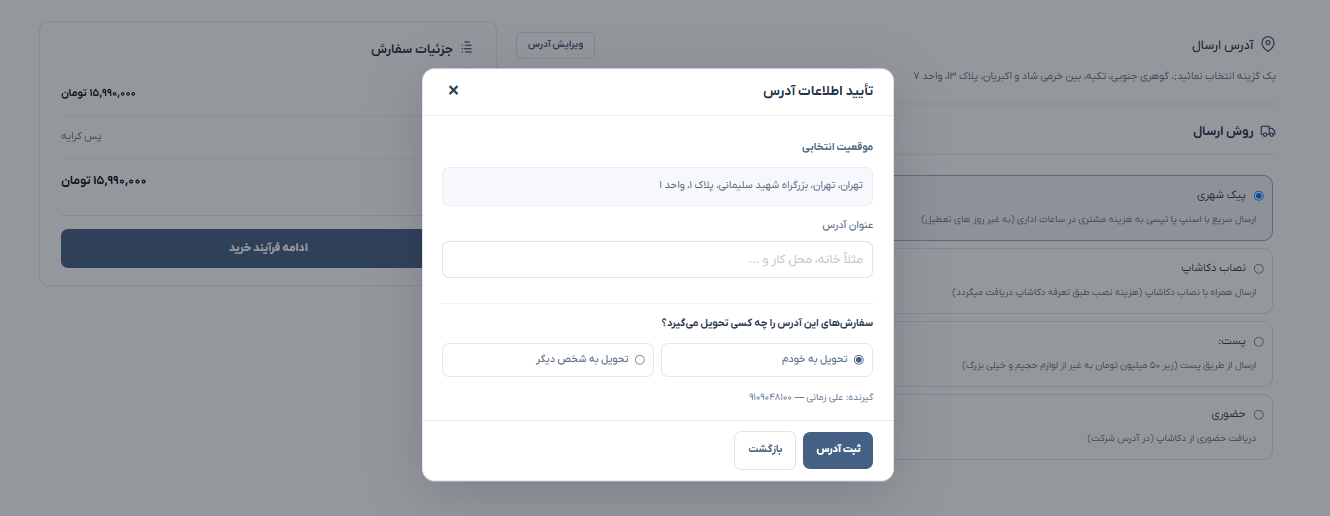
✅ 5. Address & Recipient Confirmation
The confirmation dialog shows the selected location, an optional address label, and the delivery-recipient choice.
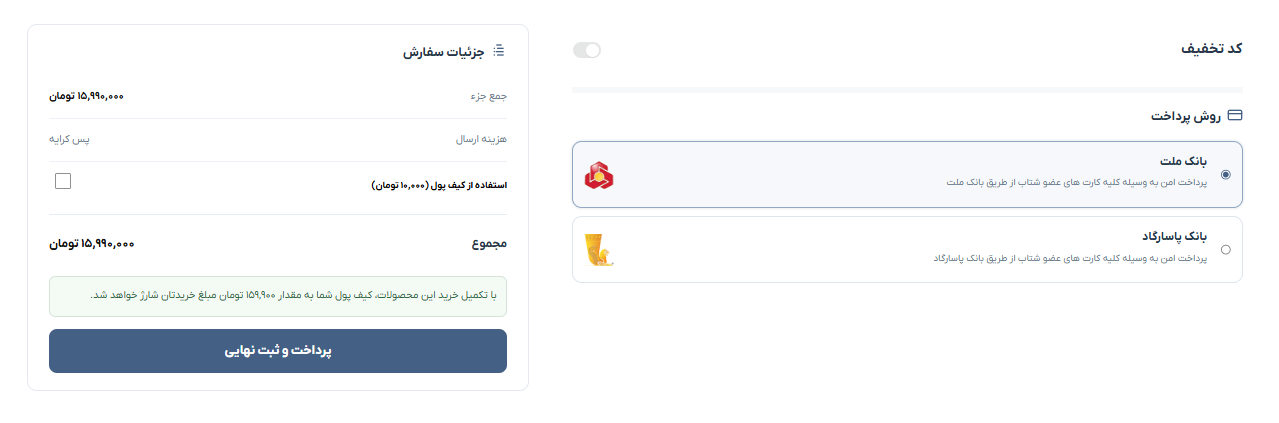
💳 6. Payment Step
The second checkout step includes the order summary, coupon area, wallet integration, and available payment gateways.
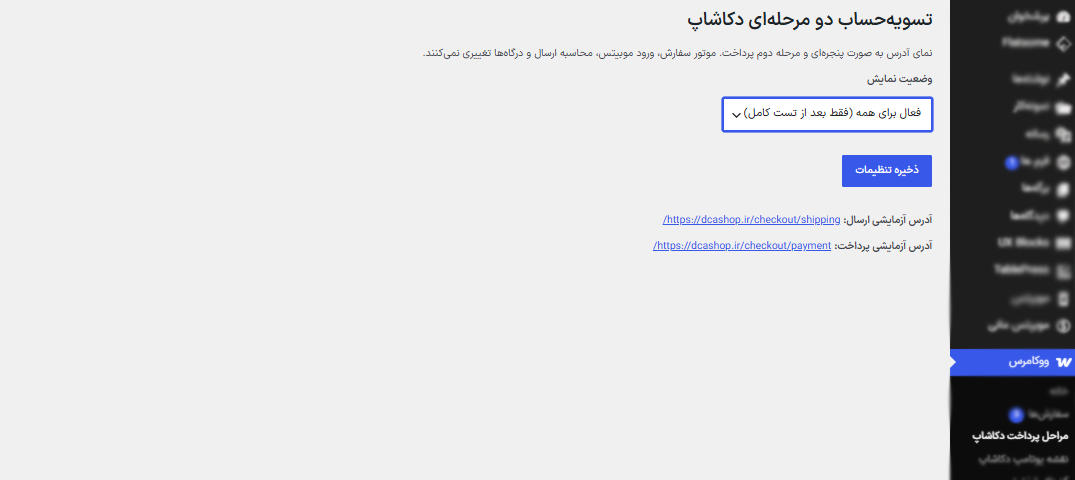
⚙️ 7. Plugin Settings
Administrators can disable the custom checkout, enable an admin-only preview, or enable it for everyone.
🧩 Requirements & Integrations
- WordPress with WooCommerce.
- Classic checkout page / shortcode, not the WooCommerce Checkout Block.
- PHP 7.4+ as declared in the plugin header; compatibility should be verified on the target server.
- Flatsome theme layout and YITH Checkout Manager fields were part of the original deployment setup.
- DCAShop Uttamap is used for map-based address selection. It is a separate plugin and is not included in this repository.
- In the original checkout setup,
billing_address_4stores the plaque number andbilling_address_3stores the unit number.
🚀 Installation
- Back up the WordPress database and website files before changing an active checkout.
- Activate WooCommerce and configure a classic WooCommerce checkout page.
- Configure DCAShop Uttamap when map-based address selection is needed.
- Download the WordPress release ZIP from the repository's Releases page.
- In WordPress Admin, go to Plugins → Add New → Upload Plugin, select the ZIP file, and activate the plugin.
- Open the checkout-mode settings and enable Admin preview first.
- Test saving and selecting addresses, shipping totals, coupons, the payment hand-off, payment retry, and order confirmation with the store's own gateways.
- When step URLs return 404, visit Settings → Permalinks and click Save Changes to refresh rewrite rules.
Testing note: The version label was updated for this public release. A live end-to-end production payment test was not part of the release preparation.
🗺️ Address & Map Behavior
- Stores existing map coordinates through
billing_map_lat_longand compatible address metadata. - Uses the Uttamap
streetfield for automatic street-address population; postal codes are not automatically generated by this field. - Allows manual completion when an address is not provided by the map.
- Preserves existing address data keys for backward compatibility.
📂 Project Structure
dcashop-two-step-checkout/
├── assets/
│   ├── account-addresses.css
│   ├── account-addresses.js
│   ├── checkout-steps.css
│   └── checkout-steps.js
├── screenshots/
│   ├── 01-shipping-step.png
│   ├── 02-saved-addresses.png
│   ├── 03-map-location-picker.png
│   ├── 04-address-details-form.png
│   ├── 05-address-confirmation.png
│   ├── 06-payment-step.png
│   └── 07-admin-settings.png
├── dcashop-two-step-checkout.php
├── README.md
└── .gitignore👨💻 Developer
Seyyed Behzad Mousaviyan
WordPress & WooCommerce Developer
GitHub: @behzad79