Install
This is the repository archive. It installs, but the folder name will carry the branch suffix and updates will not flow.
Install straight from GitHub with WP-CLI:
wp plugin install https://github.com/beamkiller/connector-for-bluefox-email/archive/refs/heads/main.zipA WordPress plugin that connects your site and WooCommerce store to bluefox.email: signup forms with double opt-in, a WooCommerce checkout opt-in with a welcome coupon, order and abandoned cart emails, contact sync and wp_mail() delivery.
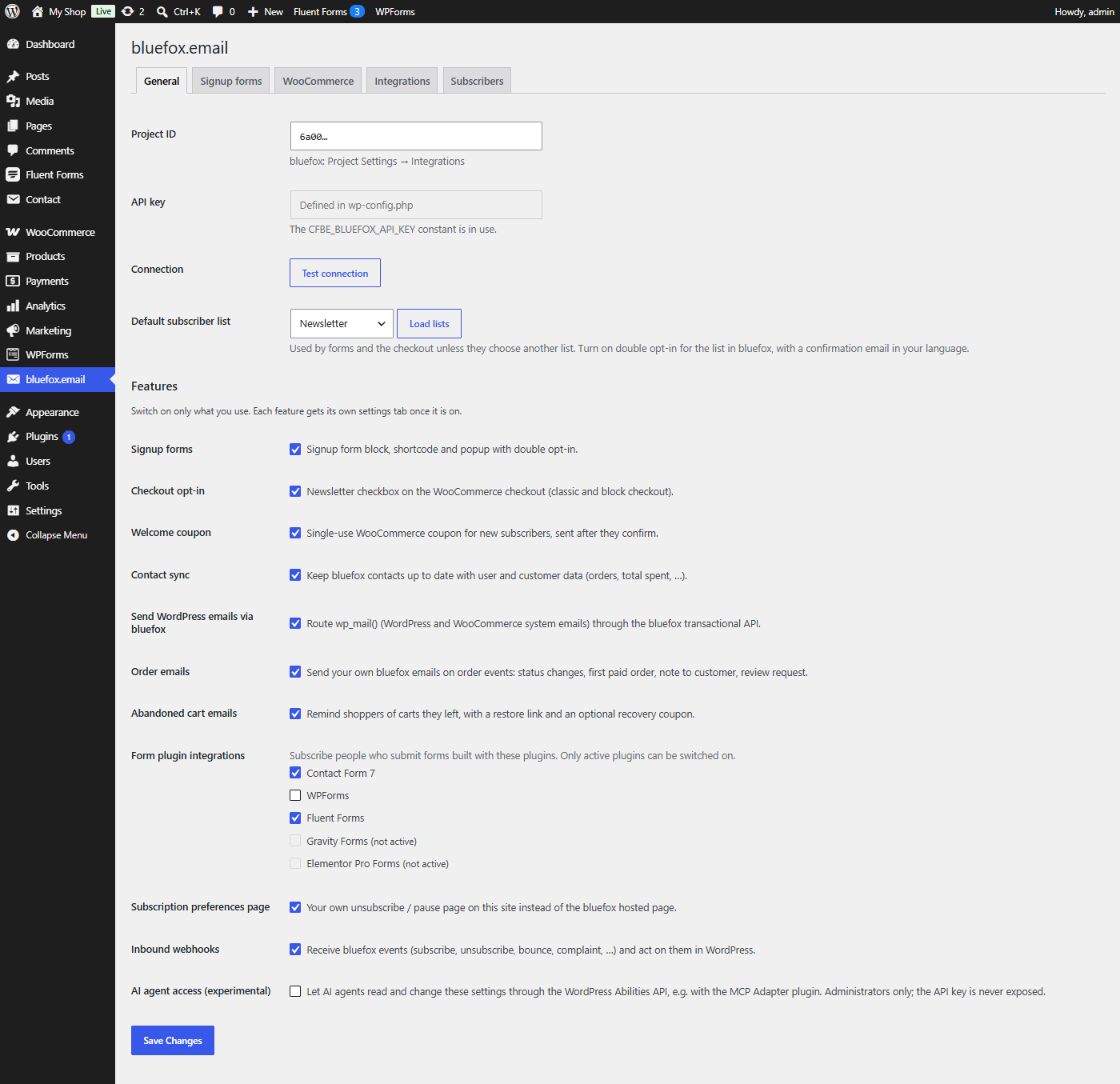
Every feature is a module you switch on or off, so the plugin only loads what you use.
Documentation: https://beamkiller.github.io/connector-for-bluefox-email/

Features
- Email templates – ready-made, mobile-friendly bluefox emails (confirmation, welcome coupon, order emails, abandoned cart reminder) created in bluefox with one click and wired up automatically – no copying of email IDs.
- Signup forms – block,
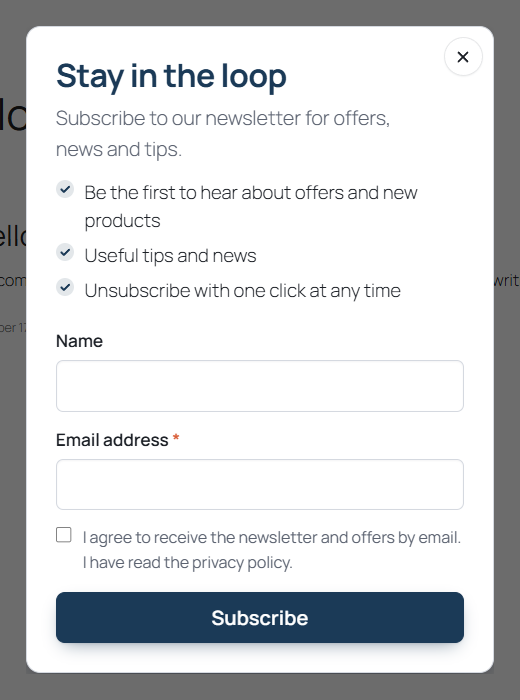
[cfbe_form]shortcode, compact[cfbe_promo]bar and a popup with scroll, delay, exit-intent and page-view triggers, page targeting and frequency rules. Double opt-in is handled by your bluefox list. - Tags and interests – every signup is tagged by source and placement; an optional interests field adds one tag per choice.
- Checkout opt-in – an unticked newsletter checkbox on the classic and block checkout, and optionally on My Account.
- Welcome coupon – a single-use WooCommerce coupon locked to the subscriber's email, created only after they confirm, one per email address (and by default one per mailbox).
- Order emails – your own bluefox emails on order status changes, first paid order, customer notes and review requests.
- Abandoned cart emails – reminders with a restore link and an optional single-use recovery coupon.
- Contact sync – user and customer data (order count, total spent, last order date, …) on bluefox contacts for segmentation, with bulk backfill and WP-CLI.
- Email delivery – route
wp_mail()through the bluefox transactional API, with a test button and fallback. - Form plugin integrations – Contact Form 7, WPForms, Fluent Forms, Gravity Forms and Elementor Pro.
- Preferences page – your own translatable unsubscribe / pause page instead of the bluefox hosted page.
- Inbound webhooks – bluefox subscription, bounce and complaint events stored in WordPress, with developer hooks.
- AI agent access (experimental) – read and change the settings through the WordPress Abilities API, for example with the MCP Adapter plugin.
- Privacy tools – consent records, IP address modes and retention, personal data export and erasure.
- Page-cache friendly (no nonces in public forms), accessible markup, English and Hungarian translations.
Requirements
| Version | |
|---|---|
| WordPress | 6.7 or newer (6.9+ for AI agent access) |
| PHP | 8.1 or newer |
| WooCommerce | optional, 9.0 or newer – HPOS and the block checkout are supported |
| bluefox.email | an account with a project and an API key |
Install
From WordPress.org – planned. Once listed, search for Connector for bluefox.email under Plugins → Add New.
From a zip – download the zip from Releases (or Code → Download ZIP), then upload it under Plugins → Add New → Upload Plugin and activate it.
With git
cd wp-content/plugins
git clone https://github.com/beamkiller/connector-for-bluefox-email.git
wp plugin activate connector-for-bluefox-email
The repository root is the plugin; there is no build step.
Quick start
- Open bluefox.email → General, enter your project ID and API key (or define
CFBE_BLUEFOX_API_KEYinwp-config.php) and click Test connection. - Click Load lists and choose the default list.
- In bluefox.email, turn on double opt-in for the list, choose its confirmation email (with
{{verifyLink}}) and set its redirect link to your thank-you page. - Switch on the features you need under Features and configure each one on its tab.
- Add the bluefox.email signup form block or
[cfbe_form]to a page, create the thank-you page with[cfbe_thankyou], and click Register webhook in bluefox on the Webhooks tab.
The Getting started guide walks through each step.
Privacy
This plugin sends data to the external bluefox.email API (https://api.bluefox.email): email addresses, names, tags and lists of people who sign up, and – depending on the features you turn on – customer data, order and cart details and the emails sent with wp_mail(). Nothing is sent before you enter your project ID and API key. See the bluefox.email terms of use and privacy policy, and the privacy page of the docs.
License
GPL-2.0-or-later. See LICENSE.
Developed by Peter Kulcsár - KREMONT s.r.o.. This plugin is not developed by or affiliated with bluefox.email.