ووکامرس - علامتگذاری محصولات ناموجود
Woo Mark OutOfStock is a lightweight WordPress + WooCommerce plugin that allows administrators to easily mark multiple products as Out of Stock using either product IDs or SKUs. All safely processed within a database transaction.
Install
This is the repository archive. It installs, but the folder name will carry the branch suffix and updates will not flow.
Install straight from GitHub with WP-CLI:
wp plugin install https://github.com/basemax/woo-mark-outofstock/archive/refs/heads/main.zipWoo Mark OutOfStock is a lightweight WordPress + WooCommerce plugin that allows administrators to easily mark multiple products as Out of Stock using either product IDs or SKUs. All safely processed within a database transaction.
📦 Features
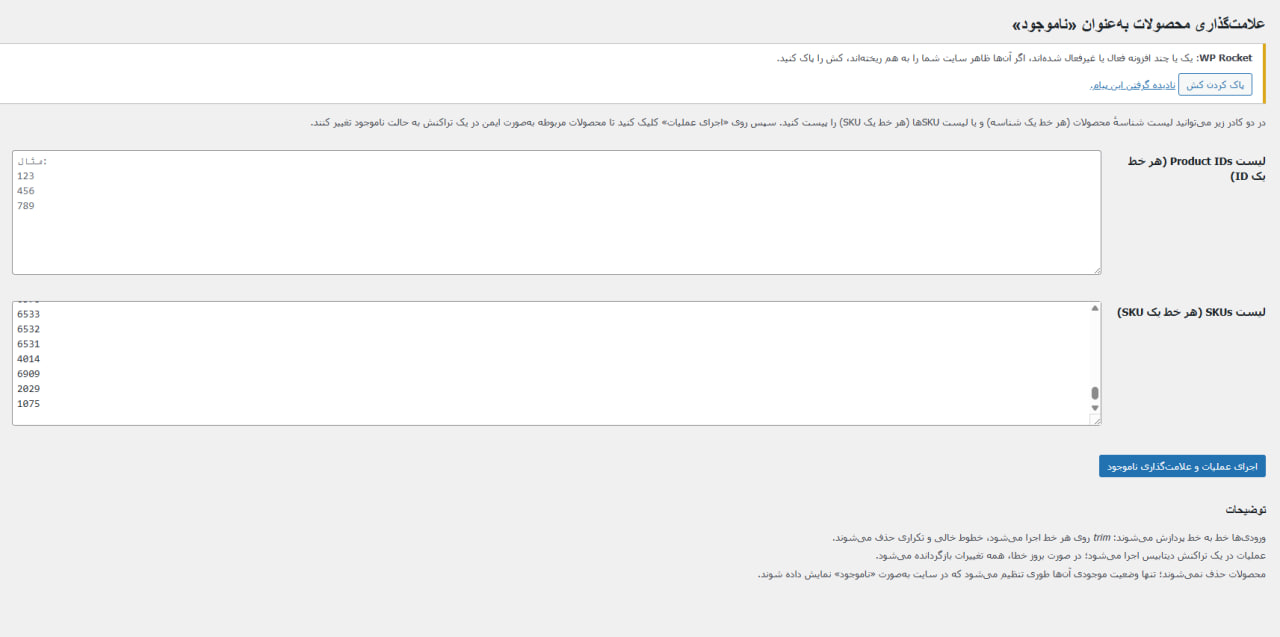
- Add a simple admin page in WordPress Dashboard
- Two input fields (Product IDs and SKUs) for bulk processing
- Automatically trims, filters, and removes duplicates or empty lines
- Safely processes updates inside a database transaction
- Works with both simple and variable products
- Updates both parent and variation stock statuses
- Keeps products visible (not deleted, only marked as out of stock)
- Fully localized (Persian interface text)
🧭 How It Works
- Navigate to
Dashboard → ناموجود کردن محصولات - Paste your product IDs or SKUs (one per line).
- Click "اجرای عملیات و علامتگذاری ناموجود".
- The plugin:
- Trims and cleans your input lines.
- Looks up WooCommerce products by ID or SKU.
- Starts a database transaction.
- Marks products as “Out of Stock” (
outofstockstatus). - Commits all changes safely.
🖼 Screenshot
⚙️ Installation
-
Download or clone the repository:
git clone https://github.com/BaseMax/woo-mark-outofstock.git -
Upload the folder to your WordPress installation at:
wp-content/plugins/woo-mark-outofstock -
Activate it via WordPress → Plugins.
-
Make sure WooCommerce is installed and active.
🧩 Requirements
- WordPress 5.8+
- WooCommerce 6.0+
- PHP 7.4 or higher
- MySQL (supports transactions)
🧠 Notes
- All operations are executed inside a SQL transaction (
START TRANSACTION,COMMIT,ROLLBACK). - If any error occurs during processing, all changes are reverted automatically.
- No product deletion — only stock status is updated.
🪪 License
MIT License - see LICENSE file for details.
© 2025 Seyyed Ali Mohammadiyeh
💡 Repository
GitHub: BaseMax/woo-mark-outofstock