Procyon Dig Engine
Procyon Dig Engine is a high-performance WooCommerce search plugin that builds dedicated FULLTEXT and taxonomy index tables for fast, relevant product discovery. It includes REST endpoints, WP-CLI reindex commands, facet support, and automatic incremental updates on product changes, delivering scalable search for large catalogs. Built for speed.
Install
This is the repository archive. It installs, but the folder name will carry the branch suffix and updates will not flow.
Install straight from GitHub with WP-CLI:
wp plugin install https://github.com/bartek5186/procyon-dig-engine/archive/refs/heads/main.zip

"You see, in this world, there's two kinds of people, my friend: those with loaded guns and those who dig. You dig"
- Clint Eastwood, The Good, The Bad, and The Ugly
Procyon Dig Engine
High-performance WooCommerce product search powered by dedicated FULLTEXT and taxonomy index tables.
What This Plugin Does
- builds a searchable product index (title, excerpt, content, SKU, term names),
- stores product-to-term mappings (
taxonomy + term_id) for filters/facets, - exposes REST API endpoints for search and status,
- provides WP-CLI commands for status and full reindex,
- keeps the index updated automatically when products change.
Requirements
- WordPress with WooCommerce active,
- PHP 7.4+,
- MySQL/MariaDB with InnoDB FULLTEXT support,
- WP-CLI for
procyon digcommands.
Quick Start
- Activate the plugin.
- Configure plugin in Settings -> Procyon Dig Engine:
- searchable fields (title/excerpt/content/SKU/term names),
- additional custom product taxonomies to index,
- optional WooCommerce search replacement toggle.
- Optionally add custom product taxonomies from CLI:
wp option set procyon_dig_taxonomies '["grape_varieties","regions"]' --format=json- Build the initial index:
wp procyon dig reindex --batch=200 --truncate=1- Check status:
wp procyon dig statusAllowed Taxonomies
The plugin indexes only product taxonomies:
- default:
product_cat,product_tag, allpa_*, - additional: values from
procyon_dig_taxonomiesoption (array), - additional: values from
procyon_dig_taxonomiesfilter.
Admin Settings
Settings -> Procyon Dig Engine
- choose searchable fields used to build the FULLTEXT text,
- choose additional custom product taxonomies (defaults are always included),
- enable/disable replacing WooCommerce product search.
Filter example:
add_filter('procyon_dig_taxonomies', function(array $taxes) {
    $taxes[] = 'grape_varieties';
    $taxes[] = 'regions';
    return array_values(array_unique($taxes));
});
REST API
Status Endpoint
GET /wp-json/procyon-dig/v1/status
Requires authenticated user with manage_options.
Returns, among others:
version,indexed,table_search,table_terms,index_fields,taxonomies,woo_search_replacement.
Search Endpoint
GET /wp-json/procyon-dig/v1/search
Parameters:
q(required) search query,page(default1),per_page(default12, max50),include_products(defaulttrue),taxtaxonomy filters, e.g.tax[grape_varieties]=riesling,chardonnay,facets(defaultfalse) include facet response (calculated from the full matched set, not only current page),facet_taxonomiesCSV list of taxonomies for facets; if empty, all allowed taxonomies are used.
Response includes:
totaltotal number of matched products,total_pagestotal pages for currentper_page,search_mode(fulltextorlike_fallback),fallback_limitedandfallback_limitwhen fallback is used,- in
facets[*]:term_id,slug,name,term_link,count.
Fallback behavior:
- runs only when FULLTEXT returns 0 results,
- uses substring matching (
LIKE) with small capped limit, - requires at least one token with length
>= 4, - works only for first page (
page=1), - disables facets (returns empty
facetsin fallback mode).
WooCommerce replacement behavior:
- applies only to main frontend product search query,
- keeps native Woo search when ordering is unsupported (
price,rating,popularity, etc.), - keeps native Woo search when full result candidate set is too broad (safety cap),
- uses
post__inrelevance order from Procyon index. - safety cap can be tuned via filter
procyon_dig_woo_max_candidate_ids(default2000).
Examples:
curl "https://your-domain.com/wp-json/procyon-dig/v1/search?q=wine"
curl "https://your-domain.com/wp-json/procyon-dig/v1/search?q=riesling&tax[grape_varieties]=riesling&facets=1"
curl "https://your-domain.com/wp-json/procyon-dig/v1/search?q=whisky&include_products=0"
Advanced Facet Example
Request focused on facets only:
curl -G "https://your-domain.com/wp-json/procyon-dig/v1/search" \
  --data-urlencode "q=riesling" \
  --data-urlencode "include_products=0" \
  --data-urlencode "facets=1" \
  --data-urlencode "facet_taxonomies=grape_varieties,regions,pa_color"
Sample response (trimmed):
{
  "q": "riesling",
  "total": 42,
  "search_mode": "fulltext",
  "facets": {
    "grape_varieties": [
      {
        "term_id": 123,
        "slug": "riesling",
        "name": "Riesling",
        "term_link": "https://your-domain.com/grape_varieties/riesling/",
        "count": 31
      }
    ]
  }
}
Render clickable facet chips:
const chips = (response.facets?.grape_varieties ?? []).map((f) => ({
  label: `${f.name} (${f.count})`,
  href: f.term_link ?? `/shop/?s=riesling&tax[grape_varieties]=${encodeURIComponent(f.slug)}`
}));
WP-CLI
wp procyon dig status
wp procyon dig reindex --batch=200 --truncate=1
reindex options:
--batchminimum50, default200,--truncate=1|0default1.
Database Tables
The plugin creates these tables on activation and auto-upgrades them when the table version changes:
${prefix}procyon_dig_search${prefix}procyon_dig_terms
procyon_dig_search:
PRIMARY KEY (product_id)FULLTEXT KEY ft_searchable (searchable)
procyon_dig_terms:
PRIMARY KEY (product_id, taxonomy, term_id)KEY idx_tax_term (taxonomy, term_id, product_id)KEY idx_product (product_id)
Automatic Index Updates
After the initial full reindex, updates are automatic:
save_post_product-> reindex product,updated_postmeta/added_postmeta/deleted_postmetafor_sku-> reindex product,set_object_termsfor allowed taxonomies -> reindex term map and product,before_delete_post-> remove product from both tables.
Notes
- Search uses BOOLEAN FULLTEXT mode (
+term*). - Query result cache is enabled via transients (default TTL:
120s), configurable with filterprocyon_dig_cache_ttl. - If REST returns 404, make sure plugin is active and permalinks were refreshed.
- If results are empty after migration/import, run full reindex.
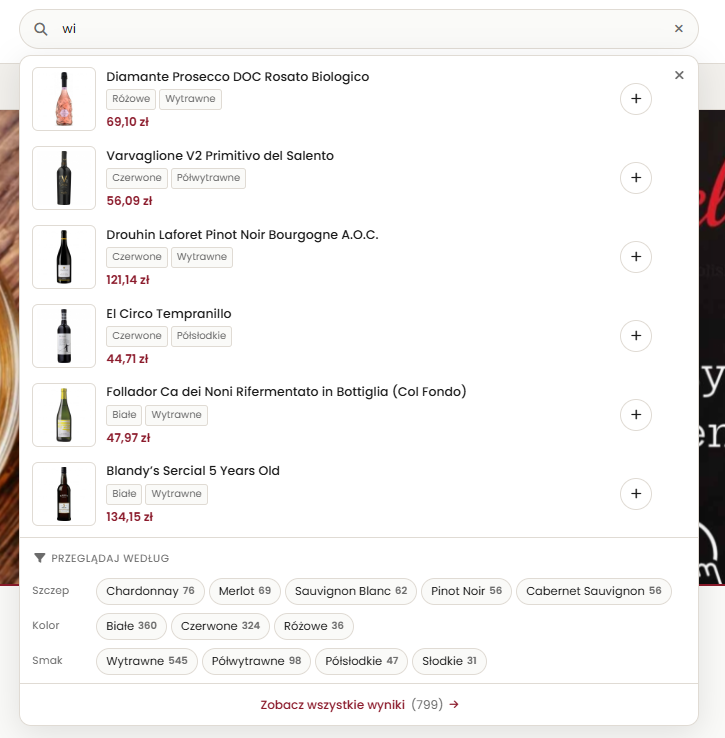
Example In Use
License
This project is open-source and licensed under GNU GPL v2 or later (GPL-2.0-or-later).
See LICENSE.