Install
This is the repository archive. It installs, but the folder name will carry the branch suffix and updates will not flow.
Install straight from GitHub with WP-CLI:
wp plugin install https://github.com/barmaandev/voicedoon/archive/refs/heads/main.zipVoice Doon - WordPress Audio Player Plugin
A lightweight, modern audio player with a canvas waveform for WordPress. No external libraries. Fast, clean, and customizable with Persian/Farsi support.
Table of contents
- Features
- Screenshots
- Installation
- Usage
- Using without WordPress (pure PHP)
- Available Attributes
- Design Presets
- Development
- Browser Support
- License
- Author
- Changelog
- Contributing
- Support
Features
- 🎵 Canvas-based Waveform: Beautiful waveforms rendered using HTML5 Canvas
- 🚀 Lightweight: No jQuery or external dependencies
- 🎨 5 Design Presets: Modern, Minimal, Neon, Wave, Wave Top
- ⚙️ Highly Customizable: Colors, sizes, button position, wave styles
- 🌍 Multilingual: Persian/Farsi translations included
- 📱 Responsive: Works on all devices
- 🔒 Privacy-friendly: No third-party calls
- 📝 Shortcode Support: Works in posts, pages, and widgets
- 🧱 Gutenberg Ready: Block editor integration
- ✏️ TinyMCE Button: Classic editor support
Screenshots
Design Presets Preview
|
|
|
|
|
|
|
|
Maybe More in near future |
 Modern preset - Clean bars with subtle shadows
 Minimal preset - Thin lines with elegant spacing
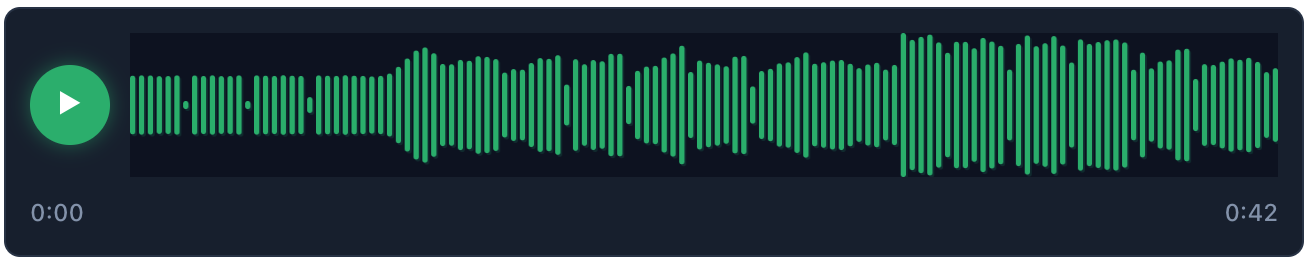 Neon preset - Glowing bars with dark theme
 Wave preset - Continuous filled waveform
 Wave Top preset - Only upper half of waveform
Installation
- Upload the plugin folder to
/wp-content/plugins/ - Activate "Voice Doon" from Plugins in WordPress
- Go to Settings → Voice Doon to configure defaults
- Add the shortcode to a post or page
Usage
Basic Shortcode
[voicedoon src="https://example.com/audio.mp3"]Advanced Shortcode
[voicedoon
    src="https://example.com/audio.mp3"
    title="Episode 1"
    preset="wave"
    button_position="inside"
    accent="#3b82f6"
    bg="#f3f4f6"
    progress="#111827"
    height="64"
    radius="2"
    wave_style="continuous"
    load_on="view"
    preload="metadata"
]
Using without WordPress (pure PHP)
You can use the same lightweight player in any PHP or non‑WordPress project. The WordPress plugin normally outputs the HTML and enqueues assets; outside WordPress, you just include the CSS/JS yourself and render the same HTML structure with data-* attributes. The script automatically initializes every element with the wbdn-voice-player class when it comes into view.
Files you need
assets/css/player.cssassets/css/fonts.cssassets/js/player.js
Copy these files to your project (preserving paths), or serve them directly from where the plugin lives on your server.
Minimal HTML
<link rel="stylesheet" href="/path/to/assets/css/fonts.css">
<link rel="stylesheet" href="/path/to/assets/css/player.css">

<div class="wbdn-voice-player wbdn-voice-preset-modern wbdn-voice-btn-outside"
     data-src="https://example.com/audio.mp3"
     data-title="Episode 1"
     data-accent="#3b82f6"
     data-bg="#f3f4f6"
     data-progress="#111827"
     data-height="64"
     data-preload="none"
     data-load-on="view"
     data-radius="2"
     data-preset="modern"
     data-wave-style="bars">
  <button class="wbdn-voice-button" aria-label="Play"><span class="wbdn-voice-icon">▶</span></button>
  <div class="wbdn-voice-wave-wrap">
    <canvas class="wbdn-voice-wave"></canvas>
    <div class="wbdn-voice-time">
      <span class="wbdn-voice-current">0:00</span>
      <span class="wbdn-voice-duration">--:--</span>
    </div>
  </div>
  <div class="wbdn-voice-title">Episode 1</div>
  <noscript><audio controls src="https://example.com/audio.mp3"></audio></noscript>
</div>

<script src="/path/to/assets/js/player.js"></script>
No extra init code is required; player.js observes the DOM and initializes players lazily.
Rendering from PHP
<?php
function render_voicedoon_player($src, $options = []) {
    $defaults = [
        'title' => '',
        'accent' => '#3b82f6',
        'bg' => '#f3f4f6',
        'progress' => '#111827',
        'height' => 64,
        'preload' => 'none',      // none | metadata | auto
        'load_on' => 'view',      // view | click
        'radius' => 2,
        'preset' => 'modern',     // modern | minimal | neon | wave | wave_top
        'wave_style' => 'bars',   // bars | line | continuous
        'button_position' => 'outside', // outside | inside
    ];
    $o = array_merge($defaults, $options);
    $btnClass = $o['button_position'] === 'inside' ? 'wbdn-voice-btn-inside' : 'wbdn-voice-btn-outside';
    ?>
<div class="wbdn-voice-player wbdn-voice-preset-<?= htmlspecialchars($o['preset']) ?> <?= $btnClass ?>"
     data-src="<?= htmlspecialchars($src) ?>"
     data-title="<?= htmlspecialchars($o['title']) ?>"
     data-accent="<?= htmlspecialchars($o['accent']) ?>"
     data-bg="<?= htmlspecialchars($o['bg']) ?>"
     data-progress="<?= htmlspecialchars($o['progress']) ?>"
     data-height="<?= (int) $o['height'] ?>"
     data-preload="<?= htmlspecialchars($o['preload']) ?>"
     data-load-on="<?= htmlspecialchars($o['load_on']) ?>"
     data-radius="<?= (int) $o['radius'] ?>"
     data-preset="<?= htmlspecialchars($o['preset']) ?>"
     data-wave-style="<?= htmlspecialchars($o['wave_style']) ?>">
  <?php if ($o['button_position'] === 'outside'): ?>
  <button class="wbdn-voice-button" aria-label="Play"><span class="wbdn-voice-icon">▶</span></button>
  <?php endif; ?>
  <div class="wbdn-voice-wave-wrap">
    <?php if ($o['button_position'] === 'inside'): ?>
    <button class="wbdn-voice-button" aria-label="Play"><span class="wbdn-voice-icon">▶</span></button>
    <?php endif; ?>
    <canvas class="wbdn-voice-wave"></canvas>
    <div class="wbdn-voice-time">
      <span class="wbdn-voice-current">0:00</span>
      <span class="wbdn-voice-duration">--:--</span>
    </div>
  </div>
  <?php if (!empty($o['title'])): ?>
  <div class="wbdn-voice-title"><?= htmlspecialchars($o['title']) ?></div>
  <?php endif; ?>
  <noscript><audio controls src="<?= htmlspecialchars($src) ?>"></audio></noscript>
</div>
<?php }
?>
Include the CSS and JS once on the page (see Minimal HTML). Then call render_voicedoon_player() wherever you need a player.
Notes
- CORS: Waveform is built via
fetch()+ Web Audio. If audio is on another domain, enable cross‑origin requests (e.g.,Access-Control-Allow-Origin). - Autoloading:
data-load-on="click"defers loading/decoding until the user clicks;viewstarts as soon as in viewport. - Accessibility: The play button includes an
aria-label. Add more labels where appropriate. - Customization: All WordPress shortcode attributes map to the same
data-*attributes here. - Styling: Override via CSS or switch
data-preset.
Available Attributes
| Attribute | Description | Options | Default |
|---|---|---|---|
src |
Audio file URL (required) | Any valid URL | - |
title |
Optional title label | Any text | - |
preset |
Design preset | modern, minimal, neon, wave, wave_top | modern |
wave_style |
Wave style | bars, line, continuous | bars |
button_position |
Button position | inside, outside | outside |
accent |
Wave bar color | Hex color | #3b82f6 |
progress |
Played overlay color | Hex color | #111827 |
bg |
Canvas background color | Hex color | #f3f4f6 |
height |
Canvas height | Pixels | 64 |
radius |
Bar radius | Pixels | 2 |
preload |
Audio preload | none, metadata, auto | none |
load_on |
When to load audio | view, click | view |
Design Presets
Modern (Default)
Clean bars with subtle shadows
- Colors: Blue accent, light gray background, dark progress
- Height: 64px, Radius: 2px
Minimal
Thin lines with elegant spacing
- Colors: Gray accent, white background, dark progress
- Height: 48px, Radius: 0px
Neon
Glowing bars with dark theme
- Colors: Green accent, dark background, yellow progress
- Height: 72px, Radius: 4px
Wave
Continuous filled waveform
- Colors: Blue accent, light gray background, dark progress
- Height: 64px, Radius: 0px
Wave Top
Only upper half of waveform
- Colors: Blue accent, very light gray background, dark progress
- Height: 64px, Radius: 0px
Development
WordPress Coding Standards
This plugin follows WordPress Coding Standards (WPCS). To check compliance:
# Install tools
composer global require squizlabs/php_codesniffer wp-coding-standards/wpcs

# Configure PHPCS
~/.composer/vendor/bin/phpcs --config-set installed_paths ~/.composer/vendor/wpcs

# Run checks
~/.composer/vendor/bin/phpcs --standard=phpcs.xml.dist /path/to/voicedoon
File Structure
voicedoon/
├── voicedoon.php              # Main plugin file
├── assets/
│   ├── css/
│   │   ├── player.css         # Player styles
│   │   └── admin.css          # Admin styles
│   ├── js/
│   │   ├── player.js          # Player functionality
│   │   ├── block.js           # Gutenberg block
│   │   └── admin.js           # Admin functionality
│   └── tinymce-wbdn-voice.js  # TinyMCE integration
├── languages/
│   ├── voicedoon-fa_IR.po     # Persian translations
│   └── voicedoon-fa_IR.mo     # Compiled translations
├── phpcs.xml.dist             # WPCS configuration
├── readme.txt                 # WordPress.org readme
├── README.md                  # This file
└── .gitignore                 # Git ignore rules
Browser Support
- Chrome 60+
- Firefox 55+
- Safari 12+
- Edge 79+
License
GPLv2 or later - https://www.gnu.org/licenses/gpl-2.0.html
Author
Barmaan Shokoohi
WebDoon - https://webdoon.ir
Changelog
1.0.0
- Initial release
- Canvas-based waveform rendering
- 5 design presets
- 3 wave styles
- Customizable colors and dimensions
- Shortcode support
- Gutenberg block integration
- TinyMCE button
- Persian/Farsi translations
- WordPress Coding Standards compliance
- No external dependencies
Contributing
This plugin is developed by WebDoon. For issues and contributions, please visit our website at https://webdoon.ir
Support
For support and questions, please visit our website or create an issue in the repository.