Install
This is the repository archive. It installs, but the folder name will carry the branch suffix and updates will not flow.
Install straight from GitHub with WP-CLI:
wp plugin install https://github.com/badabingbreda/timber-metabox-blocks/archive/refs/heads/master.zipAdd Timber Meta Box Blocks just by adding templates to your theme or plugin. This plugin is based heavily on this article by nicoprat , this plugin by MWDelaney and also this package by Palmiak
Dependencies for this plugin
This plugin has dependencies on the following plugins:
Creating blocks
Creating blocks is easy. After installing and activating the plugin, create a subdirectory in your theme called 'views' and another subdirectory in that called 'blocks'.
- theme-directory
   └ views <directory>
     └ blocks <directory>
   functions.php
   style.css
You can now start using Timber Meta Box Blocks to create Gutenberg Blocks!
Add twig templates to the views/blocks directory that get and use Meta Box data. All Twig templates require a comment block with some data in it. Here's an example of a block WITHOUT meta box data:
{#
  Title: Test Block
  Description: My Test Block
  Category: formatting
  Context: side
  Icon: admin-comments
  Keywords: test block
  Mode: preview
  Align: wide
  PostTypes: page post
  SupportsAlign: left right center wide full
  SupportsMode: false
  SupportsMultiple: false
#}
<div class="{{ block.classes }}">
  <div class="uk-tile uk-tile-primary">
    This is a test block
  </div>
</div>
Here's an example of a block WITH Meta Box data:
{#
  Title: Testimonial
  Description: Customer testimonial
  Category: formatting
  Context: side
  Icon: admin-comments
  Keywords: testimonial quote "customer testimonial"
  Mode: preview
  Align: center
  PostTypes: page post
  SupportsAlign: left right center
  SupportsMode: false
  SupportsMultiple: true
  Example: [{ "testimonial": "Testimonials", "author": "John Doe" }]
  Fields: [{ "type" : "wysiwyg" , "id" : "testimonial" , "name": "Testimonial", "raw" : false , "options" : { "textarea_rows": 4 , "teeny": true }  },{ "type" : "color" , "id" : "background_color" , "name" : "Background Color" },{ "type" : "color" , "id" : "text_color" , "name" : "Text Color" }]
#}

<div class="uk-tile uk-tile-primary" data-{{ block.id }}>
    <p>{{ block.testimonial }}</p>
    <cite>
      <span>{{ block.author }}</span>
    </cite>
</div>
By defining the "Fields" header you can generate the blocks and custom fields all in one file. This makes the blocks extremely portable. By providing the "Example" header you can provide data for the example/preview that displays before you add the Block to the layout.
Using Timber twigs to render blocks
It's not unimaginable to have blocks with multiple fields. In such cases, trying to define all fields from within the twig-file can be pretty tedious. But you can also create your blocks as you're used to, and simply set the the render callback to use the callback in the plugin.
Simply set the render_callback setting in your code, or use the setting in the Meta Box Builder to use:
"render_callback" => "\TimberMetaboxBlocks\timber_blocks_callback",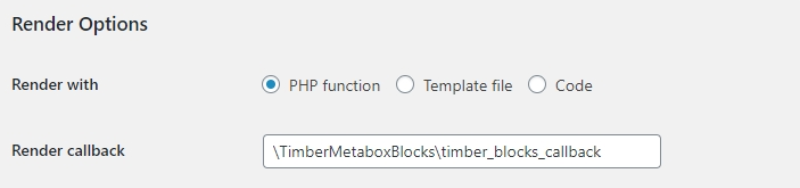
Timber views directory
Timber will also have access to the twig files located in the theme-directory/views directory. This is pretty convenient for including: {% include 'filename.twig' %}, using of block files: {% use 'filename.twig' %}, importing macro files: {% import 'filename.twig' as my_macros %} or direct block rendering: {{ block( 'blockname' , 'filename.twig' ) }}.
Block variables
The render_callback exposes a few important variables to the Timber template:
|name|description
|--|--|
| name | the block name |
| post_id | the current post_id |
| is_preview | if the block is currently in preview mode |
| block | array of data |
| | block.id unique id for the block, changes with each save
| | block.classes classes as defined in the gutenberg block's advanced settings
| | block.align Alignment setting for the block
| | block.FIELDNAME each Meta Box fieldname will be available under the ID it was registered on. Should you have made the mistake to register fields using spaces, you can output the values using the attribute() function, like this: {{ attribute( block , 'fieldname with spaces' ) }}
changelog
1.0.0 Initial version