Sunday Sermon Facebook Video
A WordPress plugin that automatically pulls the Facebook reels and posts from your church Facebook site to show on your church website.
Install
This is the repository archive. It installs, but the folder name will carry the branch suffix and updates will not flow.
Install straight from GitHub with WP-CLI:
wp plugin install https://github.com/avdude/sunday-sermon-facebook-video/archive/refs/heads/main.zipA WordPress plugin that automatically pulls your church's service videos from its Facebook Page (videos, Reels, live streams and video posts) and shows them on your church website, with a playlist of past services.
Features
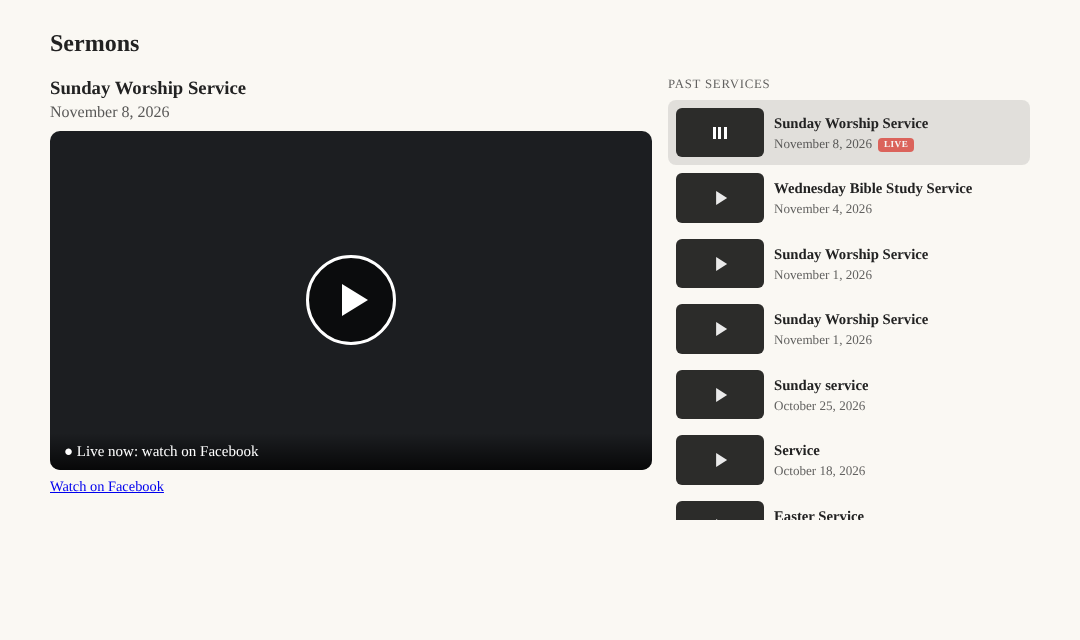
- Automatic: checks your Facebook Page every hour (every 5 minutes while a service is live) and always shows the newest service.
- Plays on your site: plays the video file directly, so it works even when Facebook's own player blocks the video because of worship music.
- Finds services, skips the rest: matches by phrases like
Sunday Worship Service, untitled videos posted on Sundays, or Sundays only. - Reads dates from titles: a post titled "Service from 4/6" is filed under April 6, not the day it was uploaded.
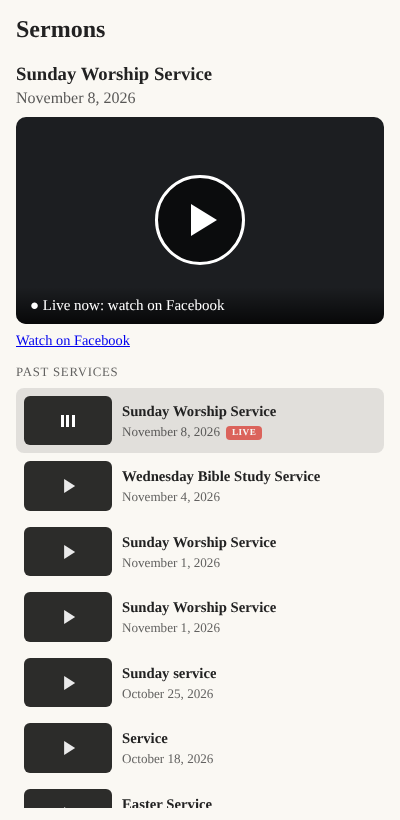
- Archive with playlist: the latest service with a "Past services" list beside it, and the transcript under the list; everything stacks under the player on phones.
- Live streams: shows a live service with a LIVE tag, then switches to the recording.
- Never goes blank: if Facebook can't be reached, visitors keep seeing the last video that loaded.
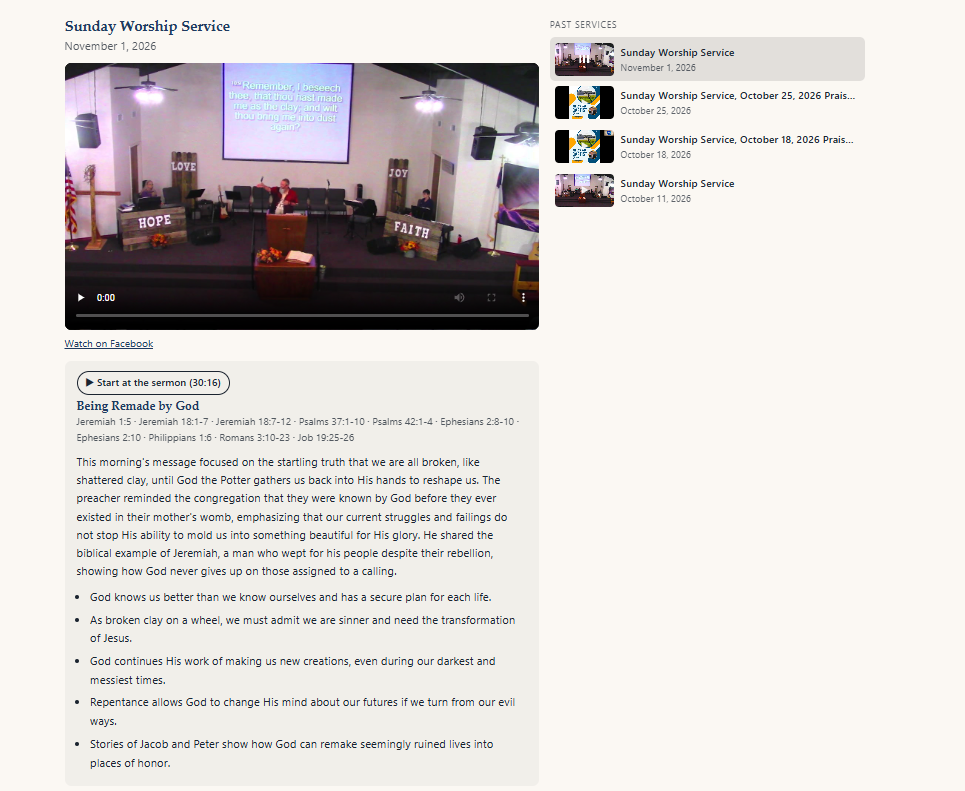
- Sermon transcripts (optional): sends each new service to AssemblyAI and shows the transcript beside the video (under Past services in the archive). Click a timestamp to jump to that moment. Transcripts can be corrected in WordPress.
- Sermon summaries (optional): an AI model, through AssemblyAI's LLM Gateway or Claude directly, finds where the sermon starts and ends inside the full service, then writes a summary, key points and the Bible passages used. Adds a "Start at the sermon" button and can trim the transcript to just the sermon.
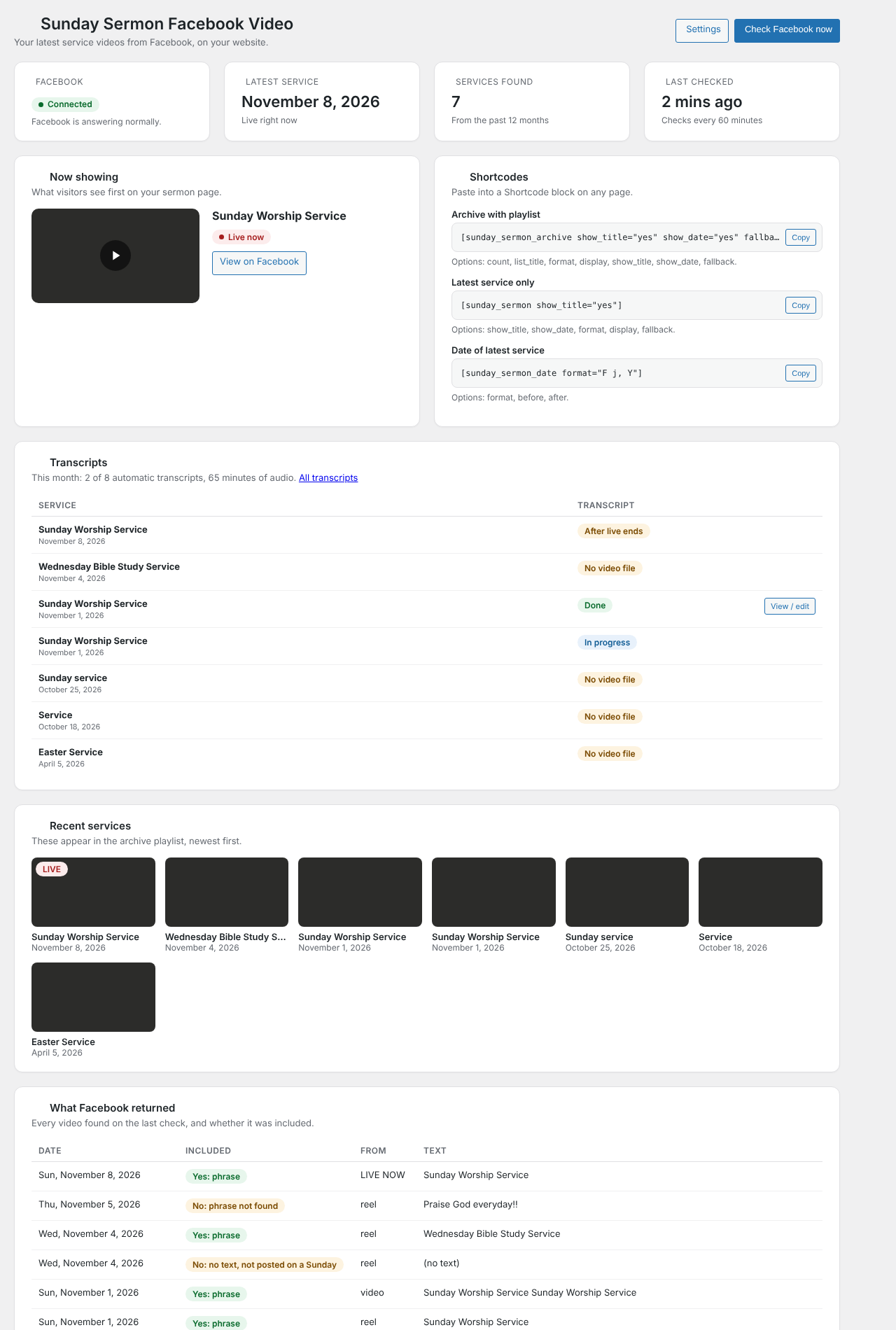
- Admin dashboard: connection status, what's showing, copy-ready shortcodes, and a table showing every video Facebook returned and why it was or wasn't included.
Requirements
- WordPress 6.0 or later, PHP 7.4 or later
- A Facebook account with full control of the church's Facebook Page
- A free Meta developer app (Development mode is fine; no app review needed)
- Service videos posted as the Page, not on a personal profile
Installation
-
Download the latest release zip (or Code → Download ZIP).
-
In WordPress, go to Plugins → Add New → Upload Plugin, choose the zip, then Install Now and Activate.
-
Set Settings → General → Timezone to your church's city.
-
Go to Sunday Sermon → Settings and add your Facebook Page access token (see below).
-
Add a Shortcode block to a page with:
[sunday_sermon_archive show_title="yes" show_date="yes" fallback="Check back Sunday afternoon."]
Getting a Page access token that never expires
-
Create an app at developers.facebook.com (My Apps → Create App; leave it in Development mode).
-
In the Graph API Explorer, choose your app, Get User Access Token with
pages_show_listandpages_read_engagement, and select your church Page in the pop-up. -
Click the ⓘ next to the token → Open in Access Token Tool → Extend Access Token. Copy the extended token.
-
Open this address in a browser tab, replacing
LONG_TOKENwith the extended token:https://graph.facebook.com/me/accounts?fields=id,name,access_token&access_token=LONG_TOKEN -
Copy the
access_tokennext to your church Page's name. -
Check it in the Access Token Debugger: it must say Type: Page and Expires: Never.
-
Paste it into Sunday Sermon → Settings, save, then click Check Facebook now on the Dashboard.
The token stops working if that Facebook account changes its password or loses full control of the Page. If that happens, the Dashboard shows the error and visitors keep seeing the last good video; repeat the steps above.
Transcripts (optional)
- Create an account at assemblyai.com and copy your API key. AssemblyAI bills per hour of audio.
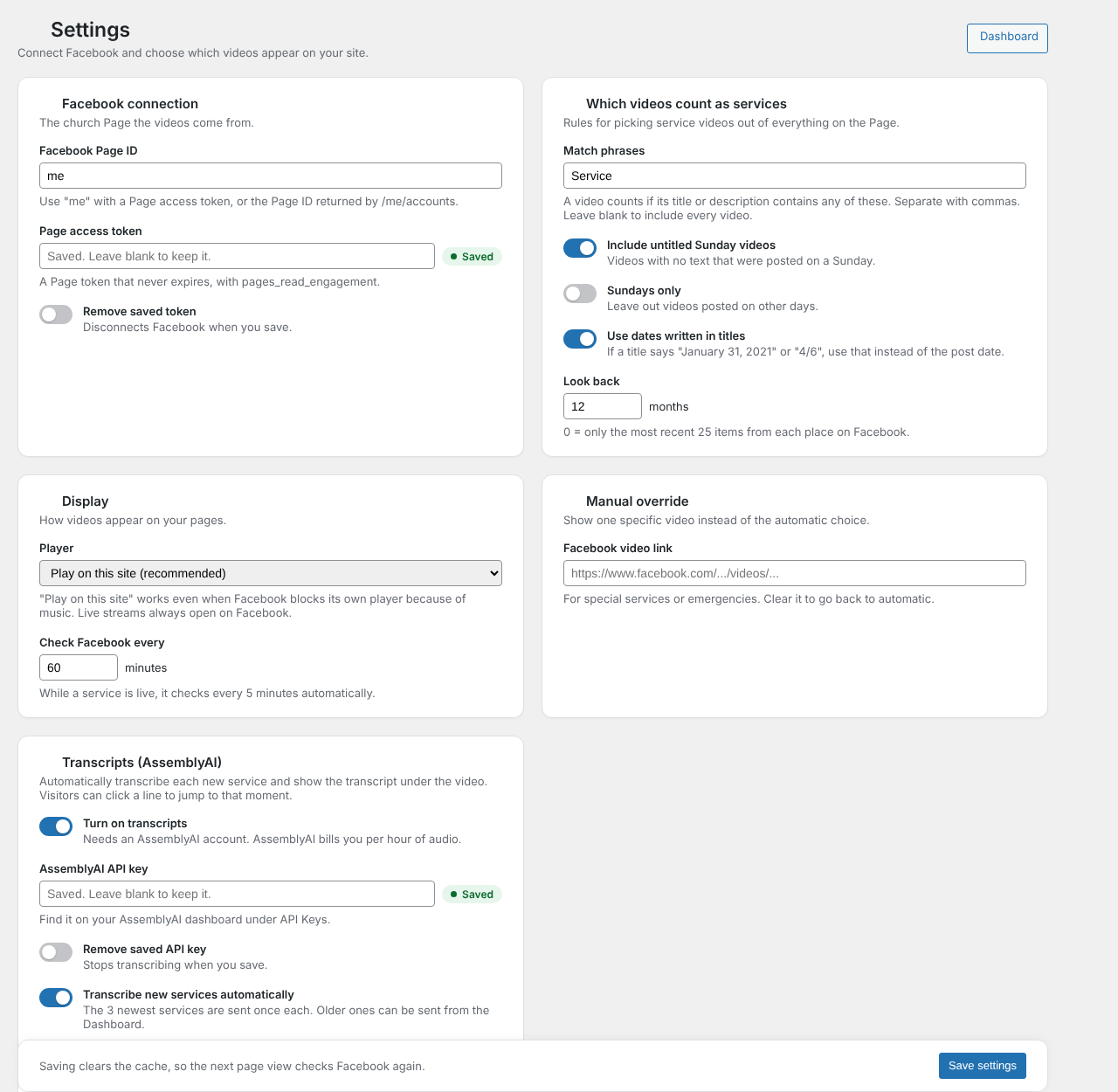
- In Sunday Sermon → Settings → Transcripts, turn on transcripts and paste the key.
- Choose whether new services are sent automatically (the 3 newest, once each), a monthly limit, the language, and any names or words to recognize (pastors' names, local places, Bible books).
- The Dashboard's Transcripts card shows each service's status. Use Transcribe to send an older service by hand.
- Finished transcripts appear in the archive's right-hand column under Past services (under the player with
[sunday_sermon], or withtranscript_position="below"). Edit them under Sunday Sermon → Transcripts; keep the[m:ss]at the start of each paragraph so the timestamps keep working.
Transcripts need the video file from Facebook, so they work only for services posted as the Page, after a live stream has ended. Add transcript="no" to a shortcode to hide them.
Sermon summaries (optional)
Needs transcripts turned on first.
- In Sunday Sermon → Settings → Transcripts → Sermon summaries, turn summaries on and pick a Provider:
- AssemblyAI LLM Gateway (default): uses the AssemblyAI key you already entered. Pick a model from the AssemblyAI model dropdown, which lists AssemblyAI's current models. Which models you can use depends on your AssemblyAI plan; a free account may only have access to Qwen3.5 4B Fast. The plugin trims long transcripts to fit smaller models.
- Claude, directly from Anthropic: paste an API key from the Claude Console and pick Claude Haiku 5.5 or Sonnet 5.5.
- Each finished transcript is summarized automatically. The Dashboard's Transcripts card shows the status, with a Summarize button to run it again.
- On the website, the summary appears under the player with a Start at the sermon button, beside the transcript. With Show only the sermon in the transcript on, songs and announcements are hidden from the transcript.
- Correct anything on the transcript's edit screen in the Sermon summary box: start and end times, title, summary, key points and scripture.
Shortcodes
| Shortcode | Shows | Options |
|---|---|---|
[sunday_sermon_archive] |
Player with a playlist of past services | count (default 8, max 100), show_title, show_date, list_title, format, display, fallback, match, transcript, transcript_position |
[sunday_sermon] |
The latest service only | show_title, show_date, format, display, fallback, match, transcript |
[sunday_sermon_date] |
The latest service's date | format, before, after, match |
In the archive the transcript sits in the right-hand column under Past services, beside the summary; use transcript_position="below" to put it under the summary instead.
format uses WordPress date codes, e.g. F j, Y. display is one of native (play on site), auto, embed (Facebook player) or thumbnail (opens Facebook).
Screenshots
| Dashboard | Settings |
|---|---|
 |
 |
Troubleshooting
| Message | Fix |
|---|---|
| Invalid OAuth 2.0 Access Token | The token expired. Get a new one and confirm Expires: Never before saving. |
| Tried accessing nonexisting field (videos / video_reels) | Set Page ID to me and make sure the token's type is Page, not User. |
me/accounts returns an empty list |
Regenerate the user token and tick your Page in the pop-up; check you have full control. |
| No recent video matched | Look at What Facebook returned on the Dashboard and adjust the match phrases. |
| "This video can't be embedded" | Set Player to Play on this site. |
| AssemblyAI: Your account does not have access to this LLM Gateway model | Pick another model in AssemblyAI model, add billing to your AssemblyAI account, or switch Provider to Claude. |
| Couldn't read the summary the AI model returned | Click Summarize again; small models sometimes reply in the wrong format. A larger model or Claude is more reliable. |
External services
This plugin connects to Meta's Facebook Graph API (graph.facebook.com) using the Page access token you provide, to list your Page's videos, Reels, live videos and posts. Requests are made from your server on a schedule and when an administrator clicks Check Facebook now. Video files, thumbnails and the optional Facebook player are loaded from Facebook's servers in your visitors' browsers. See Meta's Terms and Privacy Policy.
If you turn on transcripts, the plugin also sends the address of each sermon's video file to AssemblyAI (api.assemblyai.com) using your API key, and downloads the finished transcript. AssemblyAI fetches and processes the audio. See AssemblyAI's Terms and Privacy Policy.
If you turn on sermon summaries, the plugin sends each finished transcript's text, using your API key, to the provider you choose: AssemblyAI's LLM Gateway (llm-gateway.assemblyai.com) or Anthropic's Claude API (api.anthropic.com), to find the sermon and write the summary. See Anthropic's Commercial Terms and Privacy Policy.
License
GPL-2.0-or-later. See LICENSE.
Copyright © 2026 avdude